
What You Can and Can't Buy With Steam Wallet Funds
Where a Steam Wallet balance pays (store, gifts, in-game, renewals, hardware, Market), where it stops, and the condition to check at each checkout.
Article languages
On this page
Money ends up in a Steam Wallet in a few ordinary ways: a refund, a Market sale, a top-up you never finished spending. Once you learn it can't be withdrawn, the useful question becomes where it can be spent. Steam doesn't answer that on one page. The pieces sit in the Subscriber Agreement's wallet clause, the Wallet FAQ, the gifts FAQ, the digital gift card page, the Community Market FAQ and the refund policy, and this guide sorts them by the place you would spend the money.
I read those pages signed out on 1 November 2026 (Korea time). I made no purchase with a real account, so I don't quote checkout wording, and the images below are SteamVaults illustrations with invented names and amounts. Whether the balance can become cash or move to another account is covered separately in Can You Cash Out a Steam Wallet Balance? and Can You Transfer Steam Wallet Funds to Another Account?.
The short answer: anything Steam sells, inside Steam
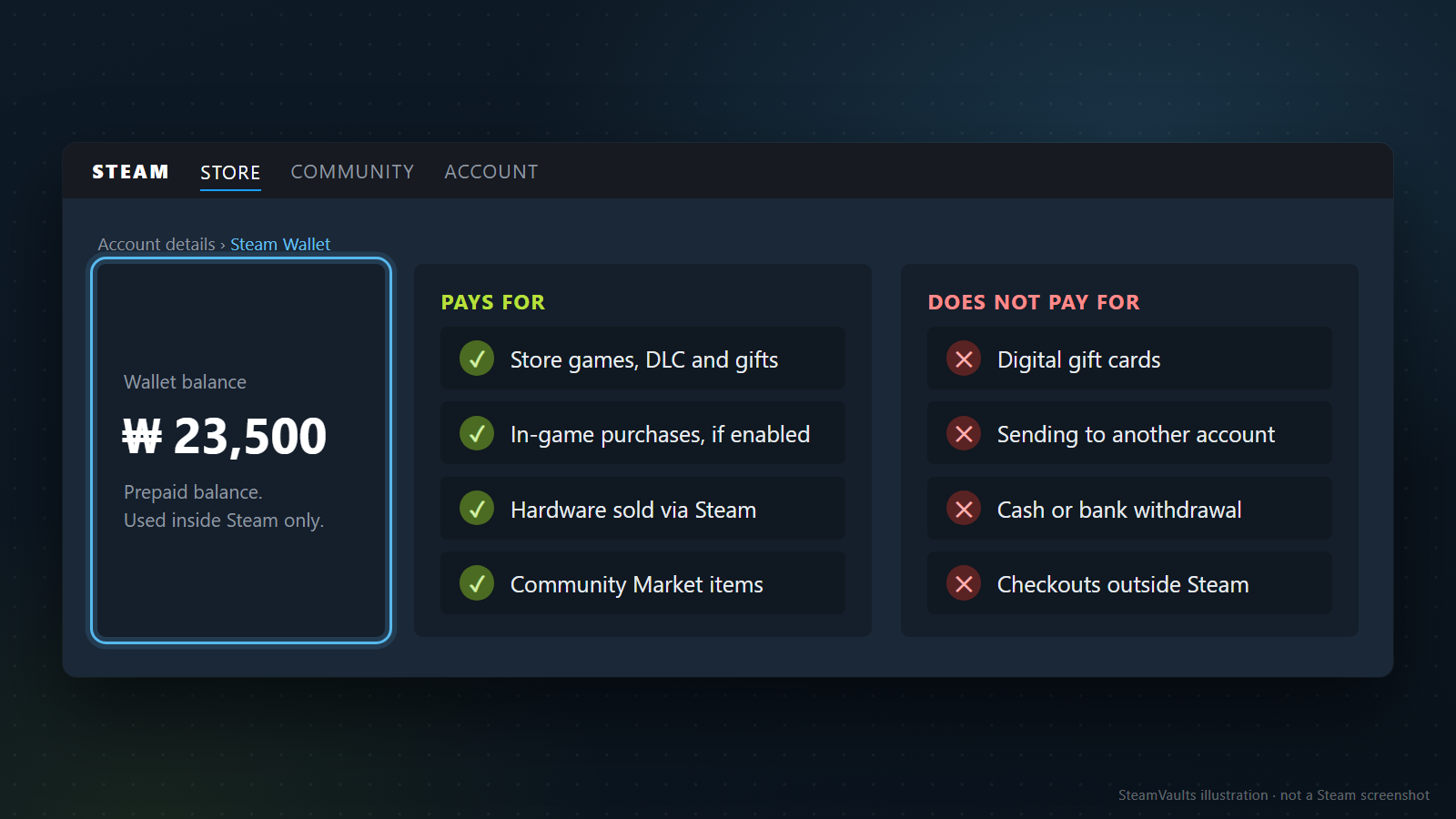
Section 3.C of the Steam Subscriber Agreement describes the Wallet as a prepaid balance, not a bank account and not a payment instrument. The same clause says Wallet funds can order Subscriptions, including in-game orders where Wallet transactions are enabled, and can buy Hardware. It also says the funds have no value outside Steam and can't be exchanged for cash.
"Subscriptions" trips people up. The agreement uses the word for your right to use games, in-game content and virtual items from the Market, not just monthly plans. Hardware is defined as physical goods bought through Steam. So the clause reads, roughly: what Steam sells inside Steam, plus physical hardware bought through Steam.
That is the split the mockup draws. On one side of an illustrative ₩23,500 balance, marked as a prepaid balance used inside Steam only, are store games, DLC and gifts; in-game purchases where enabled; hardware sold via Steam; and Community Market items. On the other side: digital gift cards, sending money to another account, cash or bank withdrawal, and checkouts outside Steam.
Section 3 of the agreement adds that all charges on Steam and all purchases made with Wallet funds are prepaid and final, with the refund section (3.I) and section 7 as the exceptions, so paying from the Wallet doesn't loosen refund rules. And the code redemption page says gift cards and wallet codes can be spent on games, software and anything else you can buy on Steam, converted into your wallet currency wherever they were bought.
Store checkout and gifts: the Wallet goes first
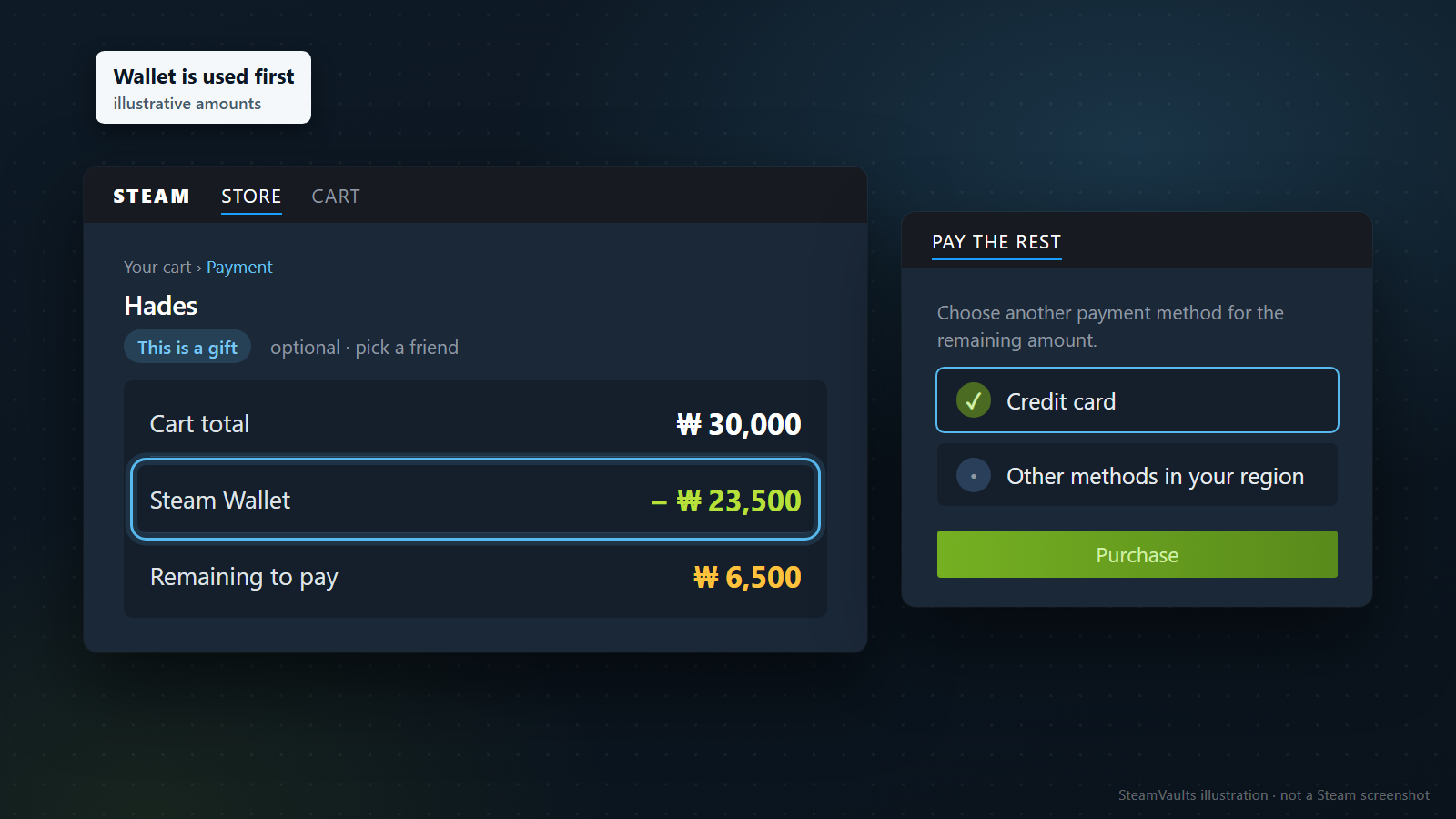
You don't need to hunt for a game that costs exactly what's left. The Steam Wallet FAQ says wallet funds go towards your next purchase, and if the balance doesn't cover it, you pay the remainder with another payment method; the methods available in your region are listed during checkout. Games, DLC, software and pre-purchases all go through that same cart.
Here is the mockup's example, with invented numbers that are not real prices. The sample title in the cart is Hades, but ₩30,000 is not its price. The cart total is ₩30,000 and the Wallet holds ₩23,500. Going by the FAQ, the ₩23,500 comes out of the Wallet, ₩6,500 is left to pay, and you cover it with a credit card or another method offered in your region before pressing Purchase. It's the simplest way to take a balance to zero.
Paying for a gift
Gifts use the same checkout. The Steam gifts FAQ lays out the order:
1. Add the game to your cart and choose to buy it as a gift (the mockup marks this with a "This is a gift" tag, optional, where you pick a friend). 2. Pick the friend, then send it now or schedule it. A scheduled gift can be set for any date up to 12 months from the purchase date. 3. Go to payment. At this step the FAQ notes that if your Wallet balance does not cover the full cost, you pay the rest with a secondary payment method.
Gifts carry conditions a purchase for yourself doesn't. A friend who already owns the game shows up greyed out and can't be selected. Some gifts can't go to someone in a different purchase region because of regional price differences; the store page says so. DLC can only be gifted to someone who owns the base game. Bundles built around your own library (the ones marked Complete Your Collection) can't be gifted. Multipacks can't be sent as a gift directly; you buy them on your own account and gift the extra copies. Some games simply can't be gifted. The recipient has 30 days to accept or decline, and if they do nothing, Steam cancels the purchase and refunds it. Changing or cancelling a scheduled gift is its own topic, covered in our guide to scheduled Steam gifts.
Where a refund lands
The Steam refund policy says refunds are issued to your Wallet or to the payment method used for the purchase, and if the original method can't take the refund, the full amount goes to the Wallet. My reading, not a line in the policy, is that money paid from the Wallet goes back to the Wallet. What the policy does not say is how a split purchase like the ₩23,500 + ₩6,500 example gets divided on a refund. Does a Steam refund go to your card or your Wallet? covers the destinations in more detail.
The conditions don't change because you paid with Wallet funds:
| Purchase | Refund condition in the policy |
|---|---|
| Game | Requested within 14 days of purchase, with less than 2 hours of playtime |
| DLC | Within 14 days, less than 2 hours of base-game play after buying the DLC, and the DLC not consumed, modified or transferred; third-party DLC that can't be refunded is marked on the store page before you buy |
| Pre-purchase you can't play yet | Refund can be requested any time before release; the 14-day and 2-hour window starts on release day. If you can play before release (early access, for example), that playtime counts toward the 2 hours |
| Bundle | Full refund if no item was transferred and total playtime is under 2 hours; checkout tells you if the bundle includes in-game items or DLC that can't be refunded |
| Gift | The refund goes back to the original purchaser |
One line in the policy is handy around sales: refunding a game bought just before a discount and buying it again at the sale price is not treated as abuse. If the first purchase came from the Wallet and the refund returns there, the difference would stay in the Wallet. That last step chains my reading above to the policy line; the policy does not say where the difference ends up. The 14-day and 2-hour limits still apply, and the 2-hour and 14-day refund guide goes through the edge cases.
Points are the last checkout detail. The Steam Points page says you earn points on Steam purchases by the amount spent, and not for adding funds to your Wallet or for Market purchases. It lists no exception by payment method, so as far as that page goes, a game paid from the Wallet earns points like any other.
In-game purchases and renewals
Buying items or currency inside a game can come out of the Wallet when the game uses Steam for payment. The agreement says "where Wallet transactions are enabled"; the add funds page says "within a game that supports Steam transactions". Valve's developer documentation on in-game purchases asks developers to use the Steam microtransaction API, says users can buy individual items or in-game currency with their Wallet, and notes that developers commonly read the user's wallet currency code to decide which price to show. If a game's shop shows prices in your wallet currency, that may be a hint it's reading your Wallet; I'm inferring that, not quoting it. I found no list of games that skip this system.
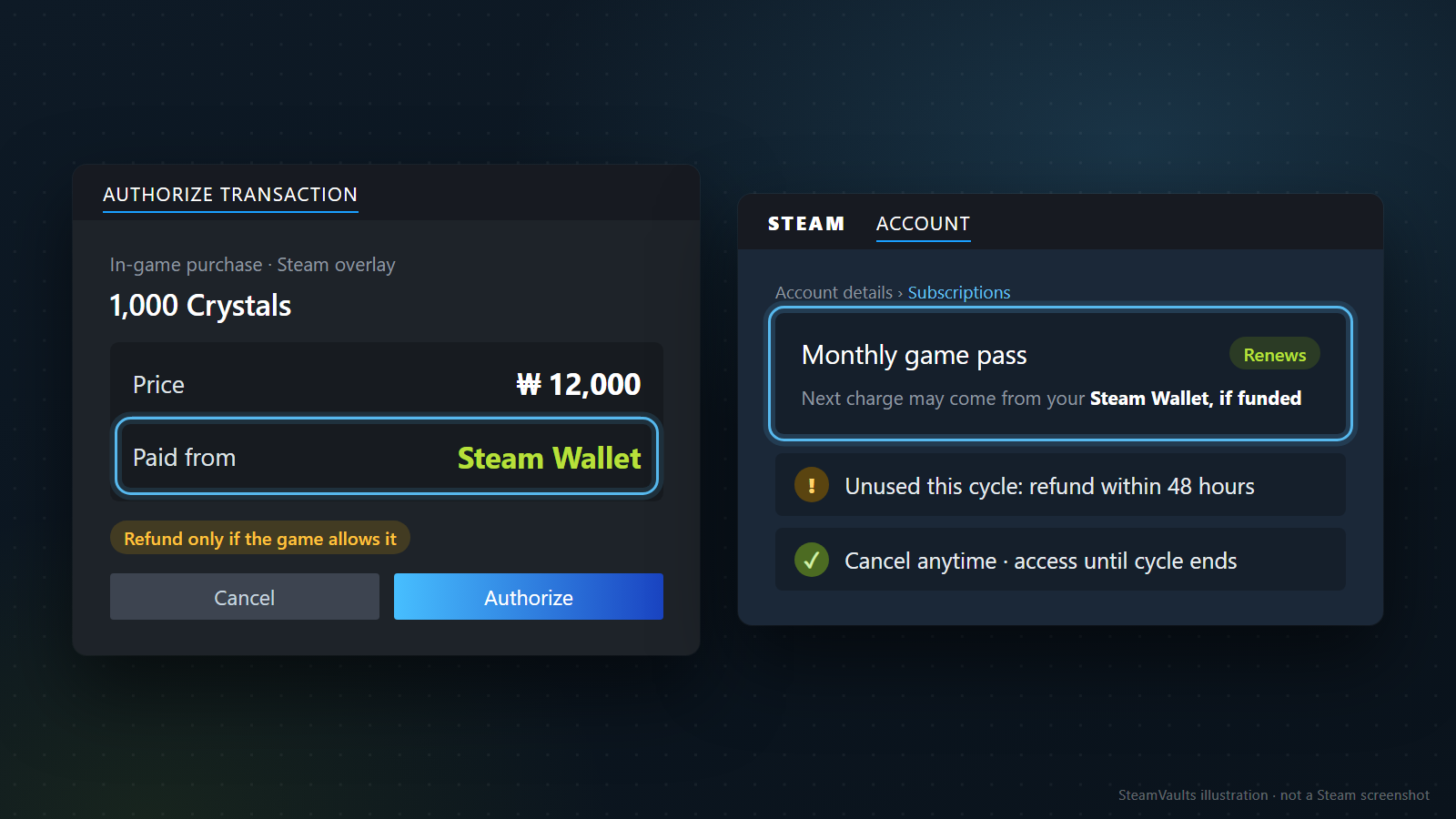
The mockup's in-game window is invented: 1,000 Crystals for ₩12,000, labelled as an in-game purchase in the Steam overlay, with "Paid from: Steam Wallet" and Cancel and Authorize buttons. If a payment screen sends you to a publisher account or another website instead of a Steam window, my reading of the agreement is that it's outside the Wallet's scope.
The tag under the price reads "Refund only if the game allows it". Per the refund policy, in-game purchases in Valve games can be refunded within 48 hours if the item wasn't consumed, modified or transferred. Third-party developers can opt into the same terms, and you'll be told at purchase if they have. Otherwise there is no refund through Steam. My own caution on top of that: spending in-game currency may count as consuming it, so turning a leftover balance into game currency is harder to undo than buying a game.
Renewing subscriptions are covered by section 3.A of the agreement, which says recurring charges may go to your card or to your Wallet "if funded". A balance you leave sitting there may pay the next renewal; the mockup's monthly game pass, marked Renews, shows that line. Which is tried first, card or Wallet, isn't stated. The refund policy adds that a renewing subscription unused in the current cycle can be refunded if you ask within 48 hours of the first purchase or an automatic renewal, and that you can cancel anytime from account details and keep access until the cycle ends.
Hardware: check who sells it where you live
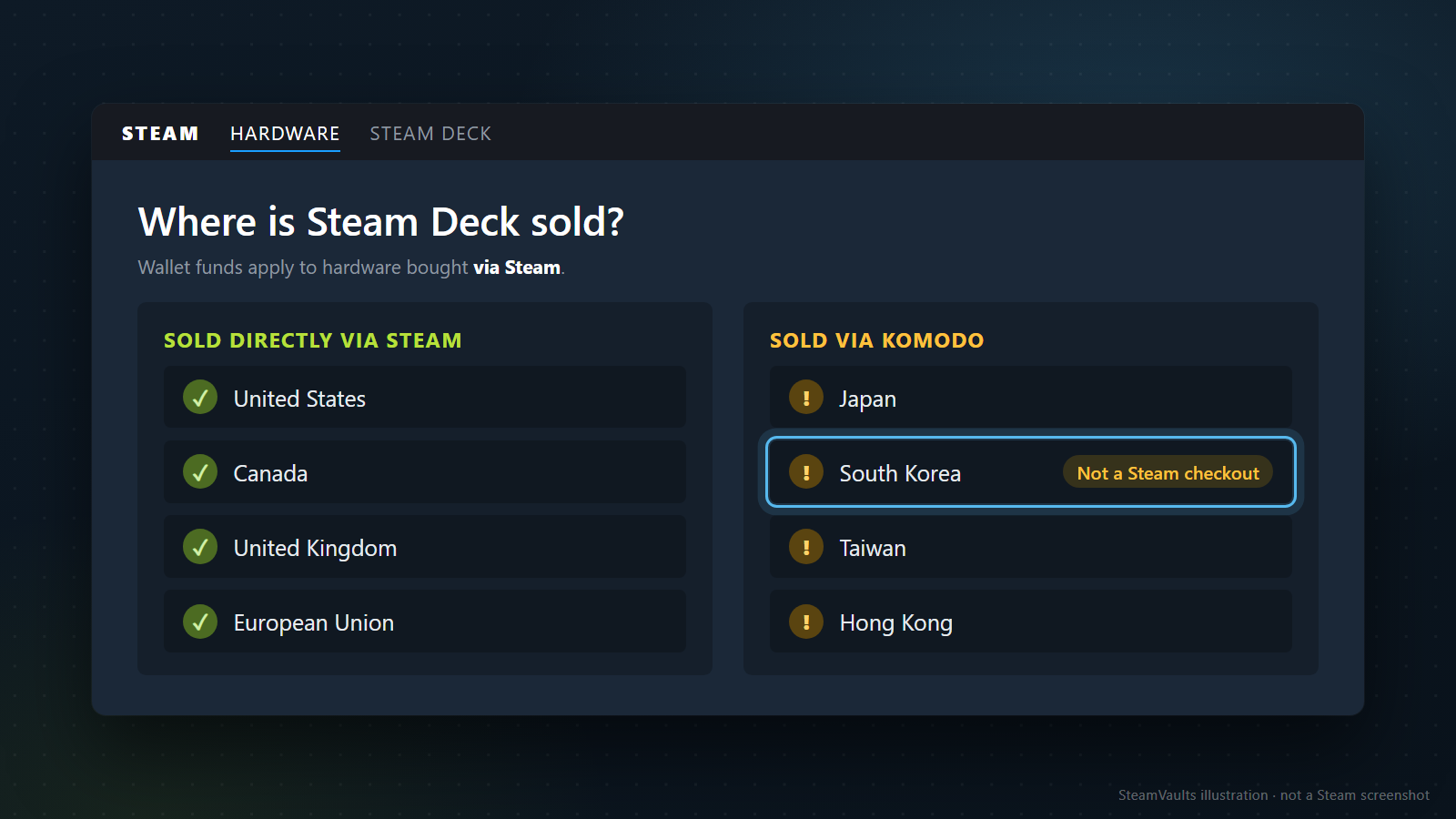
The agreement says Wallet funds can buy hardware, and the Steam gift card page says gift cards work for games, software and hardware. The mockup's note puts the condition plainly: Wallet funds apply to hardware bought via Steam. Under section 1.D, a hardware order is only accepted when Valve dispatches it and sends a dispatch confirmation email, and the item stays Valve's property until it is fully paid for.
Where Steam is the seller depends on your country. The Steam Deck FAQ says Steam Deck is sold directly via Steam in the United States, Canada, the United Kingdom and the EU, and with Komodo in Japan, South Korea, Taiwan and Hong Kong. Valve's 4 August 2022 announcement introduced Komodo as the authorised reseller there and said reservations were taken on Komodo's website. In those four places, South Korea among them (the row the mockup highlights), the purchase isn't a Steam checkout, so I see no basis for expecting a Steam Wallet balance to apply. Komodo's site timed out when I tried it, so its payment methods are unconfirmed. I also found nothing on gifting hardware, and didn't read the separate hardware refund policy.
Whoever sells you the device, the games you play on it come from the Steam store, where the Wallet works as usual. Our Deck compatibility guide explains the Verified and Playable labels to check first.
The Community Market runs on the Wallet alone
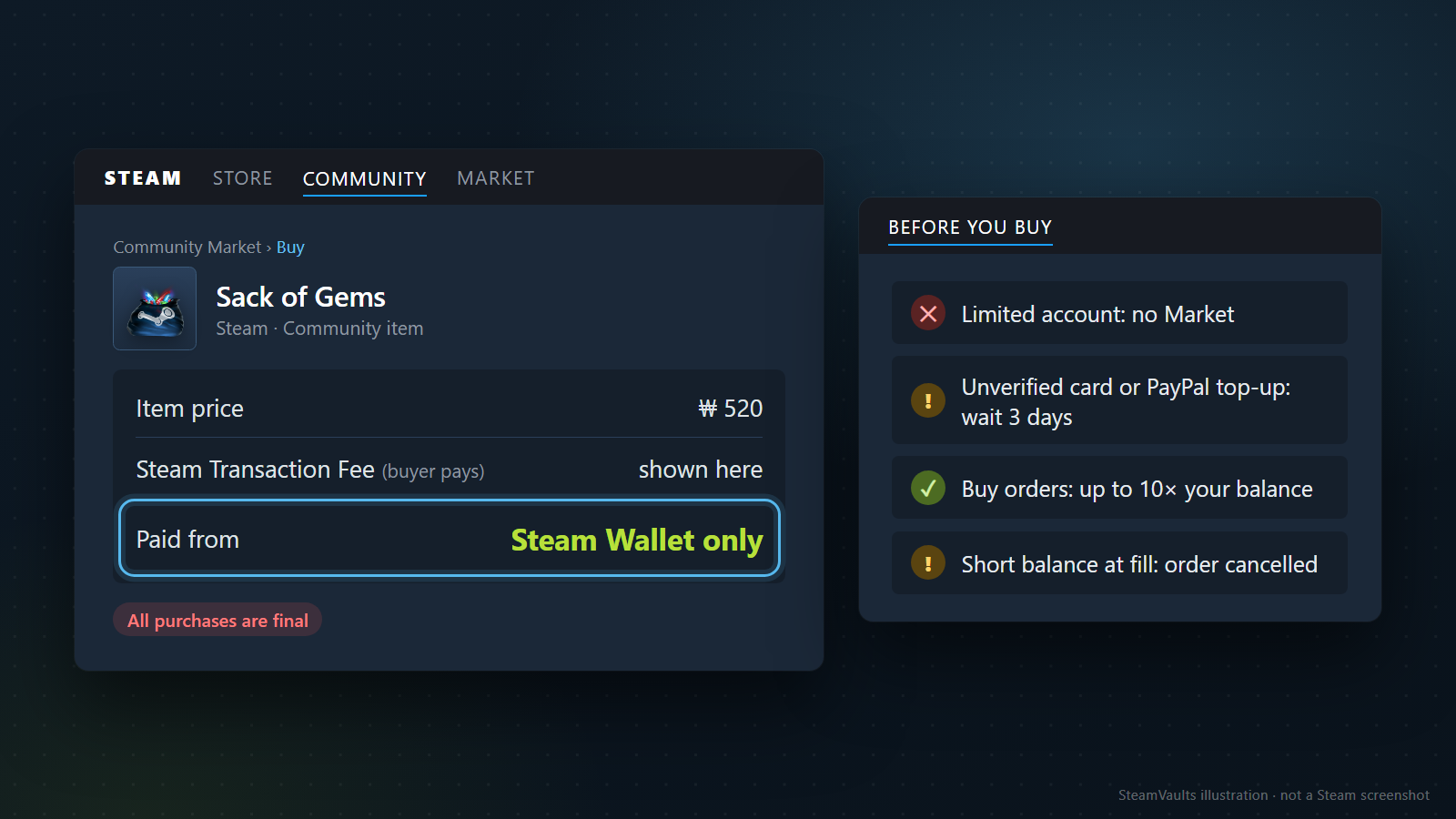
New to the Market? What is the Steam Community Market? is the basics. The difference that matters here is payment. The Community Market FAQ says all Market sales and purchases are completed using the Steam Wallet. Unlike the store, I found no line about topping up a shortfall with a card, so the balance has to be there before you buy. All purchases are final: a completed Market transaction can't be reversed or refunded.
In the mockup, a Sack of Gems (a Steam community item) is priced at an invented ₩520 and paid from the Steam Wallet only. The Steam Transaction Fee line says "shown here" instead of a number, because of what the FAQ does and doesn't say. It says the buyer pays the Steam Transaction Fee, that it is currently 5% with a minimum of USD 0.01, and that it appears on the confirmation screen before you buy; the four games it names (Team Fortress 2, Dota 2, Counter-Strike 2 and Artifact) add a 10% game fee. It gives no separate figure for Steam's own community items such as Sack of Gems, so I don't put one on it. The Steam Market fee calculator shows how a seller's take and a buyer's price relate.
Accounts that can't use the Market yet
Having a balance isn't enough on some accounts. The documents list three checks:
| Check | What the documents say |
|---|---|
| Is the account limited? | Limited accounts can't use the Market. The limit lifts once you've spent USD 5 or more in the Steam store: adding USD 5 or more to the Wallet, or buying games, wallet cards or gifts. Gifts or digital gift cards you received, and spending Market sale funds, don't count. A bank refund or chargeback that drops you below USD 5 locks the account again |
| Purchase history and Steam Guard | You need a purchase older than 7 days and no more than 1 year old, and Steam Guard enabled for 15 days. Redeeming a gift alone doesn't make you eligible |
| Recent funding method | Funding with an unverified credit card or PayPal blocks the Market for 3 days. A card can be verified with Steam's verification tool; PayPal and virtual cards can't be verified |
The first row matters most for anyone who was given a digital gift card. The digital gift card page itself says a recipient can buy Market items "if your friend's account is not limited", and the limited user accounts page says received gift cards don't count toward the USD 5. A new account funded only by gifts can spend in the store and in games but may find the Market closed. That same page also explains how the limit comes back: a refund to your bank or a chargeback is deducted from your spend total. Refunding the game you bought to unlock the Market, back to the original payment method, can do exactly that. Why a Steam account can't use the Market walks through all three checks and how each is lifted.
Currency and buy orders
On an account that has had money added, prices appear in your own wallet currency: sellers list in theirs, buyers see theirs, and a daily-updated exchange rate bridges the two. An account that has never been funded may not see its own currency on the Market. Per the Wallet FAQ, the wallet currency is set by the address you enter on your first top-up, and later top-ups arrive in that currency. So a price someone quotes in dollars won't map one-to-one onto your won or euro balance.
Buy orders are measured against the Wallet too. The FAQ caps the total of your active buy orders at 10 times your wallet balance, and if your balance can't cover an order when it would fill, that order is cancelled automatically. An invented example: with ₩5,000 in the Wallet you can have up to ₩50,000 of orders open, but once earlier fills have used the ₩5,000, the remaining orders may be cancelled. Open orders let you wait for a price, and what you can actually spend is still capped by the balance. The price on an order is the most you'll pay; if a cheaper listing turns up, you pay the lower price.
Items bought on the Market may not be tradable or sellable straight away; why a Steam item isn't tradable or marketable explains the dates. Market purchases earn no Steam Points.
This is also why the Market comes up when people want cash. Buying a Market item such as a Sack of Gems is an ordinary use of the Wallet. SteamVaults, which runs this site, buys tradable Sacks of Gems for a USDT site balance. In my view that route doesn't move the Wallet balance out of Steam: it is two separate transactions, buying an item with the Wallet and then selling the item. Market purchases are final, prices move, and an item can only be sent once its trade restriction ends. The cash-out guide covers the order of steps and the risks.
What the Wallet can't pay for
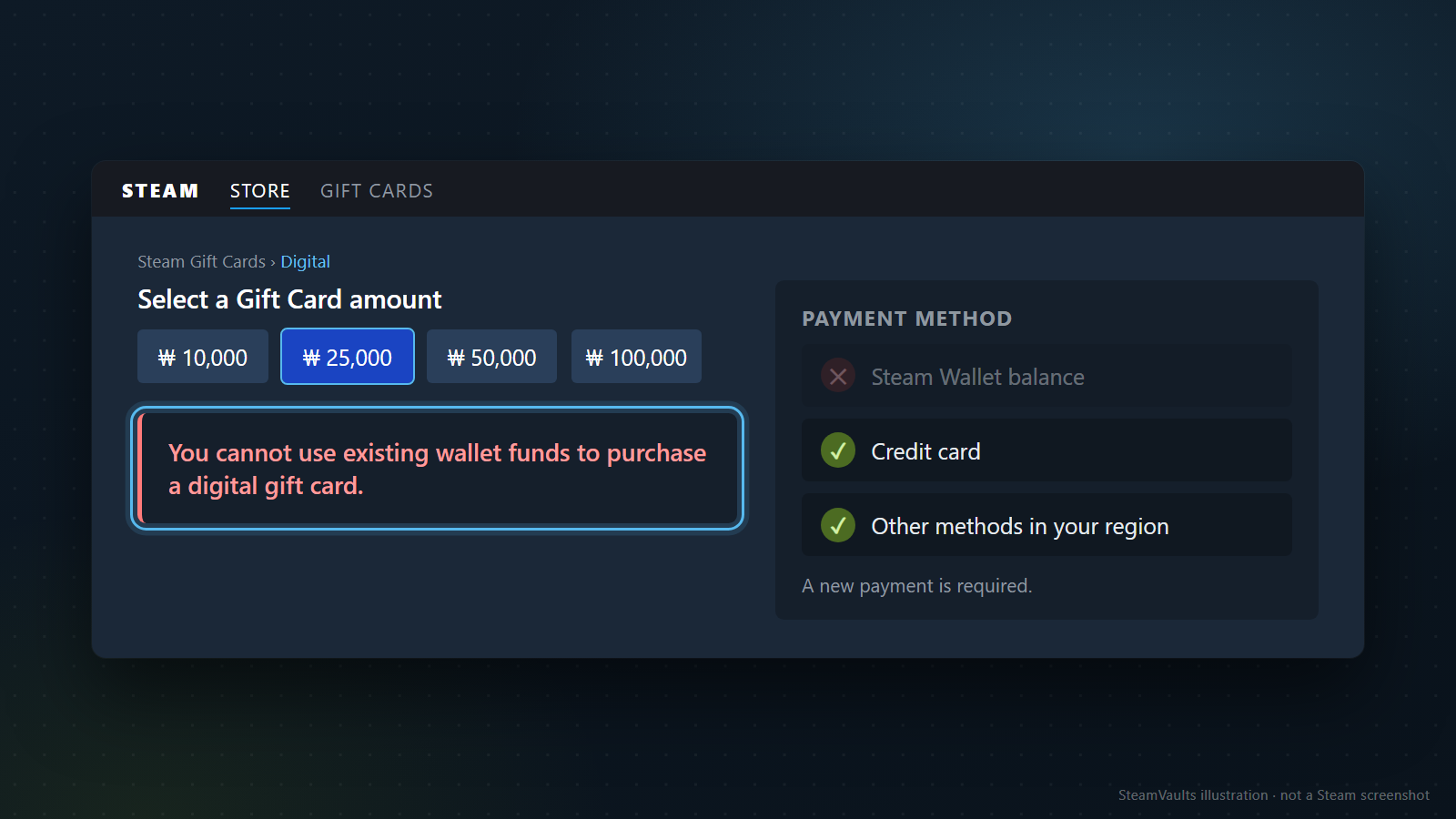
Digital gift cards cause the most confusion. They put money into a friend's Wallet, so they look like a way to pass your balance on, but the digital gift card page says plainly: "You cannot use existing wallet funds to purchase a digital gift card." The mockup shows that notice under the amount picker, with sample amounts of ₩10,000, ₩25,000, ₩50,000 and ₩100,000 (₩25,000 selected; the amounts are illustrations, not a list I'm vouching for). In the payment panel, Steam Wallet balance is greyed out; a credit card or another method available in your region is required, because a new payment is needed.
Buying a specific game for a friend is different. That's a gift from the store, and the Wallet can pay for it, as covered above. If the friend lives in another country, a digital gift card is converted into their currency; Steam gift card region and currency limits explains what happens when code and wallet currencies differ. If they decline, the money goes back to your original payment method where possible, otherwise to your Wallet. The transfer guide reaches the same conclusion about gift cards.
Physical cards are on their way out. The Wallet FAQ says Steam is ending its retail gift card programme and won't restock, expects retail stock to run out by the end of 2026, and says existing cards stay usable subject to local law. Cards and codes only ever add money to a Wallet.
The rest is brief:
- Sending to another account: the Wallet FAQ says Wallet funds can't be moved or gifted to another Steam account.
- Paying a trade partner: Steam's trading safety guidance says the trade interface doesn't support transferring money of any kind, Wallet credit included, and tells you not to accept trades that promise Wallet funds.
- Withdrawal: the Market FAQ says Market sale funds can't be withdrawn to a bank or third-party account or moved to another account, and the agreement says Wallet funds have no cash value.
- Checkouts outside Steam: the agreement limits the Wallet's value to Steam, so outside sites and other sellers are out of scope. I'd put Komodo in this group too.
- The Points Shop: its items are redeemed with points, which you earn from purchases, not top-ups. Steam Points Shop items and refunds and what Steam Points can redeem have the details.
The same safety page warns about people who ask you to buy a Market item and pass it on in exchange for another item; they give a reason they can't buy it themselves, then disappear once they have it, and the seller was working with them to sell a cheap item at a high price. Since Market purchases are final, treat that kind of request as a no.
Japanese users have a deadline. The agreement says that under Japanese law, Wallet funds added by users in Japan expire if unused within six months of being added, and the expiry date can be seen in the account's Wallet. It also says Wallet funds judged to be unclaimed property may be handed to the relevant authority, without saying which cases that covers.
Picking where the balance goes
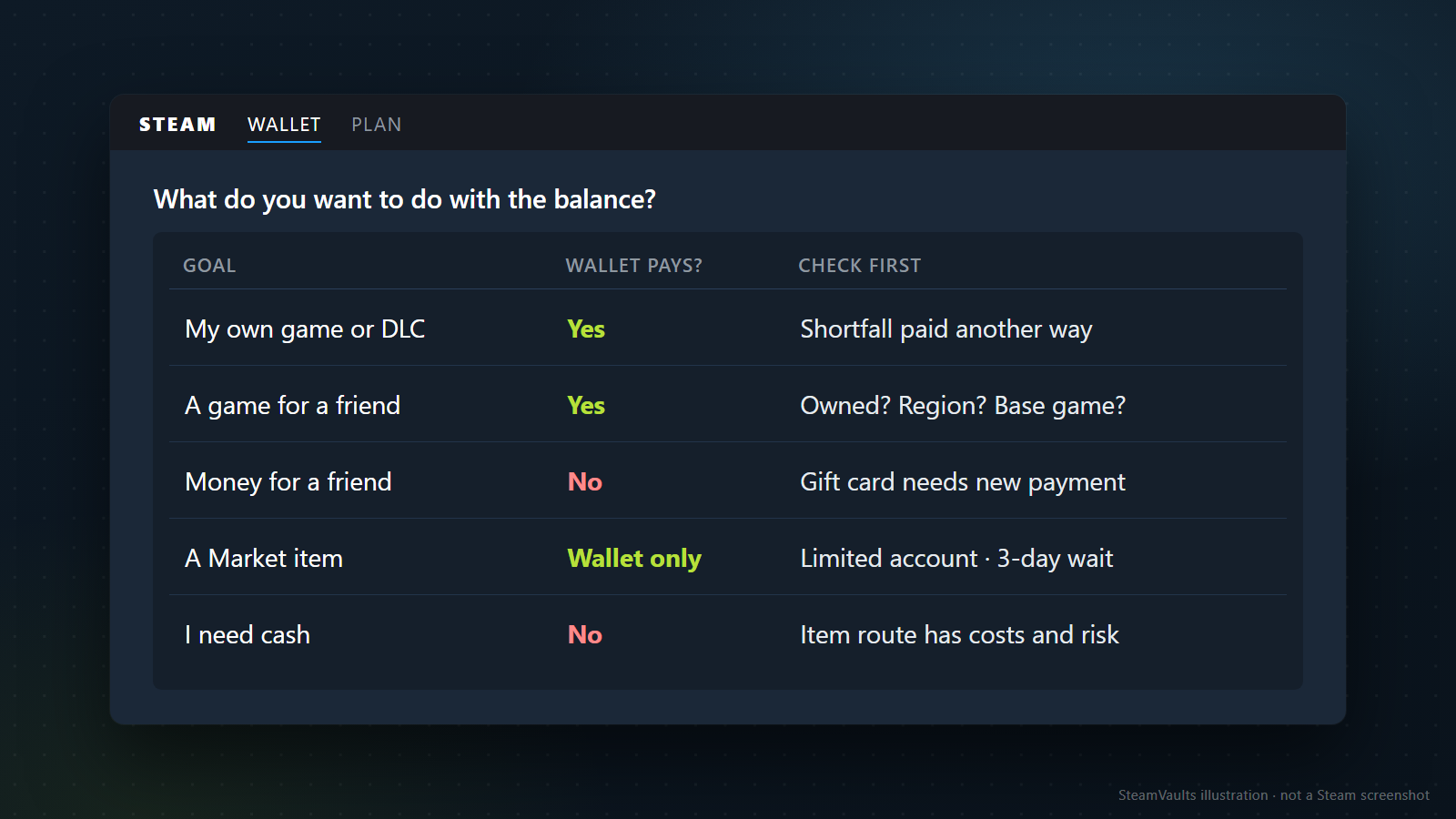
Decide what you want to do first; whether the Wallet pays, and what to check, follows from that. The mockup keeps it to five goals. The table adds the other places covered above.
| Goal | Does the Wallet pay? | Check first |
|---|---|---|
| My own game or DLC | Yes | Shortfall paid another way; refund window of 14 days and under 2 hours |
| A game for a friend | Yes | Do they own it already? Region restriction? Do they own the base game (for DLC)? |
| Money for a friend | No | A digital gift card needs a new payment |
| In-game items or currency | Yes, if the game uses Steam payment | Is the authorization a Steam window, and is a refund offered? |
| A subscription renewal | It may be charged, if funded | Renewal date and the 48-hour unused refund |
| Steam Deck | Yes under the agreement, where Steam sells it directly | Japan, South Korea, Taiwan and Hong Kong buy via Komodo |
| A Market item | Wallet only | Limited account, 3-day wait, the fee on the confirmation screen |
| I need cash | No | The item route has costs and risk |
Planning a large spend in one go? Section 3.C caps the sum of what's in your Wallet and what you spent from it within 24 hours at USD 2,000 or the local equivalent. Spending counts toward that sum. The one consequence the agreement names is on money coming in: an attempt to add funds past the threshold may not show up in the Wallet until your activity drops below it. Nothing there says a purchase gets refused. In practice, after a big spending day, a fresh top-up may not appear right away. Steam Wallet balance limit works through how Market sales and top-ups hit that cap. That article sums up the same clause as content, Market purchases and gifts because it's about the limit; the clause also names in-game orders and hardware. The two don't conflict; this article reads the clause more widely.
How the balance arrived changes the advice a little. Three invented cases (the amounts are made up):
First case: ₩8,000 left from a refund. If there's another game you'll buy, leave it. The store takes the Wallet first and only the gap goes to your card. In Japan, check the six-month expiry date in the account. If you have a renewing subscription, expect that this money may pay the next charge.
Second case: ₩150,000 built up from Market sales. Spending it on other Market items is fine, but that spending doesn't count toward the USD 5 that lifts a limited account. To spend it on a friend, buy them the game they want as a gift. A digital gift card can't come out of this balance.
Third case: a new account holding ₩30,000 from a friend's digital gift card. It works in the store and in games right away. The Market stays closed while the account is limited, and received gift card money doesn't count toward lifting that. If the Market is the goal, check that you've paid USD 5 or more in the store yourself. The other two eligibility rules still apply: a purchase older than 7 days and no more than 1 year old, and Steam Guard on for 15 days. So on a brand-new account, spending USD 5 won't open the Market the same day. The limited user accounts page links to your current spend total.
Right before you press the button:
1. On the checkout screen, confirm the Wallet balance is actually being applied and what remaining amount is shown. 2. For a gift, check that the friend's name can be selected and whether the store page mentions a region restriction. 3. For an in-game purchase, check that the authorization is a Steam window and whether a refund is offered. 4. For a Market buy, look at the fee and total on the confirmation screen and decide whether you can live with a purchase that can't be undone.
What I checked, and what I couldn't
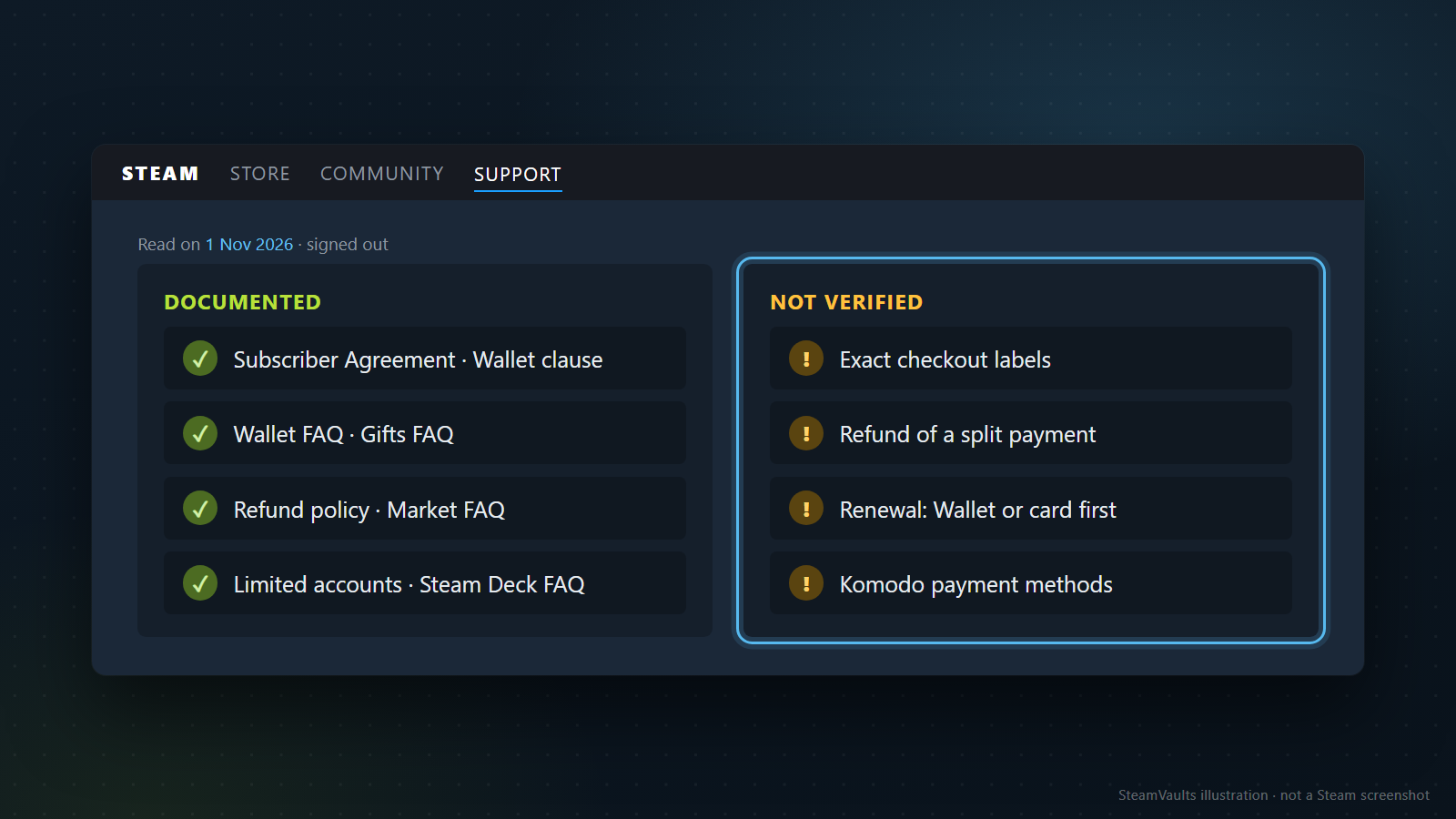
Read on 1 November 2026, signed out: the Subscriber Agreement's wallet clause, the Wallet FAQ, the gifts FAQ, the refund policy, the Market FAQ, the limited user accounts page and the Steam Deck FAQ, along with the add funds and code redemption pages, the digital gift card pages, the trading safety page, the Steam Points page, the Steamworks in-game purchase documentation and the 2022 Steam Deck announcement. The SteamVaults line comes from this site's own pages. All of these are policy pages and can change.
Not verified: the exact labels on a real checkout screen, how a refund of a split Wallet-and-card payment is divided, whether a renewal tries the Wallet or the card first, and which payment methods Komodo accepts. Hardware gifting wasn't covered by anything I read either. If one of these decides your plan, go by what the confirmation screen shows and ask Steam Support if you're stuck. And if nothing in Steam is worth buying and you need cash, that question continues in the cash-out guide.