
Steam Points Shop: requirements and refunds
Understand Steam Points earning, game-item requirements, profile display, trading restrictions, and the effect of game refunds on points and recent rewards.
Article languages
On this page
You may have enough Steam Points for a profile background and still find that you cannot redeem it. An item you already own may be unavailable for sale on the Community Market. After a game refund, recently redeemed cosmetics can disappear along with the points. These situations involve different checks: your points balance, eligibility to redeem an item, and the settings that determine where an owned item appears.
This guide connects earning points, game-item requirements, display locations, and refund deductions. The policy references are Valve's FAQ and Steamworks documentation checked on October 23, 2026; the troubleshooting sequence is practical guidance based on those rules. This isn't an account-level purchase, equip, or refund test. The ledger below is explicitly hypothetical. Card crafting and Gem calculations belong to separate guides.
Which purchases earn points?
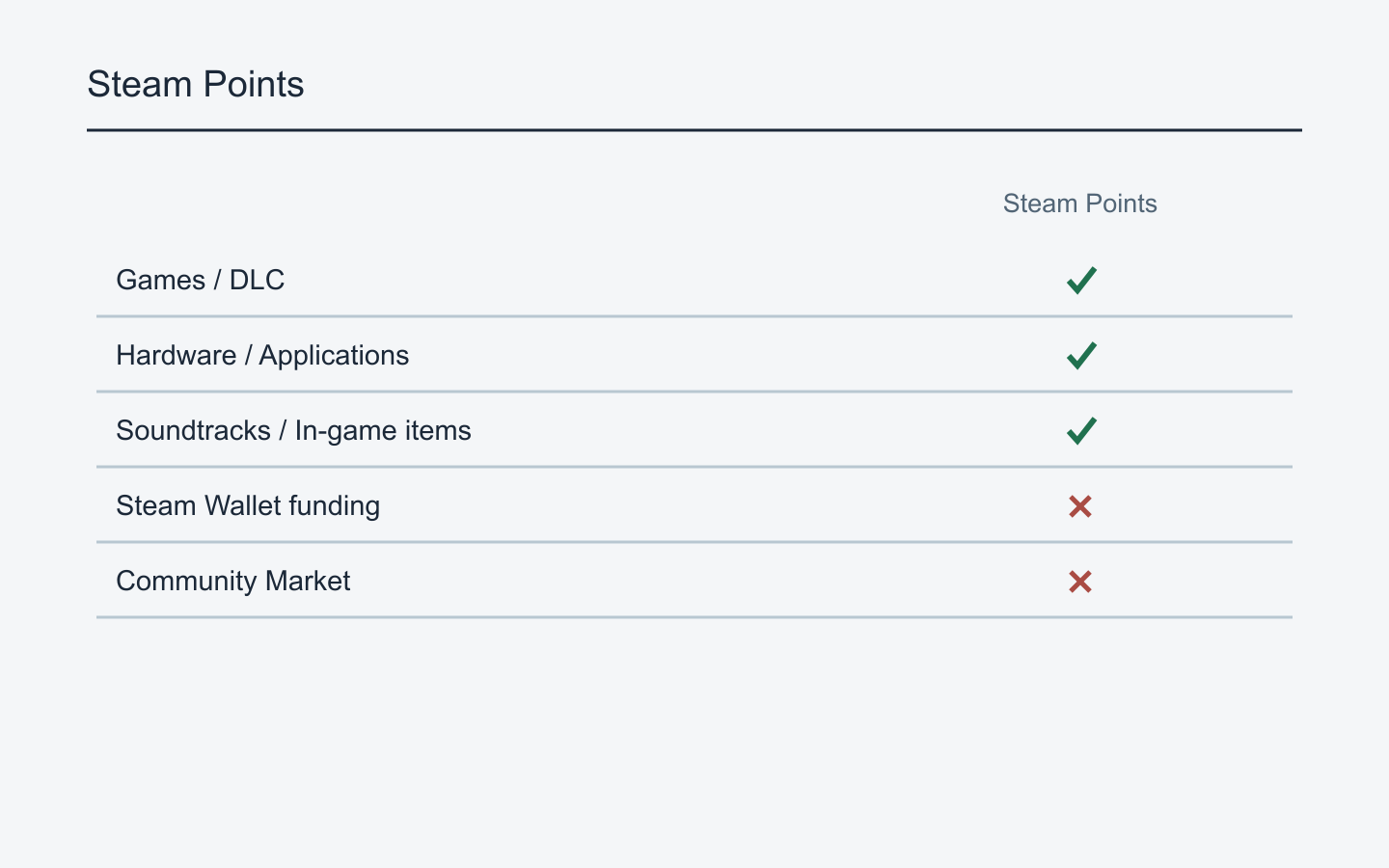
Steam Points are earned from spending on Steam and can be redeemed for profile and chat items in the Points Shop. Valve lists games, DLC, hardware, applications, soundtracks, and in-game items as examples. Funding your Steam Wallet and buying on the Community Market do not earn points. Adding money to a wallet and spending it on a product are separate transactions. Steam Points FAQ
If a wallet top-up hasn't changed your points balance, inspect the transaction type first. Do you have only a funding receipt, or also a game purchase receipt? That distinction identifies when you expected points to arrive. A background or emoticon bought on the Community Market needs the same check. Paying inside Steam and receiving an item don't, by themselves, establish eligibility for points; the purchase destination matters.
Read wallet funds as currency and Points Shop costs as points. Insufficient points for a background means you haven't met that redemption cost. It doesn't establish that you lack money for a game, or that selling an inventory item will increase your points by the same amount. Treating the two balances as interchangeable makes it difficult to understand either transaction.
Valve says the purchase amount is converted to US dollars and then to points. This guide therefore doesn't provide a permanent conversion rate between Korean won and points. If an older conversion chart differs from your account history, compare the actual amount and transaction date first. The FAQ doesn't establish the exact exchange-rate source or rounding method needed to reconstruct every account entry.
When your balance is lower than expected, make three columns: the transaction you completed, the points-earning entry, and subsequent spending. A funding-only receipt fails the first eligibility check. If an earning entry exists but the balance later fell, examine the spending column. Reporting only an unexpected balance doesn't distinguish missing earnings from points spent afterward.
Valve says points don't expire and the shop is open year-round. You don't need to spend merely because you fear the balance will expire. Year-round operation is separate from a promise that every individual design will remain available forever. Check the actual item details when choosing a product.
Match the item to the place you want to change
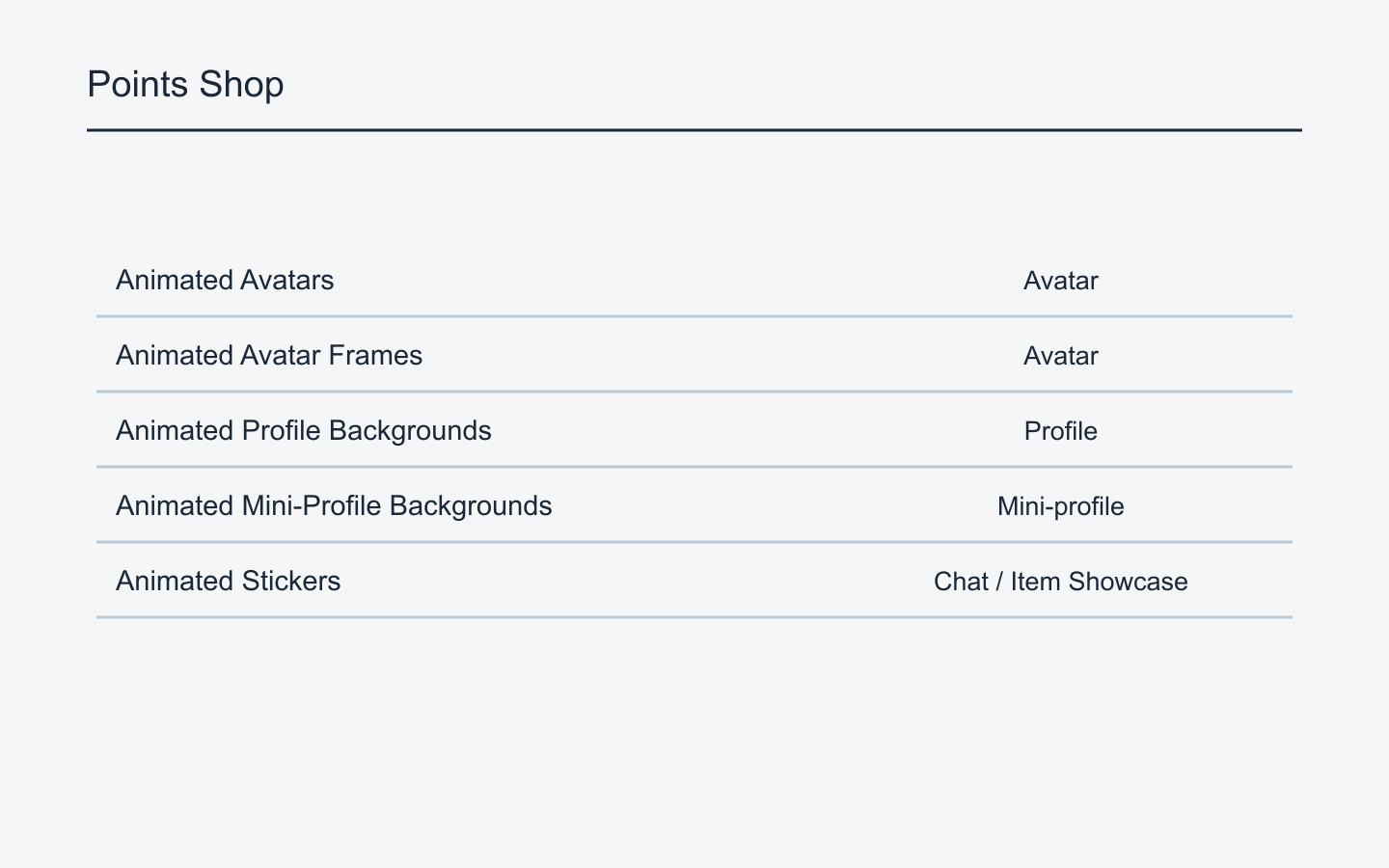
Similar item names can describe different display areas. Valve's developer documentation places avatars and avatar frames wherever your profile avatar appears. Profile backgrounds appear on your profile page; mini-profile backgrounds appear on hover in the friends list and Steam Community. Animated stickers can appear in chat and profile item showcases. Steamworks Points Shop item documentation
Redeeming a mini-profile background won't meet your expectation if you wanted a large profile-page background. Start with the area you want to change: the page behind your profile content, the small panel someone sees when hovering over your name, or an image to use in chat. Matching a game name or color scheme isn't enough. Items intended for different areas aren't substitutes.
For avatars and frames, describe the element you want. Choose an avatar if you want to replace the central character image; look at frames if you want a border around an existing image. A preview can show several elements together. Check the item category and identify which part of that preview the product represents. The game name identifies its theme, not necessarily its display location.
A Game Profile is a coordinated bundle. Valve's documentation describes an animated avatar, avatar frame, animated mini-profile background, animated profile background, and profile theme colors. Check the actual bundle's contents and options rather than assuming all bundles have the same price or controls. If you want just one component, compare the individual item with the bundle separately.
Turn your goal into a specific phrase. “The background behind the panel my friend sees when hovering over my name” points to a mini-profile background. “The background behind my introduction and showcases” points to a profile background. “A picture to send in chat” points toward emoticons or stickers. Keep that phrase beside the item category when comparing several products from the same game.
A comparison list can separate product name, category, points cost, and included components. For a frame versus a Game Profile bundle, decide whether you would use the extra components. A shared game name doesn't make them the same purchase. Since Points Shop redemptions aren't trading stock, evaluate the configuration you want to use rather than assigning a future resale value to it.
Why a sufficient balance may not unlock a game item
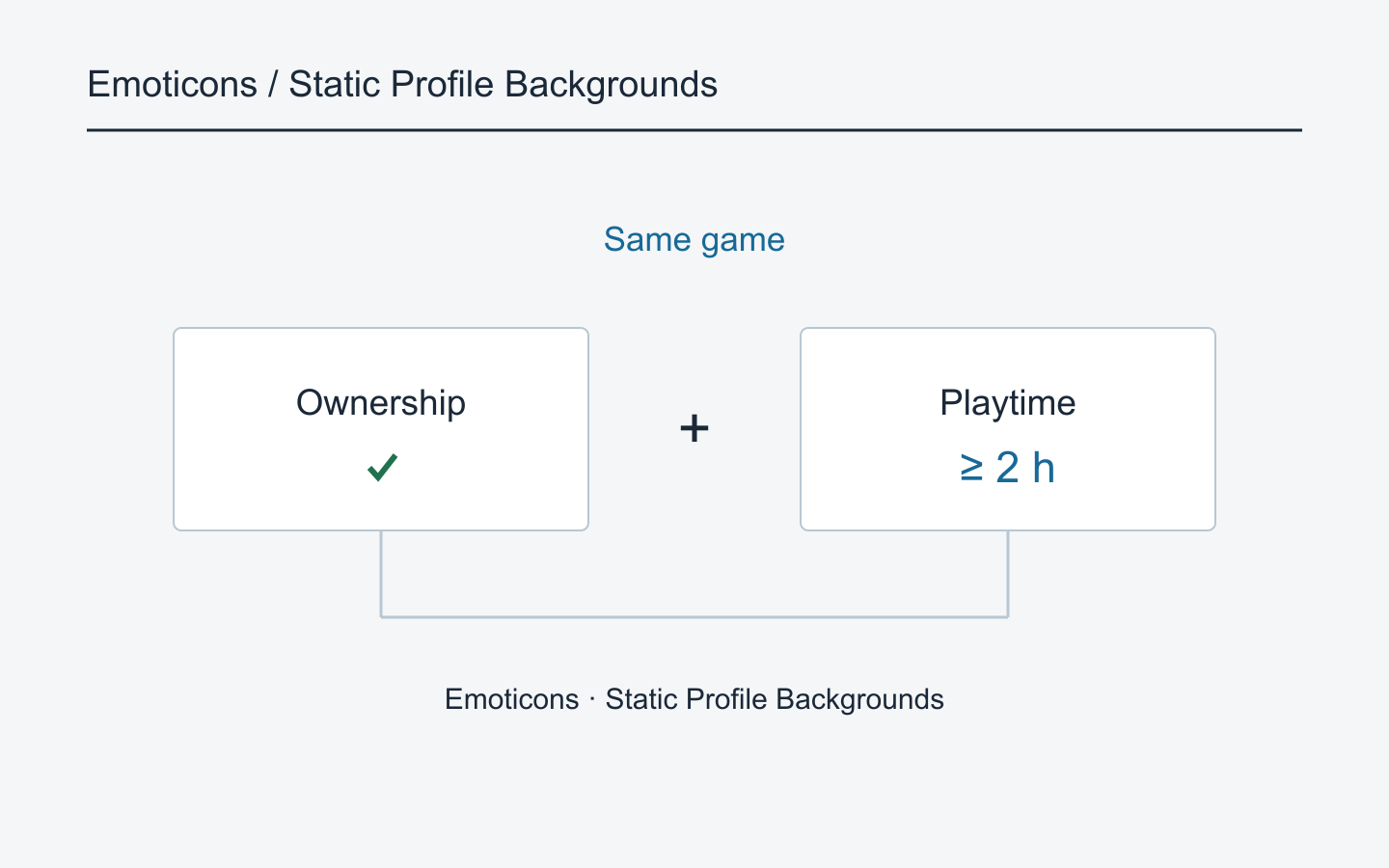
A sufficient balance doesn't make every game-related item redeemable. Valve's community-item documentation says users must own the product and have at least two hours of playtime to redeem points for its emoticons or static profile backgrounds. Both conditions apply. Don't extend this specific statement to every animated avatar or every item in the Points Shop. Steam Community Items documentation
If a static background is unavailable, identify the linked game, then check ownership and playtime on your account. Repeatedly checking your balance won't solve an ownership requirement. Buying another copy without reading the restriction isn't a useful first step either. First establish whether you already own the relevant product and whether the item belongs to the game you think it does.
A game appearing in a library and the account owning that product aren't assumptions you should merge. The official wording requires ownership. The documentation checked here doesn't resolve every shared-library, temporary-access, demo, or edition-specific case. Record the actual restriction text and explain how you access the product instead of reducing the issue to “I have the game.”
Apply the two-hour statement narrowly. For emoticons and static profile backgrounds, check the documented ownership and playtime conditions. For animated avatars and frames, read the item details rather than inferring the same conditions from that paragraph. For a Game Profile bundle, inspect its contents and any restrictions shown. A rule documented for one category isn't automatically a shop-wide rule.
Record the eligibility result in separate parts. If points are insufficient, note the required cost and current balance. If points are sufficient but you don't own the linked game, ownership is the unmet condition. If you own it but have less than two hours of playtime, the time condition is unmet. If both appear satisfied and a restriction remains, retain the exact message for Support. Don't jump to that final case before checking the earlier conditions.
These game backgrounds and emoticons connect to existing community items associated with cards. Valve describes points as a more direct acquisition route while retaining card crafting. Familiar artwork doesn't establish identical eligibility or trading attributes across acquisition routes. Card drop counts, badge levels, and XP calculations aren't needed to identify the requirement on the item in front of you.
Owning an item and displaying it are separate checks
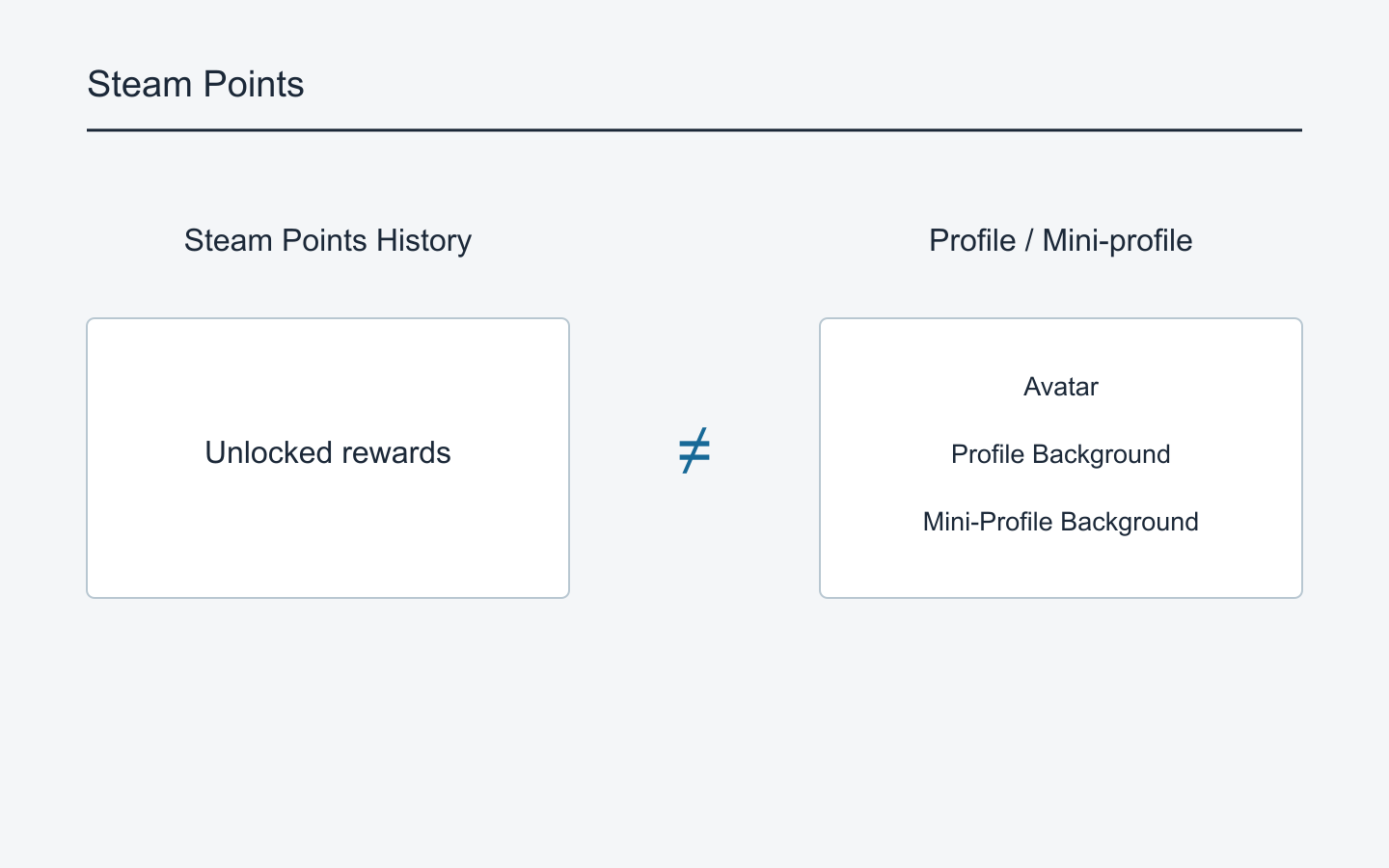
Points spending and the visible profile result answer different questions. First establish whether you obtained the desired item; then check whether it is applied to the intended area. If the screen looks unchanged after choosing a background, connect the recorded item name with the screen you're inspecting. A profile view doesn't establish whether points were deducted, and a balance doesn't establish whether a decoration is displayed.
Steam Support says your points history includes points earned and spent, plus unlocked rewards. Look for the actual item there rather than inferring redemption from the balance alone. If the balance fell, identify the spending entry and check whether it names the reward you expected. Remembering a button click isn't the same evidence as a recorded transaction. Steam Points Support
Once ownership is confirmed, return to the display categories. Are you inspecting a mini-profile background while expecting the main profile background to change? Did you select a frame while expecting a different avatar picture? For a Game Profile bundle, identify which component you want to use. The check is a relationship between item category and destination, so it remains useful even when interface labels or layout differ.
Inspect one element at a time instead of changing every profile setting. Compare the name of the currently used background with the newly unlocked one. For a frame, examine the border rather than the central avatar. For a mini-profile background, don't judge the result solely from the full profile page. Identify where the change should appear before deciding it hasn't applied.
Summarize the result in two lines: “This item name is/isn't in my points spending history” and “This decoration is/isn't visible in this location.” If no matching reward appears but the balance fell, look for a different spending entry. If the desired reward is recorded but its display differs, you can report that separately from an earning problem. Combining transaction and display questions into one complaint also mixes the evidence needed to investigate them.
Why familiar artwork may still be nonmarketable
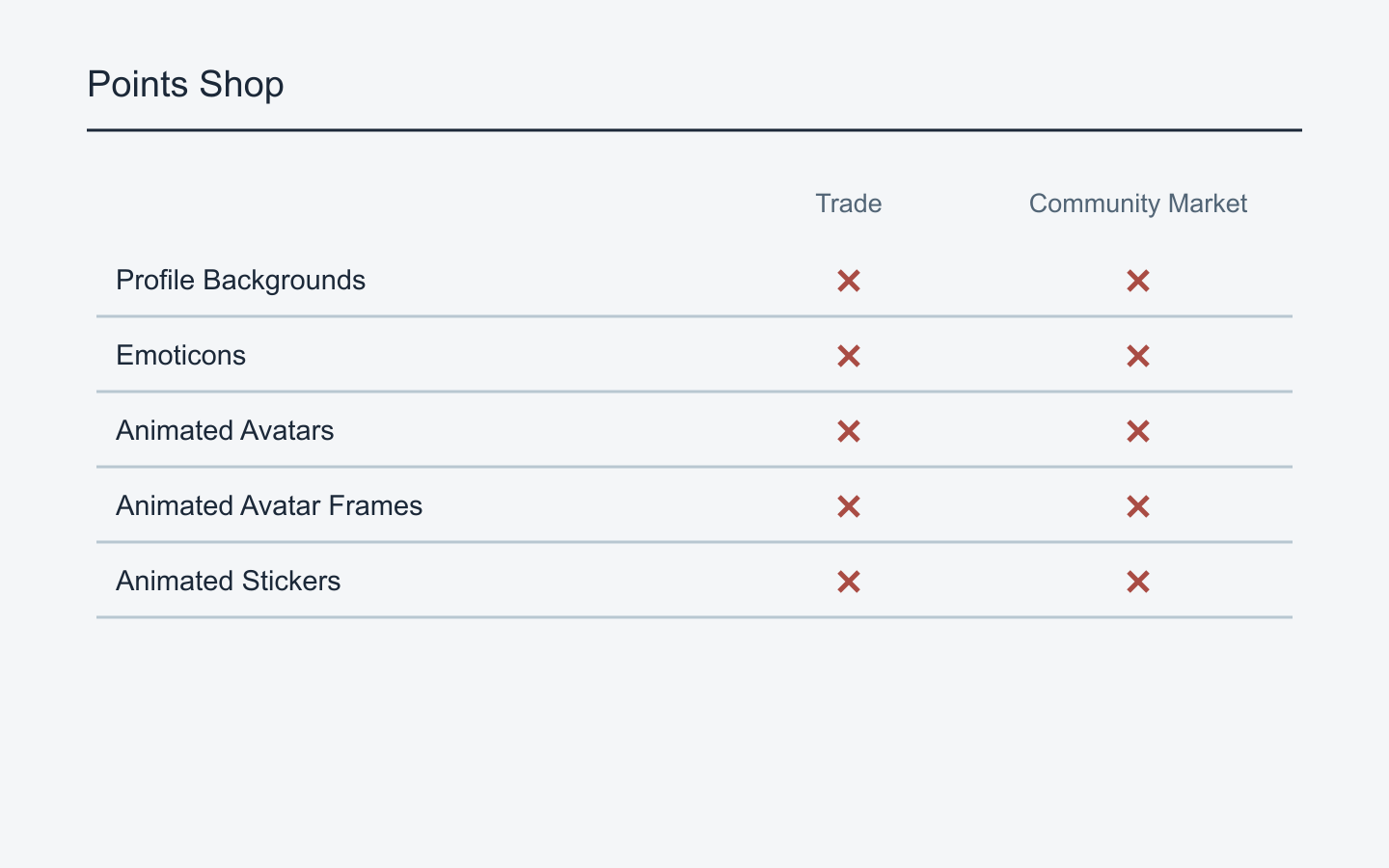
Valve's FAQ says Points Shop items are associated with your account and cannot be traded, sold, or transferred to someone else. Don't classify a background or emoticon as marketable inventory just from its category. Seeing an item in inventory may help establish ownership, but it doesn't establish permission to sell it. Know this before redeeming an item on the assumption that you can resell it if you change your mind. Points Shop trading restrictions
Valve lists card crafting, trading, Community Market purchases, and points redemption as distinct acquisition routes for community items. Check the route and the properties of your particular item rather than relying on its picture. Another user listing similar artwork doesn't make your points redemption listable. The existence of a marketable acquisition route doesn't remove the restriction on the points version.
If customization is your goal, compare whether the item gives your account the appearance you want. If your goal is later resale or transfer, Points Shop redemptions don't meet it. This also prevents mixing a points cost and a Market price into a supposed return calculation. Working backward from a points-earning conversion rate doesn't establish an item's cash value.
Check transferability before selecting something as a gift. Redeeming a decoration for your account and planning to send it to a friend conflicts with the account-bound restriction. Community Awards are a separate way to recognize another user's content with points; they aren't a trade of a shop item or an ordinary person-to-person points transfer. Similar reward terminology doesn't make the recipient or result the same.
“When can I sell it?” and “Is this item marketable?” are different questions. Nonmarketability of a points redemption isn't a documented trading hold that ends on a particular date. The FAQ checked here doesn't provide a waiting period or external-tool procedure that converts a points item into a tradable one. Establish the item's account-bound nature before searching for an unlock date.
When comparing inventory items with matching names, keep their acquisition routes separate. If one came from points and another from the Market, don't count saleable quantity from names alone. Read the trade and sale properties of each item. “This design exists on the Market” describes an acquisition route; “I can sell this particular copy” describes a property of the copy you own. For points redemptions, use Valve's account-bound restriction as the starting point.
What a game refund does to points and recent rewards
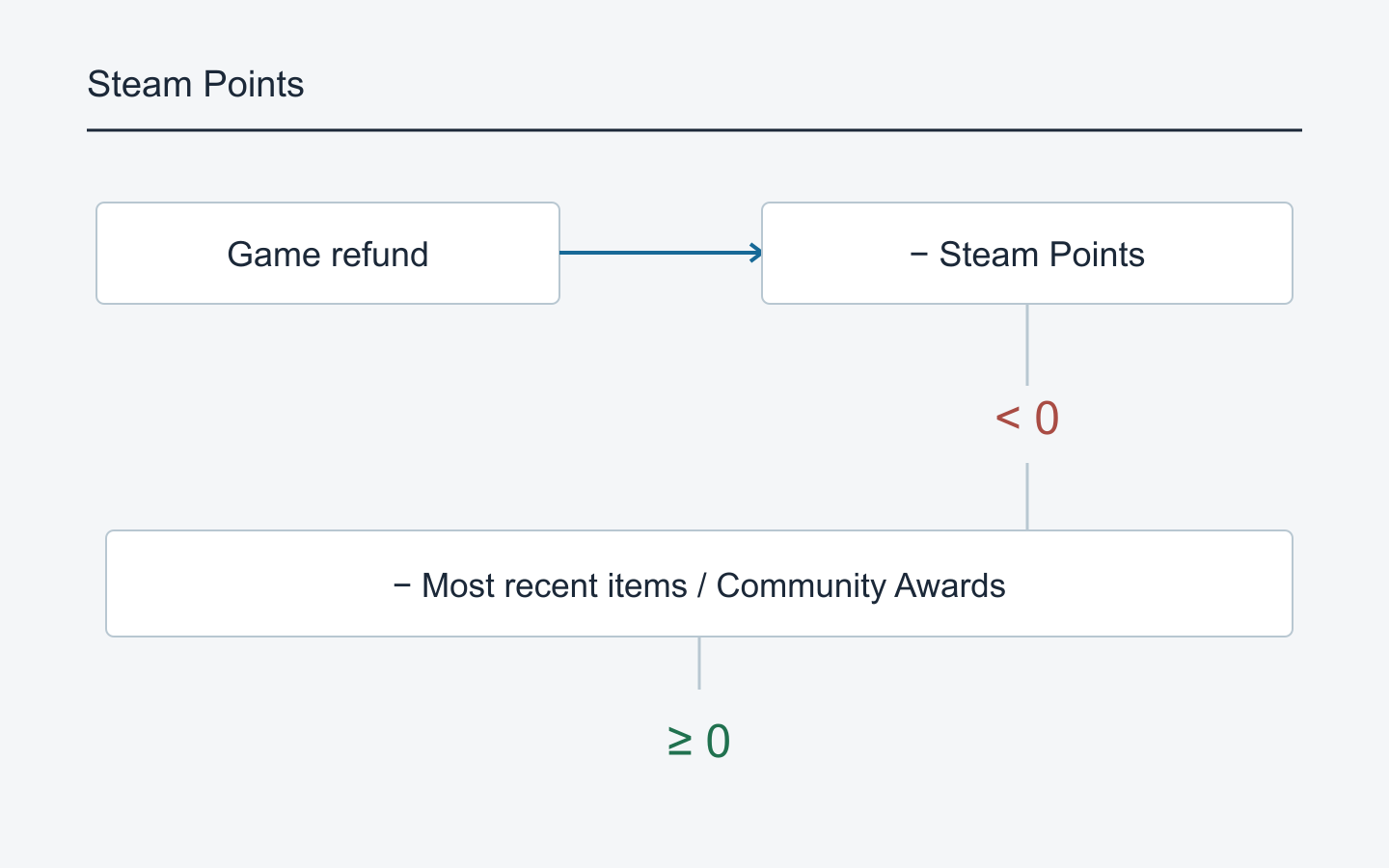
Valve says a game refund deducts the points earned from that purchase. If this makes your balance negative, it also removes the most recent items and Community Awards redeemed with points until the balance is no longer negative. Spending the points before a refund doesn't stop the deduction. Check recent spending as well as the balance. Points after a game refund
The starting point is the points earned from the refunded purchase, not whether a redeemed decoration belongs to that same game's theme. Spending those points on another game's cosmetic doesn't establish an exemption. The FAQ describes the account balance and recent redemptions; follow the earning and spending records rather than matching artwork to the refunded game.
Here is one hypothetical ledger with three spending branches. These numbers aren't actual product prices or an observed account. Assume you already had 1,200 points, earned 800 from one game purchase, and therefore had 2,000. Assume no other earnings or refunds and a refund of that one game. The deduction is 800; only the amount spent in between changes below.
If you spent 500, the pre-refund balance is 1,500. Deducting 800 leaves 700. The negative-balance condition isn't met in this calculation. Merely feeling that you have spent the game's points isn't enough to conclude that every reward disappears; the remaining account balance matters.
If you spent 1,200, the pre-refund balance is 800. The deduction leaves 0. Zero isn't negative, so the same negative-balance condition isn't met. You don't need to label each spent point as belonging to the old balance or the later purchase. The documented explanation is a deduction followed by the resulting balance.
If you spent 1,700, only 300 remains before the refund. Subtracting 800 gives an intermediate arithmetic result of −500, meeting the negative-balance condition. This is where the documented removal of recent items and awards applies. The calculation doesn't claim that the interface necessarily displays −500, even temporarily. It also doesn't predict the final balance after removals or which particular item survives.
To investigate that last case on a real account, a total spent isn't enough. You need the items and awards redeemed and their order. Because Valve refers to recent redemptions, examine the spending history before the refund rather than listing only an old background. The public wording doesn't specify every internal ordering detail or the handling of simultaneous entries. Adding invented item prices would not justify a precise removal prediction.
Replace the example's starting balance and purchase earnings with your real entries. Include other purchases that earned points and any additional spending between them. Omitting transactions can make your calculation disagree with the adjustment. Don't explain an unexplained difference as an undocumented fee or hidden rule before checking for unmatched records.
A game refund that adjusts points and a voluntary return of an unwanted Points Shop item are different questions. The cited FAQ answers the former. It doesn't, by itself, establish a general return process for individual points purchases. Check the actual support options and item-specific guidance for that question.
Read the FAQ's indefinite-ownership and unlimited-use explanation alongside the refund rule. Expiry during normal use differs from an adjustment when the purchase that earned points is refunded. Taking “yours to keep” in isolation would omit the latter condition.
Community Awards are explicitly included in the refund explanation. No recent cosmetic purchases doesn't necessarily mean no recent points spending; check awards given to reviews or other content too. Award payout amounts and waiting periods aren't needed to establish that those entries belong in this check.
Finally, verify both the game refund record and the points adjustment. A purchase refund result doesn't establish that your remembered points balance is correct. Conversely, a missing item doesn't prove a refund caused it. Confirm the purchase was refunded and how its points were adjusted, then distinguish the connections you've verified from entries you still cannot find.
Narrow the question before contacting Support
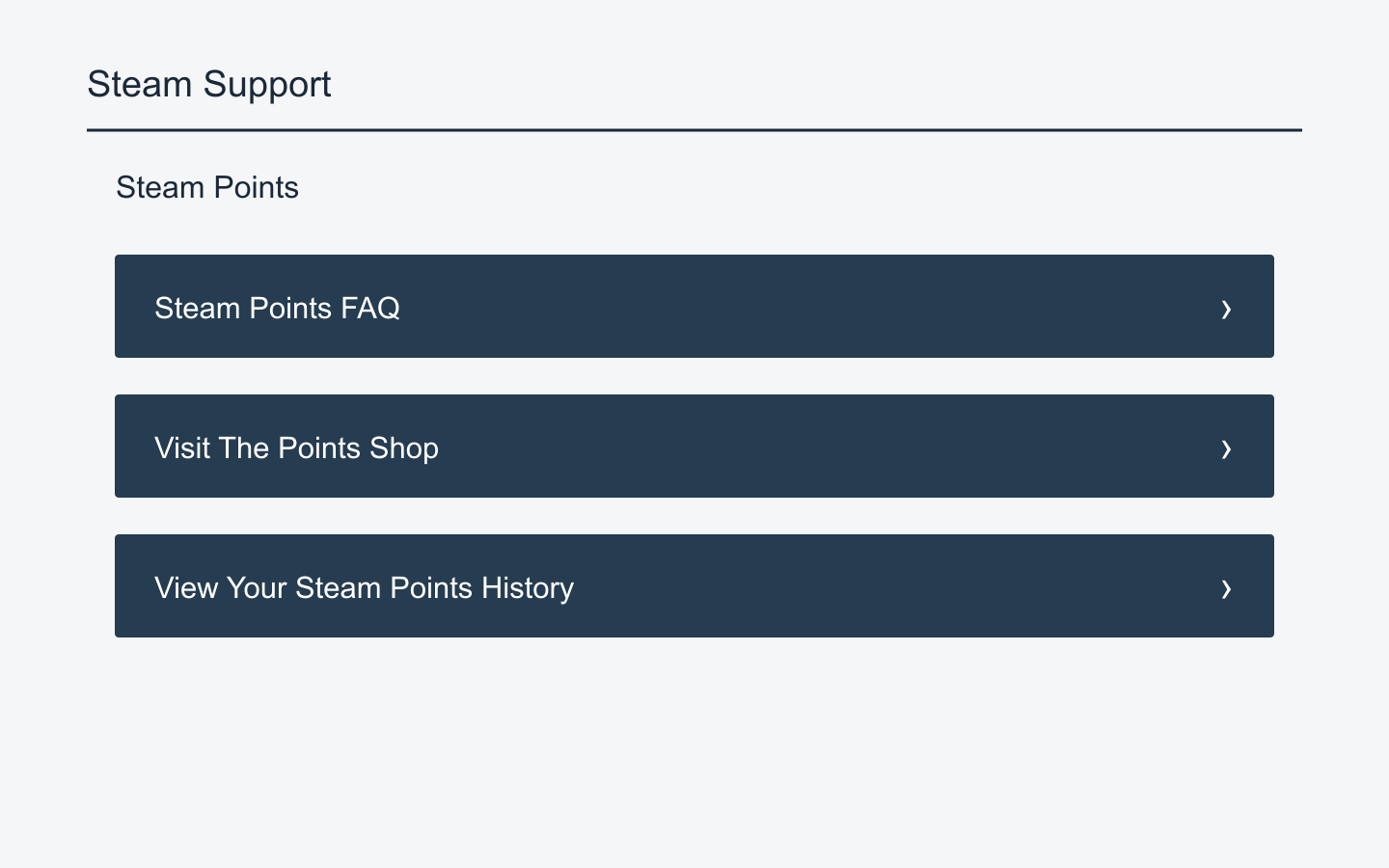
Steam's support page directs users to read the FAQ, inspect earned and spent points and unlocked rewards in their history, then submit a detailed request if the problem remains. Start with Points History and Steam Points Support. This guide hasn't submitted a request or inspected your private account history.
Use an observed fact in the request title: a game purchase with no matching points entry, a static background with a redemption restriction despite apparent eligibility, or a recent reward missing after a refund. You don't need to claim a cause you haven't established. State how far you've checked earning, redemption eligibility, ownership, display, or refund adjustment.
For earnings, prepare the purchase date, product name, and transaction type. For eligibility, include the item link, category, associated game, and exact restriction text. For display, name the unlocked reward and the place where the expected result is absent. For a refund issue, arrange the purchase and subsequent points spending chronologically. Select evidence for the problem instead of attaching the same long template to every question.
Make screenshots answer the same question. A restriction screenshot should include the item name and message; an ownership issue should show the relevant reward record. Don't crop so tightly that the category and name disappear. You don't need to publish your whole purchase history or unrelated chats. Remove unrelated personal information before posting evidence publicly.