
Steam-Abzeichen herstellen oder Karten behalten?
Was verbraucht ein Steam-Abzeichen, was bringen 100 XP und welche Belohnungen sind zufällig? Entscheide nach Kartenbestand, Profilziel und eigenem Budget.
Artikelsprachen
In diesem Artikel
Ein vollständiger Kartensatz stellt dich vor eine etwas merkwürdige Entscheidung. Beim Sammeln zählte nur die letzte Lücke. Jetzt ist der Herstellungsbutton aktiv, und plötzlich kommen andere Fragen: Sind die Karten danach weg? Was bringt mir das Abzeichen? Möchte ich den Satz vielleicht lieber behalten?
Ein Abzeichen ist keine Pflicht. Wer Steam nur zum Starten von Spielen nutzt, braucht die Funktion möglicherweise überhaupt nicht. Wer im Profil Spuren seiner Lieblingsspiele sammeln möchte, hat dagegen ein kleines Hobby jenseits des eigentlichen Spiels. Keine der beiden Gruppen nutzt Steam deshalb grundsätzlich richtiger.
Mit dem Klick verbrauchst du den Kartensatz und erhältst ein accountgebundenes Abzeichen samt Herstellungsbelohnungen. Die Karten bleiben also nicht einfach mit einer zusätzlichen Auszeichnung im Inventar. Bevor du über weitere Käufe oder Verkäufe nachdenkst, lohnt sich die Frage, was du mit dem bereits gesammelten Satz überhaupt möchtest.
Ein vollständiger Satz ist noch kein hergestelltes Abzeichen
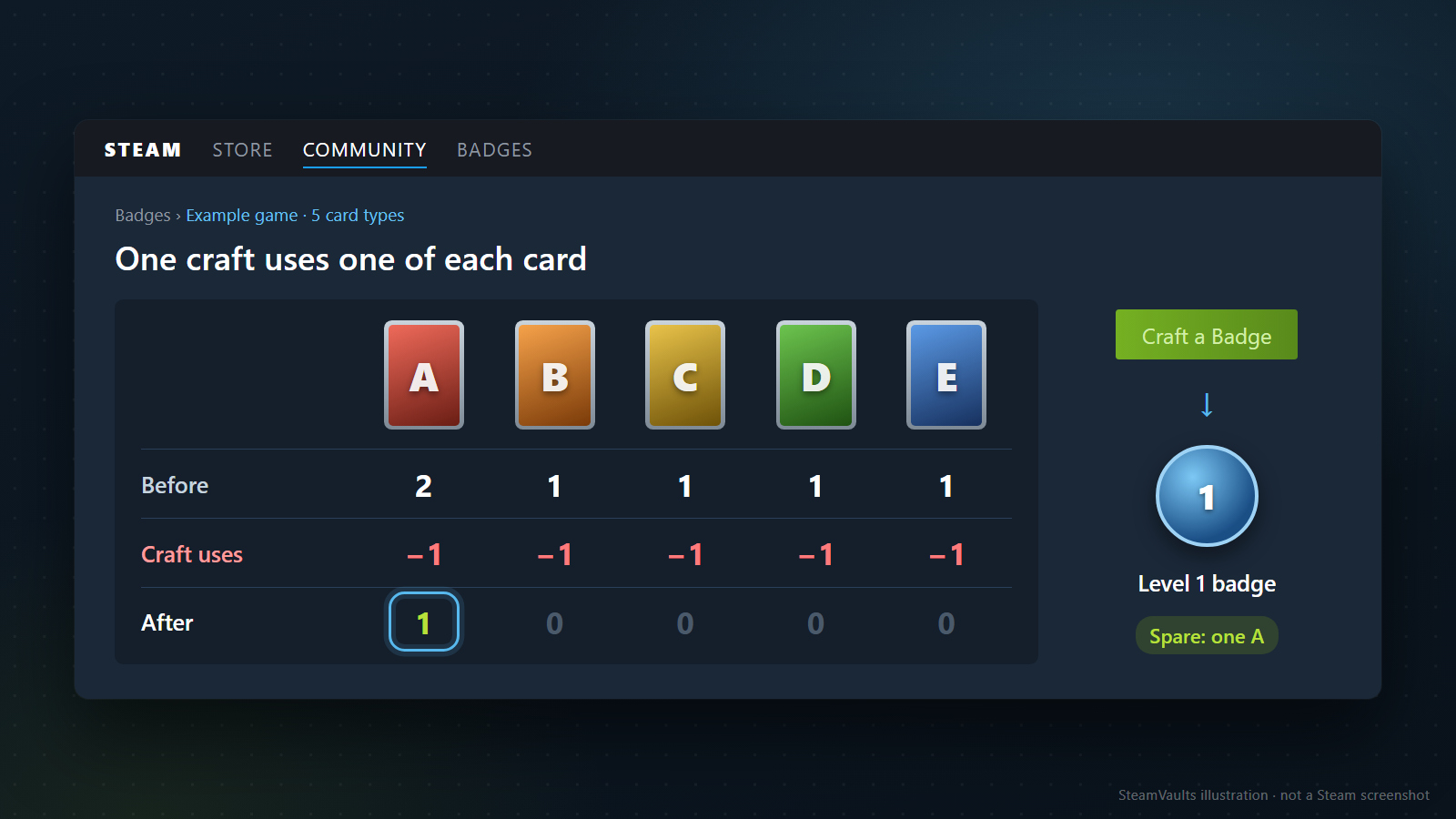
Der vollständige Satz liegt zunächst weiter im Inventar. Erst mit der Herstellung wandelst du ihn in ein Spielabzeichen und Communitygegenstände um, wie es Steams Einführung in Sammelkarten beschreibt. Das Abzeichen ist anschließend an deinen Account gebunden; den verwendeten Satz behältst du nicht zusätzlich.
„Ein Satz“ ist dabei nicht bloß eine Gesamtstückzahl. Ein frei erfundenes Spiel habe fünf normale Kartenarten A, B, C, D und E. Fünf Exemplare von A bilden keinen vollständigen Satz. Besitzt du zweimal A und je einmal B, C, D und E, hast du einen vollständigen Satz plus eine zusätzliche Karte. Nach einer Herstellung bleibt ein A übrig. Die Zahlen sind ein Beispiel zur Unterscheidung von Arten und Mengen, keine Daten eines bestimmten Spiels.
Auch derselbe Spielname macht Karten nicht beliebig austauschbar. Für einen normalen Satz benötigst du die passenden normalen Karten. Eine vorhandene Foil-Karte füllt dessen Lücke nicht automatisch. Richte dich nach den Kartennamen und der Satzart in der Abzeichendetailansicht.
Vielleicht ist der vollständige Satz schon das, was du sammeln wolltest. Wenn du die Kartenbilder gern im Inventar ansiehst, kannst du den Herstellungsbutton stehen lassen. Möchtest du dagegen das Spielabzeichen, sind die Karten das Material dafür. Entscheide dich für die Form, die dir mehr bedeutet – eine weiterhin nutzbare Kopie der ursprünglichen Items behältst du bei der Herstellung nicht.
Auch bereits vorhandene Karten gehören zu dieser Entscheidung. Ohne zusätzliche Zahlung herzustellen bedeutet nicht, nichts einzusetzen. Dein Satz wird verbraucht. Willst du dieselben Karten später erneut im Inventar haben, solltest du einplanen, sie neu beschaffen zu müssen. Rechne nicht damit, ein ungeliebtes Abzeichen wieder in den ursprünglichen Satz zu zerlegen. Die geprüften offiziellen Herstellungsanleitungen beschreiben keinen solchen Rückweg.
Sind Kartenbesitz und Markthandel noch neu für dich, hilft zuerst der Artikel darüber, was der Steam Communitymarkt umfasst. Ab hier vergleichen wir nicht den Preis desselben Gegenstands an verschiedenen Stellen, sondern seine Verwendung für dein eigenes Profil.
Das Abzeichen ist festgelegt, die zusätzlichen Motive sind zufällig
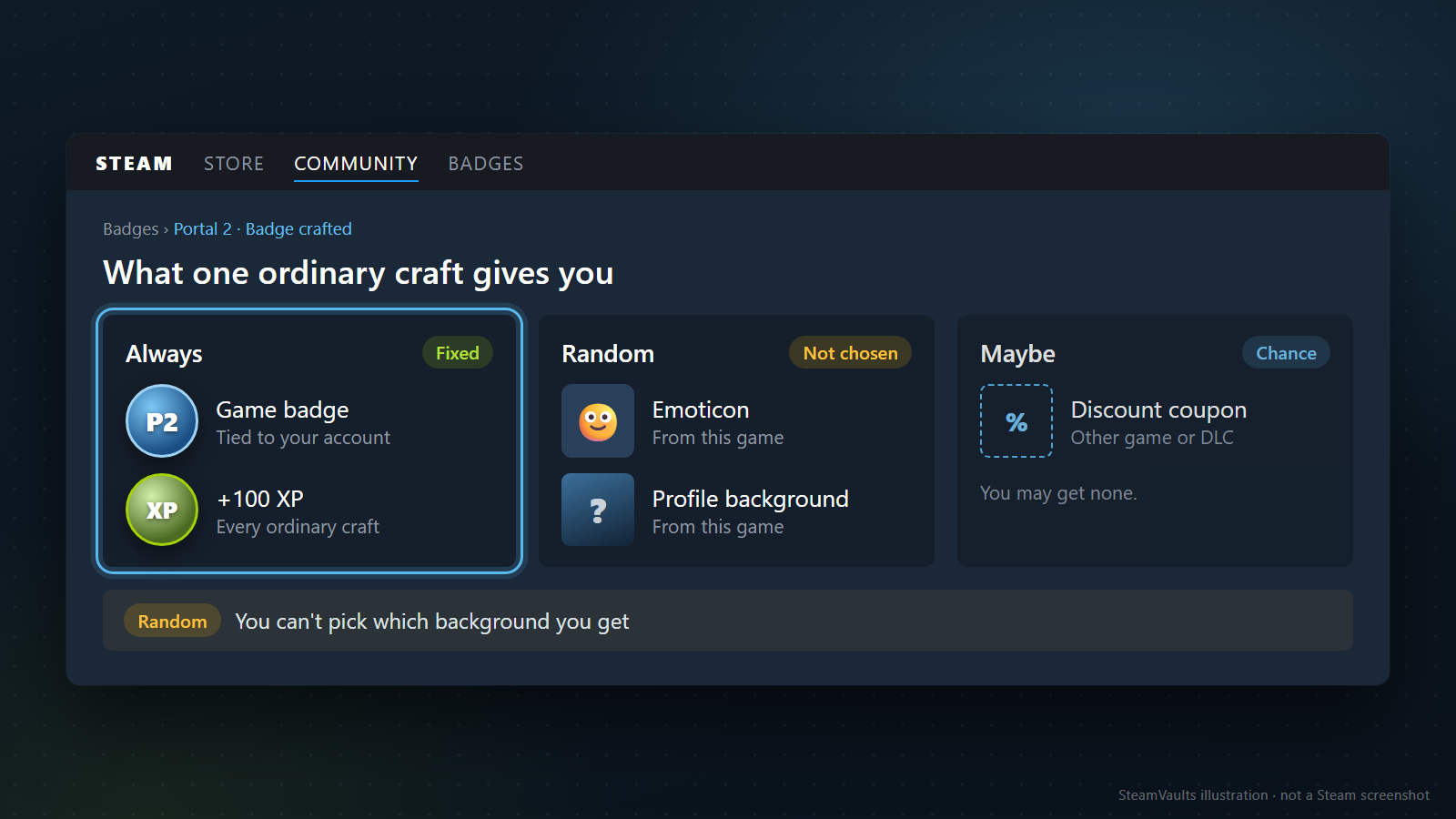
Die Herstellung eines gewöhnlichen Spielabzeichens bringt das Abzeichen und 100 XP. Steam nennt außerdem ein zufälliges Emoticon und einen zufälligen Profilhintergrund des Spiels sowie die Möglichkeit eines Rabattcoupons für ein anderes Spiel oder einen DLC. Ein garantierter Coupon oder die freie Auswahl eines Hintergrunds wäre mehr, als diese Regeln zusagen. So beschreibt es die offizielle FAQ zu Herstellungsbelohnungen.
Wie wichtig dieser Unterschied ist, hängt von deinem Ziel ab. Möchtest du ein Abzeichen mit dem Namen dieses Spiels, passt die Herstellung. Suchst du einen Hintergrund mit einer ganz bestimmten Figur, sieht es anders aus. Dass ein Hintergrund zu den Belohnungen zählt, sichert dir nicht dieses Motiv. Je genauer dein Wunsch, desto größer die Lücke zwischen irgendeinem Hintergrund und dem ausdrücklich gesuchten Bild.
Weitere Abzeichenstufen können Spaß machen, wenn du sie sammeln möchtest. Ich würde nur kurz innehalten, wenn eigentlich eine Herstellung geplant war und erst der enttäuschende Hintergrund zum nächsten Kartensatz führt. Willst du die nächste Stufe wirklich? Dass dir das erste Bild nicht gefällt, gibt dir noch keine Zusage für ein besser passendes Ergebnis beim nächsten Mal.
Die geprüfte Dokumentation nennt keine Verteilung, aus der wir solche Chancen berechnen könnten. Mehrere mögliche Motive bedeuten weder gleiche Häufigkeit noch eine Garantie, irgendwann jedes zu erhalten. Auch wann die Belohnungen die Kartenkosten ausgleichen würden, lässt sich damit nicht verlässlich vorhersagen. Für die Entscheidung reicht eine persönlichere Frage: Würdest du das Abzeichen auch herstellen, wenn dir der Hintergrund nicht gefällt?
Einen möglichen Rabattcoupon würde ich vorab gar nicht gegen die Kartenkosten rechnen. Er kann nützlich sein, wenn er auf ein ohnehin geplantes Spiel anwendbar ist. Vor dem Erhalt weißt du aber weder, für welchen Titel er gilt, noch ob du ihn haben möchtest. Auch ein hoher Rabatt ist keine Erstattung der Herstellungskosten. Verleitet er dich zu einem ungeplanten Spielekauf, gibst du insgesamt womöglich mehr aus.
Trenne auch accountgebundene Ergebnisse von Inventargegenständen. Das Abzeichen und seine XP sind keine Karten, die du anschließend verkaufen kannst. Ob sich ein Hintergrund oder Emoticon abgeben lässt, ist eine andere Frage als die Freude am Profilabzeichen. Alles in einen vermeintlichen Gegenwert des Abzeichens zusammenzurechnen halte ich für wenig hilfreich. Dein Interesse an der eigenen Profilgestaltung muss nicht ebenfalls eine Marktzahl bekommen.
100 XP sind nicht auf jeder Stufe ein ganzes Level
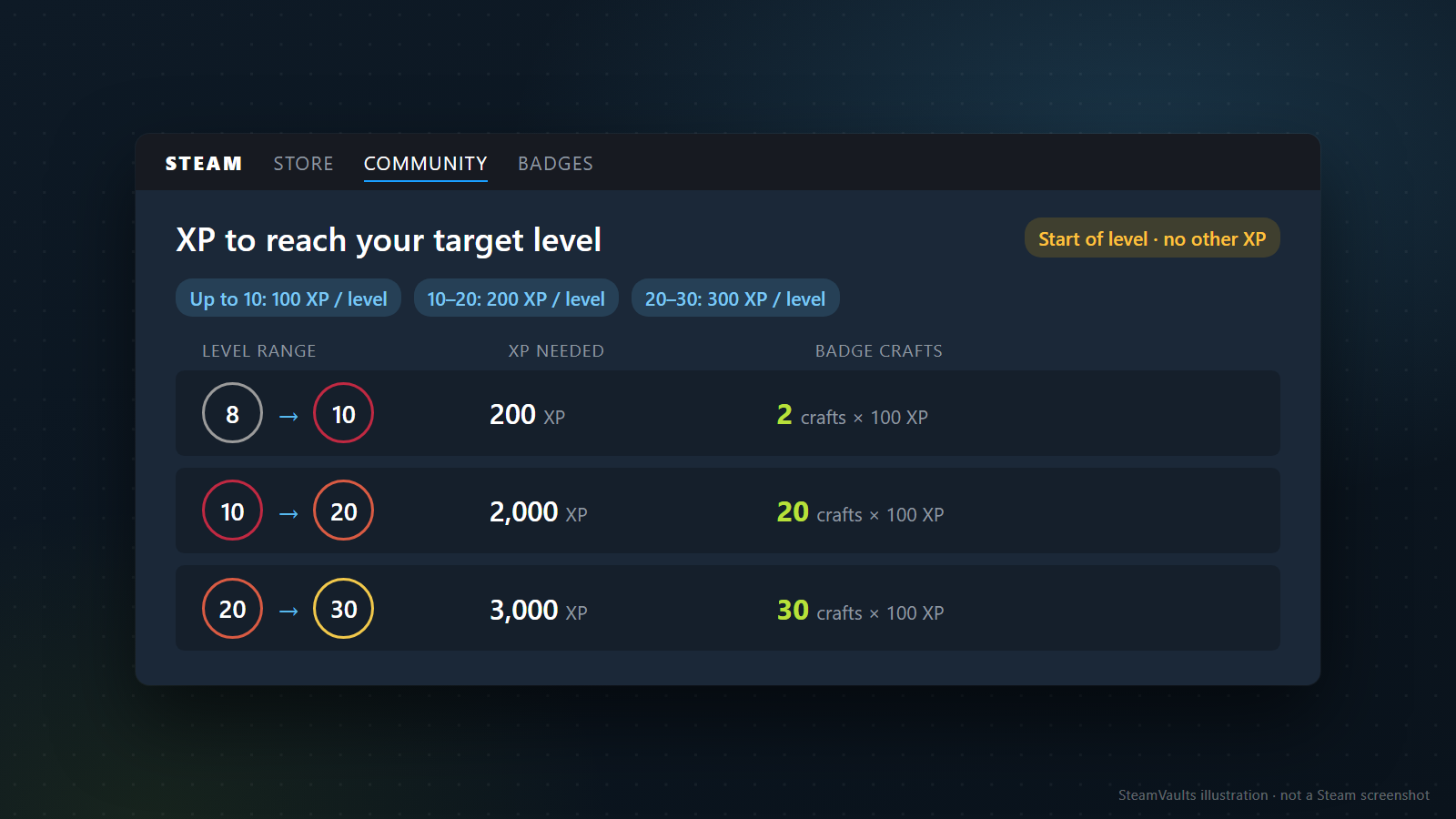
Für ein bestimmtes Levelziel lohnt sich eine konkrete Rechnung. Steam erklärt, dass anfangs 100 XP je Level nötig sind, ab Level 10 dann 200 und ab Level 20 jeweils 300. Das Abzeichen bringt weiterhin 100 XP. Seine sichtbare Wirkung hängt also davon ab, in welchem Bereich sich dein Account befindet.
Die folgende Tabelle ist eine Rechnung aus diesen Regeln. Angenommen wird jeweils der Beginn des genannten Levels ohne zusätzlichen Fortschritt innerhalb dieser Stufe. Es kommen keine XP aus anderen Quellen hinzu, und eingesetzt werden ausschließlich herstellbare gewöhnliche Spielabzeichen mit 100 XP. Die Tabelle zeigt weder einen beobachteten Account noch eine Rangliste günstigster Abzeichen.
| Angenommener Ausgangspunkt | Ziel | Zusätzlich nötige XP | Herstellungen mit je 100 XP |
|---|---|---|---|
| Level 8, innerhalb des Levels 0 zusätzliche XP | Level 10 | 200 | 2 |
| Level 10, innerhalb des Levels 0 zusätzliche XP | Level 20 | 2.000 | 20 |
| Level 20, innerhalb des Levels 0 zusätzliche XP | Level 30 | 3.000 | 30 |
Von Level 8 bis 10 reichen im Beispiel zwei Herstellungen. Für die späteren Levelbereiche wächst der Bedarf deutlich. „Noch zehn Level bis zum nächsten Showcase“ ist deshalb ohne den Ausgangslevel keine brauchbare Kostenschätzung.
20 nötige Herstellungen bedeuten allerdings nicht, dass du dasselbe gewöhnliche Spielabzeichen 20-mal verwenden kannst. Die Grenze je Spiel gilt zusätzlich.
Bei vorhandenem XP-Fortschritt wird die Restrechnung einfacher. Fehlen beispielsweise 180 XP zum Ziel, bringen zwei Herstellungen 200 XP und überschreiten den Restbedarf. Die 180 sind ausdrücklich eine Beispielzahl, nicht der Wert deines Accounts. Teile die tatsächlich fehlenden XP durch 100 und runde auf. Erhältst du zwischendurch XP aus anderen Abzeichen oder Aktivitäten, rechne erneut.
Ich würde das Ziel vor den Kartenkäufen festlegen: mehr Platz für Freunde, ein Screenshot-Showcase oder einfach ein Level, das dir gefällt. Dann weißt du, wann du aufhören kannst. Passt du es dagegen nach jedem Blick auf ein höheres fremdes Profil an, verschiebt sich auch der Kartenbedarf immer weiter.
Die Steam-Hilfe nennt als tatsächliche Vorteile Freundeslistenplätze und Profilshowcases. Das Grundlimit der Freundesliste liegt bei 250, wächst um 5 je Level und endet bei 2.000. Über Level kommt je zehn Level ein Showcase-Platz hinzu, laut aktueller Hilfe bis zu 20. Im Punkteshop gekaufte zusätzliche Showcases werden laut Dokumentation darüber hinaus berücksichtigt. Die geltenden Details stehen in der Steam-Hilfe zu Level und XP.
Mit viel Platz in der Freundesliste und ohne Interesse an Showcases bemerkst du von zusätzlichen Zahlen vielleicht wenig. Wer gerade am Freundeslimit hängt, kann fünf neue Plätze tatsächlich gebrauchen. Ein kurzer Blick ins eigene Profil vor der Herstellung zeigt meist, welche Lage eher auf dich zutrifft.
Bleibt dein Account wegen eines eingeschränkten Nutzerstatus auf Level 0, beginne nicht mit weiteren Kartenkäufen. Dieselbe Hilfe erklärt, dass eingeschränkte Nutzer ihr Steam-Level nicht erhöhen können. Prüfe zuerst den Accountstatus. Eine manuelle Vergabe gewünschter Level, XP oder Abzeichen durch den Support ist ebenfalls kein dort angebotener Lösungsweg.
Ein Foil-Abzeichen schaltet keine zusätzlichen Funktionen frei
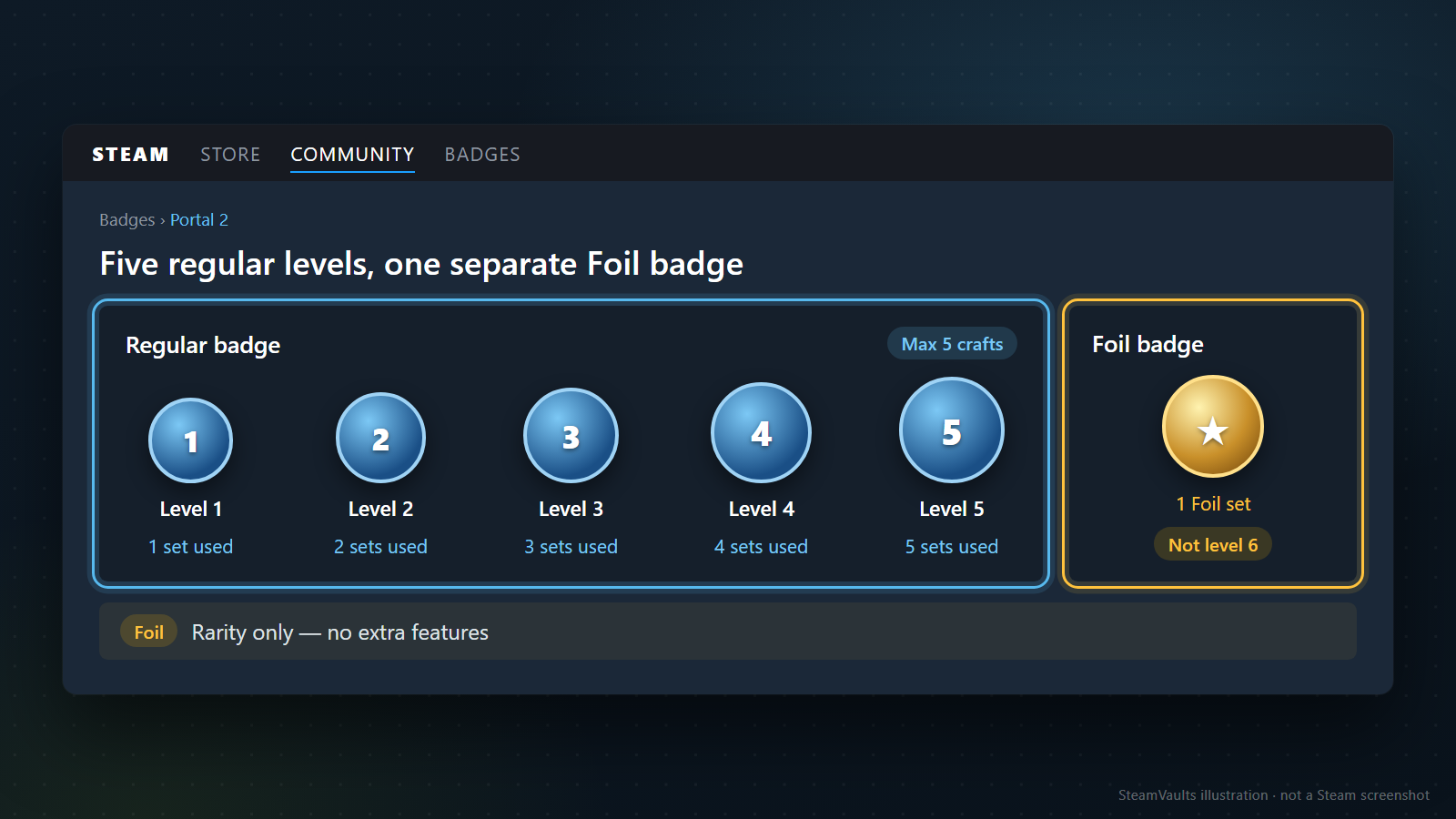
Ein normales Spielabzeichen steigerst du mit weiteren vollständigen Sätzen desselben Spiels. Insgesamt sind einschließlich der ersten Herstellung höchstens fünf möglich. Aus Stufe 1 werden mit vier weiteren Sätzen die Stufen bis 5. Lies „fünfmal steigern“ also nicht als erste Herstellung plus fünf zusätzliche, insgesamt sechs.
Die Steamworks-Anleitung zu Abzeichenmaterial unterscheidet fünf normale Abzeichenstufen und ein Foil-Abzeichen. Jede normale Stufe hat ein eigenes Bild und einen eigenen Namen. Das Foil-Abzeichen entsteht aus einem Foil-Kartensatz; es ist keine automatisch erreichte Schlussstufe des vollständig gesteigerten normalen Abzeichens.
Die höchste Stufe muss dir nicht am besten gefallen. Vielleicht passt die Farbe einer früheren besser zu deinem Profil oder du magst den späteren Namen nicht. Für reine XP spielt das womöglich keine Rolle. Sammelst du wegen des Bildes, sieh dir die nächste Stufe an, bevor du den Satz verbrauchst. Mit dem Ziel Stufe 5 könntest du gerade das Motiv hinter dir lassen, das du ursprünglich wolltest.
Zukünftige Spiele und einzelne Abzeichenentwürfe kann dieser Artikel nicht für dich bewerten. Schau die tatsächlichen Motive auf der Abzeichenseite des Spiels und in veröffentlichten Spielmaterialien an. Prüfe auch bei Suchbildern, ob du normale Stufe 1, normale Stufe 5 oder ein Foil-Abzeichen siehst. Ein fremdes Profilbild und beliebige Karten mit demselben Spielnamen sichern dir nicht das gewünschte Ergebnis.
Wenn dir das Foil-Motiv oder seine Seltenheit gefällt, kann das bereits dein Grund sein, es zu sammeln.
Valve nennt abgesehen von der Seltenheit keine zusätzlichen Vorteile für Foil-Karten oder Foil-Abzeichen. Mehr Freundesplätze oder besondere Marktrechte sind also kein Grund, genau diese Variante zu wählen. Siehst du einen höheren Preis als bei normalen Karten, ist das nicht automatisch der Preis zusätzlicher Funktionen.
Für eine Funktion betrachtest du zuerst normale Abzeichen und den nötigen XP-Bedarf. Für das Foil-Motiv oder seine Seltenheit legst du fest, was dir gerade diese Eigenschaft wert ist. Ein Hobby wird nicht falsch, weil ein anderer es unvernünftig findet. Vermeiden würde ich vielmehr höhere Ausgaben wegen einer Funktion, die vermeintlich dazugehört, tatsächlich aber gar nicht entsteht.
Was genau möchtest du im Profil zeigen?
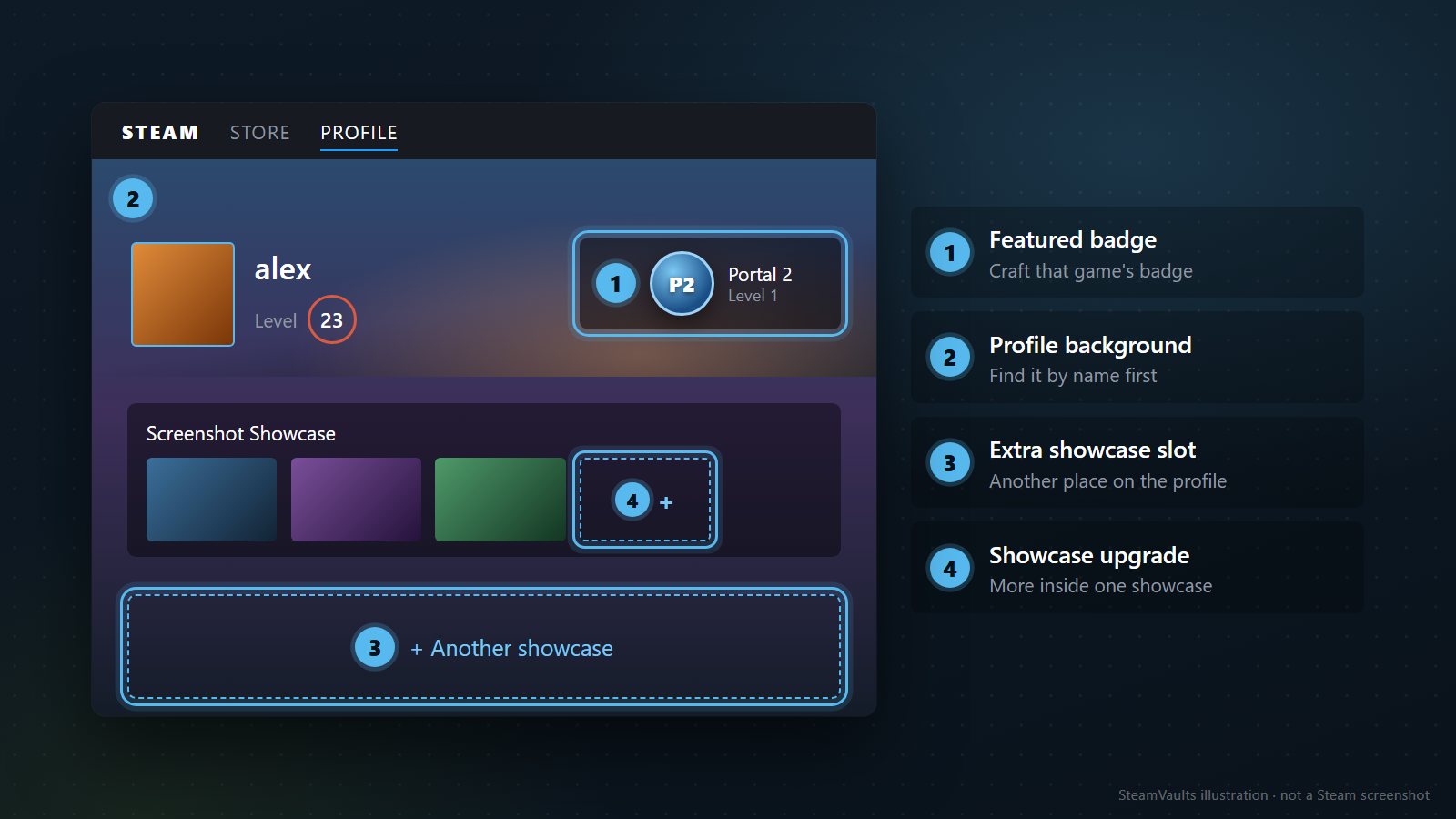
Stell dir vor, du siehst einen schönen Hintergrund bei einem Freund und beginnst dafür Karten zu sammeln. Die erste Frage sollte dann nicht „Welches Level brauche ich?“ lauten, sondern „Wie heißt dieses Element?“. Normaler Profilhintergrund, animierter Miniprofilhintergrund, Avatarrahmen und ein Bild in einem Showcase führen an unterschiedliche Stellen. Ein schönes Gesamtprofil besteht nicht automatisch aus Abzeichenbelohnungen.
Valve nennt neben der Herstellung auch Nutzerhandel, Communitymarkt und Punkteshop als Wege zu Communitygegenständen. Für das Einlösen von Punkten gegen spieleigene Emoticons und statische Profilhintergründe nennt die Dokumentation ausdrücklich den Besitz des Spiels und mindestens zwei Stunden Spielzeit. Das sind Voraussetzungen für diese Itemarten. Übertrage sie nicht pauschal auf jeden Artikel im Punkteshop.
Kennst du den Namen des gewünschten Hintergrunds, prüfe, ob genau dieser auf dem Markt oder im Punkteshop angeboten wird. Spiele haben unterschiedliche registrierte Items und mögliche Kaufbedingungen. Seine Verfügbarkeit solltest du nicht vorwegnehmen. Gibt es einen Weg zur gezielten Auswahl, brauchst du vielleicht keine weiteren zufälligen Herstellungsbelohnungen.
Der Punkteshop umfasst zudem Kategorien außerhalb gewöhnlicher Abzeichenbelohnungen. Valves Dokumentation zu Punkteshop-Items behandelt unter anderem animierte Avatare, Avatarrahmen, Miniprofilhintergründe und Spielprofilpakete. Für einen bewegten Rahmen ist die Suche nach diesem Item direkter als das Durchgehen normaler Abzeichenbelohnungen. Derselbe Oberbegriff „Profilgestaltung“ bedeutet keinen gemeinsamen Beschaffungsweg.
Bei Showcases musst du zwischen einem zusätzlichen Platz im Profil und einem Upgrade für mehr Inhalte im vorhandenen Showcase unterscheiden. Mehr XP erweitern nicht automatisch genau den Bereich, den du ändern willst. Vergleiche die Showcase-Seite des Punkteshops mit deiner Profilbearbeitung und lies die konkrete Produktbeschreibung. Wir kennen die bereits gekauften Optionen deines Accounts nicht und können deshalb kein überall identisches Ergebnis versprechen.
Wer beispielsweise einen weiteren Screenshot zeigen möchte, sollte zuerst unterscheiden: Soll ein vorhandener Showcase mehr Bilder aufnehmen oder soll ein weiterer Showcase auf das Profil? Ohne diese Entscheidung kann das Level wachsen, während das Profil weiterhin anders aussieht als gewünscht. Das konkrete Ziel bestimmt, welche Beschreibung du lesen musst.
Prüfe vor neuen Käufen ruhig die vorhandenen Hintergründe und Bearbeitungsoptionen. Vielleicht ist zunächst deren tatsächliche Platzierung nötig, nicht ein neues Item. Ein freier Showcase-Platz verlangt kein höheres Level; ein schon nutzbarer Hintergrund verlangt keine weiteren zufälligen Bilder. Natürlich darf dir etwas Neues einfach besser gefallen. Trenne nur „Diese Funktion fehlt mir“ von „Ich möchte ein anderes Aussehen“.
Vorhandene Karten verschwinden nicht aus der Kostenfrage
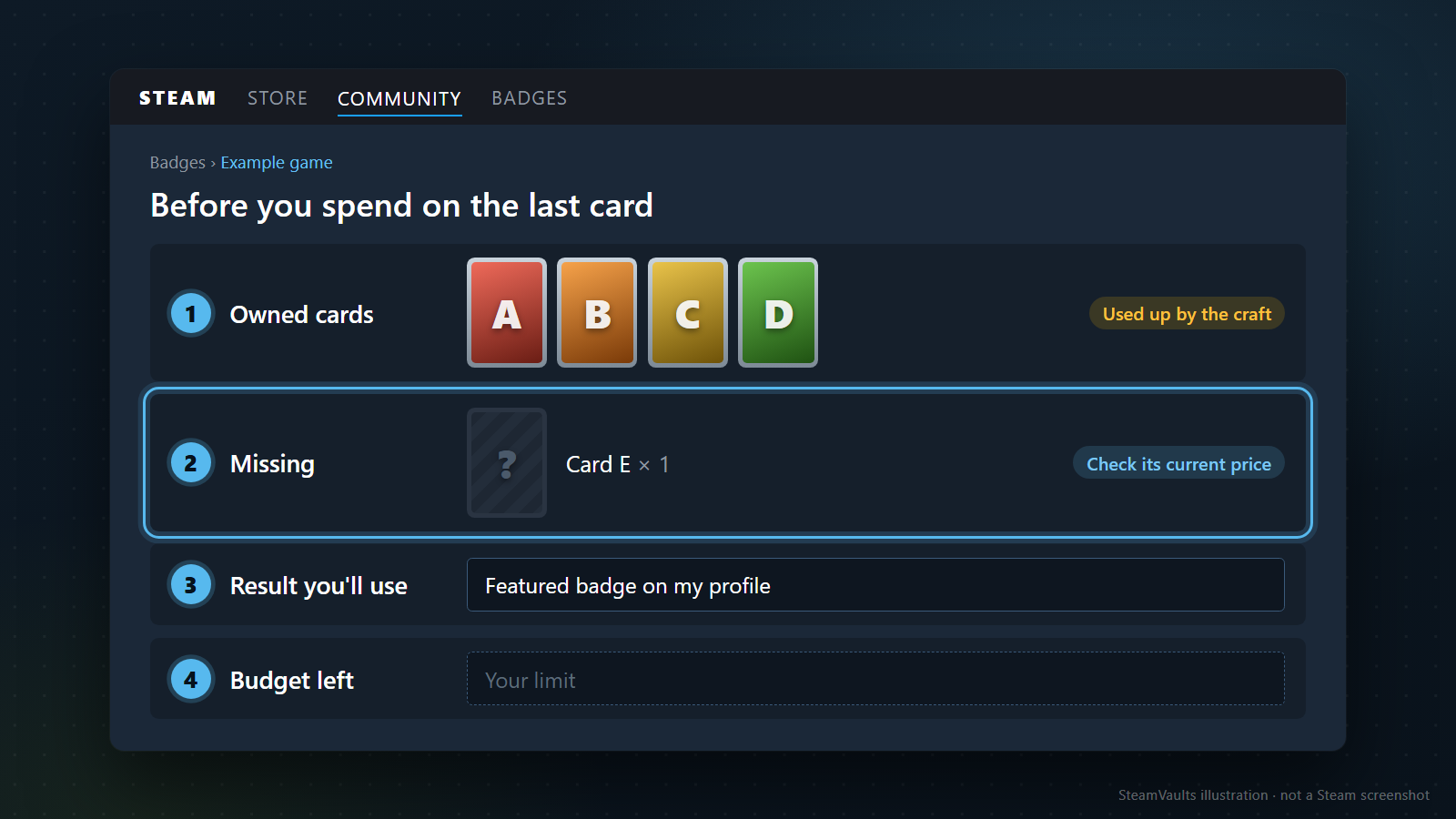
Ein Satz mit nur einer fehlenden Karte wirkt beinahe erledigt. „Ein kleiner Zukauf, dann bin ich fertig“ lässt allerdings manchmal offen, warum du überhaupt fertig werden möchtest. Wolltest du das Abzeichen schon vorher oder ist der Wunsch erst entstanden, weil zufällig viele Karten vorhanden waren?
Auch ein zufällig gewachsener Satz kann ein guter Anlass sein. Es muss nicht immer das seit Jahren geliebte Spiel sein.
Aus vorhandenen Karten folgt trotzdem keine Pflicht, den Rest zu kaufen. Gibt es außer dem hohen Sammelfortschritt noch einen Grund für das Abzeichen? Gefällt dir ein anderes besser, dessen Satz erst halbvoll ist, darfst du dich ebenso dafür entscheiden.
Notiere getrennt, was du jetzt noch bezahlen müsstest, welche vorhandenen Karten du verbrauchst und wofür du das Ergebnis verwenden möchtest. Ein kleiner Zukauf macht den übrigen Satz nicht kostenlos. Das muss dich nicht vom Abzeichen abhalten; du solltest nur wissen, was du dafür einsetzt.
Für diese Rechnung brauchst du die fehlenden Kartennamen, Stückzahlen und die aktuell verlangte Gesamtsumme. Preise und vorhandene Mengen unterscheiden sich je Spiel und Account; vielleicht besitzt du schon den ganzen Satz. Ein alter Richtwert wie „ein Abzeichen kostet ungefähr …“ ersetzt diese Angaben nicht. Die Preisvergleichsmethode findest du im Marktartikel. Hier zählt, ob die konkreten Kosten zu deinem Profilwunsch und Budget passen; aktuelle Preise wurden für diesen Artikel nicht erhoben.
Ein einzelnes Lieblingsspiel-Abzeichen als hervorgehobenes Profilabzeichen ist ein kleines, klares Ziel. Liegen seine Kosten in deinem Freizeitbudget und möchtest du den Satz dafür verwenden, musst du nicht zwingend nach einem billigeren Abzeichen suchen. Das Abzeichen eines anderen Spiels, das dich nie interessiert hat, bringt zwar ebenfalls XP. Das ursprünglich gewünschte Ergebnis fehlt dir dann weiterhin. Effizienz lässt sich sinnvoll nur bei gleichem Ziel vergleichen.
Planst du Abzeichen mehrerer Spiele, betrachte zuerst die Gesamtsumme. Kleine Einzelkäufe können zusammen überraschend viel ergeben. Bei einem Spiel fehlt eine Karte, beim nächsten mehrere; die bloße Anzahl fast fertiger Spiele reicht nicht. Wähle die geplanten Herstellungen, ermittle sämtliche benötigten Karten und streiche bei zu hoher Summe einige davon.
Auf die Liste gehören auch Sätze, die du behalten möchtest. Bei einem Spiel interessieren dich vielleicht die Kartenbilder, beim nächsten das Abzeichen und beim dritten keines von beiden. Dafür brauchst du keine einheitliche Regel für das ganze Inventar.
Geht es noch darum, fehlende Karten per Pack oder direkt zu beschaffen, lies zunächst den Vergleich von Booster-Herstellung und gezieltem Kartenkauf. Die Entscheidung hier liegt danach. Ein fertiger Satz verpflichtet nicht zur Herstellung. Ist das Abzeichen dagegen klar gewünscht, kannst du dich auf die passende Beschaffung dieses Satzes konzentrieren.
Bleibt als Begründung nur die Hoffnung, später mehr zu verdienen, würde ich nicht eilig herstellen. Level und Booster-Berechtigung behandelt der Artikel über Kartendrops und Booster-Voraussetzungen. Ein zufälliger zukünftiger Ertrag ohne bekannten Zeitpunkt kann den heutigen Materialeinsatz nicht sicher aufheben. Profilgestaltung braucht keinen künstlichen Einnahmeplan, um als Ausgabe in Ordnung zu sein.
Prüfe vor dem Klick noch einmal die konkrete Abzeichenseite
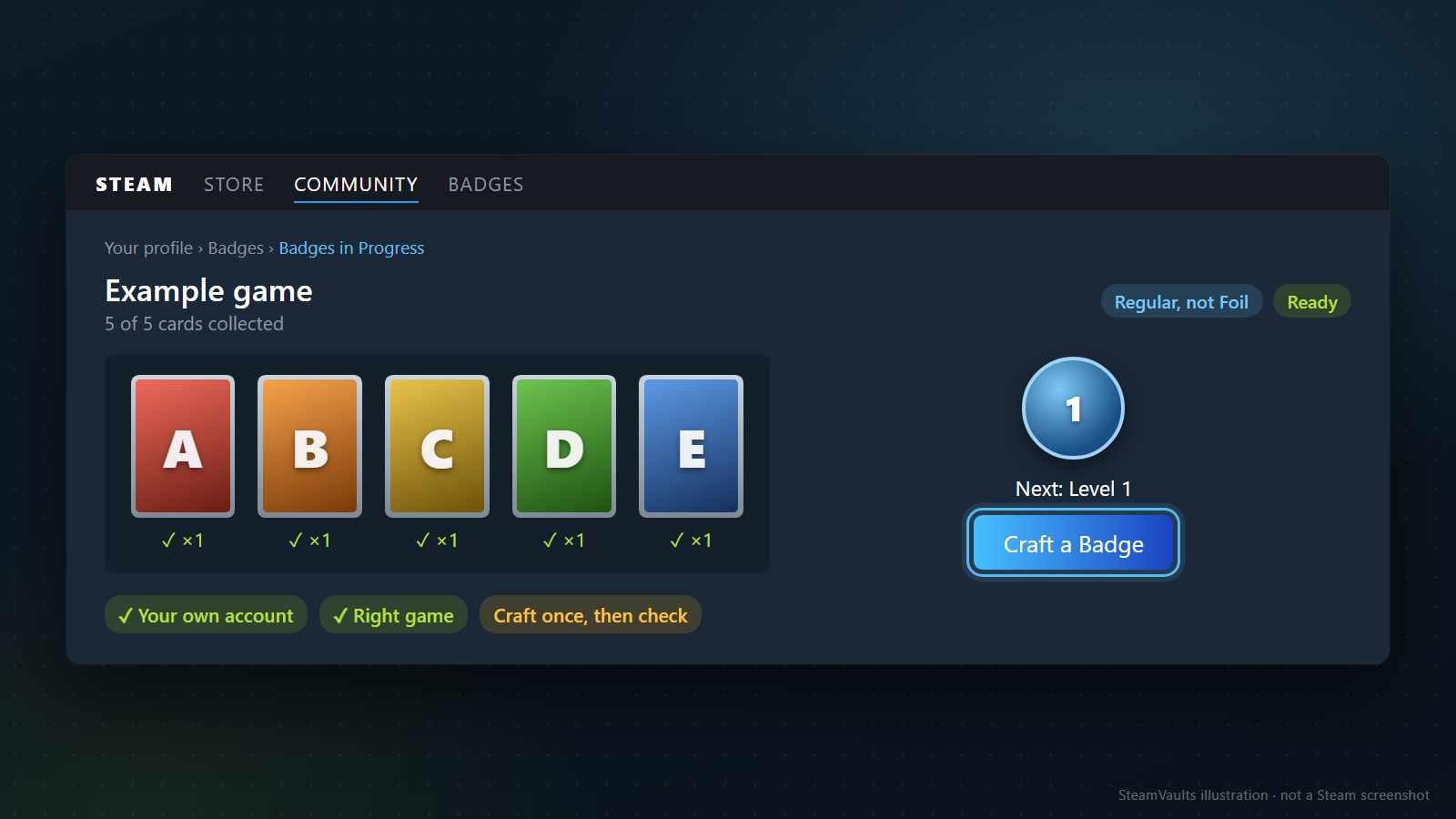
Hast du dich entschieden, öffne die Abzeichenseite über dein eigenes Steam-Profil. Der offiziell beschriebene Weg führt in der englischen Oberfläche über Badges in Progress zum Abzeichen des Spiels. Dort siehst du vorhandene und fehlende Karten und kannst bei vollständigem Satz über Craft a Badge fortfahren. Übersetzte Namen oder eine andere Anordnung ändern den wichtigsten Abgleich nicht: Es muss dein Account und der richtige Spielsatz sein, kein Button aus einem fremden Profil.
Prüfe zuerst Spielname und normale beziehungsweise Foil-Ausführung, danach aktuelle und geplante Abzeichenstufe. Hast du mehrere zusätzliche Sätze, wolltest aber nur einmal herstellen, bleib zunächst bei dieser Anzahl. Du musst nicht gewohnheitsmäßig alles Verfügbare verarbeiten. Nach dem ersten Ergebnis kannst du neu über den nächsten Satz entscheiden.
Dafür brauchst du weder einen zusätzlichen Dienst noch eine Übertragung der Karten an einen anderen Account. Die Herstellung ist eine Steam-Funktion für deine eigenen gesammelten Sätze. Übergib einem Fremden weder den Satz noch den Account, nur damit daraus dein Abzeichen wird. Auch „Ich level dich günstiger“ wird nicht allein durch den Begriff Abzeichen zu einem geprüften Angebot.
Kontrolliere danach das Spielabzeichen, die hinzugekommenen XP und die Belohnungen im Inventar. Hattest du mehrere Sätze, zähle auch die verbliebenen Karten. So kannst du abgleichen, wie oft du tatsächlich hergestellt hast und ob das deiner Planung entspricht.
Scheint die Oberfläche währenddessen zu hängen, klicke nicht sofort mehrfach weiter. Sieh zuerst in Abzeichenliste und Inventar nach, ob die Herstellung bereits verbucht wurde. Bevor eine nicht aktualisierte Anzeige und eine tatsächlich nicht ausgeführte Herstellung unterschieden sind, machen Wiederholungen schon die eigene Zählung unsicher. Dieser Artikel kann weder die Ursache eines konkreten Fehlers noch eine Wiederherstellungszeit bestimmen. Bleibt das Problem, suche anhand von Meldung und aktuellem Status den passenden Steam-Supportweg.
War die Anzeige im Profil dein Ziel, wähle abschließend das hervorgehobene Abzeichen und öffne das tatsächliche Profil. Wer nur den Satz vervollständigt und das Ergebnis nie platziert, hat diesen Zweck noch nicht abgeschlossen. Dafür musst du nicht das ganze Profil umbauen. Ein bewusst gesetztes Abzeichen und ein Blick darauf reichen.
Bei einem Levelziel prüfst du zum Schluss in der Profilbearbeitung, ob die gewünschte Funktion verfügbar ist. Auch wenn schon die nächste Zahl lockt, kontrolliere zuerst dein ursprüngliches Ziel. Wer sofort das nächste ergänzt, bevor er das gerade Erreichte nutzt, verbringt womöglich mehr Zeit mit Kartenbeschaffung als mit der gewollten Profilgestaltung.
Du darfst einen vollständigen Satz auch einfach behalten
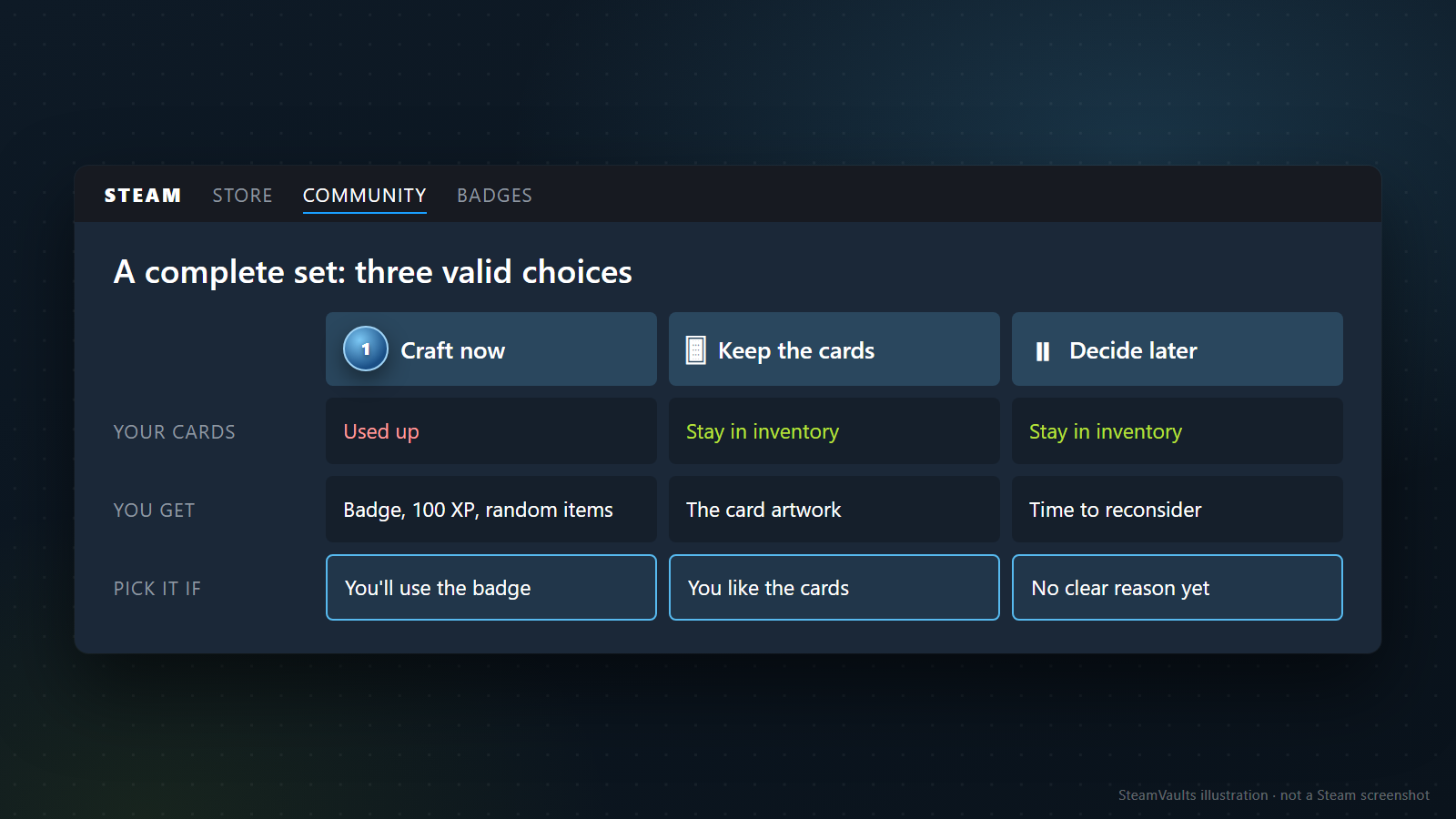
Karten führen zu Abzeichen, Abzeichen bringen XP und höhere Level eröffnen Showcases. Da kann leicht der Eindruck entstehen, man müsste die ganze Kette durchlaufen, um Steam richtig zu nutzen. Für mich reicht es, die Möglichkeiten zu kennen und die zu wählen, die mir etwas bringen.
Wenn du Abzeichen magst, darfst du sie in dem Umfang herstellen, der dir Freude macht. Ein gesammeltes Spiel als kleines Profilsymbol zu behalten und die Kosten zu kennen ist ein ausreichender Grund. Für den einen sind es übrig gebliebene Karten nach einem Kauf, für den anderen eine Erinnerung an ein lange gespieltes Spiel. Das braucht weder eine Renditebehauptung noch die Deutung als Beweis spielerischen Könnens.
Interessieren dich weder Bild noch Level oder Showcases, kannst du die Karten im Inventar lassen. Vielleicht möchtest du später dein Profil gestalten und entscheidest dann neu. Du musst den Satz nicht allein deshalb verbrauchen, weil der Button schon aktiv ist.
Das heißt nicht, dass Aufschieben grundsätzlich klüger wäre. Hängst du nicht an den Karten und magst das Abzeichen, kann eine schnelle Herstellung mehr Freude machen als langes Abwägen. Liebst du dagegen die Kartenbilder, ist deren Erhalt vielleicht passender. Beide Entscheidungen lassen sich nicht allein am selben Marktpreis messen. Wichtig ist, dass du weißt, was du umwandelst und was danach bleibt.
Ein einfacher Test ist ein Satz vor dem Klick: „Ich möchte dieses Spiel als hervorgehobenes Abzeichen zeigen.“ „Für den nächsten Screenshot-Showcase fehlen mir noch diese XP.“ „Mir gefällt das Foil-Motiv, deshalb sammle ich diesen Satz.“ Ist der Grund klar und das Budget akzeptabel, ist die Herstellung deine bewusste Wahl. Bleiben nur „Ist eben vollständig“ oder „Das hole ich später mit Boostern wieder rein“, darfst du pausieren.
Fällt ein bereits hergestelltes Abzeichen unspektakulärer aus als erwartet, musst du das nicht sofort mit der nächsten Stufe ausgleichen. Probiere den Hintergrund und das Abzeichen im Profil aus. Gefällt dir beides wenig, kannst du zunächst auf weitere Herstellungen verzichten. Mehr Sätze einzusetzen bringt den früher verbrauchten nicht zurück und beseitigt dessen Enttäuschung nicht automatisch.
Zum Wert eines Inventars würde ich auch zählen, welche Items du behalten und welche du anders verwenden möchtest. Ein Abzeichen ist eine solche Verwendung, kein Maßstab dafür, wie gern jemand Steam nutzt. Wenn dir der Kartensatz mehr Freude macht, bleibt er eben ein Kartensatz.
Quellenstand: 5. September 2026. Geprüft wurden Valves Sammelkarten-FAQ, die Steam-Hilfe zu Leveln sowie die Steamworks-Dokumente für Community- und Punkteshopgegenstände. Die Tabelle enthält XP-Arithmetik unter ausdrücklich genannten Annahmen, keine beobachteten Preise, Herstellungserträge oder Accountversuche. Auch die Abbildungen sind erklärende Mockups.
Bereit, unterstützte Sacks of Gems zu verkaufen?
Nach bestätigtem Bot-Eingang wird USDT deinem Site-Guthaben gutgeschrieben. Die Polygon-Auszahlung ist eine separate Anfrage.