
What happens when a Steam gift card or wallet code is in a different currency?
Steam's redeem page says codes convert to your wallet currency, while its wallet FAQ limits redemption to that currency. What each says and what to check first.
Article languages
On this page
Say your Steam wallet holds euros, and the wallet code you want to buy is listed with a face value in US dollars. It is the same kind of code in a different currency. If you redeem it, does Steam convert the amount into euros, or does it refuse the code? And if it refuses, who gives you your money back?
Steam's own pages answer this in two different ways, and neither says which one covers the code you bought. The note on the redeem page says gift cards and wallet codes are converted to your wallet's currency wherever they were purchased. The Steam Wallet FAQ lists, among its measures against scams, limiting redemption to the currency of your wallet. So this article gives no verdict. It shows where each sentence sits, what Valve actually documents as conversion, and what you can check and ask before paying so that a refusal does not cost you the money.
The article rests on Steam pages read on October 27, 2026 (the Steam Wallet FAQ in English and Korean, the Store Country FAQ, the redeem page, the digital gift card page, the refund policy, the Subscriber Agreement, a scam-advice page and a 2023 pricing notice) and on the Internet Archive's copy of the same wallet FAQ from July 13, 2024. Every page was read without signing in. No code was bought or redeemed, and no page gave an exchange rate or a fee, so no such figure appears here.
Start by writing down your wallet's currency
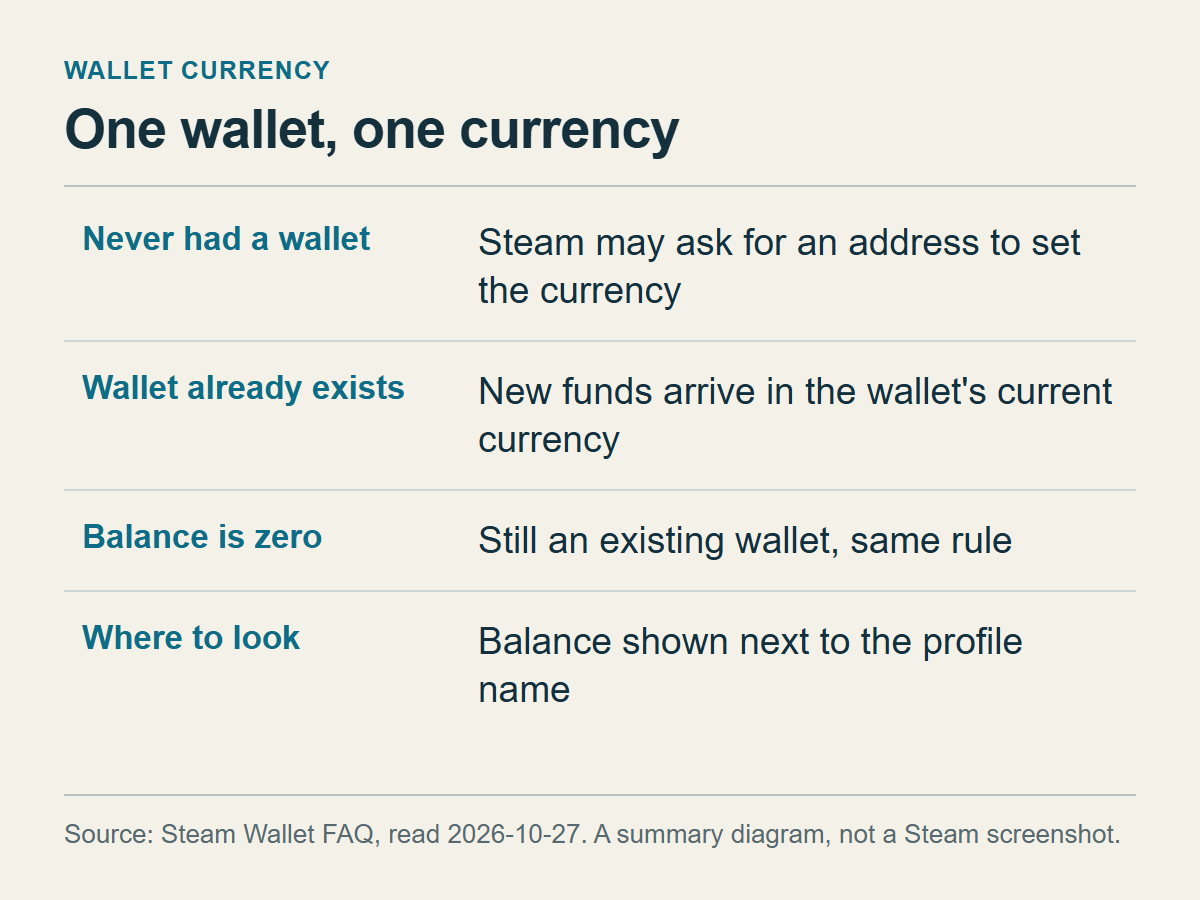
A summary of the add-funds answer in the wallet FAQ. It is a diagram, not a Steam screenshot.
A Steam wallet has one currency. The add-funds answer in the Steam Wallet FAQ covers two cases. If you have never had a wallet balance, Steam may ask for your current address to work out the wallet's currency. If you already have a wallet, whatever the balance, new funds go in as the wallet's current currency. Does an empty wallet count as a fresh start? Nothing on the page suggests it. If you drained the wallet last year and left it at zero, assume it still has a currency.
To find yours, sign in and look at the top right. The FAQ says the available balance is listed there, next to your profile name. The July 2024 copy of the FAQ adds that each account is associated with a specific currency, which you can see in the top right corner of the Steam client. Write down the currency of the number you see. Every comparison in the rest of this article depends on it.
Four things tend to get mixed up: the country you are in right now, your account's store country, the country that issued the card you pay with, and the wallet currency. This article is about the last one. According to the Store Country FAQ, your store country is set by the location of your first Steam purchase, and the store shows that country's prices. What that FAQ does not describe is what happens to a wallet's balance and currency when the store country changes. Do not assume the four match. If you have lived abroad or have paid with a foreign card, none of the pages guarantees that your wallet currency is the currency of the country you live in now.
The nearest official answer to this situation is in the same FAQ, in the entry on buying in a currency or country other than the one shown. It says your store country must be the country where you currently live and that you need a local payment method. If you cannot buy from that store country, it points you to Steam-compatible CD keys or Steam Wallet Codes sold at local gaming retail stores, and then says: "CD Keys and Steam Wallet Codes cannot be used to change your store country setting." To change the store country after a move, the FAQ describes a first purchase with a payment method from the new country, and the change is available once every three months.
The scope is narrow: someone buying a code for their own wallet and checking its currency. Changing a store country or a wallet currency by redeeming a code in another currency is not covered. The pages I opened do not say what happens to wallet currency and balance during a country change, or whether there is any procedure that changes only the wallet currency. Forum threads and third-party guides describe methods, but I could not verify them, so they are left out. The one case where Valve itself moved wallets to another currency is in the fourth section. If you need your currency changed, ask Steam Support before you buy a code. The post on moving wallet funds to another account also builds on this FAQ and warns against using other-region codes as a shortcut.
If you have more than one account, or you are buying a code for a relative, write down the currency of the account that will receive it. Currency belongs to the account, so a code that suits yours can be wrong for your brother's.
Three ways money reaches the wallet, and only one can mismatch
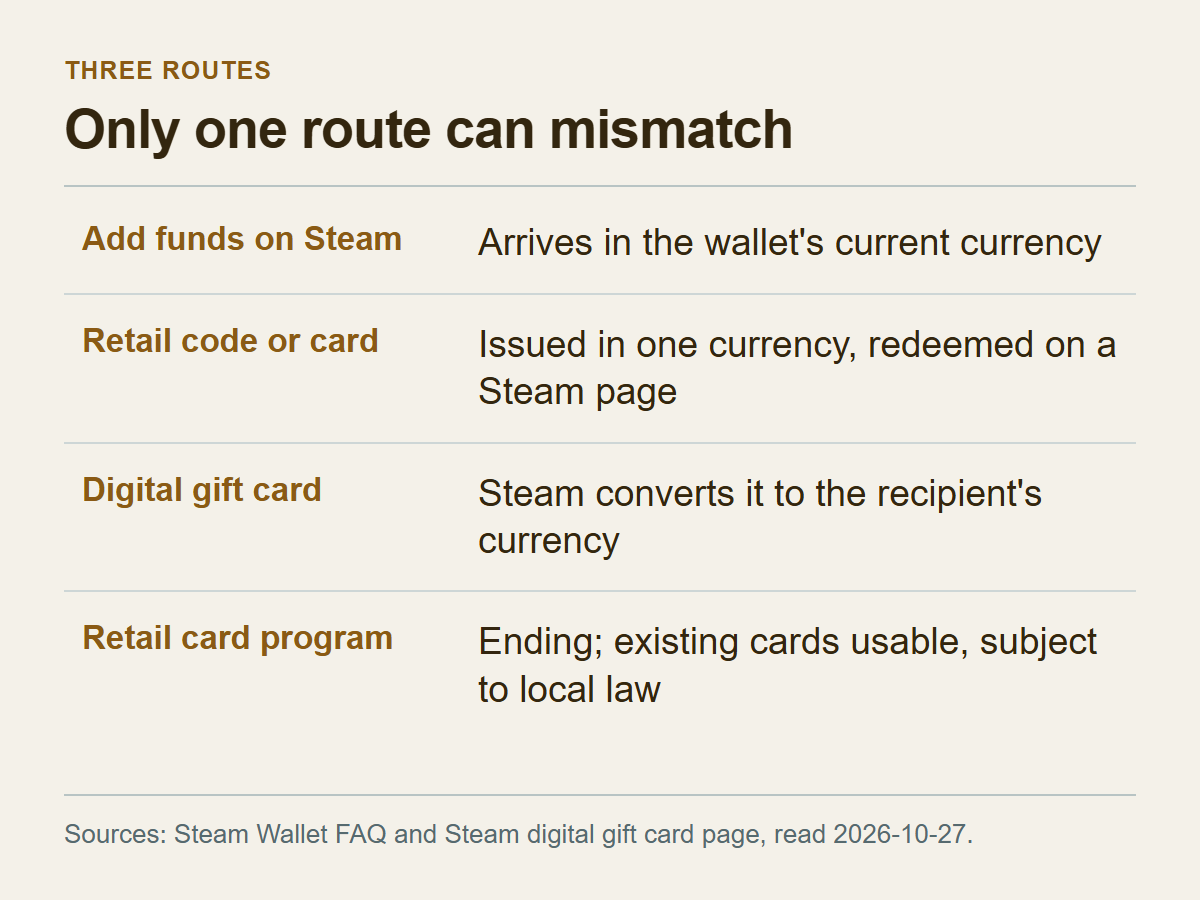
The wallet FAQ and the digital gift card page, combined into one table.
The first route is paying Steam directly. Under Account Details you pick "+Add funds to your Steam Wallet", choose an amount and go to checkout. With an existing wallet the money arrives in the wallet's current currency, and checkout lists the payment methods available in your current region. There is no code, so there is nothing to compare.
The second route is redeeming a code or physical card bought from a store or website. You enter it on the Redeem a Steam Gift Card or Wallet Code page. The 2024 copy of the FAQ lists the forms a code can take: a physical card at a local retailer, a code printed on a receipt, or a code delivered by text message or email through kiosks, cyber cafes and e-commerce sites. The same copy talks about codes "issued" in a currency other than the account's. So a code is issued in some currency, and the question is whether that currency is the same as the one in your wallet. This is the only route where a mismatch can happen.
The third route is a digital gift card sent through Steam. The sender pays on Steam's gift card page. The recipient gets an email and a gift notification in their Steam account, and the money lands in the wallet once they accept. If the friend lives in another country, the page says the card is converted automatically into the friend's currency. Nobody types a code, which is what separates this route from the second. You cannot pay for one with existing wallet funds, and any country limits on sending or receiving are shown during checkout and recipient selection. The post on moving wallet funds goes into those country limits and into what happens when a recipient declines.
One wording trap: Steam's pages do not always treat "gift card" and "wallet code" as the same thing. The Korean version of the redeem note names only gift cards, while the English line names gift cards and wallet codes together. When you read any sentence about conversion or restriction, ask which of these three routes it describes.
There is also a supply issue. The wallet FAQ says Steam has decided to end its gift card program at retail stores, expects all retailers to be out of stock by the end of 2026, and says existing cards can still be used on Steam, subject to local laws. If you are looking at an older card, first check whether its listing states a currency at all.
So the route where you must match code currency to wallet currency is the second one. The first arrives in your wallet's currency, and in the third Steam converts to the recipient's.
The redeem page and the wallet FAQ disagree
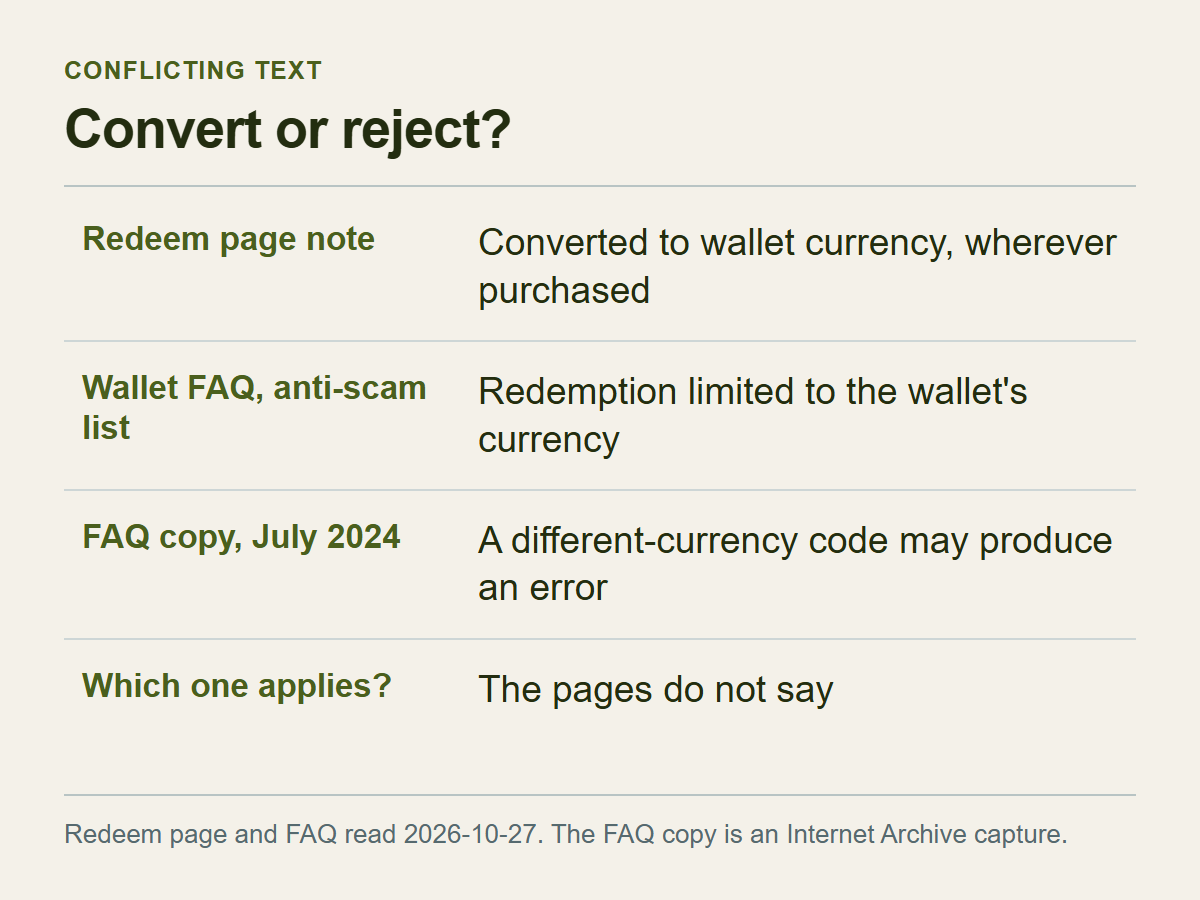
Three sources set side by side on the same question.
The redeem page, read signed out, carries a note: "Steam Gift Cards and Wallet Codes will be converted to the currency of your Steam Wallet upon redemption, regardless of where they were purchased." Read literally, a code bought in another currency is converted and added. The Korean version of the page says the same about gift cards but does not mention wallet codes.
The wallet FAQ, read on the same day, has a line that points the other way. In the answer explaining why Steam is ending retail gift cards, it lists what it has done against scams over the years. One item is "Limiting redemption to be in the currency of your Steam wallet." The Korean FAQ words that item as restricting code redemption to the same currency as the wallet, which reads as: only codes in the wallet's currency can be redeemed. The English sentence leaves a little more room for interpretation, but it points in the same direction.
The third source is the Internet Archive's copy of the English wallet FAQ from July 13, 2024 (UTC). It had its own question, "Are there country restrictions on Steam Wallet Codes?" The answer, in brief: Steam had changed how codes are redeemed, as part of its effort to reduce scams. The change should not affect regular customers who buy codes at retail in their local currency. Each account is associated with a specific currency. From then on you may get an error if you try to activate a code issued in a different currency than your account's. For questions about whether a code can be redeemed, contact Steam Support, and if you doubt a code's legitimacy, ask the retailer. The FAQ I opened on October 27, 2026 has no such question in its list. Whether the content was dropped or folded in elsewhere, the page does not say.
Two readings fit. Either the redeem-page note is an old sentence and the FAQ describes the real rule, or the two sentences cover different situations. Nothing I read decides between them, and none of the sentences is dated. If you buy on one reading and the other is correct, you carry the cost.
What follows is my judgment, not Steam's. Under either reading the sensible move is the same. Do not rely on a different-currency code being converted, and prepare for it being refused. Since both statements are on Valve's pages, such a code may work or may not, and the way back if it does not is something you have to arrange before you pay. The Store Country FAQ's advice about local retail codes is written for people who cannot pay in their store country. It says nothing about what happens when you redeem a code in another currency.
Some limits on my reading. The redeem page was read signed out, over a Korean network connection, so I could not check whether a signed-in account sees different wording. The wallet FAQ's markup carries a China-realm exclusion, which means different regions may see different paragraphs. If your screen says something other than what is described here, your screen wins.
Where Steam documents currency conversion, and where it doesn't
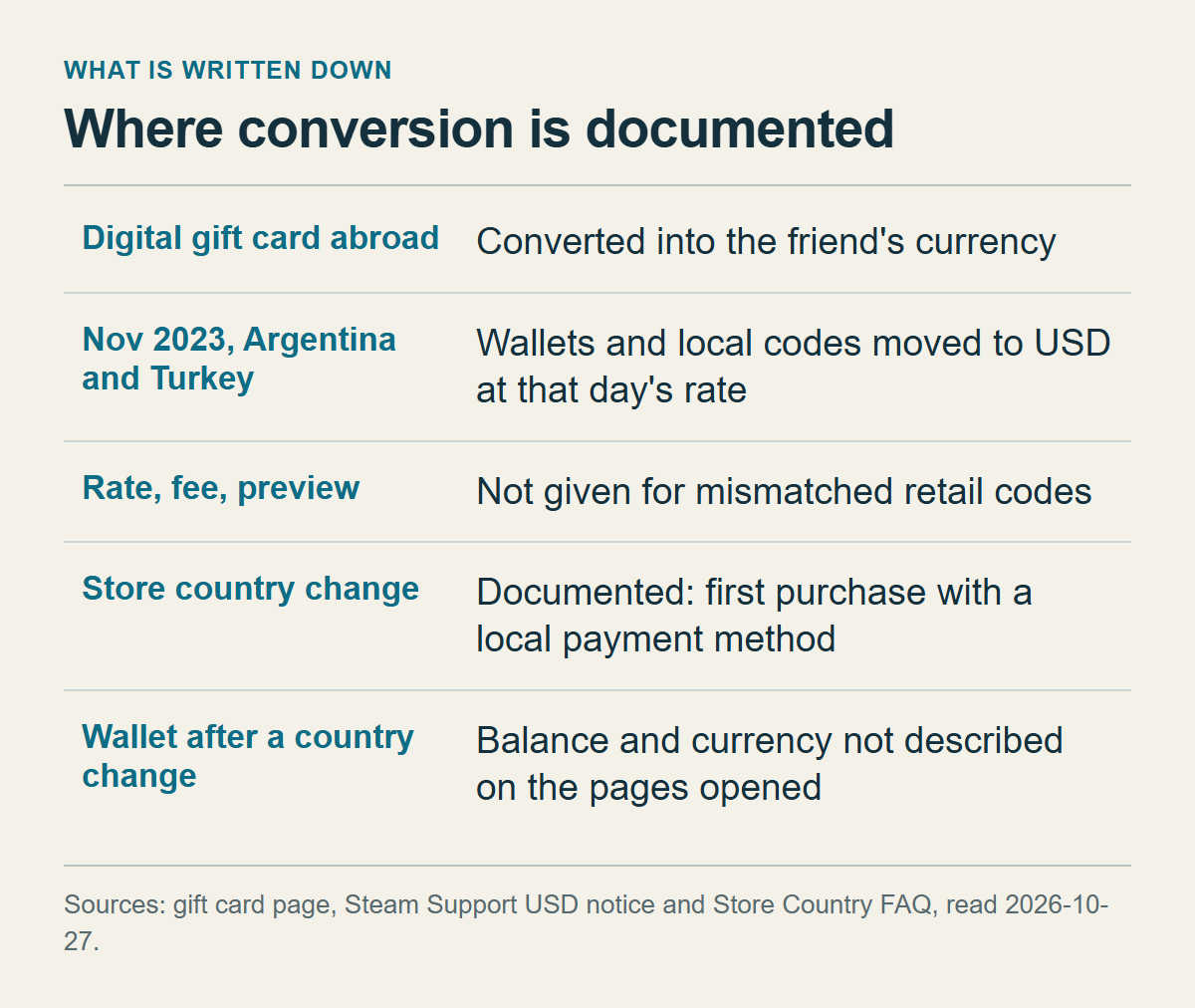
Built from the digital gift card page, the 2023 pricing notice and the Store Country FAQ.
Two cases in Valve's documents spell out conversion.
The first is the digital gift card from the previous section. When the recipient lives in another country, the card is converted automatically into their currency, and the page gives no reason to expect a refusal over currency. It does not say which rate is used, whether a fee applies, or whether the converted amount is shown before the recipient accepts.
The second is the November 20, 2023 switch of the Argentina and Turkey stores. Steam announced that both stores would start selling in US dollars, and that Argentine peso and Turkish lira wallet balances would be converted to dollars at that day's exchange rate. The only rate source named is "US Bank exchange rate", so you cannot tell which rate that was. The notice's question about retail wallet codes adds that users in the LATAM-USD and MENA-USD regions could redeem USD wallet codes after November 20, and that peso and lira wallet codes would convert to USD automatically at the daily exchange rate when redeemed after that date. Of everything I read, this notice is the only place where Valve names a specific case of a code issued in another currency being converted on redemption.
The notice came with a one-time pricing overhaul and applies to those regions. The page does not say whether the same handling continues. You cannot stretch it to a US-dollar code going into a euro wallet.
Here is what the pages I opened do not contain:
- The exchange rate and any fee for redeeming a retail code issued in another currency.
- Whether the converted amount is previewed before you redeem.
- What happens to wallet currency and balance when a store country changes, and any procedure for changing only the wallet currency.
- The message shown when a code is refused over currency.
The Store Country FAQ does describe how a store country changes (a first purchase with a payment method from the new country), but it does not say what happens to the wallet balance and currency when that change goes through.
If a seller writes "about this much in your currency", that is the seller's arithmetic. It is not a promise that Steam will credit that amount. File any figure like that under things the seller said, not under documentation.
You can sort your own case. A digital gift card from a friend abroad is a documented conversion. A code from one of the 2023 regions was documented at that time. Everything else rests on the conflicting statements in the previous section. As a made-up example, a wallet in euros with a US-dollar code bought from a web shop belongs in the third group.
What to check on the listing before you pay
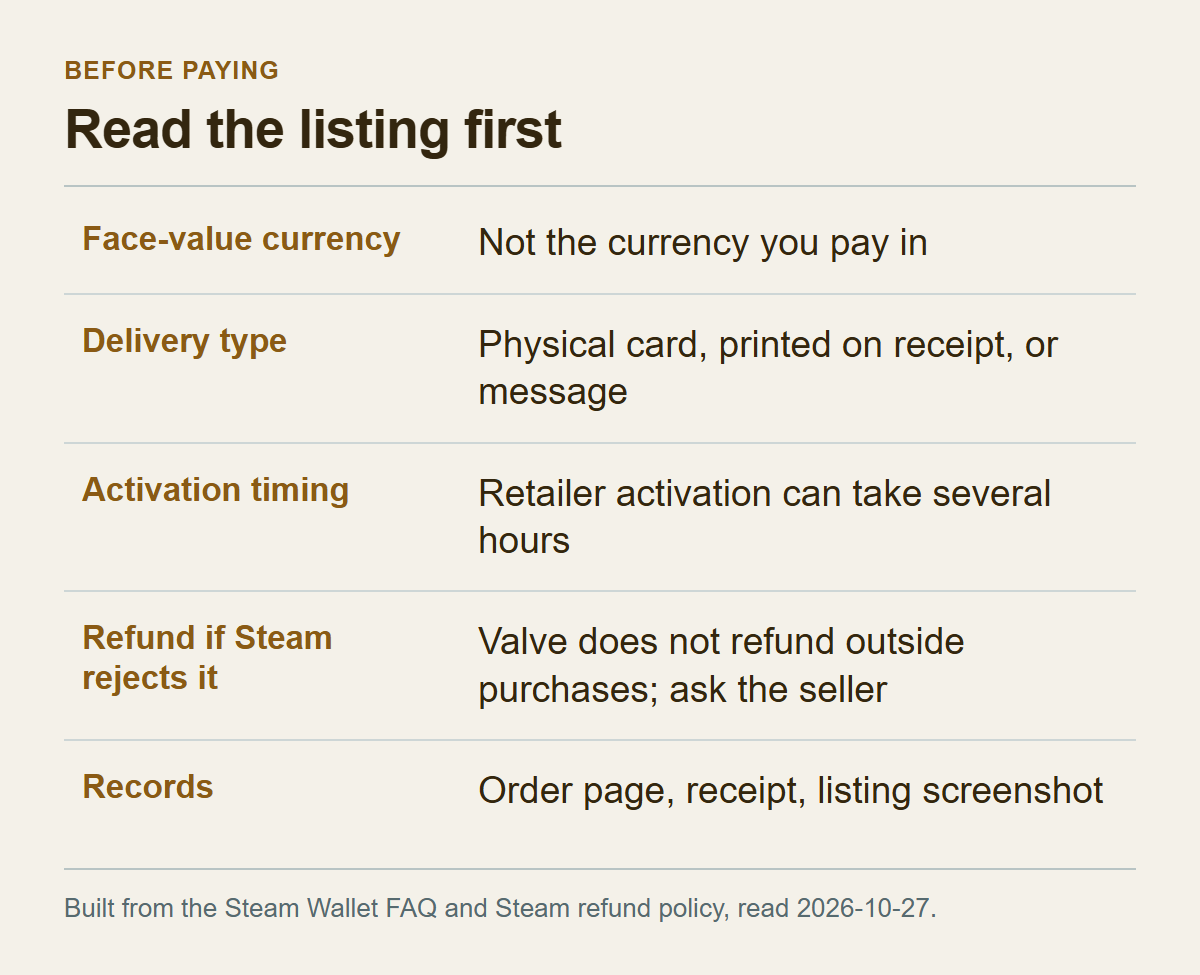
Conditions mentioned in Steam's documents, turned into pre-purchase checks.
Start with the face-value currency. That is the currency of the amount printed on the code, not the currency you pay in. A listing can show its price in your currency while the code itself is denominated in another. Steam's pages do not define what "issued in" a currency corresponds to on a store listing. The currency symbol or code beside the face amount is the closest clue a listing is likely to give. If there is none, treat the currency as unknown and ask the seller. Buying on the assumption that it must be the same is the riskiest option.
Region wording does not stand in for a currency. If a listing says the code works in all regions (a hypothetical line), that is the seller's description. Steam's documents speak in currencies, so even with region wording present you still need to confirm the face-value currency separately.
Next, the delivery type: a physical card, a code printed on a receipt, or a code sent by text or email. What Steam can do for you when something goes wrong depends on it. The 2024 copy of the FAQ presents all of these as wallet codes. The FAQ as read on October 27, 2026 says Steam cannot assist with codes printed directly on the receipt, and that you should contact the retailer. For the other types, the next section covers what Support asks for in general.
Check activation timing. A code bought from a retailer has to be activated by the seller before it will redeem, and the FAQ says this can take several hours after purchase. See whether the listing promises instant use or warns of a delay. If a code advertised as instant does not open, follow the order in the next section.
Look at who the seller is. The FAQ says that if you are worried about a code's legitimacy, you should ask the retailer. The 2024 copy linked an article on where to buy wallet codes, and when I opened that article on October 27, 2026 it came back with no body text. So this article cannot point you to a Valve-listed place to buy. Whether a seller has a contact channel, and whether it actually replies, is something you can test before buying.
The refund question is the one to nail down hardest. Steam's refund policy says Valve cannot provide refunds for purchases made outside of Steam, and gives Steam wallet cards bought from third parties as an example. If Steam rejects the code, the seller is the only party who can give the money back. Read whether the seller's refund terms cover a failed redemption. If they are vague, ask before you buy and keep the answers in writing:
- What is the face-value currency of this code?
- My wallet is in (your currency). Can this code be redeemed in it?
- If Steam refuses the code, will you refund me? By when, and to which payment method?
- Can I still get a refund after I have looked at the code?
- From when can the code be redeemed?
No answer, or an answer that pushes all the risk onto you, is itself useful information. The questions are my suggestion, built from the conditions above. Steam's documents do not contain them.
Last, keep records. Right after buying, save the order confirmation and receipt, a screenshot of the listing where the currency and refund terms are visible, and your messages with the seller.
When a code won't redeem: rule out causes in this order
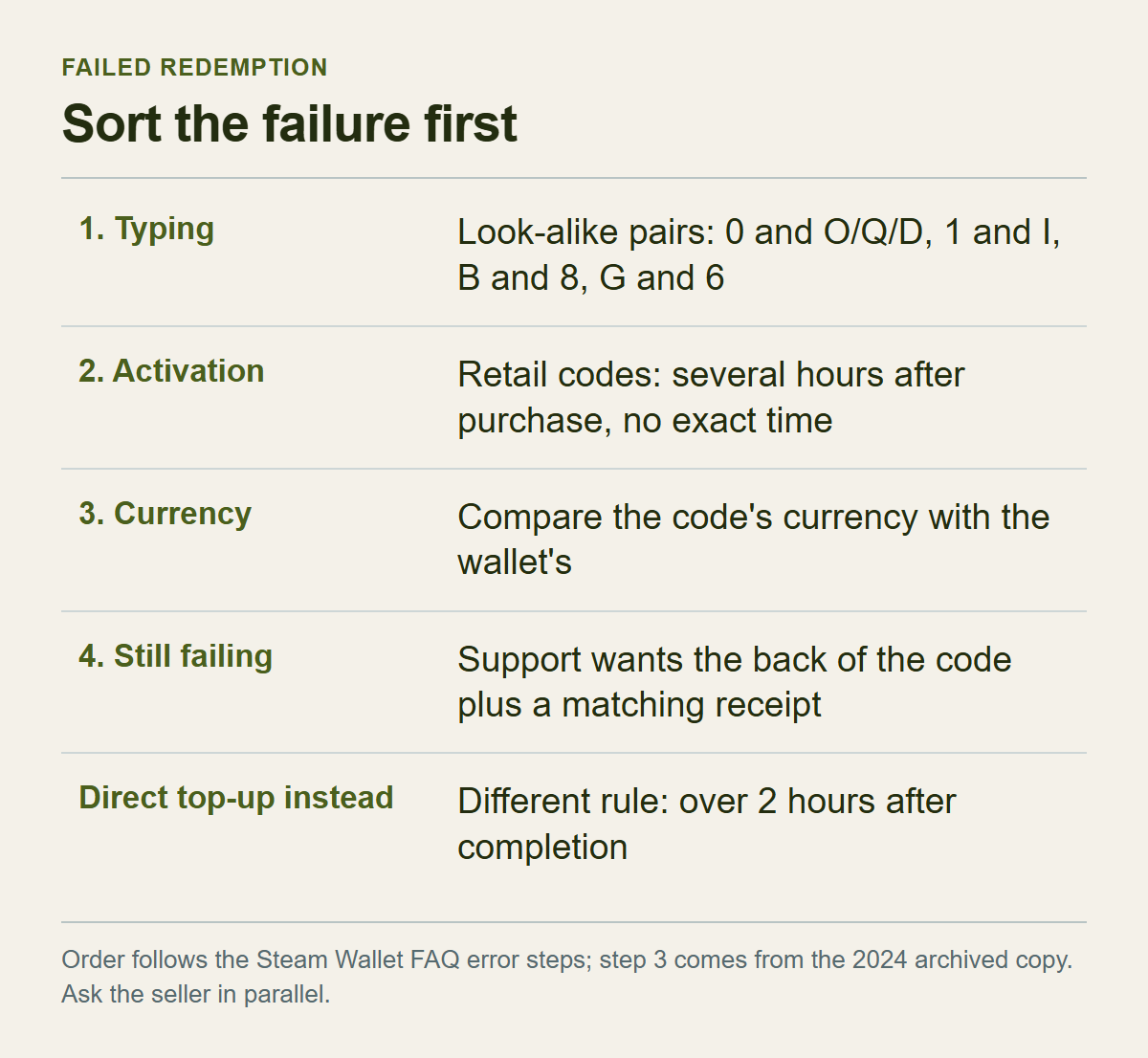
The wallet FAQ's error steps, numbered. Step 3 comes from the 2024 archived copy.
First, the method. According to the wallet FAQ, you sign in, open the redeem page, type the code into the "Steam Wallet Code" field and click "Continue", and the value is added to your wallet balance. When that errors, the pages point to three causes: you mistyped the code, the seller has not activated it yet, or (per the 2024 copy) its currency does not match.
Typing is the cheapest to check, so start there. The FAQ lists look-alike pairs. The number 0 can be Q, O or D. The number 1 can be I. The letter O can be 0, Q or D. B can be 8, and G can be 6. Re-enter the code with those swapped. Then consider time. If you bought the code recently, activation may not be finished. After several hours with the same result, the FAQ says to contact Steam Support with a clear photo or scan of the entire back of the code and a matching receipt.
Keep that "several hours" apart from the two hours that apply to direct top-ups. If you added funds on Steam and the balance is wrong, the wallet FAQ says to contact Support when the problem lasts more than two hours after the purchase completed. What to check before that is in Steam wallet funds not showing. For retail codes the FAQ says only that activation can take several hours and gives no exact time. It does not say what to send for a code delivered by text or email.
Compare currencies last, because the screen alone will not separate the three causes. The pages I read do not say what a currency refusal looks like, and the 2024 copy only says you "may encounter an error". If the message is the same in every case (an assumption), a typo, a code that is not yet active and a currency mismatch can look identical. That leaves elimination. If retyping with swapped characters changes nothing and enough time has passed, compare the code's currency with your wallet's. If they are the same, currency becomes an unlikely cause. If they differ, it is the leading suspect.
The pages do not say whether repeated attempts are allowed. Since a limit may or may not exist, do not retry blindly. Write down what you changed each time.
Here is what Steam Support can and cannot be expected to do, going by the pages. It steps in when an activation delay drags on. No page says Support will release or convert a code that was refused over currency. The refund belongs to the seller, as the previous section explained. The post on moving wallet funds tells you to keep the receipt and contact the retailer about a code that has not been activated. That fits with the order here: this article puts the typo check and the several-hour wait first because the wallet FAQ does, and you can write to the seller while you wait.
One reported case is worth a short mention. On March 9, 2024, someone posted on the Steam community help board that their region was Asia, that they had bought two codes sold in euros on an overseas website, and that they could not redeem them. They wrote that Steam Support and the website both said they could not help. Replies told them to demand a refund or exchange from the seller and, in future, to buy in their own region's currency. This is one person's account. What Support and the seller actually said cannot be verified, and the thread does not say how it ended. Treat it as a single illustration of how responsibility can fall into the gap between Steam and the seller, not as a rule.
After you redeem, there is little to undo
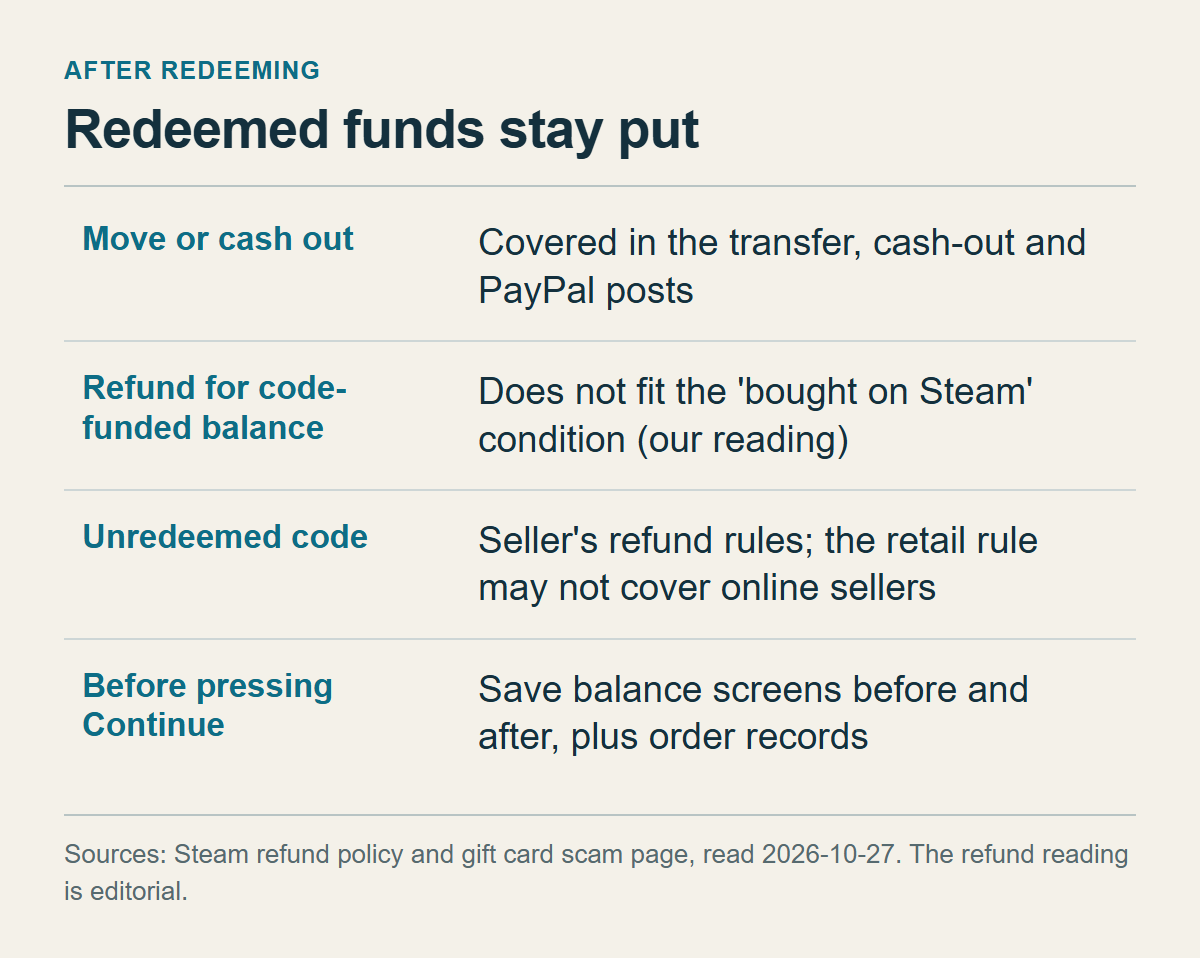
Sentences from the refund policy and the scam-advice page that apply after redemption.
Wallet funds cannot be moved to another account or turned into cash, and that is already laid out in the posts on moving wallet funds, cashing out and sending wallet money to PayPal or a bank. What follows applies only to a balance that came from a code.
The wallet FAQ lets you request a refund of wallet funds within fourteen days of purchase, if they were purchased on Steam and none of those funds has been used. A balance that came from a code does not appear to fit. That is my reading, not Valve's statement, because the refund policy never mentions codes and I got there by putting this condition next to the policy's sentence about purchases outside Steam. For refunds in general, see whether a Steam refund goes back to the card or the wallet.
That is why every check should be finished before you press Continue. A code you have not redeemed may still carry the seller's refund terms. Steam's scam-advice page says that a card that has been activated but not redeemed can normally be refunded at the retailer. That sentence is about cards at a retail store, so there is no basis for reading it as covering a code from an overseas website. If you have already redeemed, keep screenshots of your balance just before and just after, together with the records from the listing check. No document I read describes how to correct a converted amount that differs from what the seller claimed, but those screenshots are what you would use to explain the case to the seller or to Support.
A cap on how much you can hold and spend in a 24-hour period comes from a clause in the Subscriber Agreement, which may not apply to every account. If you plan to load a large amount at once, see the post on the wallet limit.
Checklist before you buy
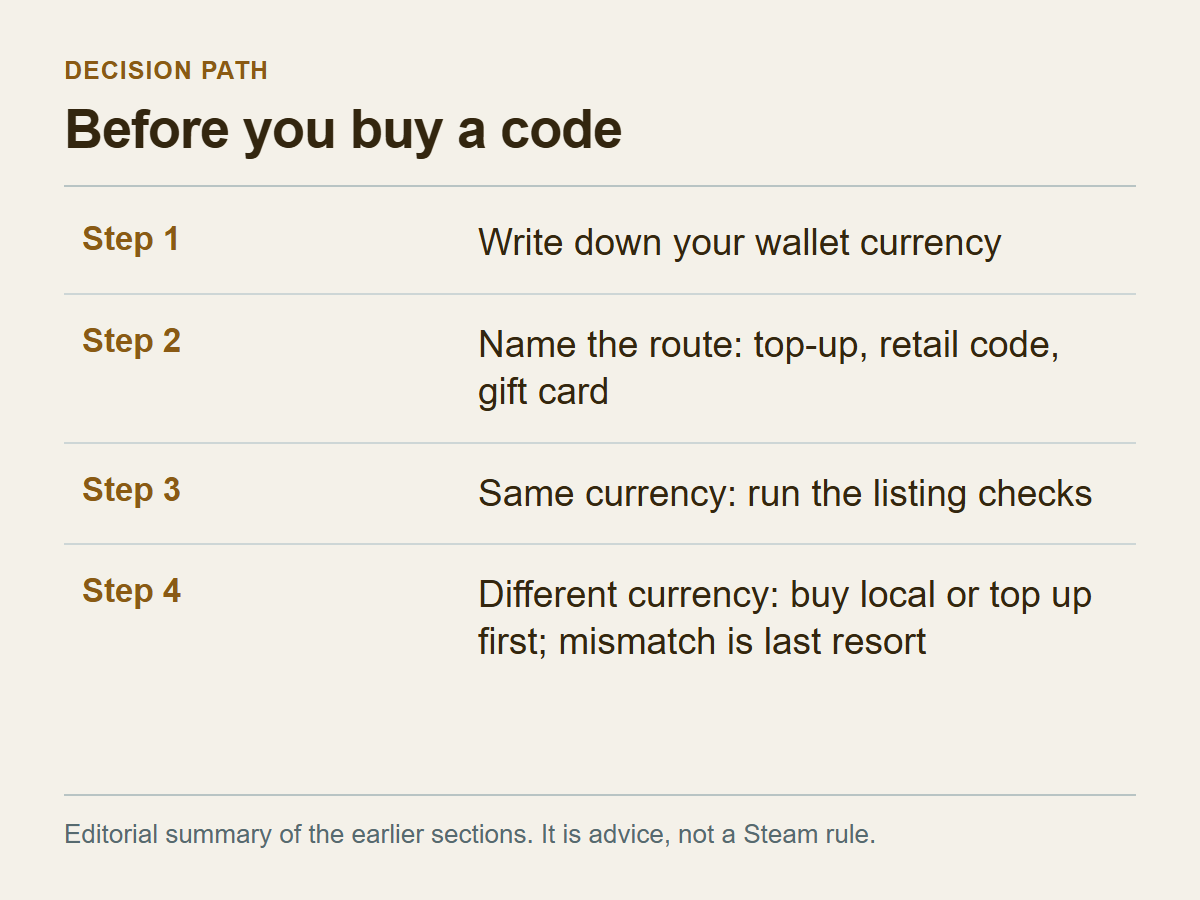
An editorial summary of the earlier sections. It is advice, not a Steam rule.
The short version: buy a code in your wallet's currency, in your own country. If the currency differs, buy it only as a last resort, and only after the seller has given you written refund terms. The first half follows what the pages say about local retail purchases and the Store Country FAQ's advice. The second half is my judgment, drawn from the fact that Valve's pages mention both conversion and refusal.
In order:
1. Sign in and write down the currency of the amount shown at the top right. Remember that a zero balance does not mean the currency is unset. 2. Decide whether this purchase is a direct top-up, a retail code or a digital gift card. Only code entry requires you to match currencies. 3. If the code's face-value currency matches your wallet, go through the listing checks in the fifth section and proceed. 4. If it differs, go back to the routes Steam describes: look for a code in your wallet's currency at a local retailer in your own country, top up directly on Steam, or, if someone else is paying, have them send you a digital gift card, which the gift card page says is converted to the recipient's currency. That page describes sending a card to a friend or family member's wallet; it does not show whether you can send one to your own account. The Store Country FAQ's pointer to local retail is aimed at people who cannot pay in their store country, and it does not discuss codes in another currency. Because retail stock is running out, a local retail code may be hard to find. A code in a different currency is the last resort when all three are blocked, and even then you buy only after the seller has answered the questions in the fifth section in writing. This article does not recommend VPNs, someone else's payment method or other-region codes as a way to change your store country or wallet currency.
If you have already bought the code, stop before redeeming. Send the seller the questions from the fifth section, gather the replies and the receipt, and decide after that.
When you are buying for a relative or friend, ask for their wallet currency first. If it differs from the code's or they do not know it, a digital gift card matches the documents best.
Steam's scam-advice page says that if someone asks you to pay with Steam wallet gift cards, you are likely the target of a scam, and that you should not give codes to people you don't know. If you send Support a photo of the back of a code, send it through the support channel only and never post it on a community board. That last point is my advice and is not in Steam's documents.
Where you are still unsure after reading this, the gap is probably in the documents themselves. As the 2024 copy of the FAQ said, you can ask Steam Support whether a code can be redeemed. Give them your wallet currency and the code's currency before you buy, and keep the reply with its date.
This article reflects the pages as read on October 27, 2026. Wording can change, so read the redeem page note and the wallet FAQ once more right before you buy.