
How much does “Playable” on Steam Deck actually tell you?
Understand Steam Deck ratings and read compatibility details using clearly fictional comparisons of controls, text and graphics, plus dated official examples.
Article languages
On this page
When you choose a game for Steam Deck, you might see the green Verified mark, or a label such as Playable or Unknown. Reading that mark as “it launches” or “I can comfortably play it the way I want” can hide important conditions. The details underneath help distinguish the work you may need to do from the questions that remain unanswered.
This guide explains how to read Valve’s official compatibility information. It is not a review based on running games on Deck or measuring frame rates and battery life. The documents were checked on October 19, 2026. Games and software can change, so do not use the ratings of the fictional games below as information about actual products.
The four labels are not four places in a performance ranking
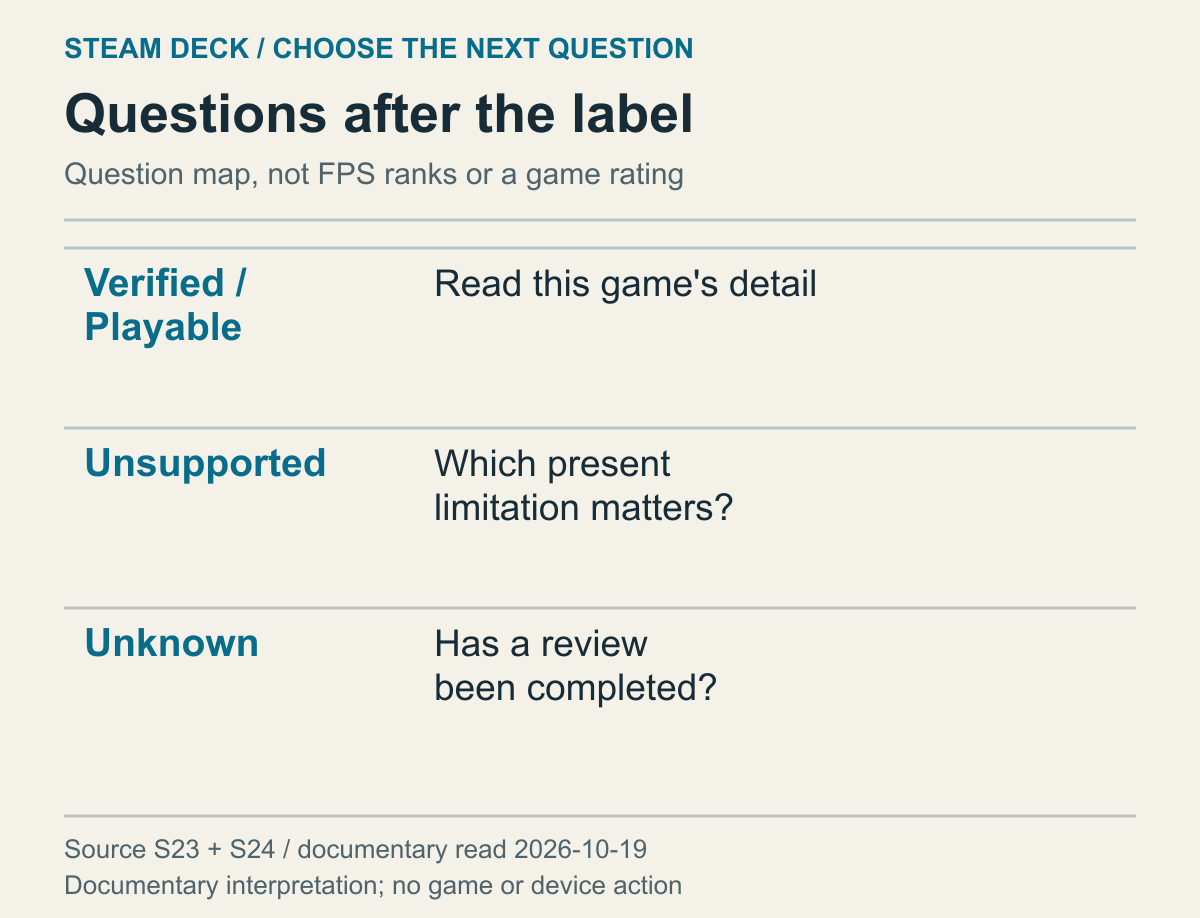
An explanatory map of what to ask after reading a rating, not a display of any particular game’s current rating or measured performance.
The official Steam Deck guide describes Verified games as working well out of the box, while Playable games may require manual adjustments by the user. Unsupported means a game is currently not functional on Deck; Unknown means its compatibility has not yet been checked. Keeping the English labels in view makes it easier to compare different materials. Treating those four names as a descending performance scale gets the meaning of Unknown wrong.
Unknown does not mean the game received a low score. A lack of information because a review is unfinished is not the same as a review finding that a game does not work on the device. Both can give you reasons to be cautious when planning to play, but the reasons differ. Separate the reasons and you can identify the next information you need.
Nor should the difference between Verified and Playable be translated into faster and slower. A badge alone cannot establish that a Verified game has a higher frame rate than a Playable game. Putting the ratings of two different games next to each other does not produce a measurement of their actual speed. A performance comparison needs separate, current evidence suited to that question.
Record where and when you read a label. A saved image preserves that reading, not proof that the same information is current today. If a small badge in a search result came from older material, treat its date as part of the limitation. Check the name of the rated device as well as the game title. A summary that omits the device name does not establish that the result applies to every handheld PC using Steam.
Match the product too, even when a base game and a separate demo share a brand name. Suppose two fictional product pages show Verified details for the full game but no compatibility information you can read for the demo. The full game’s badge cannot fill the demo’s blank. Deciding whether to buy the full game and deciding whether to use its separate demo on Deck are different questions to begin with. Equally, a warning read for the demo cannot simply become the full game’s rating.
This distinction also matters if you expect a demo to answer everything you need before buying. Imagine that your concern is the burden of reading long explanations in the full game, while a fictional demo offers only a short control sequence. Even if the demo has compatibility details, those details do not answer for the full game’s long reading screens. First find Deck information for the product you intend to use, then ask whether it covers the question, including the scenes you need. The decision here is not an extended comparison of demo pricing or content: it is matching the badge you are reading to the product and question it actually concerns.
A fictional Playable report can contain passed checks too
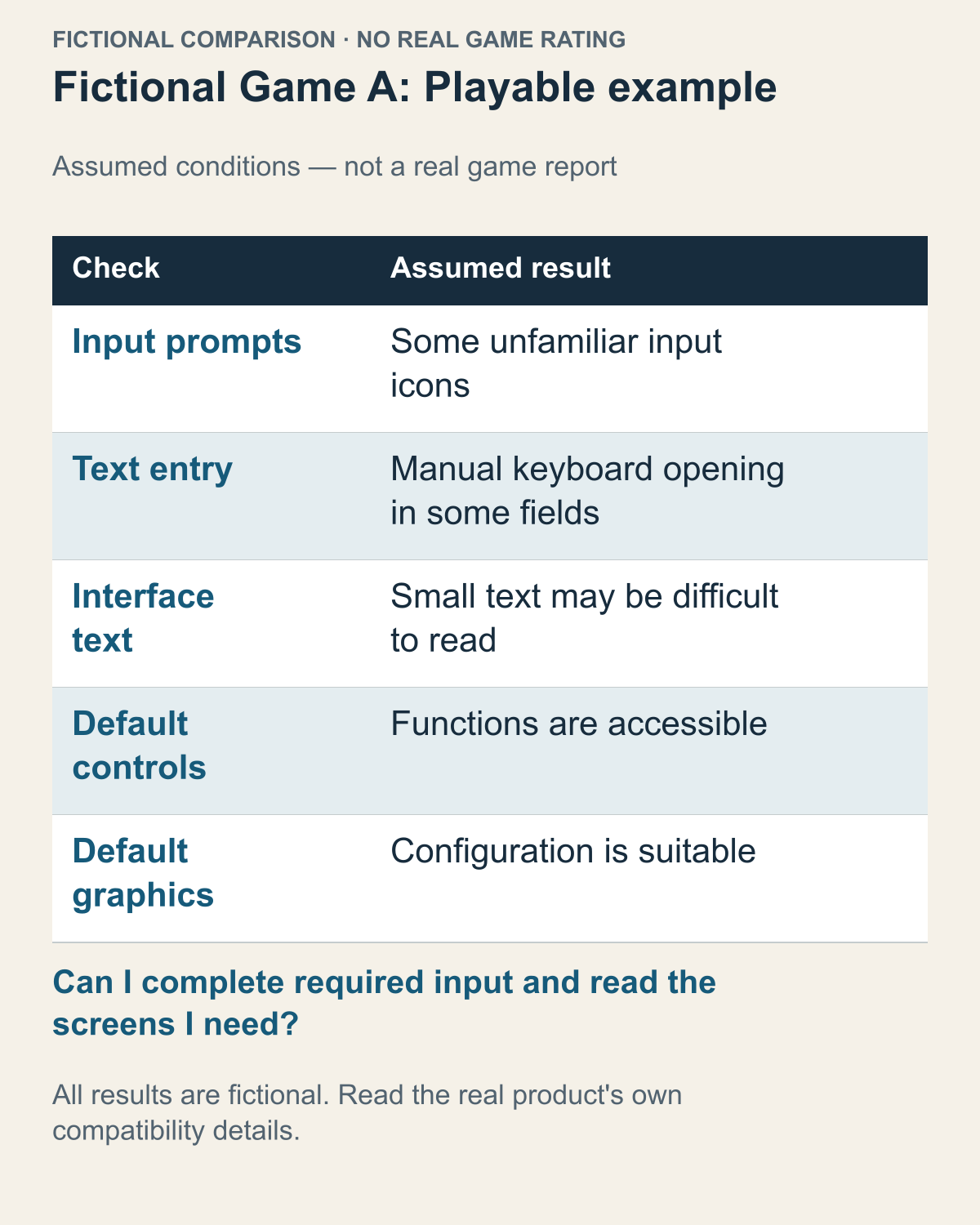
An invented comparison using Valve's documented check categories, not a real product rating, store capture or game test.
The fictional A figure combines three assumed warnings with two passed rows. Its outcomes are invented; the row categories come from the documented checklist. Read it as a mixed result, not a total rejection or an unqualified recommendation.
For a real game, use that product's own current entry. Valve's official guide says compatibility details for reviewed titles are available in the store and library. Match the product and rated device, open the available details, and read each warning and passed item separately. A small badge or search image cannot supply omitted details. If you cannot find readable information, retain that limitation instead of guessing a rating, warning, review date or cause. The following comparisons explain how to use information once you actually have it.
Read each row as a statement with a defined scope. A passed row does not cancel a warning elsewhere, and one warning does not overturn every passed item. A warning alone may leave the frequency of extra work unstated; do not fill that gap with “every turn” or “only once at the start”. Keep both the favorable result and the unresolved burden, then connect them to the functions you actually need.
How you sit and use the screen matters here. Holding the device near you and using a dock with a screen farther away create different reading conditions. An external screen is not an automatic solution either. Resolution and screen size alone do not determine viewing distance or the game’s layout. What you need is a real view close to your intended arrangement, or the game’s explanation of its display options.
Frequency and a bottleneck on the required path are different questions. In a separate fictional game, suppose starting requires entering a name once and there is no route around that screen. Even though it happens rarely, a reader who cannot finish that action cannot reach the scenes beyond it. Dismissing an “occasional keyboard” requirement as a small burden can miss this mandatory step. The relevant questions concern not just the total number of entries, but whether that screen is required for the progress you want and whether you have a way to complete it.
Now suppose another fictional game needs text whenever you add an optional note, but you can make the progress you want without writing notes. Repeated input and blocked mandatory progress are not the same problem in that case. Notes become a requirement again for someone who specifically needs that feature; otherwise, that task can be left out of the plan. Rather than counting warnings, choose the functions you need, then ask whether the interaction is unavoidable and whether you can finish it. The same manual-input warning can call for different preparation depending on your goal.
A fictional Verified report shows the scope of default settings
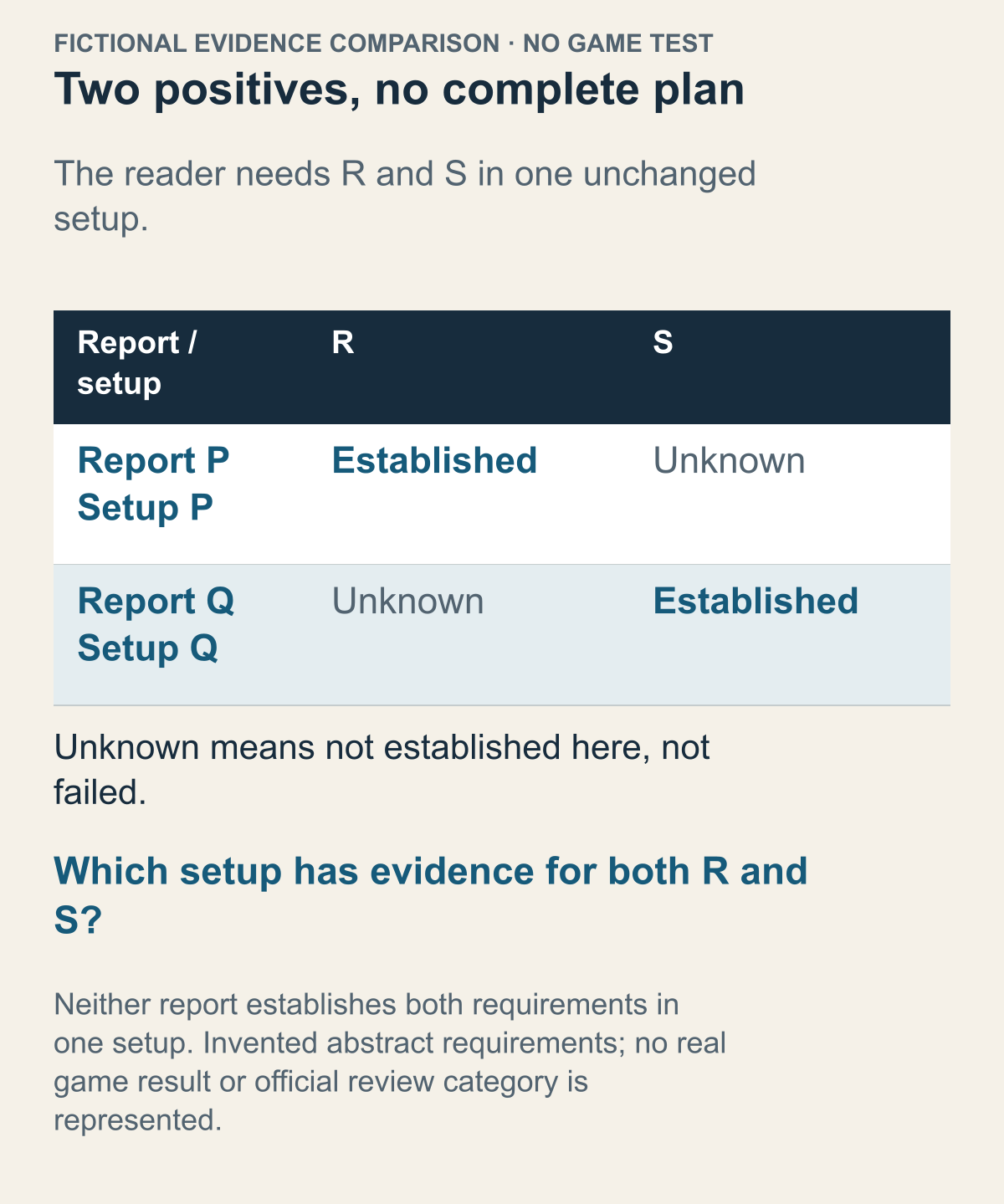
An entirely fictional evidence comparison using abstract requirements, not actual game results, official review categories, a Steam capture or a game test.
For fictional B, assume a favorable report under one starting setup. That assumption supplies no measurement of game speed and assigns no rating to a real product. The question here is how far a conclusion can travel when a reader changes the plan.
The documented review concerns default conditions. For fictional B, the assumed report concerns one starting setup. A personal change raises a new question. A different arrangement is not automatically worse, but it needs evidence for the way you intend to use it. Decide your intended setup before transferring a conclusion from another arrangement.
Suppose Game B also advertises a separate VR mode. That is another assumption in this fictional example. A VR plan needs the mode's requirements and supported equipment separately. Product features and device-specific compatibility reviews answer different questions.
What about a plan to connect a VR headset directly to Deck? Valve’s official FAQ says a PC VR headset can technically be connected, but Deck is not optimized for PC VR experiences. Being able to connect it does not mean plugging in the cable completes the conditions for the VR use you want. Read the game’s VR-mode requirements separately from the headset’s officially supported environment, then look for information supporting the actual combination.
A dock or external GPU proposed as a performance upgrade needs a different check. The same FAQ says docking does not increase Deck’s performance and external GPUs are not supported. Changing the display or connection arrangement is not the same as adding computing power. You therefore cannot complete a VR plan on the premise that docking provides more performance or that an external GPU will make up a shortfall. Questions about a dock’s connections and questions about the environment that will run the game need separate answers.
You can work through the required VR mode, the headset’s supported environment, and the official scope of the machine intended to supply it. Game documentation answers for the mode; headset documentation for the connection target and supported environment; device documentation for what that machine can provide. First distinguish a handheld-screen and built-in-control plan from a separate VR setup. That makes the next material you need more specific.
Other marks on the product page have different jobs too. A large audience or many favorable user reviews can help you judge whether a game interests you, but that is not the same question as whether evidence covers your intended setup. Nor does a favorable setup report decide whether you will enjoy a genre or progression. Keep the questions separate so that enthusiasm about one does not conceal a gap in the other.
If an account of actual play seems to differ from the report, first check whether they address the same question. A measurement made with someone’s separate settings and equipment need not be rejected; read the conditions attached to it. A brief scene does not establish what happens in later parts of the planned session. Comparing these sources is not about choosing one to believe unconditionally. It is about selecting the parts that answer your own plan. For average frame rates, you need material with actual measurement conditions rather than compatibility checks.
Two positive fragments need not support one complete plan. Consider an entirely fictional comparison with abstract requirements R and S. A reader needs both in one unchanged setup. Report P establishes R under setup P, but says nothing about S there. Report Q establishes S under a different setup Q, but says nothing about R. Collecting the two positive sentences does not yet establish either usable whole plan. For P, S remains unknown; for Q, R remains unknown. Neither blank is a failure result.
This differs from asking which report is more trustworthy. Both can be accurate and still leave the reader's combined requirement unanswered. Making P sound like Q in a summary would conceal the change that separates the observations. Nor does a longer report automatically fill its missing cell. Extra pages about R in P add detail about R, not evidence for S. The useful next material is the missing result under the same intended setup, not another positive fragment for the condition already established.
The decision changes if the reader can genuinely choose between P and Q instead of needing one unchanged setup. That flexibility creates two candidate plans to investigate; it does not confirm either automatically. If switching between setups is part of the intended plan, the ability to carry out that switch and meet both requirements also needs its own basis. State which plan is being judged before combining evidence. Keeping an honest gap allows a targeted follow-up; combining incompatible positives creates a confident answer to a plan no source actually described.
Now change the fictional evidence, not the reader's requirement. Suppose report M establishes R and report N establishes S, both explicitly for the same unchanged setup P. Neither document answers everything alone, but their relevant statements can jointly support R and S for P. The earlier problem was not a shortage of one comprehensive document. It was the absence of a supported combination under a single setup. Requiring one file to contain every answer would reject this different, adequately covered case for the wrong reason.
Putting two incompatible statements into one summary cannot repair their mismatch. Conversely, keeping compatible statements in two documents does not create a gap merely because the files are separate. A useful combined note preserves which statement answers R, which answers S, and why both apply to P. Its conclusion is no broader than that combination: it does not establish another requirement T or transfer the result to Q.
The shared setup is an explicit premise of this second case, not something proved by repeating the letter P. If the documents only use similar names and their relationship is unestablished, joint coverage remains unconfirmed. The missing information then concerns whether the two statements describe the same plan. Another detailed account of R alone would not settle that identity question. Distinguishing a missing result from an unproved connection helps you seek the evidence that would actually complete the decision.
Write down your own frame-rate and readability expectations
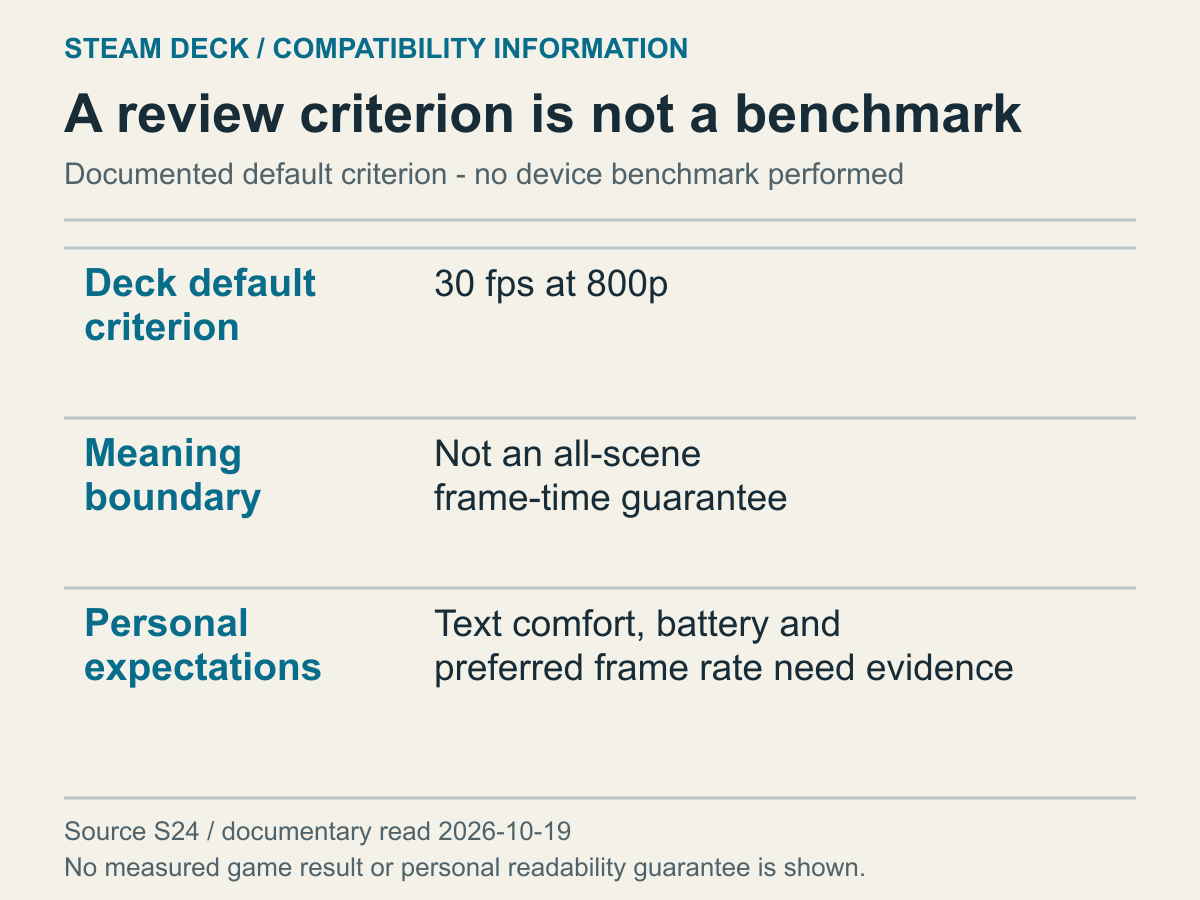
An explanation of official criteria versus personal expectations, not a chart of measured frames, battery life or text size.
At the date of the read, the Steamworks documentation specified a playable 30fps at 800p as Deck’s default-configuration performance criterion. Do not turn that sentence into a measurement showing a constant frame rate in every scene of every currently Verified game. A documented review criterion and an individual game’s present behavior are different kinds of evidence.
If you expect a higher frame rate, record that expectation separately. For example, distinguish “I need a higher frame rate in the mode I intend to use” from the definition of Verified. This is not a recommendation that everyone should seek the same frame rate. The information you need can differ with the kind of game and your preferences. Treating the badge as proof that your extra expectations are met would hide the reason to seek more specific evidence.
Your eyesight, posture and preferred text size still matter to your own decision. If small text bothers you, separate official guidance may explain whether the game allows text-size or layout adjustments. Evidence about readability in a different language should not immediately be presented as an actual result for your own language.
Imagine reader E wants to play handheld during short journeys, while F wants to read small text for long periods at home. Looking at the same badge, E might have further questions about getting into the game quickly; text adjustment may matter more to F. Neither has misunderstood the mark. Each is adding personal conditions to the common compatibility information it supplies.
Battery life is not a number these four categories directly provide. A game being Verified does not justify promising how long you can play it. That needs separate material describing device settings and the game situation together. Personal comfort with heat or noise is likewise difficult to decide from a badge alone. If those conditions matter to your decision, add them to the questions you want answered. Where evidence is missing, that particular item can remain unknown.
Read Cyberpunk 2077’s storage conditions separately from its badge
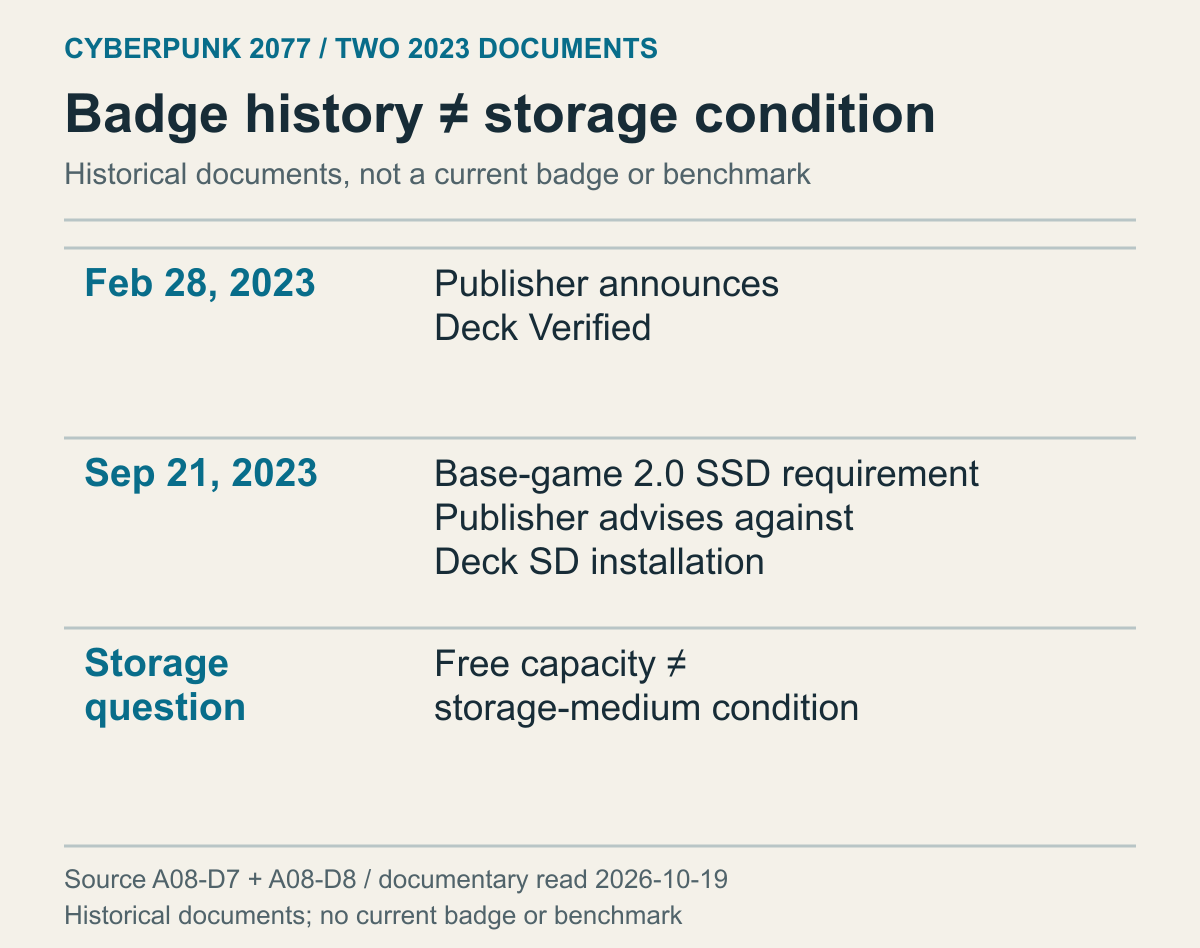
A historical case based on two official notices from 2023, read in October 2026. It is not a check of today’s badge or a storage-performance test.
CD PROJEKT RED announced on February 28, 2023 that Cyberpunk 2077 was Deck Verified. Its later Update 2.0 notice of September 21, 2023 required running from an SSD and advised against HDDs and Deck SD cards because bandwidth limitations could prevent new content from streaming properly. An earlier positive compatibility announcement and a later explicit installation condition can exist together.
The reader’s question goes beyond whether they own a Deck. It also concerns the medium on which the game is installed. A different installation location within the same device can change the answer to whether the setup matches the document’s conditions. A model name or an ownership mark in the library cannot supply the current location of the game files. The first decision is to check the official installation conditions for the game version you intend to use.
In particular, do not treat free capacity and medium type as the same requirement. One fictional user might have plenty of space on an SD card, while another lacks space on an SSD. The first user’s free capacity does not substitute for the documented medium condition. The second user’s correct medium does not create room for the installation. One concerns how much data can fit; the other concerns the medium the official guidance requires. Identifying which condition is unmet tells you whether the next question concerns freeing space or checking where the game is installed.
An experience of launching the game does not erase the documented support conditions. The 2.0 notice explained that the previous requirements did not necessarily prevent launch, but the game had not been tested or actively supported under those conditions, so functionality could not be guaranteed. A personal record of reaching the opening screen on an old configuration and a publisher changing its support conditions can both be true. You need not declare that launch false: limit the observation to the configuration it used. That single event cannot also establish successful content streaming in later scenes.
Not buying the expansion does not automatically avoid this change. The same notice described 2.0 as a free update applying to the base game and distinguished it from Phantom Liberty’s additions. Someone who did not buy the expansion therefore cannot assume they remain under the previous base-game conditions. The products owned in a library and the version of the installed game are different information. This example does not conclude that buying extra content solves a storage-medium issue, or that you should cancel a purchase.
Version differences also matter when bringing in old settings advice. The 2.0 notice announced an updated Deck graphics profile. You cannot copy numbers from an older settings screen and call them “the values Verified recommends.” An official compatibility badge and a publisher’s in-game profile are different materials, and an update announcement is not a measurement of constant frame rates in every scene. To check the choices in the current game, read documentation for that version.
Turning this example into a ban on SD cards for all Deck games would be wrong too. The adopted condition belongs to a particular game’s particular update document. A different game needs its own evidence. Equally, an impression that most games are fine does not remove this specific condition. Start with the common badge, then narrow the question to installation conditions stated for the individual game. Having enough capacity and meeting the official running environment should not become interchangeable answers.
Keep LCD, OLED and other SteamOS device names distinct
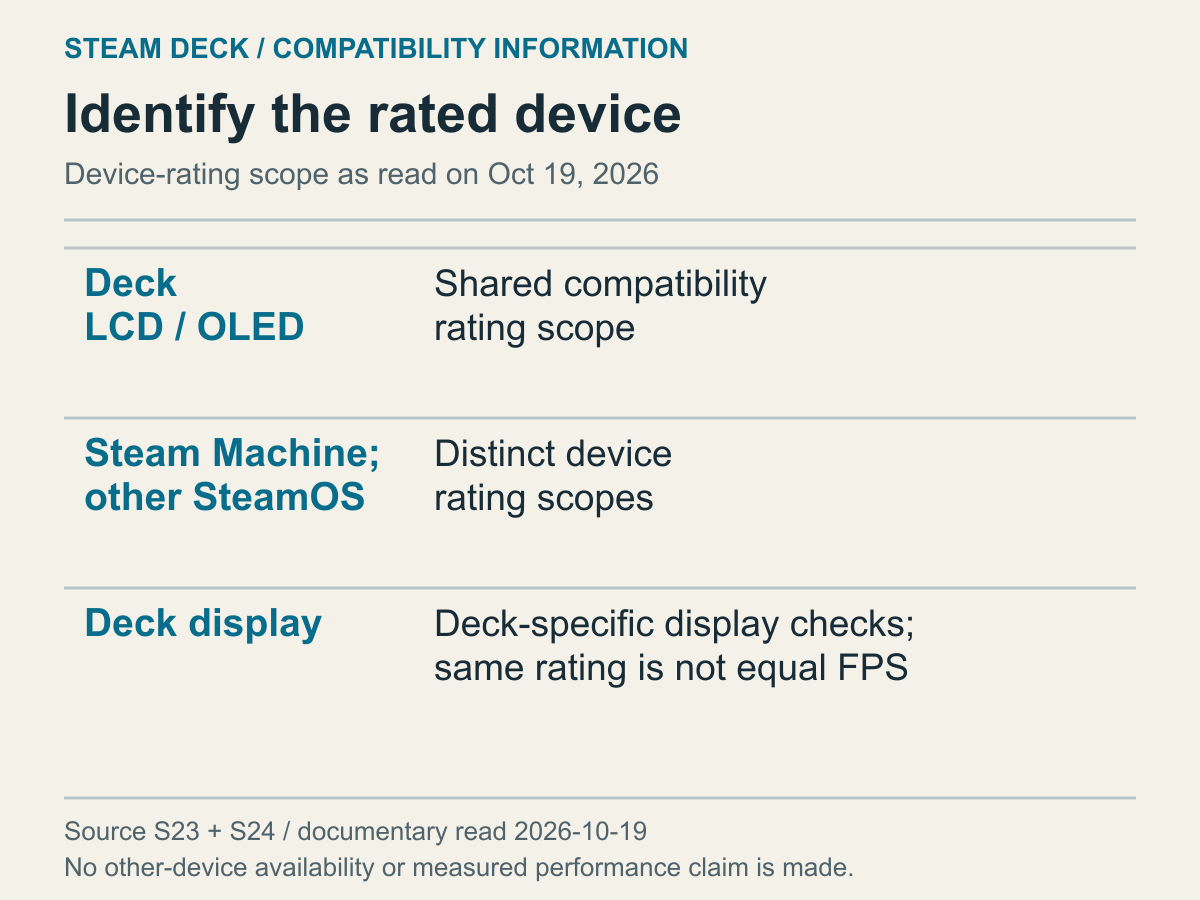
Documentary device grouping, not a model performance test or a claim about future devices.
The diagram supplies no extra frames or battery hours for a particular game. Keep the exact model name in your notes so that a later comparison does not quietly change the machine being discussed.
When several machines appear in one document, a summary needs its subject as well as its conclusion. Otherwise a sentence about one row may look like a finding about the whole collection. Select the row relevant to your intended hardware before using it alongside another document. Similar terminology alone cannot establish matching test conditions.
Seeing “SteamOS support” online does not by itself mean the material reviewed the handheld screen and controls of Deck. The operating system’s name and the hardware being assessed are not the same information. Devices may share a software family without erasing differences in displays, inputs and configurations. If a source concerns another device, retain its name rather than turning it into direct evidence of Deck’s rating.
Adding a dock or external monitor also changes your usage conditions. Seeing a Deck badge does not mean the full combination of dock, cable, display and particular input device was tested. If that connection is central to your plan, separately check the combination’s official capabilities and current information. Keep a game badge from becoming an apparent certification of all the peripherals around it.
Keep ratings with their date and game version
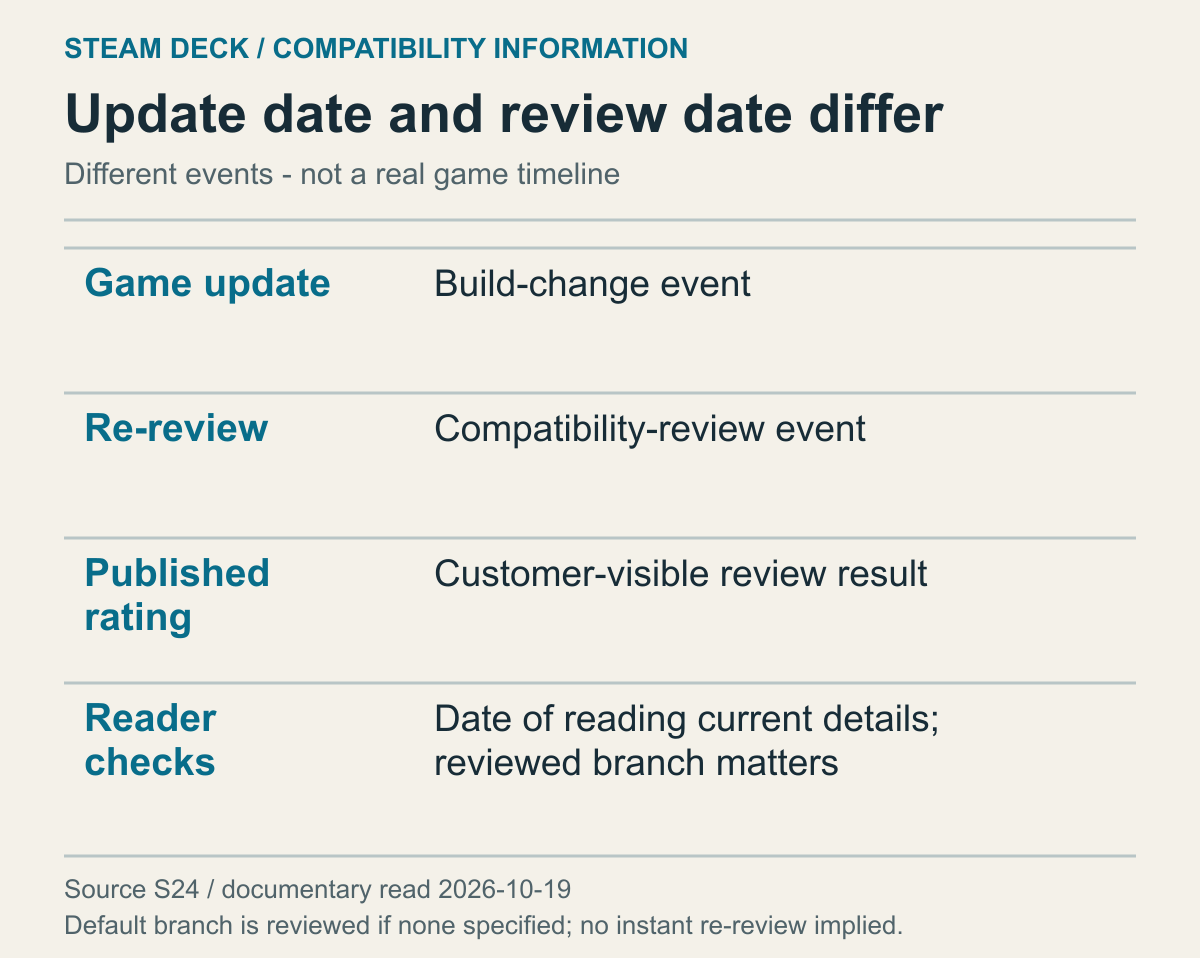
A documentary event diagram, not a particular game's actual timeline.
Keep a saved rating with the source and date on which you read it. A screenshot records that reading, not every later version. If an exact review time is unavailable, leave it unconfirmed rather than using an update date to fill the gap. Preserve what each record actually establishes so another person can understand why two dated records differ.
A game update and a compatibility review are not the same event. An update does not establish that a new review was immediately completed, while an unchanged rating does not establish that nothing changed. If you can verify both dates, record them separately. If you know only one, do not use it to fill the other. A document describing an ongoing process is not a guarantee here that every displayed rating always updates instantly.
Read anti-cheat responses with the same distinction. Valve’s developer guidance says a follow-up review can be requested after support work for a game previously restricted by anti-cheat. Being able to request a review and having a completed new rating are different stages. A publisher’s response announcement cannot itself determine the game’s current Deck badge.
Suppose fictional game H is Playable in an image from last month and Verified in the current store. Keeping the sources and dates separate avoids forcing apparently conflicting information into one result. Today’s mark may be more relevant to your present plan, but if you cannot establish why it changed, the reason remains unknown. Explaining it as a frame-rate improvement or a particular feature fix would add a cause the material does not provide.
Valve’s documentation for Verified promotional pages says a separate promotional page requires both Verified status and a published all-ages trailer. Not finding that page is therefore not evidence of Unknown: promotional material has conditions beyond the compatibility rating. Return to the actual product’s compatibility details rather than querying guessed URL patterns. That avoids turning an unfindable promotional link into a claim that the game has not been reviewed.
A publisher’s change notice is different from a current rating
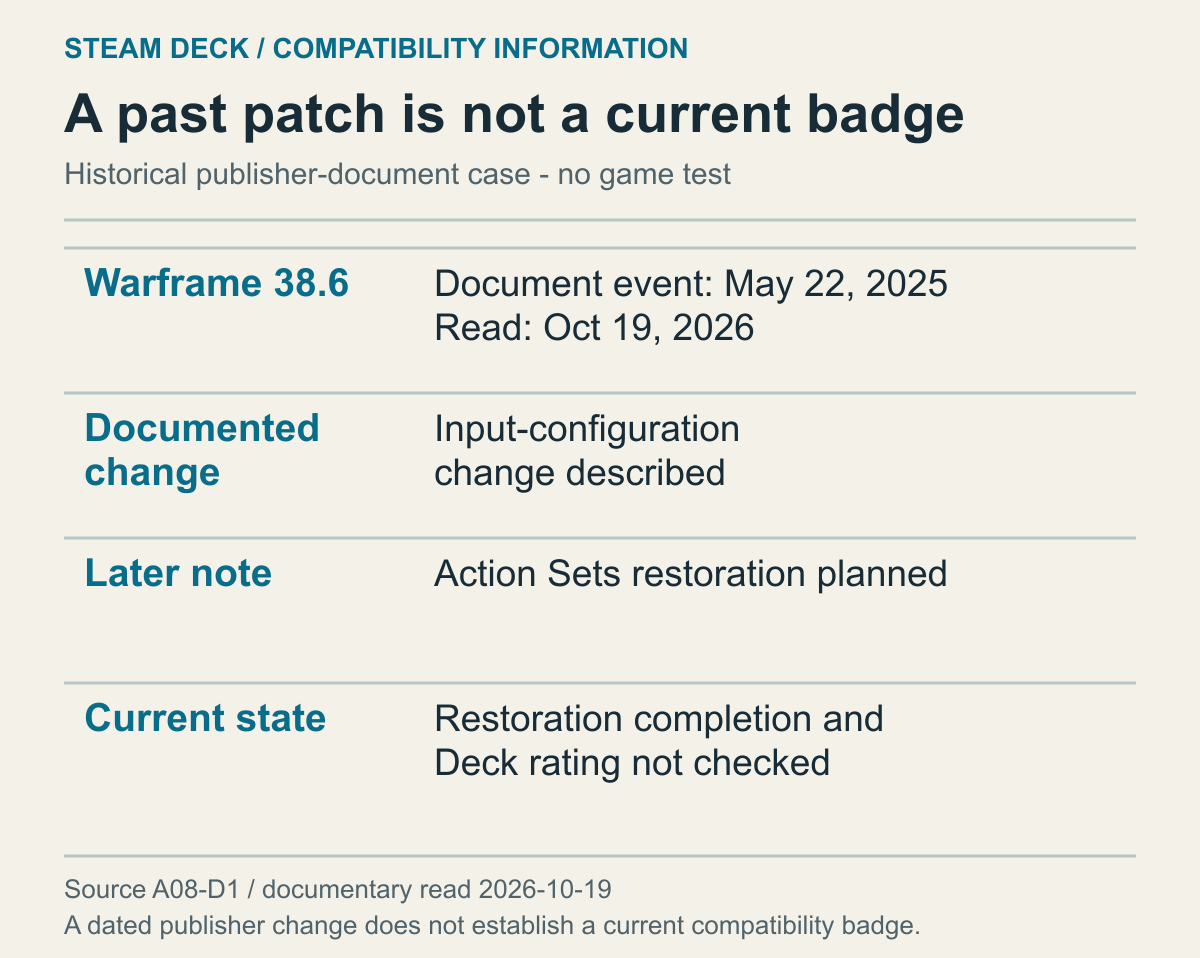
A case from a 2025 patch document read in October 2026, not direct verification of Warframe’s current rating, input settings or completed changes.
The official Warframe 38.6 patch notes describe a PC Steam and Deck input-configuration change dated May 22, 2025. The same page has a later annotation saying Steam Action Sets are to be restored. Current restoration completion and Deck rating were not checked. Reading the added note as well as the initial explanation separates an announced past change from a subsequent plan.
That patch answers a question about the publisher's input-configuration change. It does not, by itself, explain a later compatibility result. Nor does an old manual procedure remaining in a document establish that the action is still needed today. The evidence you need differs depending on whether you are asking about an assessment's reason or an older user configuration that might remain.
A later note describing a plan is not a completed state. Someone who needs the actual completed version needs subsequent official information. This example is not a recommendation to follow its control procedure. It shows why each statement in a notice should be read with its time and conditions. If the relationship between an old input change and a current badge is unconfirmed, keep them as separate information. Describing different times does not in itself make the documents contradictory.
When comparing actual play material with an official mark, match device, game version and settings too. Keep an observation limited to the conditions actually described. Decide whether you intend to use built-in controls alone and which functions you require, then choose evidence that answers those conditions. Missing evidence for a required function can justify postponing the decision. Clearly documented manual work can instead be planned with its burden understood.
Separate compatibility review from online operating conditions
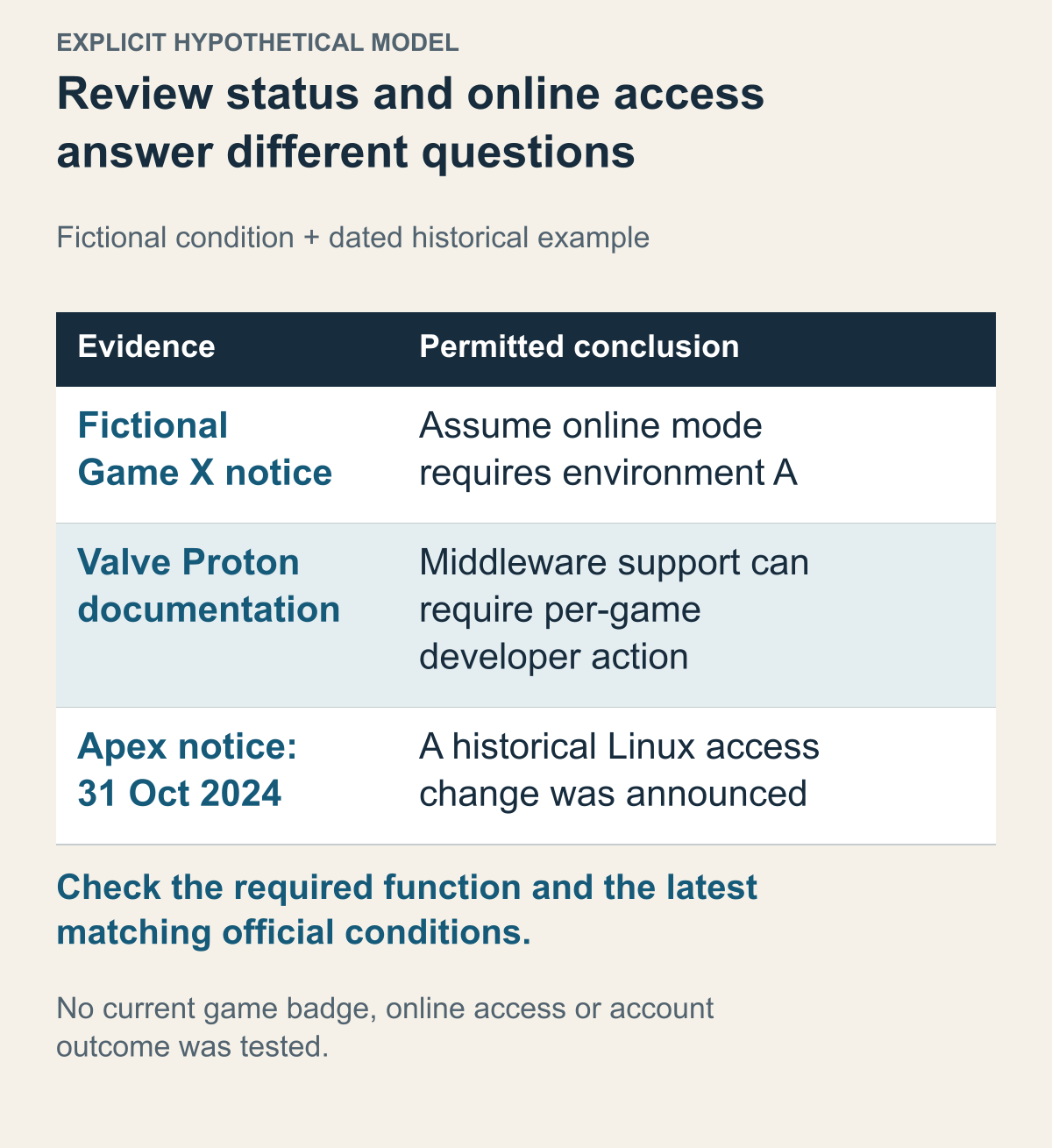
Game X is assumed; the Apex notice is a dated historical source, not a current access test.
Valve's Proton documentation says supported anti-cheat middleware can require a developer's manual enablement or configuration for each game. That is not confirmation that every game using that middleware permits online participation through Proton. Now assume a fictional Game X notice allows an online mode only in environment A. This assumed condition is not a real game's permission, incompatibility or banning policy. It illustrates why identifying the device, reaching an opening screen and meeting the conditions for a required online function are different questions.
With that information, Unsupported need not look like a score you must repair yourself. Instead of spending longer trying a route that is not permitted, you can judge whether your planned environment matches official support conditions. Owning the game files is particularly not evidence that service access is allowed. Do not jump from a library listing and an installation starting to a conclusion that you can use the service. If a publisher states a specific restriction separately from the badge, it directly affects a plan involving the required function.
Another example is the official Apex Legends Steam announcement of October 31, 2024. It announced blocking access on Linux and Steam Deck using Linux, distinguishing Steam on Windows. Read it only as evidence of a historical operating-policy change, not as certification of a 2026 badge or the current anti-cheat product. A dated service-policy change shows concretely why “it worked before” is insufficient for a present plan.
Suppose one person has only an old Deck launch video and another has the subsequent official access-change announcement. The launch shown in the video being real and a later change occurring can both be true. These sources describe different times, rather than requiring one to be false. A decision about playing today needs further checking of the latest official conditions. Also distinguish briefly reaching an opening screen in a video from using online functions. That past record cannot become a guarantee of safety for a current account.
Do not carry a game's restrictions over to other games. For a real decision, match each document to the exact product and function it concerns. A conclusion about access and one about a separate requirement should not silently fill each other's gaps.
This makes a decision to wait more specific too. Considering a different environment because official game conditions do not fit is different from waiting for more information because guidance exists but a current Deck review is missing. You can identify what new information would change the plan: a new permission notice, a follow-up compatibility review, or explicit official support for the function you need. The aim is not to find a bypass. It is to make clear which question the current evidence still cannot answer.