
How Many Gems Do Steam Cards, Backgrounds and Emoticons Give? What to Compare Before You Convert
No Valve page lists Gem counts per item. Where to read yours, why to treat conversion as one-way, and how to compare it with a Market sale in order.
Article languages
On this page
If your inventory holds a pile of trading cards, a few profile backgrounds and some emoticons from games you finished long ago, you have two ways to clear it out. Many of those items can be listed on the Community Market, and many show a button that turns them into Gems instead. The Market shows you what a buyer would pay. Nothing visible from outside shows what the button would give you.
The short answer: none of the Valve pages I opened lists a Gem count for any card, background or emoticon. As far as an archived Valve page shows, the number appears in your own inventory, so this article cannot hand you a figure and does not try to. It covers where to read the number, which Market figure to set it against, the order to do that in, and why the conversion button comes last.
On October 27, 2026 I read these Valve pages: the Trading Cards FAQ, the Community Market FAQ, Valve's Trading and Market Restrictions page, the Steam Item Restoration Policy, the Steam Trading page, the Market page for the Sack of Gems, and an archived page for the December 2014 Holiday Auction. I also read one third-party guide (MeinMMO, published in January 2023 and since updated), one Steam Discussions thread from June 2021, and our own posts. The Holiday Auction page describes an event that has ended, so its menu names may be out of date. I could not open a signed-in inventory or the Booster Pack Creator, and I have never converted an item. These unknowns are stated here once and the sections below refer back to them. Every number in the worked examples is invented to show the arithmetic. None is a real Gem count or a real price, and the diagrams are explanations, not Steam screenshots.
Our post Why 1,000+ Steam Gems May Still Not Pack into a Sack already compares an item's Market proceeds with its Gem yield, and this article uses the same proportion. Where that post stops at three figures, this one adds what to remove from the comparison first, which Market figure to write down, and what to re-check just before you press the button. The 1,000-Gem item is called a Sack of Gems here, as in our other posts. SteamVaults also runs its own card and community-item conversion service on a separate page, /gem-cycle, and its conditions are outside this article.
Start with what you want to end up with
An item has three possible futures: you keep it and use it, you sell it on the Community Market, or you turn it into Gems. The Market ends in Steam Wallet funds. The Gem route ends in Gems, and Valve's archived 2014 page says what can be done with them afterwards. They can be used to create Booster Packs, and they can be placed on the Market only after being packed into a Sack of Gems. The Market page for the Sack of Gems describes it as 1000 Gems.
Neither route pays out cash. The Community Market FAQ says all Market sales and purchases use the Steam Wallet, and that the funds cannot be withdrawn or transferred to another Steam account or to a bank or third-party account. The FAQ also says you may use the funds to purchase Steam gifts to send to other users. So "ahead" in this article means more wallet funds. For what can and cannot be done with wallet money afterwards, see Can You Cash Out Steam Wallet Balance?.
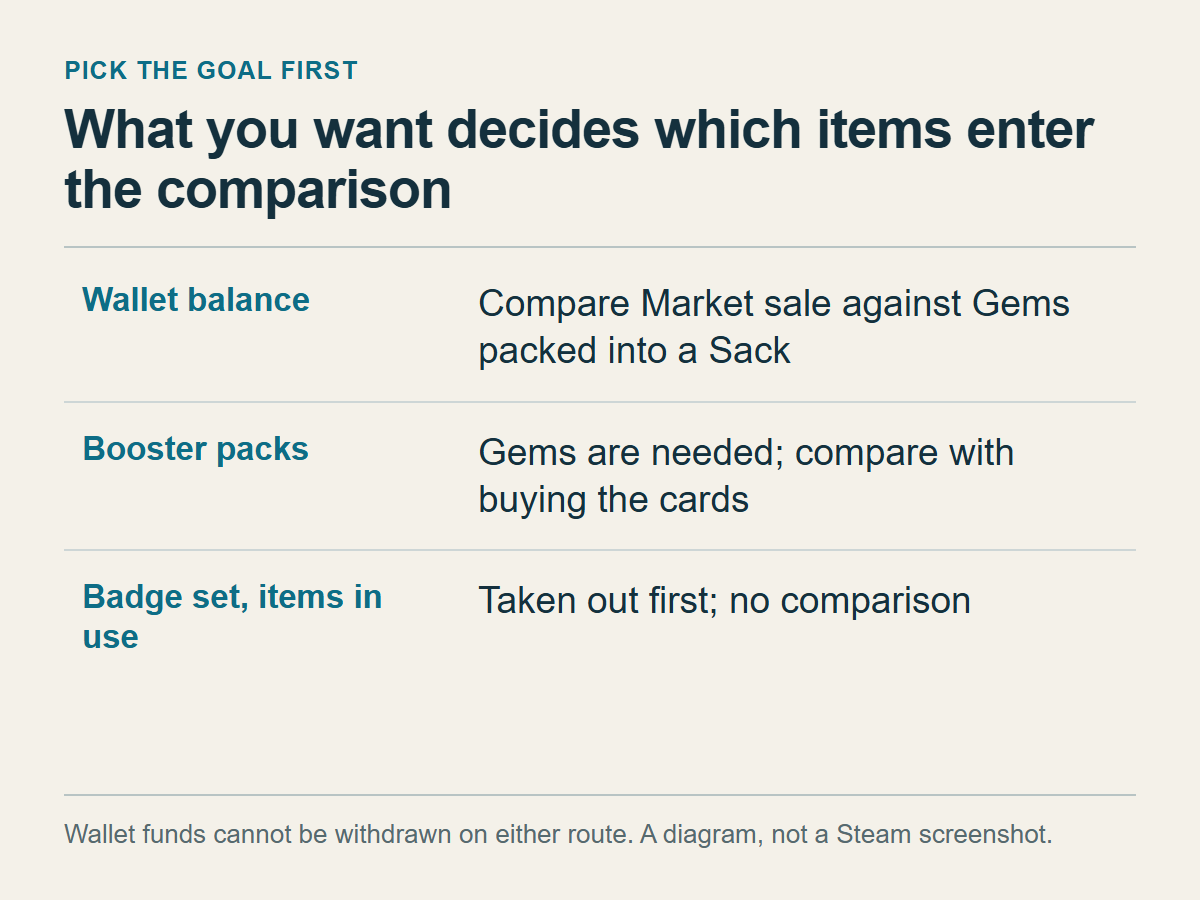
Your goal decides which items enter the comparison at all:
| Goal | What to do with the item |
|---|---|
| Wallet balance | Compare Market sale against Gems packed into a Sack |
| Booster packs | Gems are needed; compare with buying the cards |
| Badge set, items in use | Taken out first; no comparison |
The booster pack row stays open in this article. The Booster Pack Creator, which shows the Gem cost per game, needs a sign-in, so I could not read a single cost and I state none. Two of our posts do the pack-side arithmetic: One card missing: should you make a booster pack? and Sack of Gems: Craft Booster Packs or Sell on the Market?.
The third row needs a reason. The Trading Cards FAQ says a collected set of cards for one game can be crafted into a game badge, and the craft also returns a random emoticon and a random profile background for that game, a chance of a coupon, and 100 XP. Emoticons are for chat and discussions, backgrounds for your profile. If you want that badge, or you use a background or emoticon, it stays out of the comparison. Converting the cards breaks the set, and Is a Steam Badge Worth Using Up Your Cards? is the place to decide whether the craft is worth it.
One more point belongs here because it changes what "taken out" means. Valve's page calls making Gems "recycling", and no page I read says a recycled item stays in your inventory in some form. Plan as if the item is gone once converted. Whether the step can be undone is the subject of the third section.
Where the Gem number is shown, and what to write down first
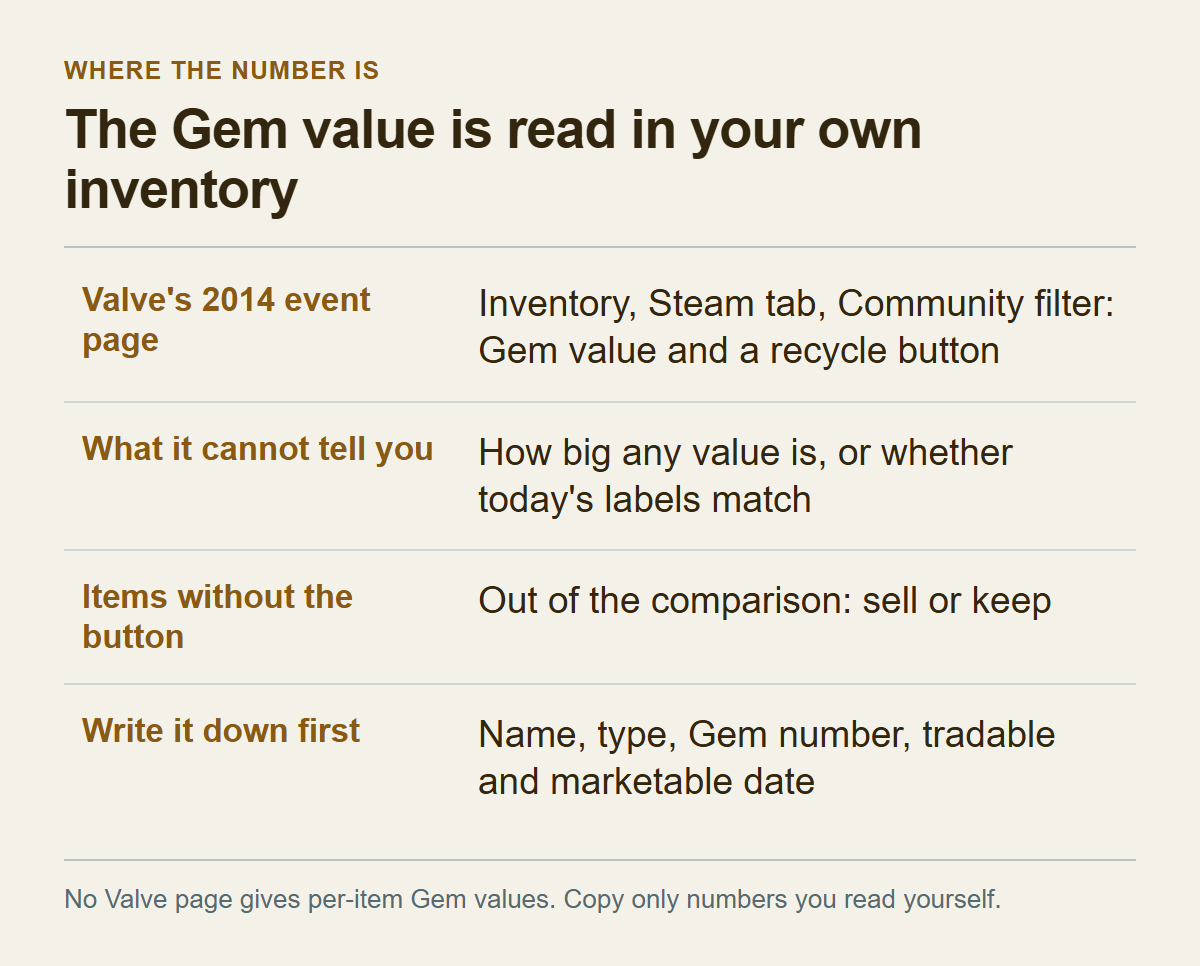
The only Valve text I found about where an item's Gem value is displayed is the archived Holiday Auction page. It says you make Gems by recycling Steam Community Items from your inventory: open the inventory, select the Steam tab, choose Community from the drop-down to see eligible items, and each one shows its Gem value and a button to recycle it. So the first point is where to look: Inventory, Steam tab, Community filter, which shows a Gem value and a recycle button.
The second point is what that page cannot tell you. It was written for an event, so I could not check that today's menu names and order still match. It gives no value for any item and does not say how big a typical value is. The Trading Cards FAQ, the other obvious place to look, never mentions Gems.
Button names differ between sources. Valve's old page says "recycle". Our other English posts call the button Turn into Gems. A German-language MeinMMO guide from January 2023 describes a green button on the right of the item information, labelled "In Edelsteine umwandeln ..." (German for "convert into Gems"). Which wording your client shows is something to find on your own screen.
The screen also decides which items get a button. Valve's wording is "eligible items", so do not assume every item in your inventory will have one. Several user answers in a June 2021 Steam Discussions thread say items bought in the Points Shop cannot be turned into Gems. I found no Valve page confirming that, so take it as a hint. The third point follows: an item without the button is out of the comparison, and your choice for it is to sell it or keep it.
Read the number at the moment you compare, and read it somewhere you can back out of. Valve's page puts the Gem value beside the recycle button. MeinMMO says a confirmation window appears before the conversion, that it shows how many Gems the item gives, and that the process cannot be undone afterwards. I have not seen that window. Two of our posts, the Gems post linked above and What Is a Steam Sack of Gems?, tell readers to check the Gem amount shown on the conversion screen before confirming. I agree about the number and add a condition: read it from the inventory display or from a window you can close without converting. If a dialog is vague, or looks as though one click will run the conversion, stop there.
The fourth point is to write the numbers down first, because after a conversion the item is, as far as I can tell, gone and so is the chance to read the number again. Record the item name, what it is (card, foil card, background or emoticon, and which game), the Gem number, and the tradable and marketable date if there is one. Valve's Steam Trading page says the Tags section of an inventory item shows whether it is tradable. The Trading and Market Restrictions page says items bought in game or on the Market are not tradable or marketable until the date indicated on the item in your inventory. I could not confirm that identical items always show identical Gem numbers, so do not process a whole stack on the strength of one reading.
Other people's numbers are no substitute. No Valve page I found says whether Gem values are the same across games or item types, and a figure from a forum has no reliable date. The Gems post quotes one 2016 community reply that gives two figures, 4 Gems from one card and 340 from one foil card. It is one person's account, and I cannot check the game, the item or whether it still applies, so I do not put the figures in a table. The only number worth using is the one on your own screen on the day you compare.
A Market listing can be taken down, but I found no way to undo a conversion
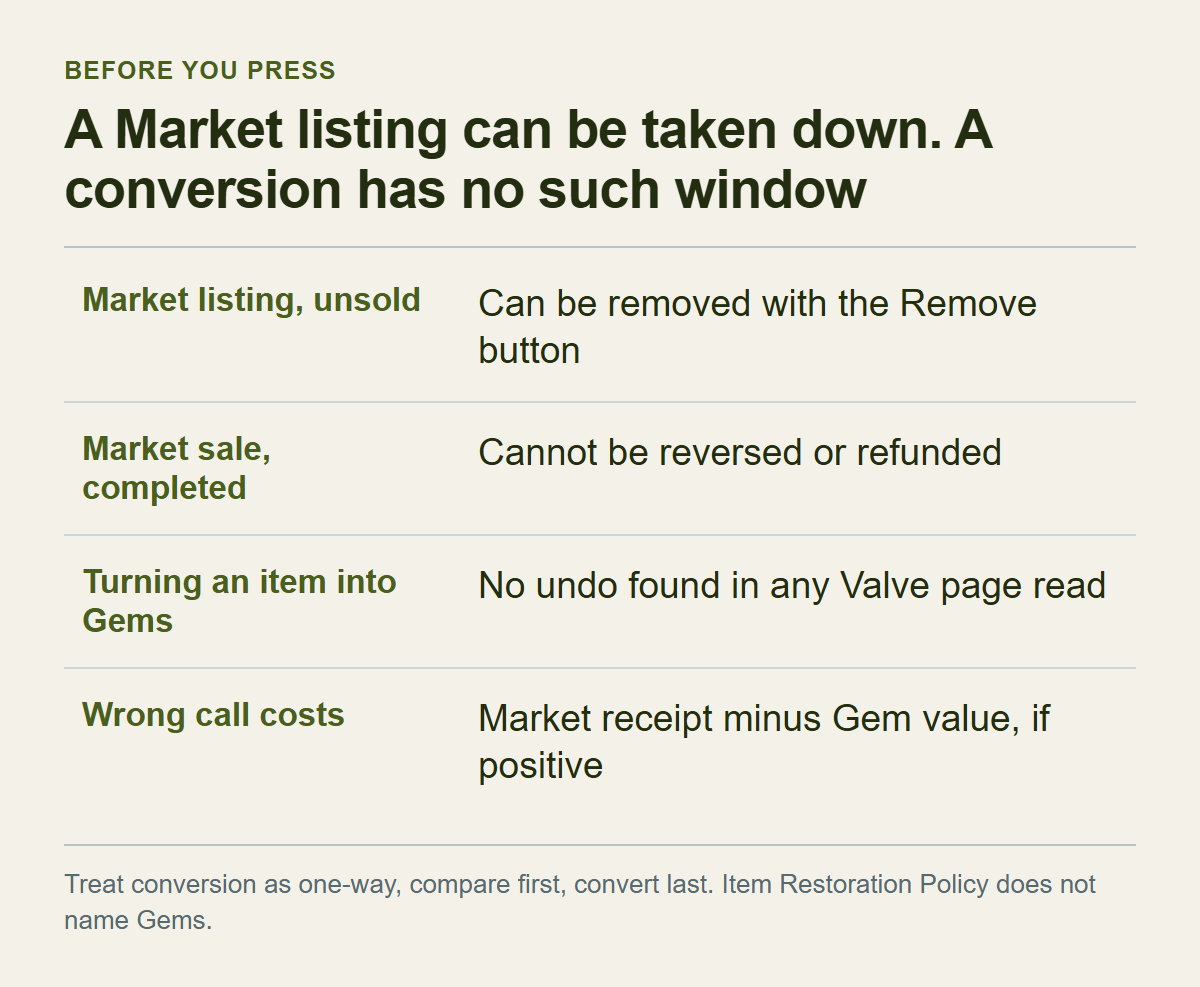
No Valve page I read says that turning an item into Gems can be undone, and none says it cannot. The one explicit statement is in the MeinMMO guide: after the confirmation window, the process cannot be undone. That is a third-party article, not a Valve confirmation.
The Steam Item Restoration Policy says Support does not restore items that have left an account for any reason, including trades, Market transactions, deletions and gifting. It does not name turning an item into Gems, so by its text alone it neither covers a conversion nor excludes one. Our Gems post says a converted item cannot easily be restored. My finding is stricter: I found no undo at all. The caution that follows is the same either way.
The Market side looks different. The Community Market FAQ says a listing can be cancelled with the Remove button any time before it is purchased. Once a Market transaction is complete there is no right to a refund or a reversal. A sale therefore gives you a window to change your mind, which closes when someone buys. For a conversion, none of the pages I read describes such a window. In my view that difference matters more than the difference between the two receipts.
The risk is lopsided, which is the reason for treating the step as one-way. If you assume it is irreversible and it turns out to be reversible, you lost a few minutes of care. If you assume it is reversible and it is not, you have no route back.
What a wrong call costs is narrower than the whole item. If you could have sold it on the Market and the receipt was larger than the Gem-side value, you lose the difference. If the Gem side was larger, you lost nothing. The difference is biggest for items with a high Market receipt, so spend your comparison effort there first. The arithmetic does not apply to items you meant to use. A card set intended for a badge would have to be re-collected by buying or trading, and a background you wear would have to be found again.
My practice for this, which is my recommendation and not a Valve instruction: finish every comparison, convert last, handle one kind of item at a time starting with the largest Market receipt, and for each kind convert the lowest-value item first. Call that the first conversion check. It has three parts. Does the dialog text match what you read earlier? Does the number of Gems that arrive equal the number you wrote down? Does the new Gem entry in your inventory carry a date or restriction label? The third part is there because our Gems post cites user reports that trade restrictions can carry over to Gems. That is not a Valve rule, and I use the reports only as a reason to look.
On the Market side, write down what lands in your wallet
The Market page for the Sack of Gems shows listings and buy orders side by side and says the lowest listing trades automatically with the highest buy order. Whether the page for a particular card, background or emoticon is laid out the same way is something to check by opening it.
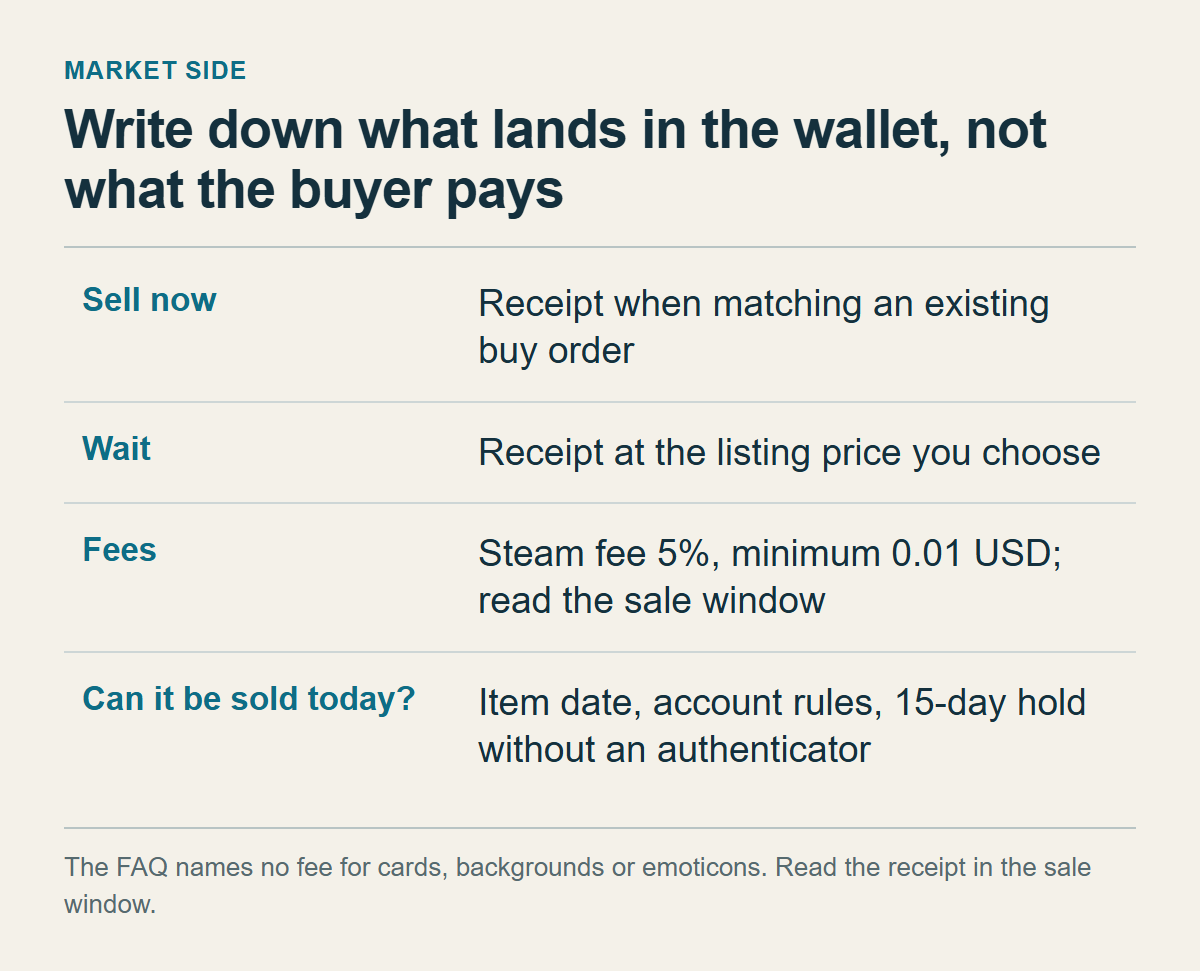
The FAQ says buy orders help sellers too: you can see what other users are willing to pay, and you can choose a lower price to sell immediately or a higher price and wait. That gives two Market figures to record. Sell now is the receipt when your item matches an existing buy order. Wait is the receipt at the listing price you choose. Compare the Gem side against the one you would really pick. If you are in no hurry but use the sell-now figure, the Gems will look better than they are.
Record the receipt, which is what reaches your wallet, and not what the buyer pays. The FAQ gives the Steam Transaction Fee as currently 5%, with a minimum of 0.01 USD, and lists game-specific fees of 10% for Team Fortress 2, Dota 2, Counter-Strike 2 and Artifact. It names no fee for Steam Community Items, meaning cards, backgrounds and emoticons. I therefore cannot turn a price into a receipt for you, and a percentage guess should not stand in for the number the sale window shows, if it shows one. I did not open a signed-in sale window, so I cannot say what it displays. How Steam Market Fees Work covers why seller proceeds and buyer totals differ.
Mixing the two kinds of figure can flip the verdict. Here is an invented example with invented fee ratios. A small item is listed at a buyer price of 15 and has a receipt of 10. A Sack has a buyer price of 1,150 and a receipt of 1,000, and you read 12 Gems on the item. By receipts, V is 12 ÷ 1,000 × 1,000 = 12 against R = 10, so the Gems are ahead. By buyer prices, V is 12 ÷ 1,000 × 1,150 = 13.8 against 15, and the Market looks ahead. Same item, opposite answers, depending on which column you used. The fee ratios are made up; only the FAQ's minimum fee points the same way, since a minimum takes a larger share of a lower price.
The Market may also impose a minimum price. The FAQ says some currencies have a minimum sale price and that Steam indicates when a listing does not meet it. For a very cheap item, the lowest price on the public page is therefore not necessarily a price you can list at. Why the Steam Market Lowest Price Is Not Your Minimum Selling Price treats that gap as a dated observation.
Then there is the question of whether the item can be sold today, and a receipt does not answer it. The FAQ says that when you pick an item to sell, only eligible items are visible, and Steam Support cannot modify an inventory item so that it can be sold. Items bought in game or on the Market are not tradable or marketable until the date shown on the item. The account has its own conditions: a successful purchase older than 7 days but not older than a year, and Steam Guard enabled for 15 days. Without a Steam Guard Mobile Authenticator, the Item Restoration Policy says, Steam holds a trade or Market listing for 15 days. Add a column for the date the item can be sold, next to the receipt. An item with a distant date and a high receipt is a case to postpone, and the invented card D in the sixth section shows how.
Prices move, and currencies differ. Sellers list in the currency of their own wallet and buyers see prices in theirs, with an exchange rate that the FAQ says is updated daily. Read the Market figures in one sitting, in one currency. Do not slot a friend's number, or a screenshot from a few days ago, into the place where your own sale-window number belongs.
Inside Steam, Gems become wallet money only through a Sack
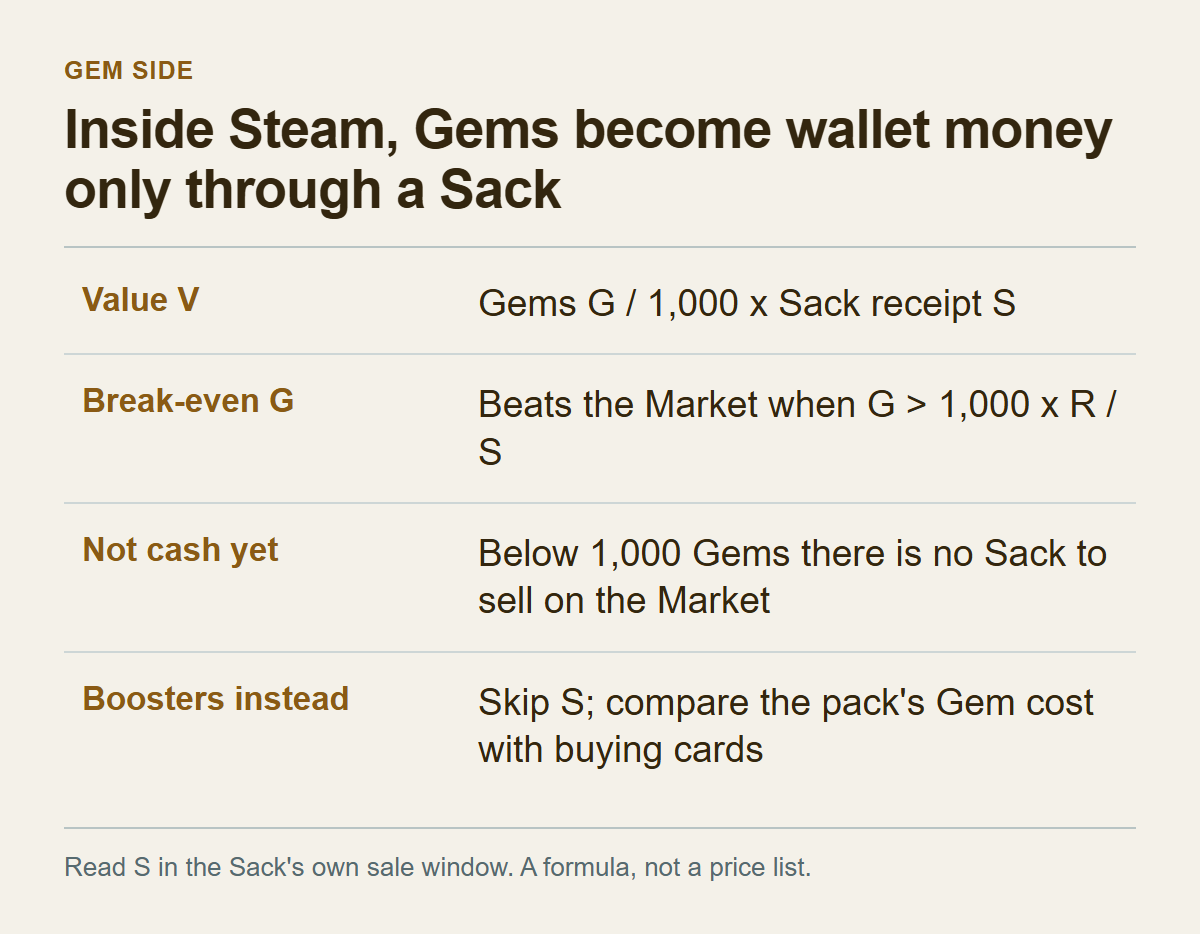
A Gem count is not money. The only route I found from Gems to wallet balance inside Steam is selling a Sack on the Market, and one Sack is 1,000 Gems. Other SteamVaults posts describe selling a Sack to SteamVaults for a site balance. I do not compare that route here and state no SteamVaults terms. For the Market route, the Gem-side value is:
> Gem-side value V = Gems read G ÷ 1,000 × wallet receipt S for one Sack
S is the receipt your own sale window shows for one Sack, if it shows it. This is arithmetic from the 1,000-Gem Sack and not a Valve formula. Our other Gems posts use the same proportion, so they and this one agree.
Turn it around and you get a faster test. If an item's Market receipt is R, the Gems come out ahead when G is greater than 1,000 × R ÷ S, the break-even. With an invented S of 1,000, one Gem is worth 1, and an item with R = 20 has a break-even of 20 Gems. Fewer than 20 favours the Market, more favours the Gems. The break-even moves with the Sack's price, so calculate it on the day of the comparison.
The formula leaves out several things.
Not cash yet. Below 1,000 Gems there is no Sack to sell on the Market. An item that gives 60 Gems has a V of 60 only on paper until another 940 Gems arrive. If you already hold a large pile, the last few Gems may be what completes a Sack. If you do not, V is a calculated share and nothing more. There is a second catch. The Gems post cites user reports of Gems sitting in separate stacks that cannot be packed together, and that is a reason the completing-a-Sack shortcut can fail. I have not tested it.
The Sack has to be sold, too. Its Market page shows buy orders and listings, and how fast it sells and at what receipt is decided there, apart from your item. S is read where the Sack's sale window shows it, just as R is for the item.
Fee-bearing sales are counted differently on the two routes. Selling item by item means one fee-bearing sale per item, and a minimum fee takes a larger share of a low-priced item. Pooling Gems into Sacks means fee-bearing sales per Sack. That is my inference and the FAQ does not compare the routes. It may matter for very cheap items, where a minimum fee is a large share of the price.
If you intend the Gems for Booster Packs, you do not need S. You compare the pack's Gem cost, which the Booster Pack Creator shows, with what it costs to buy the cards. The Trading Cards FAQ says a booster pack is a set of 3 trading cards that may include both basic and foil cards. Since you cannot know which cards you will get, do not subtract a guessed sale value of the cards from the cost in advance.
Compare in a fixed order and press convert last
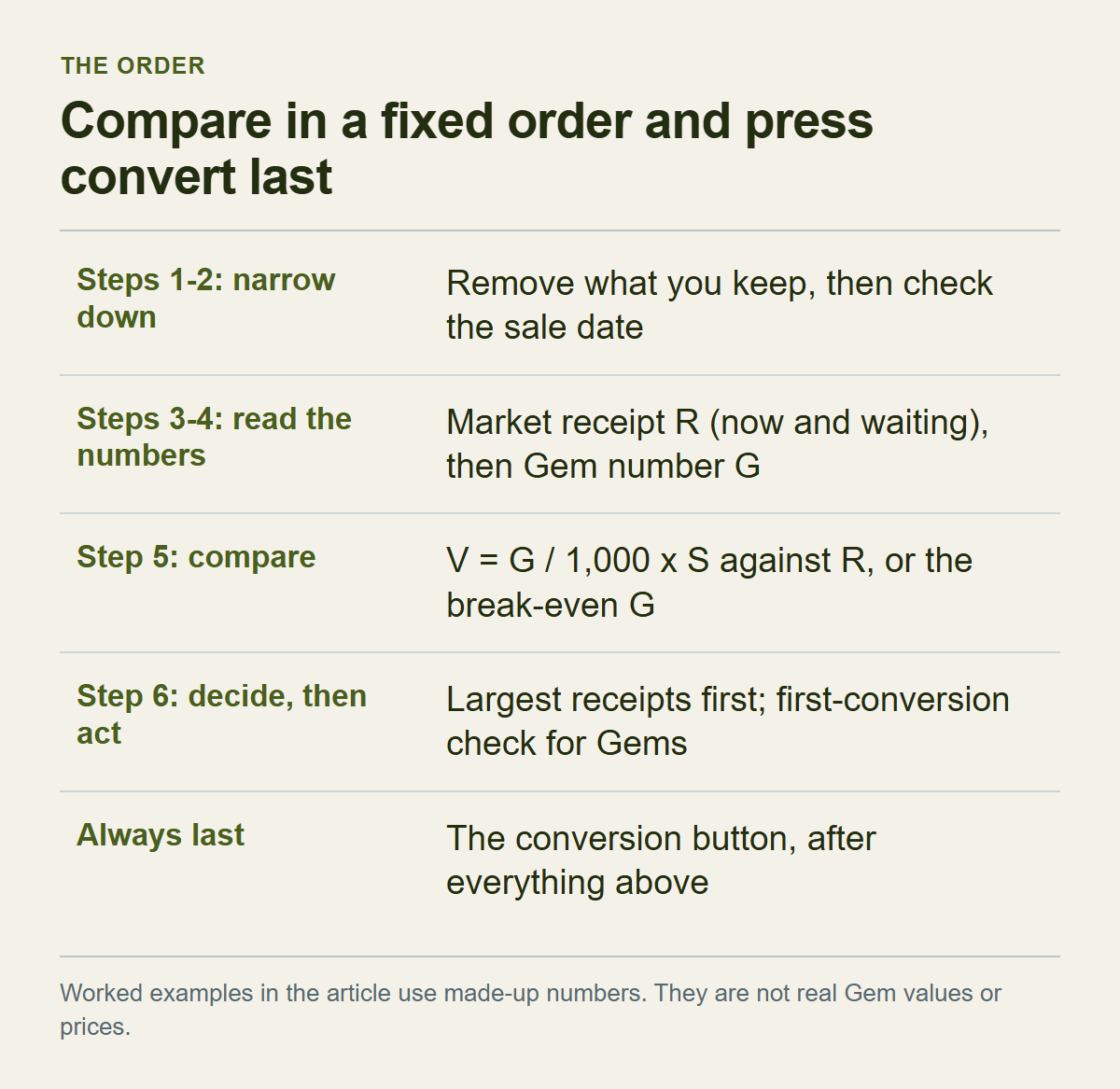
The order has three reasons: the step that cannot be undone goes last, numbers that move are read in one sitting, and the amount of arithmetic shrinks early. Keep one row per kind of item, and do these in sequence:
1. Remove what you keep: card sets for a badge, backgrounds and emoticons you use, and items without a conversion button. 2. Write down whether each remaining item can be sold on the Market and from what date, using the marks and dates in the item description. 3. Read the Market receipt R in the sale window, if it shows one, once for sell now and once for waiting. 4. Read the Gem number G. 5. Calculate V = G ÷ 1,000 × S and set it against R, or test G against the break-even. 6. Write the verdict: Market, Gems, keep, or wait for the date. Act on the largest receipts first, and send anything you judged for Gems through the first conversion check from the third section.
Put differently: steps 1 and 2 narrow the list, steps 3 and 4 read the numbers (R now and waiting, then G), step 5 compares, and step 6 decides and then acts. The conversion button always comes last, after everything above.
To see it run, take four invented items and a Sack receipt S of 1,000 units of your wallet currency, so one Gem is worth 1 unit. These are not real items or prices.
| Invented item | Market receipt R (now / waiting) | Gems G | Gem-side value V | Verdict |
|---|---|---|---|---|
| Card A | 20 / 24 | 12 | 12 | Market |
| Background B | 35 / 40 | 60 | 60 | Gems ahead; check whether you can complete a Sack |
| Emoticon C | 28 / 30 | 29 | 29 | Practically equal; decide on other grounds |
| Card D | marked not marketable | 50 | 50 | Compare again after the date |
Card A has a break-even between 20 and 24 Gems and G is 12, so the Market is ahead. Background B has a break-even between 35 and 40 and G is 60, so the Gems are ahead, but the 60 only reaches the wallet once a Sack can be completed and sold. Emoticon C has a break-even between 28 and 30 and G is 29, so the numbers do not pick a side, and a small price move would reverse the verdict.
Card D shows a sale-blocking mark, so there is no R. Converting would give V = 50, but I could not confirm whether the resulting Gems inherit the restriction. I would rather wait for the date, read R, and compare again than take a step I have to treat as irreversible on an unknown. That is my judgment and not a rule from any document.
A second invented case shows urgency deciding the verdict. S is again 1,000. Item E has a receipt of 18 if sold now and 30 if you wait, and shows 22 Gems, so V is 22. Against the sell-now receipt of 18 the Gems are ahead. Against the waiting receipt of 30 the Market is ahead. One item gets both verdicts, which is why you decide whether you can wait before comparing. Waiting does not guarantee 30 either, since a buyer has to appear at that price, so keep the figure from the sale window and the price you actually got in separate notes.
When the numbers are close, say a gap smaller than a day of price movement, other conditions settle it. If the aim is wallet balance, selling on the Market is one step shorter. If the aim is booster packs, the Gem route fits. If you already hold nearly 1,000 Gems, the last few can complete a Sack and let V become wallet money, so the Gems have the edge, although the stack reports in the previous section mean the shortcut may be blocked. If you are not in a hurry, compare against the waiting receipt, and if you are, use the sell-now one and count the time to sell the Sack as well. Time spent on a gap that a day's price movement could flip is a loss, so take the simpler route.
Group many items by kind, and run every offer through the same formula
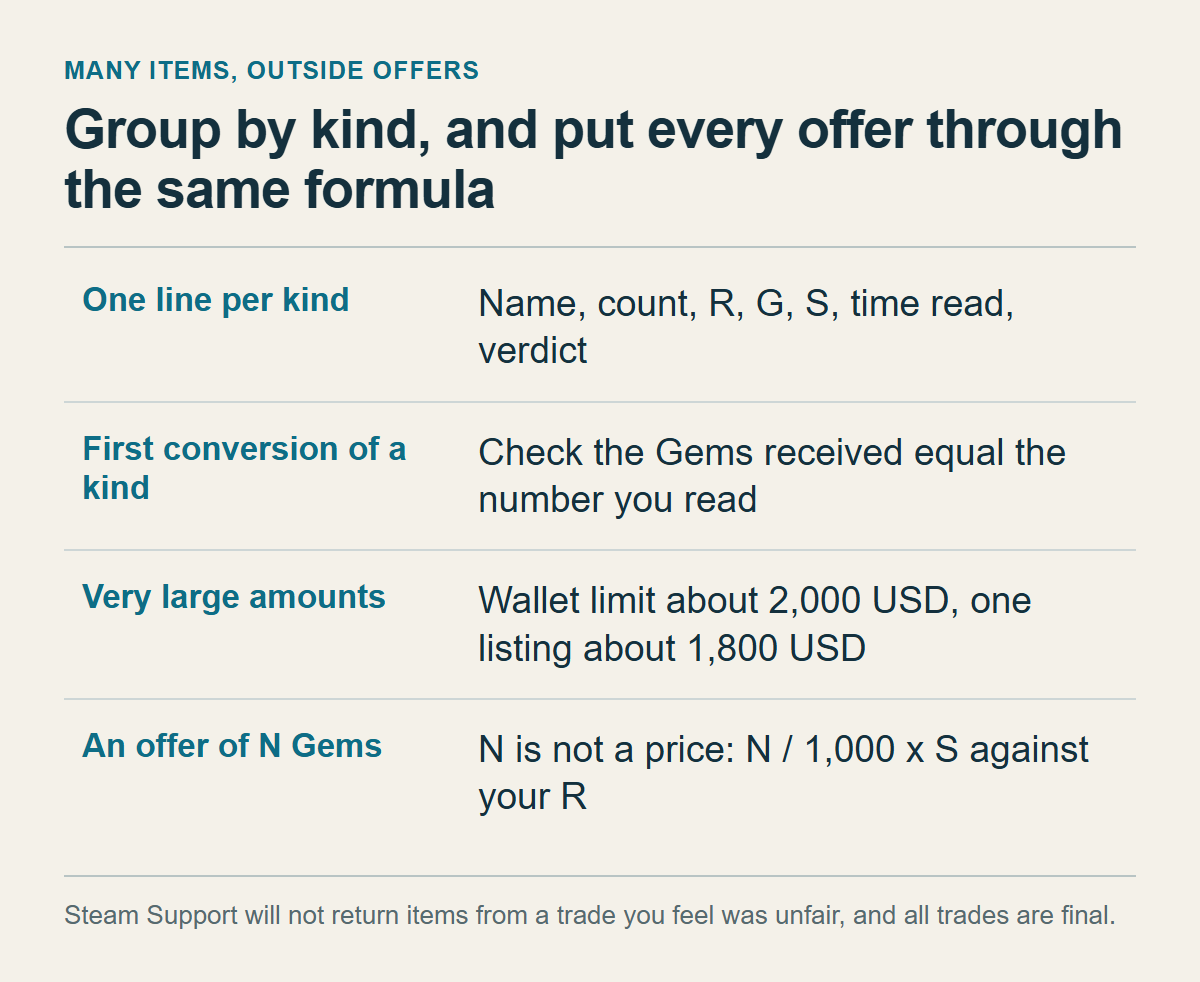
With dozens of items, comparing one by one wears you out. Group identical names into a kind and keep one line per kind with the name, count, R, G, S, the time you read the numbers, and the verdict. Look hard at kinds with a high receipt. For a pile of cheap items with similar receipts, set one threshold and apply it as a rule: below it to the Market, above it to the Gems.
Convert by kind. Each kind passes the first conversion check on its lowest-value item, which means checking that the Gems received equal the number you read before, and only then do you move on to the rest of that name. Converting the whole inventory at once means you notice a mismatch only after the step you have to treat as one-way has run on everything.
Very large amounts meet the Market limits. The FAQ says wallet balances are restricted to about 2,000 USD (other currencies get a similar value) and a single listing to about 1,800 USD. Listing is blocked if your existing balance plus the sale price would exceed the wallet limit, and if you have several accounts, the wallets are added together. Selling many Sacks runs into the same limits. A few dozen cheap items rarely get near it. A big sale does, and then the limits are part of your plan.
An offer from another person to give you N Gems for an item is not a price. Put N through the same formula, N ÷ 1,000 × S, and set the result against the R you read yourself. An exchange is also a trade. The Steam Trading page says Support will not return items that you feel were traded unfairly, with no exceptions, and the Trading Cards FAQ says all trades are final. List the offer in the same table, and send nothing until your own figures say it is fair. For judging the other party, see What to Check Before Confirming a Steam Trade.
An offer that asks for your account password or a login code in exchange for extra Gems is not worth comparing. None of the documents I read has a step in which turning items into Gems or selling them requires giving account details to another person.
Start with the largest kind, and leave out any that stalls
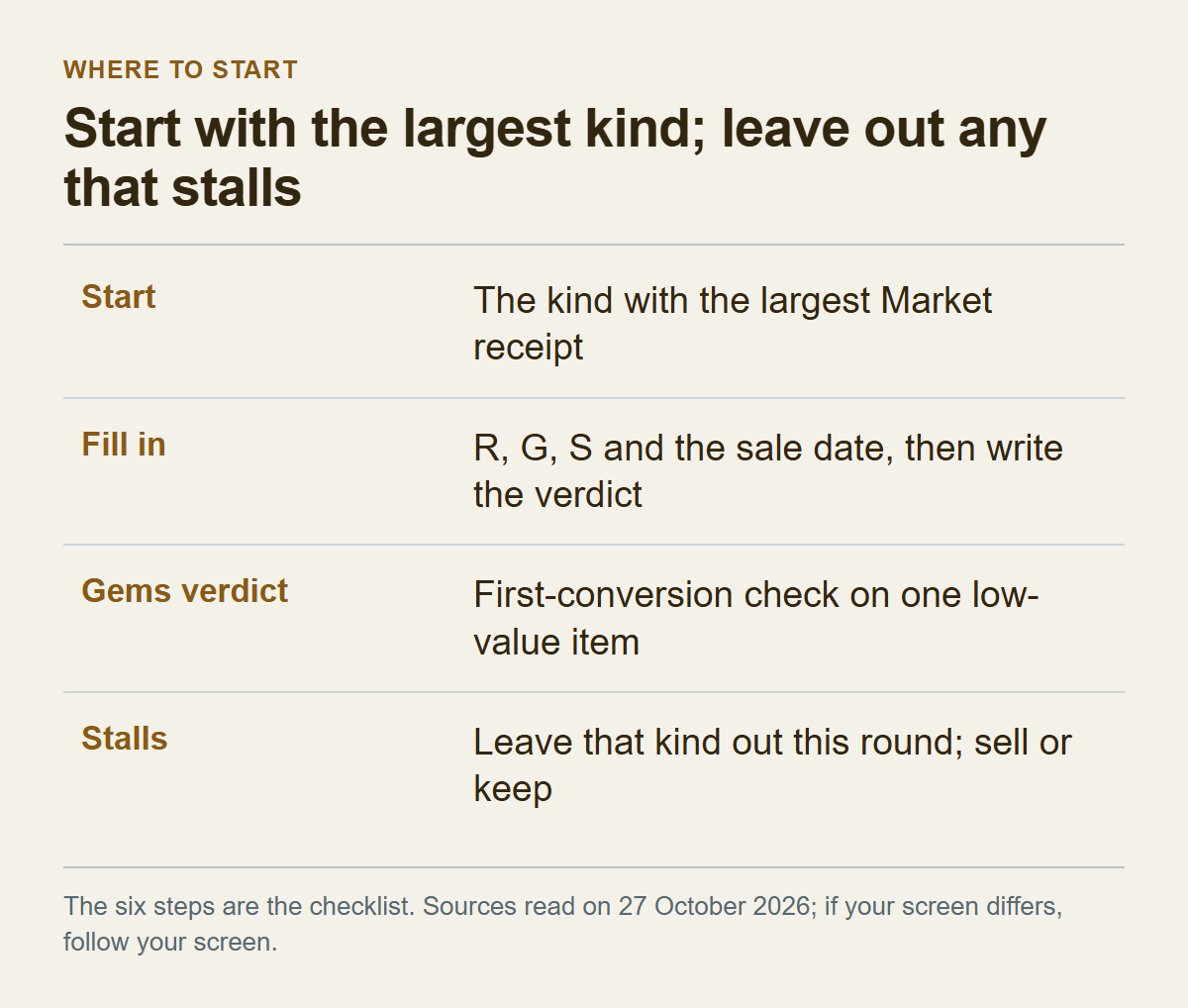
There is no separate checklist. The six steps in the sixth section are the checklist, and for anything you judge for Gems, the last gate is the first conversion check from the third section. Open the inventory and start with the kind that has the largest Market receipt. Fill in R, G, S and the sale date, write the verdict, then move to the next kind. For a Gems verdict, do the first conversion check on one low-value item before converting more of that kind.
If you stall, it is either one of the things this article said it could not confirm or a place where your screen differs. Typical cases: you cannot read the Gem number without committing to a conversion, the sale window does not show a receipt, or the sale date is far away. Leave that kind out of this round and sell it or keep it. That does not affect the other kinds. If you went the Sack route, read S on the same day as everything else.
The sources were read on October 27, 2026. Help pages, Market rules and screen wording can change, so if your screen disagrees with this article, follow your screen. It may mean the article is wrong or that the screen has changed, and if you cannot tell which, not converting is the cheaper choice.