
Can You Top Up Steam with Crypto? Why Bitcoin Was Dropped and Three USDT Routes
Why Steam ended Bitcoin payments in 2017, and the steps, costs and account checks of three ways to fund a Steam Wallet from USDT, from Valve's own pages.
Article languages
On this page
If you hold USDT and want Steam Wallet funds, two questions come first. Does Steam take crypto at all, and if not, which of the remaining routes fits your account? This article separates what Steam's own pages confirm from what they leave open, explains why Steam stopped taking Bitcoin in 2017, and shows where each of the three common routes adds cost and waiting. It does not say which route is cheaper or faster. I could not find price or speed figures that would support that comparison.
Disclosure: this article is published on the SteamVaults blog, and one of the three routes runs through a SteamVaults service. It is the only route that earns the publisher money. The service's terms set a target gap between its buy and sell prices and say there is no separate trade fee, so I read its revenue as coming from that gap. Everything said about the service comes from its own pages, terms and code repository, which makes it a description, not independent verification. Nobody on the editorial side has topped up a wallet through the service or bought a code from an outside seller.
The sources are Steam Support, Store and Market pages and SteamVaults pages, first read on October 27, 2026 and re-opened on October 31 (UTC). All of them were opened signed out, from Korea, so a signed-in account or another country may see something different. The images are SteamVaults illustrations of Steam's interface. If a code's currency differs from your Wallet's, see What happens when a Steam gift card or wallet code is in a different currency?. Turning Wallet value back into USDT, the opposite direction, is covered in Can You Cash Out Steam Wallet Balance?
Only your own checkout shows whether crypto is offered
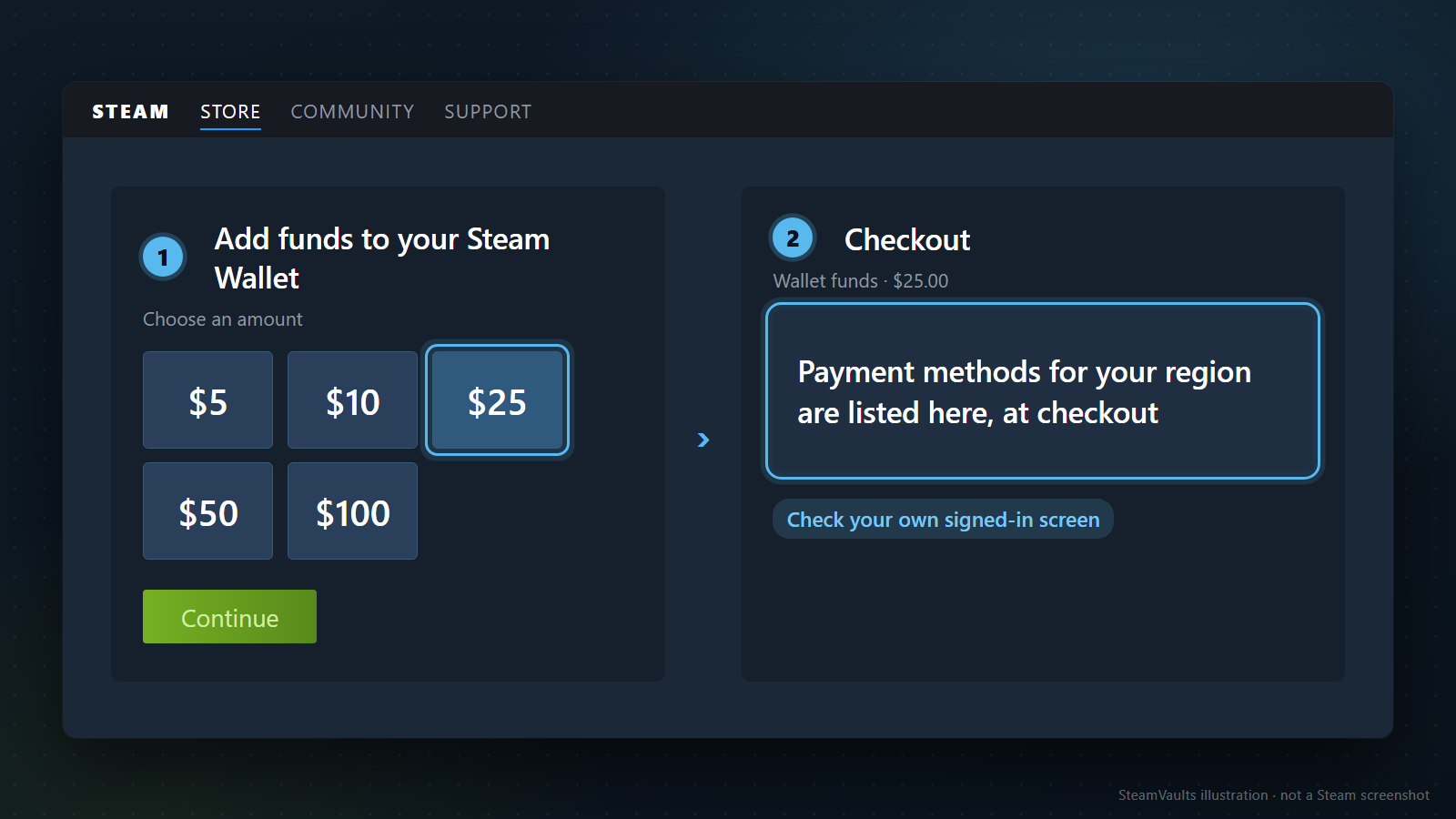
The public pages do not settle it either way. The Steam Wallet FAQ tells you to go to Account Details, choose to add funds, pick an amount and proceed to checkout, and on payment methods it says one thing: all methods available in your region are listed during checkout. The Add funds page I opened signed out showed preset amounts in Korean won and no list of methods. The illustration uses invented dollar buttons ($5, $10, $25, $50, $100) with $25 picked.
The only Valve statement on crypto I found is the December 2017 notice that Bitcoin support was ending. I found no later notice that Steam resumed crypto payments, and none saying it never will. So the first check is your own signed-in checkout. If no crypto method appears there, this route gains a step in front: selling USDT for ordinary money on an exchange. Exchange fees and how long a withdrawal takes vary by exchange and country, and I did not research them.
Why Steam dropped Bitcoin in 2017
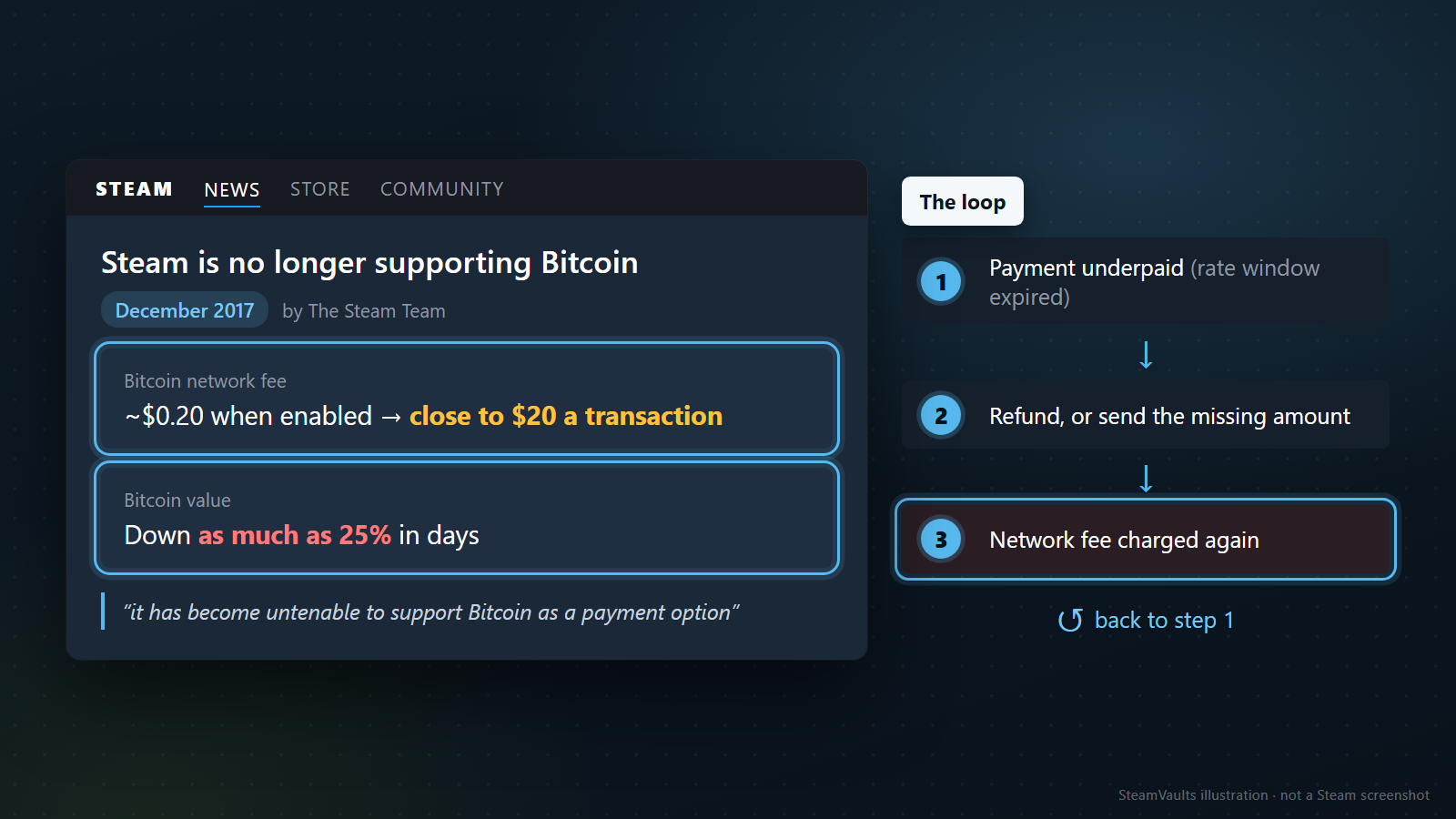
In December 2017 (December 7, Korean time) the Steam Team posted "Steam is no longer supporting Bitcoin". The reasons it gave were high fees and volatility, with two numbers attached.
- Transaction fees that the Bitcoin network charged the customer had climbed all year and reached close to $20 a transaction the week before. When Steam first enabled Bitcoin, the fee was roughly $0.20. Valve added that it has no control over that fee.
- Bitcoin had lost as much as 25% of its value over a period of days.
The two problems fed each other through the way checkout worked. A customer sent Bitcoin for the price of the game plus more Bitcoin to cover the network fee. Bitcoin's value was guaranteed only for a window of time, so if the transaction did not complete inside it, the amount needed could change. Valve's usual fix was to refund the payment or ask the customer to send the missing balance, and either way the customer paid the network fee again. The extra transfer could itself come up short if the price moved while the network processed it.
An invented example using only the notice's numbers, not a real transaction:
1. You buy a $20 game with Bitcoin during the week fees were close to $20. The fee alone is about the price of the game. 2. The transfer misses the guaranteed window, the price drops, and your payment is underpaid. 3. Whether you take the refund or send the difference, a second transfer happens and a second fee is charged. Fees now come close to twice the price of the game, and a short top-up would send you back to step 1.
The notice says that with fees this high it was not feasible to refund or ask for the missing balance, concludes that "it has become untenable to support Bitcoin as a payment option", and adds that Valve may re-evaluate later.
The notice covers Bitcoin only. It says nothing about USDT or any other coin, and this article cannot tell you whether USDT shares those problems. What carries over is the shape: every route below still has a step where coin is converted or moved. At Steam checkout that is selling on an exchange and withdrawing ordinary money; on the code and item routes it is sending coin to a seller or a service. Read the cost and timing of that step on your own exchange or wallet screen.
Three routes, and money only flows one way
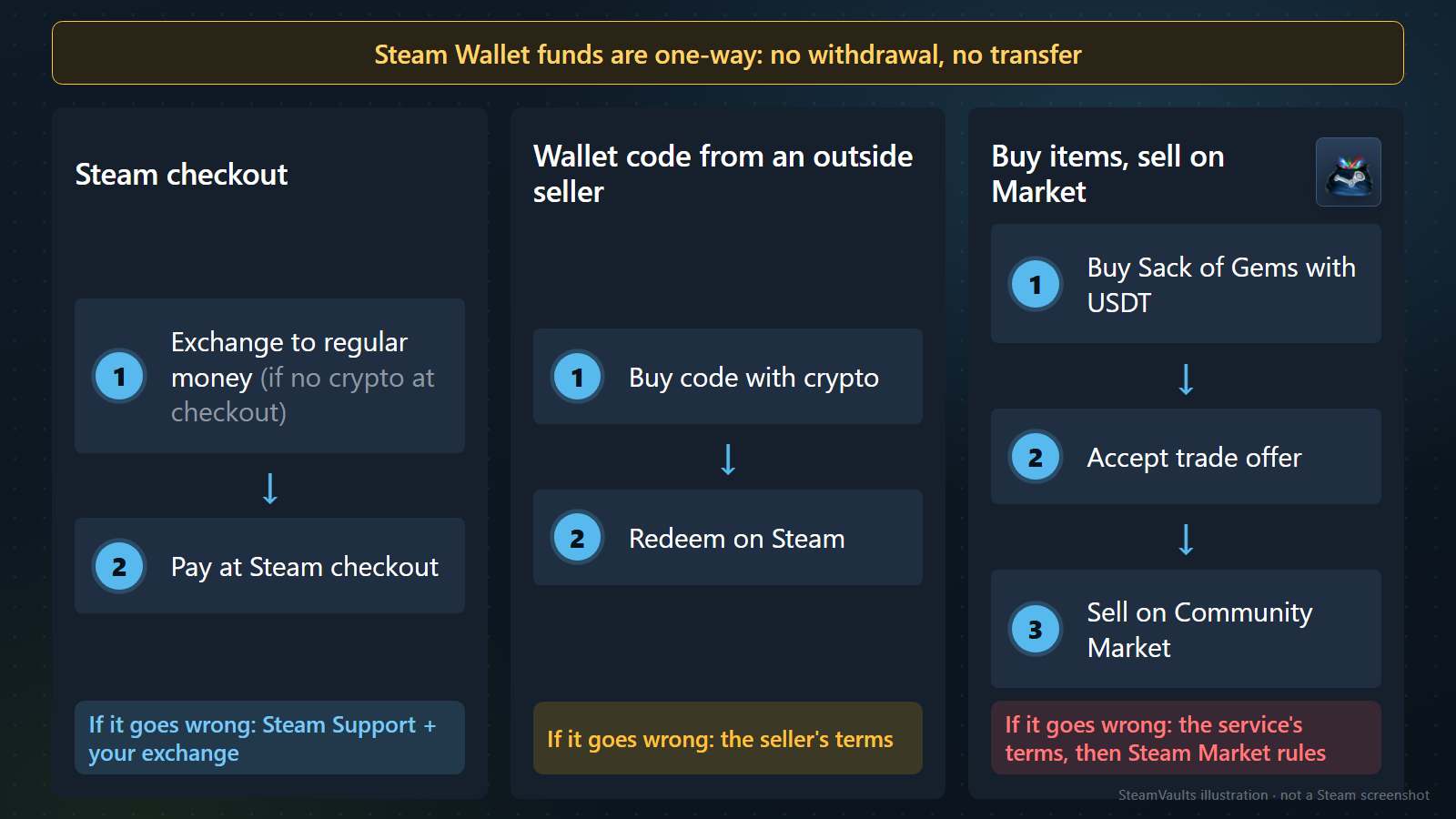
Valve is clear about direction. The Steam Subscriber Agreement describes the Wallet as a prepaid balance, not a bank account or a payment instrument, and says Wallet funds have no cash value and cannot be exchanged for cash. The Wallet FAQ adds that funds cannot be moved, gifted or withdrawn to another account. About the only way back is a refund request within fourteen days for Wallet funds bought on Steam, if none of them were used.
| Route | Steps | If it goes wrong, you rely on |
|---|---|---|
| Steam checkout | If checkout has no crypto, exchange to regular money first, then pay at Steam checkout | Steam Support and your exchange |
| Wallet code from an outside seller | Buy a code with crypto, redeem it on Steam | The seller's terms; Valve handles only redeeming |
| Buy items, sell on the Market | Buy Sack of Gems with USDT from a service, accept the trade offer, sell on the Community Market | The service's terms, then Steam Market rules |
The third route ends in your Wallet because the Community Market FAQ says all Market sales and purchases go through the Steam Wallet. SteamVaults is my example of such a service; I did not look for others built the same way. When comparing, the last column is a better place to start than price.
The wallet-code route: Steam only handles redeeming
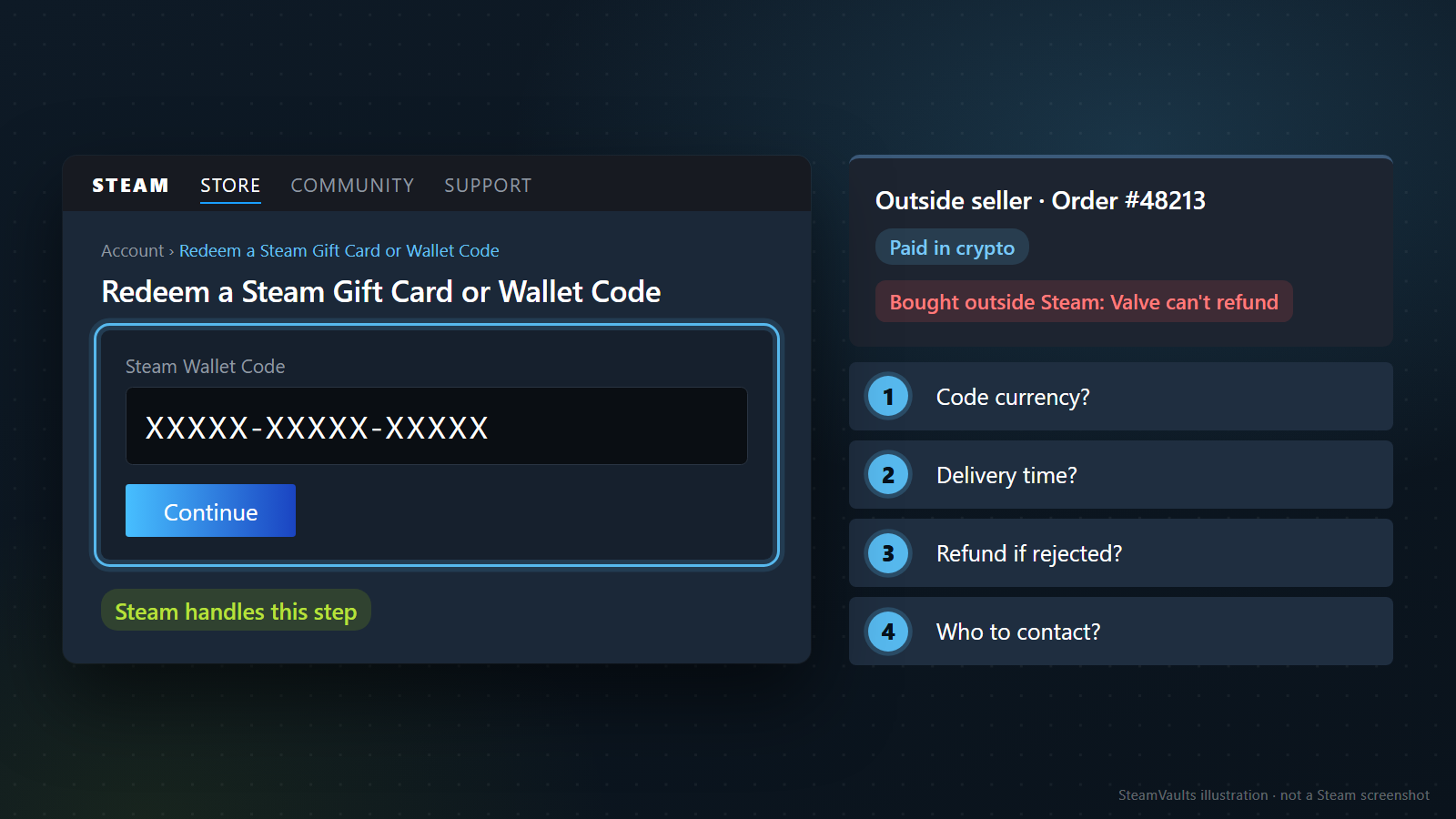
The Steam side is short. Sign in, open the redeem page, type the code into the Steam Wallet Code field and press Continue; the value is added to your balance. The redeem page describes gift cards and wallet codes as working like gift certificates for anything you can buy on Steam. The hard part is buying the code.
Valve says little about sellers. If you doubt a code is legitimate, the Wallet FAQ says to ask the retailer. The Steam Refunds page says Valve cannot refund purchases made outside Steam and names Steam wallet cards bought from third parties as an example. If a code will not redeem, the FAQ says the retailer's activation can take several hours; after several hours you contact Support with a clear photo or scan of the whole back of the card and a matching retail receipt, and Support cannot help with codes printed directly on a receipt. I read those instructions as written for physical cards from shops. A code delivered online may come with no card back to photograph and no such receipt.
The redeem page asks "Where can I purchase Steam Gift Cards and Wallet Codes?" and the only answer under it is a button to Steam's own digital gift cards. No other seller is named. I did not evaluate any seller that takes crypto for codes, and I give no prices or fees for them, because I only quote figures read and timestamped on a seller's own screen.
That narrows the safety net on this route to the seller's terms, in my judgement. Before sending money, get written answers to four questions:
1. What currency was the code issued in? 2. When and how is the code delivered after payment is confirmed? 3. Is there a refund if the code is rejected or shows as already used, and on what conditions? 4. Who do you contact if the crypto payment is wrong or late?
In the illustration these appear on an invented order, #48213, paid in crypto.
Steam also sells digital gift cards, but they are bought at Steam checkout for another account, existing Wallet funds cannot pay for them, and some countries restrict sending or receiving them. A relative or friend could buy one for you while you repay them in USDT; that is an illustration, and the repayment sits entirely outside anything Valve covers.
The Wallet FAQ also says Steam is ending its retail gift-card program and that it expects every retailer to be out of stock by the end of 2026. Cards already sold stay usable, subject to local law, and digital gift cards continue. How this affects online code sellers is not documented. Nor is their delivery time; the only documented wait is the retail "several hours".
The item route: five steps, the last two outside the service
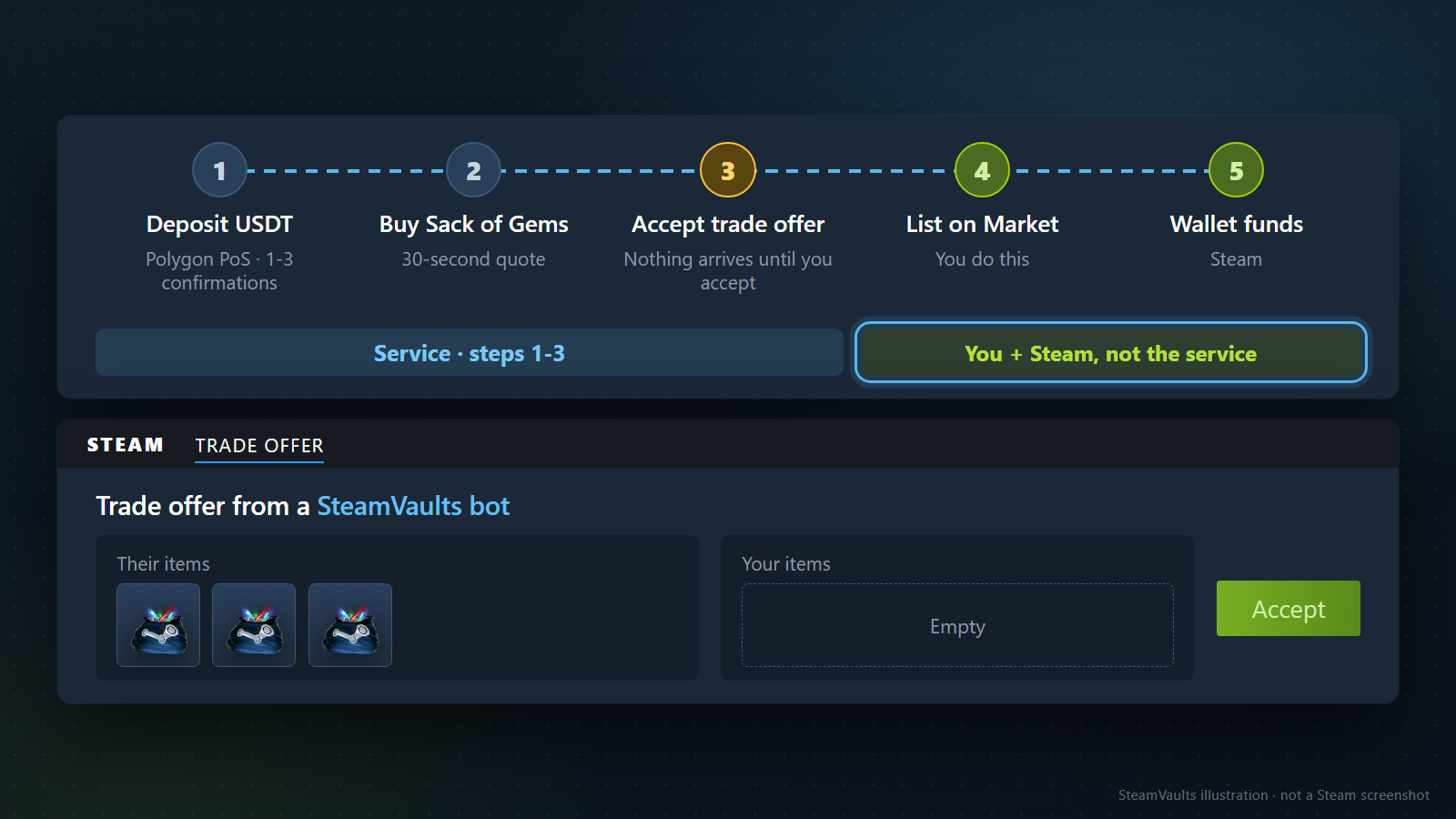
This section describes what SteamVaults' buy page, deposit page, top-up quote screen and terms say. It is the order the pages describe, not an account of using the service.
Start with the name. The buy page's heading calls it a "Steam Wallet Top-Up Route", but the first line under it says buying Sacks of Gems "does not top up your Steam Wallet directly". If Wallet balance is your goal, the page says to list and sell the Sacks you receive on the Community Market yourself, and that Steam fees, restrictions and demand decide the final proceeds and timing. This article goes by that body text.
| Step | Who acts | What the pages say | What they say about time |
|---|---|---|---|
| 1. Deposit USDT | You | Network: Polygon PoS; no site deposit fee shown | Credited after 1 to 3 network confirmations; no time per confirmation given |
| 2. Buy Sack of Gems | You | Sign in through Steam and give a Trade URL; only while stock and a valid quote exist | The total is locked for 30 seconds; that is not a processing time |
| 3. Accept the trade offer | The service's bot sends it, you accept | Nothing reaches your inventory until you accept | No time to arrival given |
| 4. List and sell on the Market | You | Done by you, not by the service | No timeframe; holds and item dates in the next section |
| 5. Wallet funds | Steam | Sale proceeds stay in your Wallet | The Market FAQ gives no single time |
Almost nothing in that last column can be added up. If anyone quotes a total time for this route, ask which cells it adds. I found no sentence promising speed on the service pages I read. For step 4, see how to sell an item on the Steam Market; if an item sold and the money is not in your Wallet at step 5, see Steam Market Item Sold but No Wallet Funds.
Step 1 is where the network matters. The terms say the service is not liable for assets sent to a wrong wallet address or an unsupported network. If your USDT sits on another network, moving it to Polygon is one more step whose cost and time depend on your exchange, and I did not check them.
Failures are covered too. If the price, stock, Trade URL or account checks fail, checkout stops and shows an error. When a queued purchase is marked refunded, its locked USDT returns to your available site balance. The terms say a trade that fails for Steam-side reasons, such as unconfirmed authentication or a trade restriction, is cancelled automatically with no balance change, and that trades settled on Steam are final and cannot be reversed by the service. The buy page also states a cap on how many Sacks one trade can carry.
Check that the service is open at all. The English interface text in the repository includes a notice that "Steam Wallet top-up is paused right now" because the top-up bot is under maintenance and no price can be quoted, and another that "USDT deposits are paused". So the screen can be stopped. Before depositing, see whether the top-up quote screen produces a quote.
A footer on the service pages says SteamVaults is independent of Valve and Steam and that all trades are subject to Steam holds and policies. Steps 4 and 5 are not something the service guarantees. Whether they open on your account is the next section.
Check that your account can use the Market before you deposit
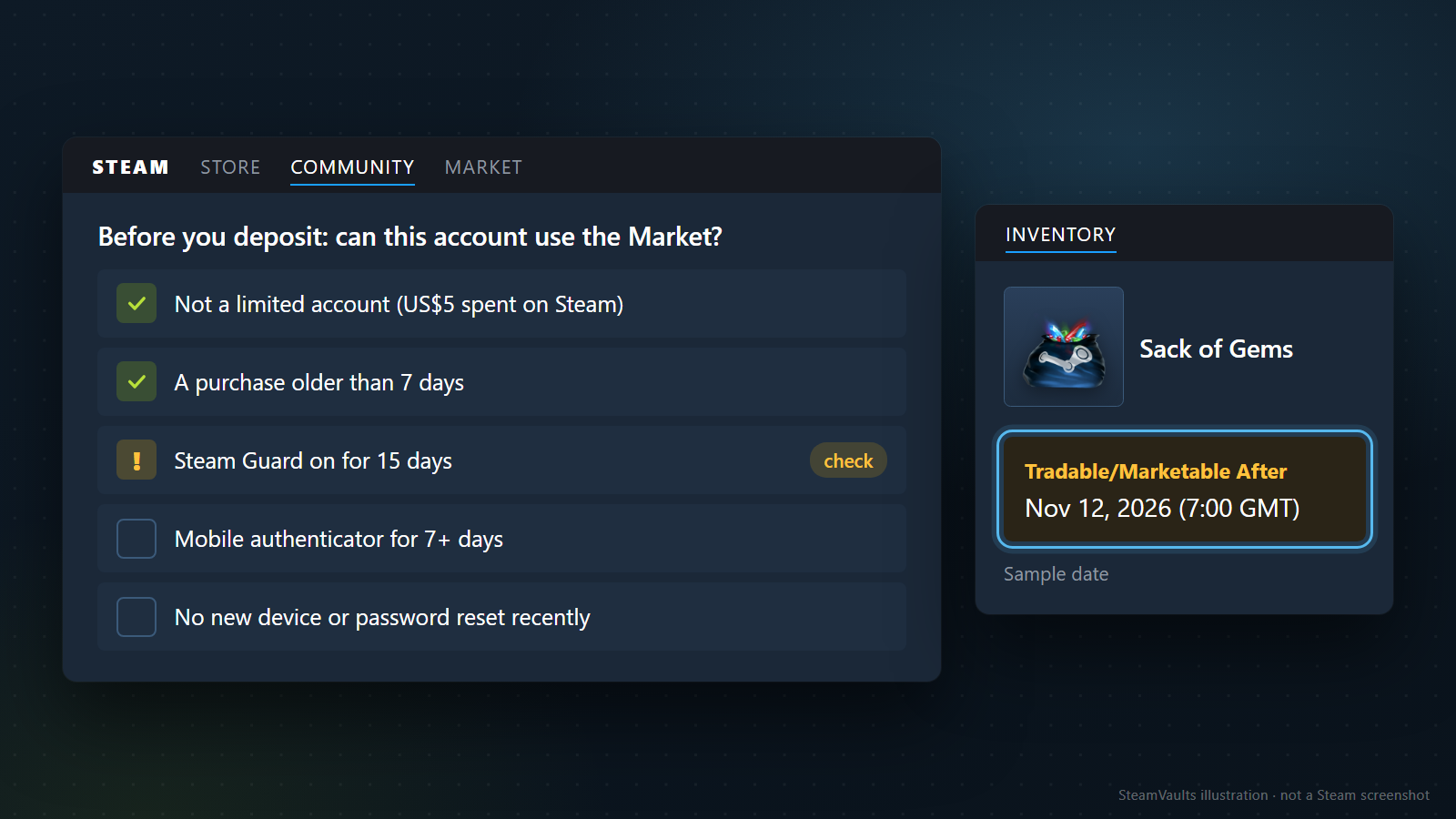
On the item route your USDT has already become Sacks of Gems at step 2. Turning them into Wallet funds at step 4 depends on your Steam account meeting Valve's conditions. If it does not, you can hold the Sacks and still be unable to sell them, so I suggest doing this check before you deposit. The conditions below come from Valve's help pages; Steam Community Market restricted account goes into them further.
Limited accounts. Valve's Limited User Accounts page says accounts that have not spent at least US$5 in Steam are limited and cannot use the Market or trade Steam Community items such as gems. That could stop you as early as step 3, receiving the trade offer. What counts toward the US$5: Wallet top-ups of US$5 or more, Wallet cards of US$5 or more, and game or gift purchases. What does not: received gifts or digital gift cards, and spending funds from items you sold. Spending is tracked in US dollars, converted at the daily rate if your Wallet is in another currency.
Market eligibility. Per the Market FAQ you need a successful purchase older than 7 days but not older than a year, and Steam Guard enabled for 15 days. The Trading and Market Restrictions page says purchases of Wallet funds, games, DLC and software count, while retail CD key activations and gift purchases do not. Neither page says whether redeeming a wallet code counts as buying Wallet funds. If your Wallet was only ever filled with codes, I would ask Steam Support first.
Recent changes to your account. The durations Valve lists:
| What you did recently | What it does to trading and the Market |
|---|---|
| Logged in on a new device | No trading or Market from that device for 7 days, unless a mobile authenticator has been on the account for 7 days |
| Enabled Steam Guard by email less than 15 days ago | No Market for 15 days |
| Removed the mobile authenticator | No trading or Market for 15 days |
| Reset the password through the help site or Support | 5 days; 30 days if the account was inactive for two months. Changing it in settings does not count |
| Funded with a new credit card or PayPal | A 3-day wait before those funds can be used on the Market. A card can be verified with the card verification tool; PayPal cannot be verified |
| Added a mobile authenticator | Trades made in the first 7 days can be held for up to 15 days |
Valve adds that Support cannot modify these restrictions. The last row connects to Steam Trade and Market Holds: without a mobile authenticator for the last 7 days, items leaving your account can be held for up to 15 days, and a market hold is a period after you create a sell listing before the item appears on the Market. Steam Trade Hold vs Market Hold explains the difference. That page describes holds on items moving away from your account, so from its wording alone I cannot tell whether an incoming trade from the bot gets the same treatment. The service's trade-holds page is written for the selling direction and does not say either.
Dates on the item. The Market FAQ says items bought in-game or on the Market may not be tradable or marketable until the date shown on the item. Open the Sack in your inventory and read the line yourself; in the illustration it reads "Tradable/Marketable After Nov 12, 2026 (7:00 GMT)", a sample date. Why Your Steam Item Is Not Tradable or Marketable lists the causes. The service's purchase flow does not say whether Sacks received by trade carry a restriction, so the text on the item is what counts.
Already holding Sacks with no Market access? The SteamVaults terms list buying Sacks of Gems for USDT site balance among the services. Its trade-holds page says only Sacks marked tradable on Steam can be quoted, and whether that buyback is open shows only in the quote at that moment. Buy and sell prices differ, so do not assume selling back returns what you paid. For a single view of your account, the service's readiness check says it automatically checks account restrictions and hold signals after you sign in through Steam. It is also the operator's own screen, so Steam's own indicators remain the reference.
Where the costs arise, and what the quote screen's saving measures
No source lets me put the three routes' costs on one line. What I can do is show where each route incurs cost and whether any document says how much.
Steam checkout: the amount on the checkout screen goes into your Wallet, and the exchange and withdrawal costs before it belong to your exchange, which I did not check. The Wallet FAQ says new funds normally appear automatically and to contact Support if they have not appeared more than two hours after purchase. Two hours is when to start asking, not a promised processing time.
The item route has four places where money goes:
- The transfer. The deposit page shows no site deposit fee. Whatever your exchange or wallet charges to send is on its own screen.
- The service's price gap. The terms and the how-it-works page set a target gap between buy and sell prices of 0.005 USDT per Sack of Gems, say the actual gap may be larger because of stock cost and required reserves, and say the quote shown before you confirm is what applies, with no separate trade fee. The trade-holds page says this gap is separate from the gap to the Steam reference price. So 0.005 USDT is not your whole cost. The difference between what you pay and what you receive on the Market lies outside that target, and I have no basis for saying how large it is. An earlier SteamVaults post, Why SteamVaults Started with the Mann Co. Supply Crate Key, mentions a 2% base spread as an early-design starting point and does not promise a quote at any given time. The current terms say 0.005 USDT, and this article follows the terms.
- The Market fee. The Market FAQ gives a 5% Steam Transaction Fee (minimum US$0.01), paid by the buyer and shown on the confirmation page before purchase. Its game-specific fees are 10% for Team Fortress 2, Dota 2, Counter-Strike 2 and Artifact. The Sack of Gems listing describes it as a Steam Community Item, which is not one of those four games, and the FAQ lists no game fee for it. The listing screen shows what the buyer pays and what you receive separately, so that screen, just before you sell, is the reference. The Steam Market fee calculator says the same about the final confirmation screen. Steam Sack of Gems Trading Fees: Buyer Price vs Seller Proceeds explains who pays what.
- Selling now or waiting. The Market FAQ explains that buy orders let a seller take a lower price immediately or list higher and wait. The price can move between receiving and selling (see Sack of Gems Price: What Moves It), and completed Market transactions cannot be reversed or refunded.
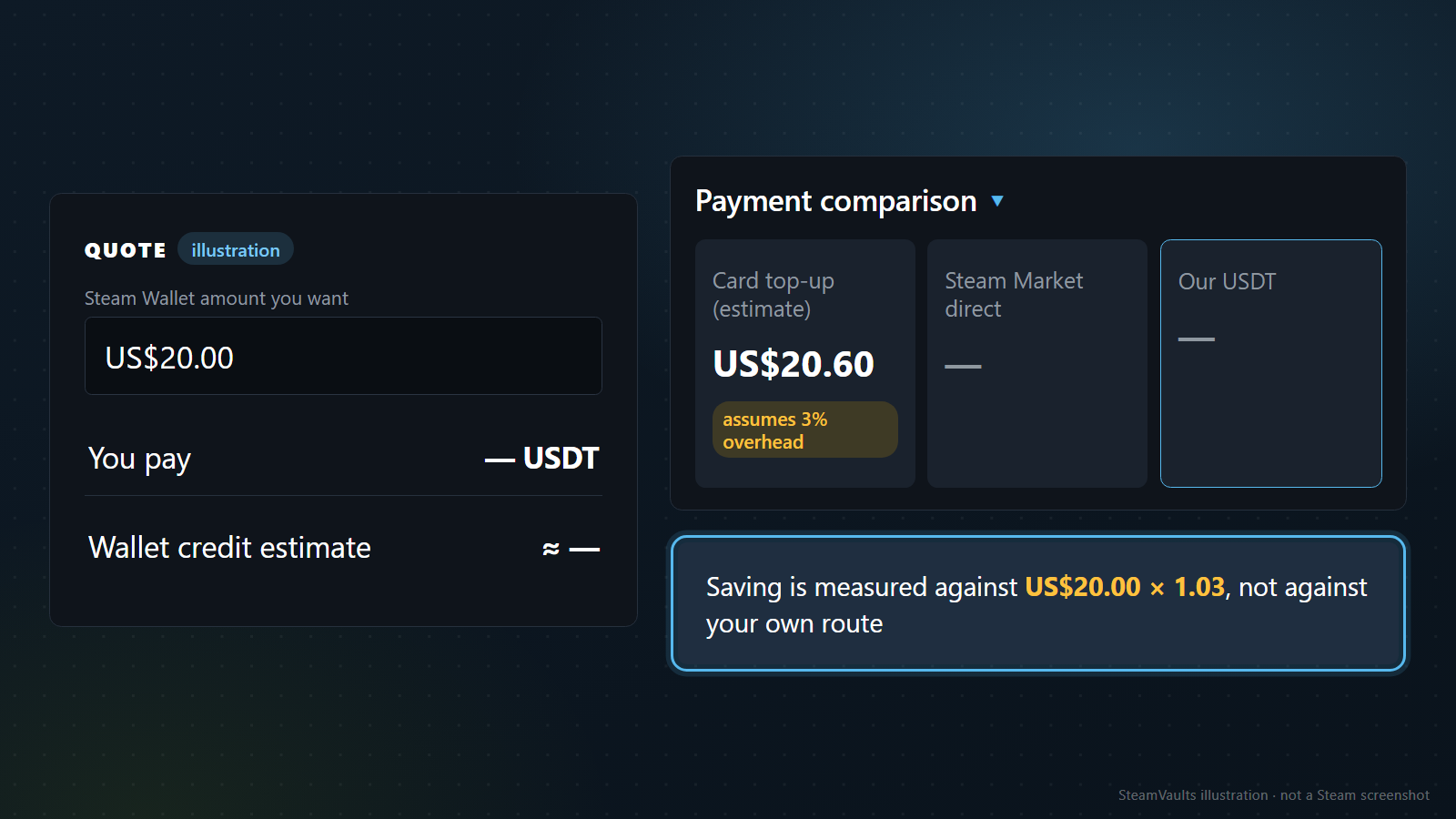
The SteamVaults top-up quote screen works like this. You enter the Steam Wallet amount you want; it shows the USDT to pay, a Wallet credit estimate marked with an approximately sign (≈), a savings line, and a collapsed "Payment comparison". Expanded, that has three columns: "Card top-up (estimate)", "Steam Market direct" and "Our USDT". The card column carries a note that the example "assumes 3% card top-up overhead, not a fixed fee; actual cost varies by country and payment method".
The repository code shows what the saving measures. The card column is the target amount you typed multiplied by 1.03 (a constant named CARD_TOPUP_OVERHEAD, 0.03). The savings percentage is the card column minus the USDT to pay, divided by the card column. With an illustrative US$20.00 target, as in the image, the card column is US$20.00 × 1.03 = US$20.60, and the saving compares that US$20.60 with the USDT to pay. The card column stays based on US$20.00 even when the expected Wallet credit comes out lower.
The middle column comes from the same code. "Steam Market direct" is the reference total a Market buyer would pay for the same Sacks, and its "after fee" percentage is the share lost between that total and the expected Wallet credit. It measures the distance between what Market buyers pay and what you would receive after selling. It is not a price to set against the USDT amount, and within what I checked there is no way to buy on the Market with USDT anyway, so it is not an option you could pick. If the USDT figure looks smallest of the three, that is because three different things are set side by side.
That is why this article does not use the screen's saving as evidence that the crypto route is cheaper. The 3% is the operator's assumption, not a Steam figure and not your card's actual cost. To use the screen for a decision, swap in three things. Replace the 3% baseline with the total cost of the alternative you would really use, such as exchanging on your own exchange and paying at Steam checkout. Treat the Wallet credit estimate as an estimate that assumes the Sacks sell. And add what the screen leaves out: the cost and time of moving USDT to Polygon, plus the account conditions and holds from the previous section.
Wallet currency, eligibility and the balance limit
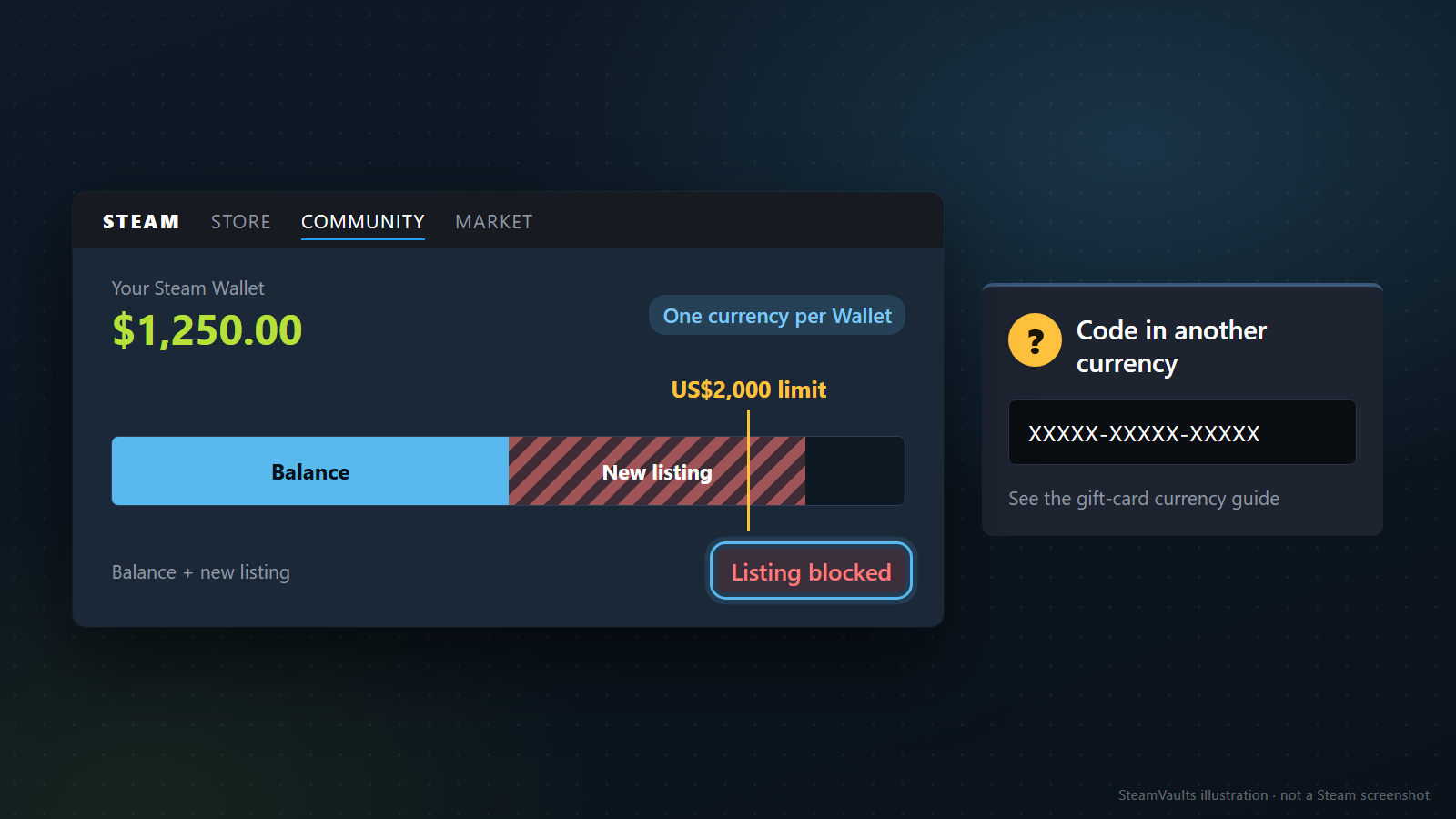
A Steam Wallet has one currency. Per the Wallet FAQ, an account that never had a balance may be asked for an address to set the currency, and an existing Wallet receives funds in its current currency regardless of the balance. On the code route that makes the code's currency the question, which the gift-card currency article linked above covers. On the item route, the Market FAQ says sellers list in their Wallet's native currency, buyers see prices in theirs, and cross-currency listings use a daily exchange rate. If your local currency does not show on the Market, the FAQ says the likely reason is that the Wallet was never funded, so a brand-new Wallet may need its first funds from one of the other two routes.
The service has eligibility rules of its own. Its terms require users to be 18 or older, to live where buying and holding crypto is legal and outside sanctioned regions, and to be the real owner of a Steam account that complies with Steam's terms. A VAC ban, trade restriction or community ban can lead to suspension or termination. Whether crypto trading is legal where you live is yours to check.
Then the limit, detailed in Steam wallet limit. The Subscriber Agreement caps your Wallet balance plus what you spend within 24 hours at US$2,000 or the local equivalent, says deposits above that may not be credited until activity drops, and lets Valve change limits with email notice. The Market FAQ adds that a listing which would push your balance over the limit is blocked; the illustration shows a sample $1,250.00 balance where a new listing would cross US$2,000. Neither document says what happens to a wallet code redeemed while you are over the limit. For large amounts, splitting them up looks like the safer choice.
What to check, in order, before you pay
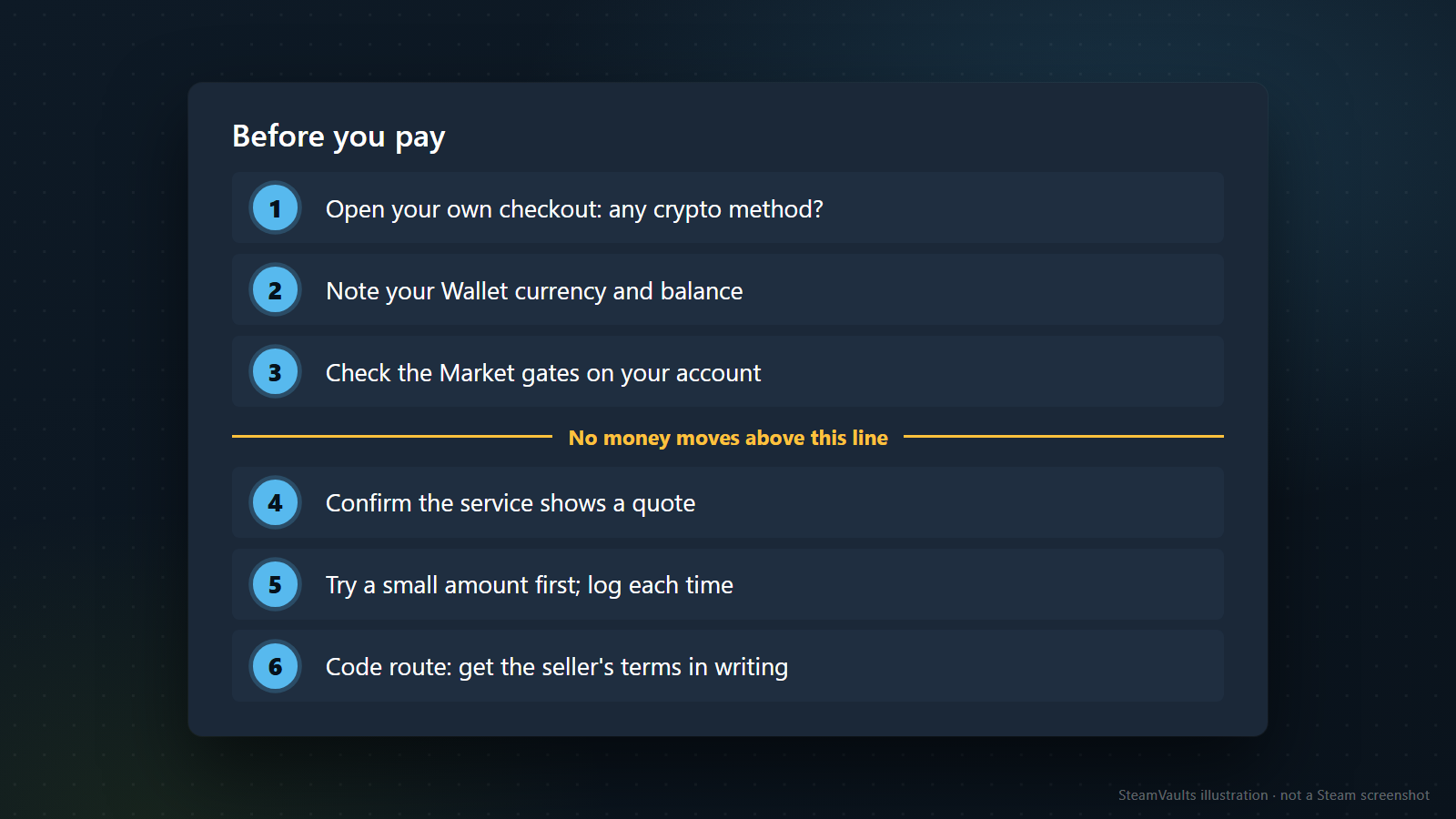
What decides the route is your account's state, your Wallet currency, whether you can trust a seller, and whether you are willing to sell on the Market yourself. The first three steps below cost nothing; no money moves until step 4.
1. Open your own signed-in checkout and read the payment-method list. Whether crypto appears is the whole answer for the first route. 2. Note your Wallet currency and balance. The Wallet FAQ says the balance shows at the top right of the page, next to your profile name, once you are signed in. 3. Check the Market gates on your account one by one. If any applies, put the item route off until its date has passed. 4. On the item route, confirm the service's quote screen shows a quote, and compare it with your own alternative's total cost instead of the 3% assumption. 5. Try a small amount first, and log the time of each stage: deposit, trade offer, item date, listing, sale, Wallet credit. Before accepting the trade offer, check the sender, the items and the quantity; How to Sell Steam Sacks of Gems and Steam Trade URLs: Is It Really Safe to Share One? have the details. The small first run is my recommendation, not something any document instructs. 6. On the code route, get the seller's four answers in writing, and when the code arrives, check its currency before redeeming.
What this article could not confirm: whether a signed-in checkout lists crypto, any code seller's prices or reliability, exchange fees, the service's processing time, how much is lost selling Sacks on the Market, whether a code-funded Wallet satisfies the Market purchase requirement, and whether Sacks received by trade carry a restriction. Any one of these can change the answer for you. Funds you add do not come back out, so settle on the amount you need first.