
Steam Market Item Sold but No Wallet Funds: Pending, Paid or No Sale?
Your Market item sold but the Wallet balance did not change. Check the sale record and receipt, then sort it as no sale, paid, pending or unexplained.
Article languages
On this page
An item left your inventory, or a "your item has sold" email arrived, and the number next to your profile name has not moved. The usual advice is to wait. Before waiting, it is worth knowing what you are waiting for, because "pending", "already paid", "never sold" and "something is wrong" are four different situations, and only one of them is solved by time.
The Valve help pages I read for this article never use the word "failed" for a Market sale, and none of them says that sale proceeds can be held. So the question "is it pending or has it failed?" cannot be answered from a policy table. It has to be answered from your own records, by sorting them into one of four outcomes: no completed sale, a normal credit, a pending sale, or a case the documents do not explain. This article gives the order for that sorting and a rule for when to wait and when to write to Steam Support.
The site already has a post that touches the same ground: Steam Wallet Funds Missing? Check the Transaction. Its section The item sold, but the proceeds are pending tells you to find the sale record and read the notice, Include money spent since the transaction walks through a balance calculation, and Send Support the story of one transaction is a template for a ticket. This article adds the four-way split, a rule for waiting, and the point at which a passed release time becomes a reason to contact Support. If the problem is a top-up that never showed up, that post is the one to read.
I read Valve's Market FAQ, its pages on holds, restrictions, confirmations, the Wallet and the Mobile Authenticator, the Support site's Market topic and the Steam Subscriber Agreement on October 27, 2026. I have not sold anything for this article, and the signed-in Market history screen was closed to me. Everything about held sale proceeds comes from forum posts, two of which quote a notice, and I say so each time. The diagrams are explanatory, not screenshots.
Four signals that a sale happened, and what each one proves
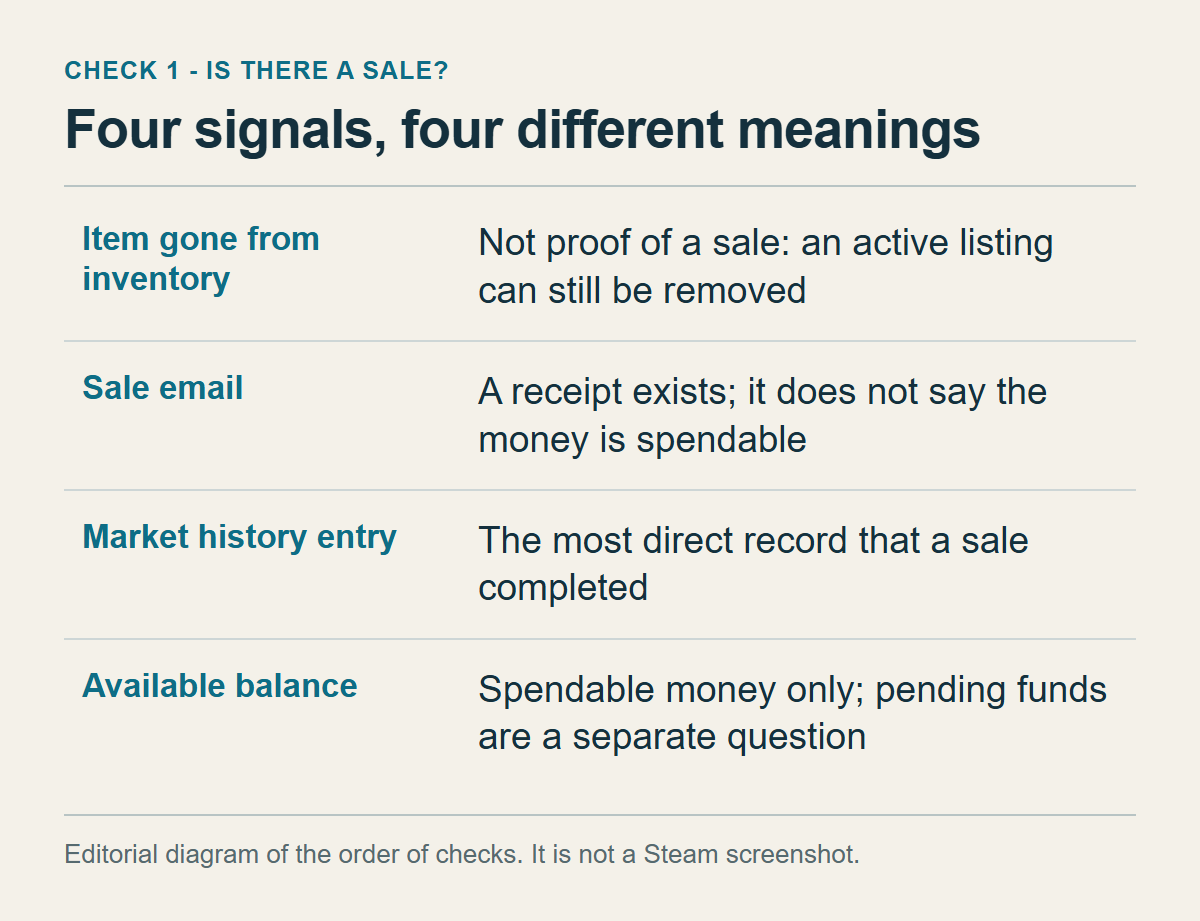
People say "it sold" because of one of four things. The item vanished from the inventory, an email arrived, the Market history shows an entry, or the Wallet number changed. They are not equal evidence, and which one you have decides where to look next.
A missing item proves least. Valve's Market FAQ says all your current listings are shown at the top of the Community Market home page, and that any listing can be removed with the Remove button until someone buys it. An active listing is therefore not a sale, however your inventory looks. How a listed item appears in the inventory view is not described in any source I read, so "it disappeared, so it sold" is an inference that should stop there.
The email is a receipt, and Valve says one is emailed for every Market transaction. A receipt tells you a transaction was recorded. It does not tell you the money is spendable, and the notice discussed later was reportedly part of a sale email. Treat an email as a prompt to look. The proof is in the history, so open Steam yourself and find the same sale there instead of following links in the message. Valve's Mobile Authenticator FAQ warns that look-alike addresses are in use, and my inference is that a fake "your item sold" message would be an easy way to get you to click.
The history is the most direct record that a sale completed. Valve says Market history is available at the top of the Market home page and on the Account Details page of the Steam Store. On the Support site, the Community Market topic has an option for seeing your Market activity, and it leads to the Market history tab.
The balance is the last signal to read. Valve's Wallet FAQ says the current available balance is shown in the upper right corner, next to your profile name. The important word is "available". If that figure has not changed, the money may be absent, or it may exist and be unavailable for now, and the figure alone cannot tell you which.
So read in this order: history first, then the receipt, then the balance. With no history entry and no receipt, no completed sale is on record and the next section applies. With an email but no history entry, suspect the email before you suspect Steam.
Until the state is clear, do not relist the item and do not buy a replacement to cover the shortfall. That is my judgment, not a Valve instruction. Acting on an unknown state mostly adds more records to reconcile later.
No buyer yet: confirmations, holds and restrictions come first
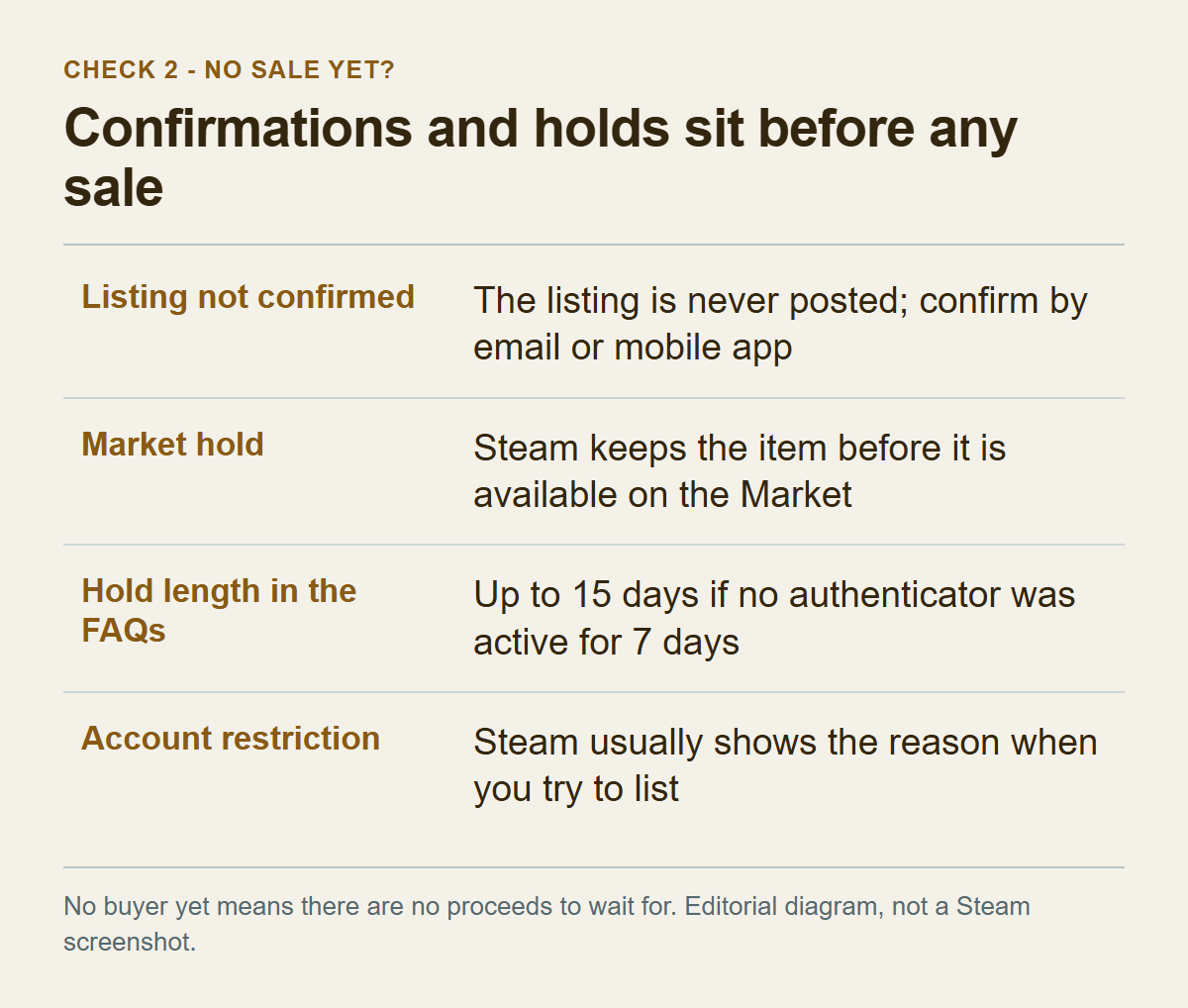
If neither the history nor your receipts show a sale, there is no money to wait for. The listing may have stopped earlier, and the site's Steam Trade Hold vs Market Hold post covers that ground. It diagnoses a status in seven steps that begin with the action you attempted and the item's Tradable and Marketable dates. This article starts from a different question, whether a sale record exists, so the order differs. If your item never appeared on the Market, follow that post's steps. I only cover where the paths fork.
An unconfirmed listing is never posted. Valve's confirmations FAQ says a Market listing has to be confirmed by email or in the Steam Mobile App (the app, if you use a Mobile Authenticator), and that an unconfirmed listing is not posted. Check the app and your inbox for a request that is still waiting.
A Market hold concerns the item, not the payment. Valve's Trade and Market Holds FAQ describes it as a period after you create a sell listing during which Steam keeps the item before it becomes available on the Market. No buyer exists during that period, so there are no proceeds either. By Valve's wording, if your account has not been protected by a Mobile Authenticator for at least the last 7 days, items leaving it are held for up to 15 days. The finer conditions (listings created before an authenticator was added, or within its first 7 days, are held; listings created later are not; adding an authenticator does not shorten holds that already exist) are explained in Why Steam Trades Are Held for Up to 15 Days and What to Check. Counter-Strike 2's separate protection is covered in the not tradable or marketable post.
An account restriction means the sale never started, which is different from a sale that failed. Valve's Trading and Market Restrictions FAQ says the reason is typically shown when you try the action on the Market. Which restrictions exist is laid out in the not tradable or marketable post.
Last, a listing nobody has bought is not a sale. If it sits at the top of the Market home page, you can remove it, and if the item is still in your inventory the sale simply did not happen. On any of these branches, the Wallet is the wrong place to keep looking.
Copy these fields from the history and the receipt
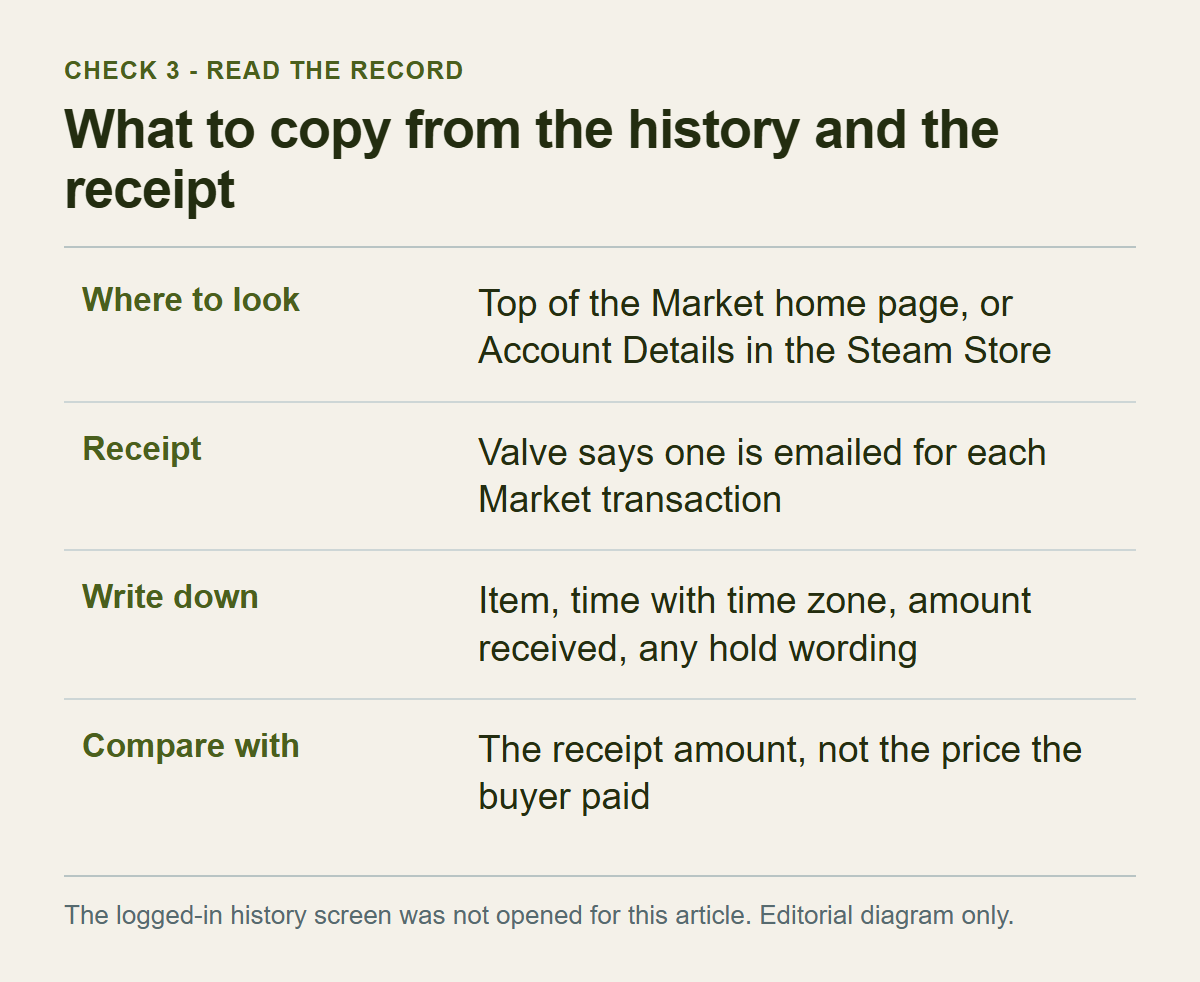
Once a sale is confirmed, the history entry and the receipt become the reference for every later decision. Valve says the history is at the top of the Market home page and on the Account Details page of the Steam Store, and that an email receipt is sent for each Market transaction. Write down six things: the item name, the transaction time with its time zone, the amount received from the receipt, the status wording the history shows, the time the email arrived, and, if the history also shows what the buyer paid, that figure.
Nothing guarantees that the email, the history and the Wallet record use the same time zone, so add a note saying which one you read, and add the date if the sale crossed midnight.
Compare the Wallet with the receipt's received amount. What the buyer paid and what you receive can differ because of fees: Valve's Market FAQ says the buyer pays the Steam Transaction Fee and lists game-specific fees, and the Subscriber Agreement says fees in a Subscription Marketplace are disclosed before a transaction is completed. The calculation itself is in How Steam Market Fees Work.
Copy the status wording exactly as it appears. In a Steam discussion thread begun on April 26, 2023, a user wrote that a sale email had arrived about six hours earlier, that the Market sales history showed "pending", and that the Wallet held no new money. I have not seen the history screen, so I cannot say the same word appears in the same place for you, or in your language. Do not paraphrase. Write down the characters you see and the time you read them. When you later write to Support, that quoted text and its time stamp are the most useful evidence you have.
A history entry with no status word does not rule out a pending sale. Draw no conclusion from it yet and move on to the Wallet.
The balance in the corner is the available balance
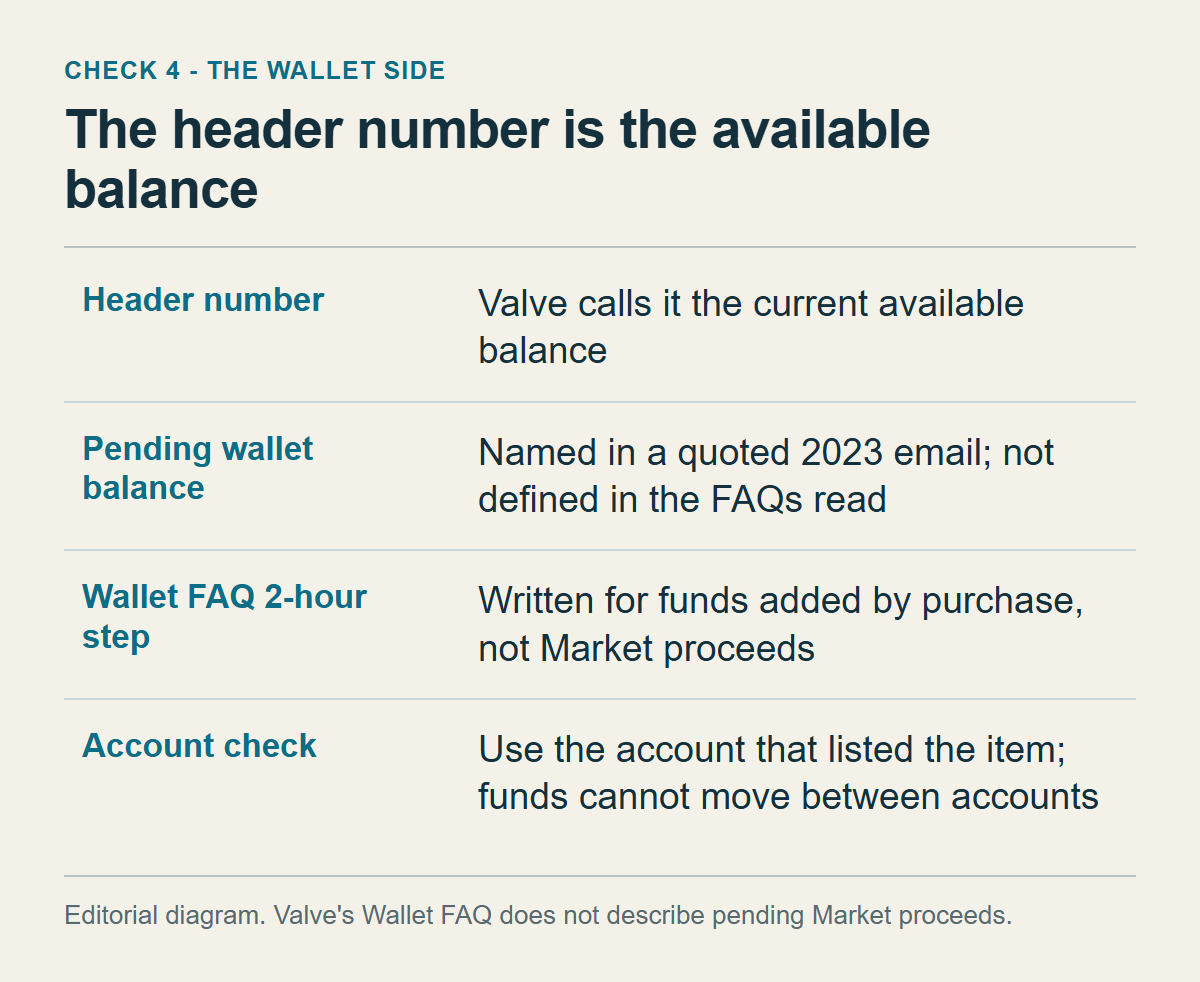
Valve calls the number beside your profile name the current available balance. The email text that users quoted in forum posts (one from April 2023, a similar one from September 2024) says the funds from a held sale are "included in your pending wallet balance". The FAQs I read do not define that term. That makes two names for two figures, and an unchanged header number is consistent with both "paid" and "pending".
Where a pending balance is displayed is not described in any Valve page I read. User reports point in two directions. A comment in the 2023 thread mentions a note of 1-2 days in the Wallet transactions, and a reply in a July 2024 thread says the Account Details page shows how long. Both are one person's report, so for your own account the only way to know is to open those screens.
Do not carry the Wallet FAQ's top-up routine over to Market proceeds. Its steps (check the emailed receipt, confirm you are signed in to the purchasing account, restart the client, contact Support if the funds are still missing two hours after the purchase) are written for funds you add by buying them. Nothing I read gives a two-hour threshold for sale proceeds, and trying those steps will not tell you whether a sale is pending. The top-up case is handled in For a completed top-up, check the account on the receipt.
If you have more than one Steam account, check that you are looking at the one that listed the item. Valve says Wallet funds cannot be moved or gifted to another Steam account, and the Market FAQ says Market funds cannot be withdrawn or transferred to another account or to a bank or third-party account. Can You Transfer Steam Wallet Balance to Another Account? goes through that limit.
An unchanged header number leaves three possibilities. The proceeds may be sitting in a pending balance. They may have been credited and then offset by something you bought in the meantime. Or no credit can be confirmed at all. To rule out the second, compare the balance just before the sale with what you spent afterwards; the wallet post linked above has a worked example. For the question in front of you, only one distinction matters: is the receipt's amount inside the available balance, or is it labelled as waiting somewhere else?
The hold notice exists only in quoted forum posts
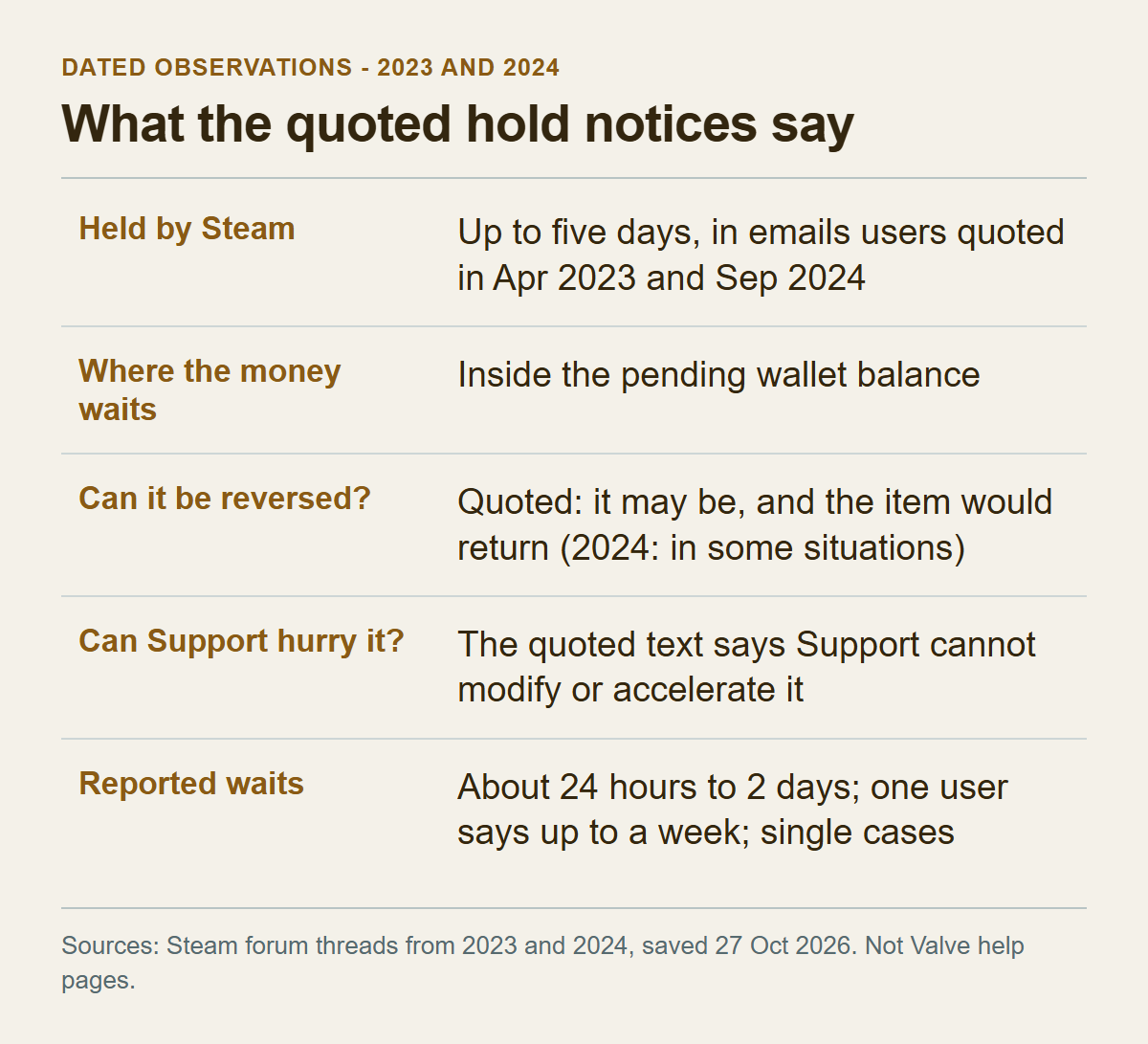
Nothing in the Valve pages I read says that Market sale proceeds can be held, or for how long. Those pages are the Market FAQ, the holds FAQ, the Mobile Authenticator FAQ, the restrictions FAQ, the confirmations FAQ, the Wallet FAQ and the Subscriber Agreement. The Support site's Community Market topic, as it appears when you are not signed in, lists four options and none is about missing proceeds. An absence from those texts is a limit of my reading and does not prove that Steam never holds proceeds.
Users have run into the situation anyway, and some copied the notice they received. I saved copies of those forum threads on October 27, 2026. On April 30, 2023, a user in a Steam discussion thread pasted what was said to be the sale email. By that text, the purchase price for the item is "unusual", and the funds are "held by Steam for up to five days", during which they are "included in your pending wallet balance". The text adds that the transaction "may be reversed and the item returned to your Steam Inventory", and that "Steam Support cannot modify or accelerate this process". I could not check the original email.
The wording came up again about sixteen months later. A different thread, from September 14, 2024, has a user pasting a nearly identical email. The "unusual" price, the five days and the pending wallet balance are the same. The reversal sentence is different: "In some situations, Steam Support may reverse the transaction and return the item to your Steam Inventory." Both are user transcriptions. Neither is a Valve help page, and I do not know what Steam's email says now. I therefore treat them as what they are, notices that users quoted in 2023 and 2024, and not as a rule about Market proceeds.
The SteamVaults wallet post cites that same September 2024 thread. It also calls the email a historical text copied by a user and not a Valve announcement. So the two posts rest on the same user-copied wording, and the only difference between them is emphasis.
The quoted reason, an unusual price, did not match everyone's experience. In the 2023 thread, one user wrote on May 10 about a pending sale of a 4-dollar skin sold at market price. On May 16 another asked why a foil card sold at its asking price counted as unusual. On May 11 a user reported three trading-card sales stuck for 2 days. In a thread started on July 10, 2024, a comment from September 26 says sales to buyers paying in a low-value currency go to pending, and another user in that thread disputed this and gave a different explanation. Those are theories and personal observations, and none of them can tell you which sales get held.
The reported durations are scattered too. The quoted email says up to five days. Users in the 2023 thread describe a note of 1-2 days (April 27), money arriving after about 24 hours (May 17) and sales stuck for about 2 days (May 11). A July 2024 poster said the Account Details page showed 1-2 days, and in the September 2024 thread a commenter wrote that it most often takes 1 or 2 days but can take up to a week. Each of these is a single case, and none can serve as a forecast for your sale. Five days is the ceiling written in one quoted email. It is no proof that your sale has the same ceiling.
The reversal sentence matters. If the quoted text is accurate, a held sale can end in two ways: the money reaches your available balance, or the transaction can be reversed and the item returned. That is my reading of the quotation, and the documents do not say when a reversal happens. It does suggest looking at the inventory as well as the Wallet once the stated time has passed.
For planning, a judgment of mine: do not commit Market proceeds to a purchase with a deadline. A user with the same display name made the same remark in both 2024 threads, but this is advice about handling money that may be held and it is not a documented fact.
On Support's role: the quoted email says Support cannot modify or accelerate the process. Valve's restrictions FAQ does say Support cannot modify trading or Market restrictions, but that sentence concerns restrictions and I do not stretch it to cover held proceeds.
Four questions that separate pending, paid and no sale
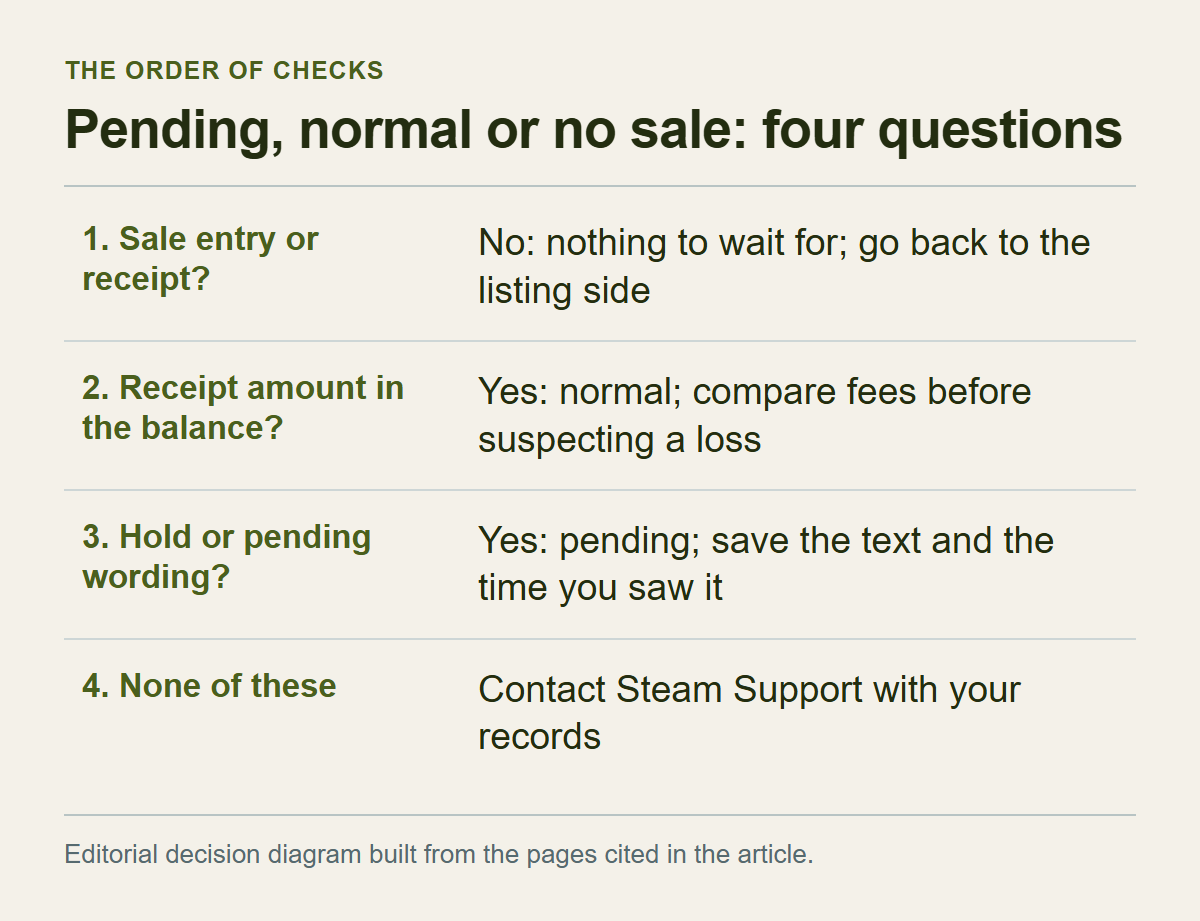
The documents give you two firm points. Either the sale never completed, or it completed, and Valve's Market FAQ says all purchases are final and that you have no right to a refund or a reversal of any Community Market transaction once it is completed. Nothing I read describes a state in which the item and the money are both gone and the sale is simply cancelled. The only place a reversal appears is in the user-quoted notices, where it is something Steam may do and not something a seller can choose. Rather than hunting for a "failed" verdict, I ask four questions in order:
1. Does the history or a receipt show a completed sale? If not, there is nothing to look for in the Wallet. Go back to the listing side: a waiting confirmation, a Market hold, an account restriction, or an unsold listing. If yes, go to question 2. 2. Is the receipt's received amount in the available balance? If it is, the payment is normal. When the numbers still do not match after you allow for spending since the sale, first check whether you compared against the receipt's received amount, which has fees taken out, and not the price the buyer paid. A gap of that kind is normal. 3. Is there any wording that means hold or pending, in the history, the email or the Wallet? If the notice exists, classify the sale as pending, and save its wording and the time you saw it. When the notice names a time, check again then. A pending sale is a state in progress, and there is nothing to do until that time. 4. If none of the above applies, the sale completed, no hold wording exists, and the available balance has not changed. The documents do not explain that. Do not guess at a cause. Gather the records and ask Support, as described in the last section.
I put the questions in this order because the cheap ones with clear answers come first. The history entry is there or it is not, and receipt versus balance is a comparison of two numbers. Searching several screens for hold wording is slower and the result can be ambiguous, so it comes third. The wallet post reads the notice first and does the arithmetic second. I reversed that only because comparing two numbers costs less. Both orders check the same two facts, whether the receipt amount is inside the available balance and whether hold wording exists. The four-way split is the part this article adds.
An invented example, not an account record or a real transaction: a sale email arrives on a Tuesday at 23:40. The history shows the sale, the receipt's received amount is 1,000 won, the available balance has not moved, and the email contains a paragraph saying proceeds are held for a period. Question 1 is yes, question 2 is no, question 3 is yes, so the sale is pending. If the same case came without the hold paragraph, and no other screen showed a waiting marker, it would drop to question 4.
If you classified the sale as pending, keep the ending open both ways. The money may reach the available balance, or, going by the quoted text, the transaction can be reversed and the item can come back. If the time passes and you see neither, you are in the same position as question 4.
If the sale is not yours, stop waiting
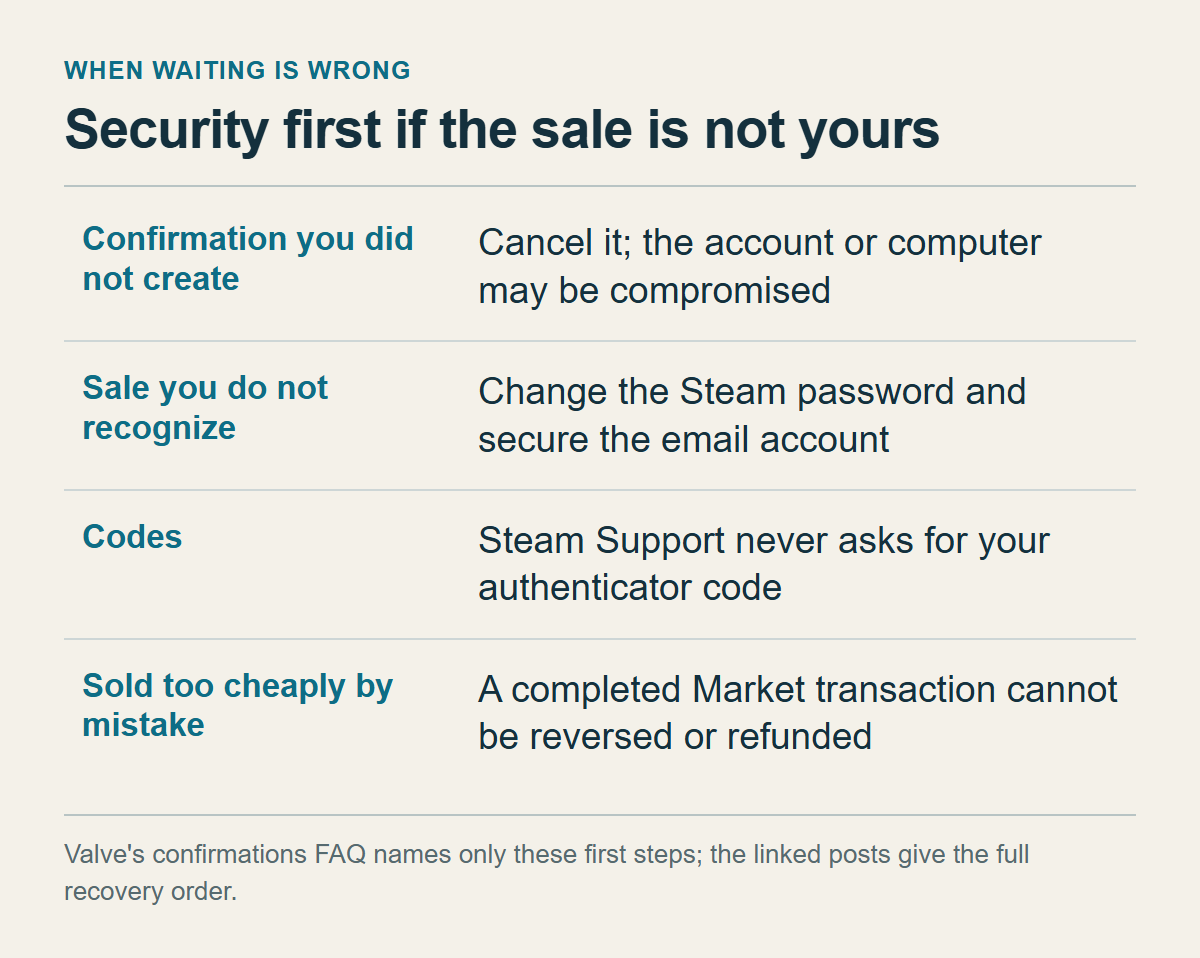
The four questions assume the sale was yours. If it was not, waiting is the wrong response.
For a confirmation request in the app or the mailbox that you did not create, open it and cancel it. Valve's confirmations FAQ gives only first steps: it warns that your account or computer may be compromised, and tells you to change your Steam password, to consider changing your email password too, and to contact Steam Support if you cannot sign in. The fuller order is in two site posts: If an outgoing offer was not created by you in the trade safety checklist, and What to do if your trade is on hold right now. I will not invent a third order here.
The same reasoning applies if a sale email shows up for something you do not remember listing. Emails can be forged, so look in the Market history after signing in yourself. If the sale is there as well, you have a reason to suspect the account. Take the same steps as for the confirmation request above: change your Steam password, consider changing the email account password too (Valve's wording in the confirmations FAQ), and contact Steam Support if you cannot sign in.
Cancelling and the seven-day cooldown are not the same thing. The 7-day trading cooldown that Valve documents applies when you cancel an accepted trade that is on hold. I found no equivalent description for a Market listing or a completed sale. The things I could confirm you can cancel here are a confirmation request you did not create and a listing that has not sold. How to cancel a sale that has already happened, while it is held, is not described in the pages I read.
Regret over a price that was too low works the same way. A hold marking is no evidence that the sale can still be undone. Valve's Market FAQ says no refund or reversal of a Community Market transaction is available once it is completed. A hold notice is about when you get paid and does not give the seller a cancel button.
Anyone who asks for an authenticator code or a recovery code, or tells you to install a program in order to release a hold, is not Steam Support. Valve's authenticator FAQ says Support never asks for your codes, and the 15-day post has a section on this, Can Steam Support or a tool remove a hold?. If you suspect theft, the Support site's Items topic has an option titled "My items are missing or stolen". The procedure behind it needs a signed-in session, and I did not open it.
Wait or contact Support, and what to send
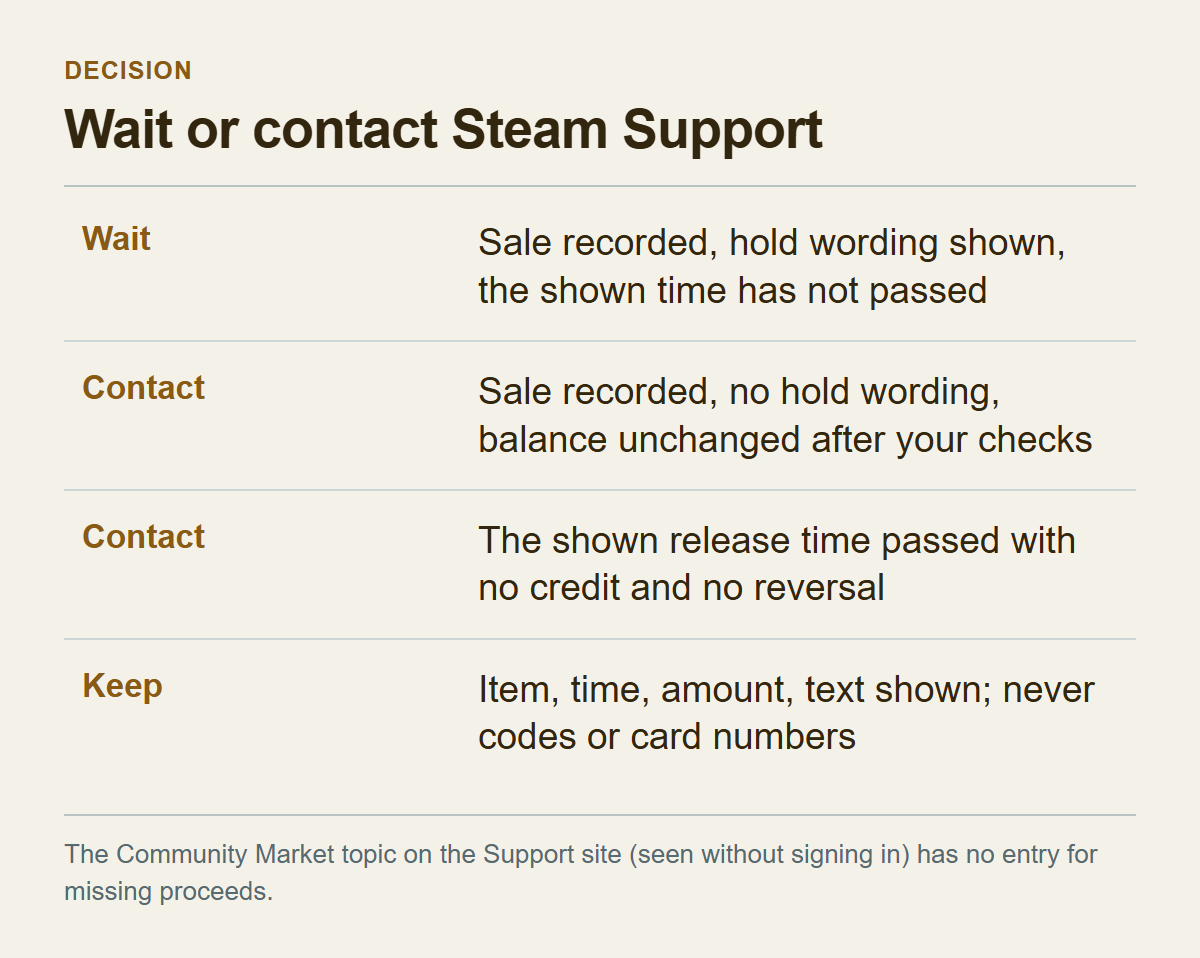
Waiting is right in one narrow case: a sale is on record, you found hold wording in your own screen or email, and the time the notice gives has not yet passed. In that case, do not plan to spend this money. If the notice names a time, look once at that time. Refreshing the Wallet every few hours has no documented effect on the credit.
If the notice gives no time, there is no figure to anchor on. Use the five days from the user-quoted email only as a moment to reopen your records and your inventory, and do not treat it as a deadline for contacting Support, because a commenter in the September 2024 thread said it can take up to a week. My own suggestion is to write to Support if a hold with no stated time passes a week with no credit and no reversal. That week comes from one user's report, which makes it a checkpoint and not a promise.
Four situations justify contacting Support:
1. A sale is recorded, but no hold wording appears anywhere, and the balance has not changed even after you checked the account and your spending since the sale. 2. The release time in your notice has passed, and there is no credit and the item has not come back. 3. The receipt's received amount and the amount that reached your Wallet differ even after fees. 4. You see a sale or a confirmation request that you did not make. Follow the security steps in the previous section first.
Situations three and four apply however long you have waited, so tell Support right away. The Support site's Community Market topic, as shown without signing in, had no entry for missing sale proceeds. I did not open the signed-in screens, so I cannot say which route reaches a person or when a reply would arrive.
For the wording of a request, use the market-sale example in Send Support the story of one transaction and add only what it lacks. Give the transaction time with its time zone. Quote any text you saw exactly, together with the time you read it. If the history shows what the buyer paid, put that beside the receipt's received amount. Never keep or send passwords, authenticator codes or card numbers, and when you attach a screenshot, check first that it shows none of them.
Three things come first in practice. Find the sale in the history and write down the six fields. Compare the receipt's received amount with the available balance. If hold wording is there, save its exact text and the time you saw it. After that the choice is between waiting and contacting Support.
Some things remain unconfirmed after this reading: how the signed-in history and pending balance screens are actually worded, how long proceeds are held, and which sales get held. Confirm those three from the screens of your own account; the forum quotes in this article cannot settle them.