SteamVaultsSteamVaults
Facts reviewed 15 min read

Why Steam Trade Hold Is 15 Days: Causes, Security Mechanics, and Instant Release Checklist

Complete technical guide to the 15-day Steam Trade Hold: Mobile Authenticator triggers, device migration cooldowns, cancellation penalties, and 0-day readiness checklist.

Written by· Founder and operator

I design SteamVaults pricing and inventory rules and write about the Steam Wallet, Community Market, item liquidity and trade constraints.

Steam GuardTrade HoldSteam Escrow
Article languages
On this page
  1. The Mechanics of the 15 Day Trade Hold: Steam Guard Security Architecture and Hold Triggers
  2. Device Changes, Password Resets, and API Invalidation: The Hierarchy of Trade Cooldowns
  3. The 7 Day Trading Penalty: Why Cancelling a Held Trade Creates Severe Capital Friction
  4. Trade Hold vs Market Hold vs Item Trade Cooldown: A Structural Comparison
  5. Why Steam Support Cannot Bypass Holds: Deconstructing Phishing Bypass Scams
  6. The 0 Day Instant Trade Readiness Protocol: 6 Step Checklist for Frictionless Trading
  7. Emergency Diagnostic Algorithm: Step by Step Resolution Tree for Held Trades

In the Steam trading and digital commodity ecosystem, nothing halts transactions more abruptly than the dreaded 15-Day Trade Hold. Whether you are liquidating Sacks of Gems, trading CS2 weapon skins, or transferring items between personal accounts, discovering that an accepted trade is locked in a two-week escrow buffer can be financially and operationally paralyzing.

Many users assume that a Trade Hold is a temporary server glitch, an arbitrary punishment, or a delay that can be expedited by contacting Steam Support or installing third-party browser tools. In reality, the 15-day escrow window is a deterministic, automated fraud mitigation architecture implemented by Valve to counteract account hijackings and unauthorized item liquidations.

Understanding the exact triggers of trade holds—and how they differ fundamentally from item cooldowns and market listing delays—is essential for any trader seeking frictionless liquidity.

This guide provides an exhaustive engineering breakdown of Valve's trade escrow system. We examine why the hold lasts exactly 15 days, analyze the hierarchy of device and credential restrictions, model the severe 7-day penalty for canceling held trades, debunk third-party bypass scams, outline a 6-step checklist for achieving 0-day instant trade status, and provide an emergency diagnostic algorithm for resolving active holds.

The Mechanics of the 15-Day Trade Hold: Steam Guard Security Architecture and Hold Triggers

Steam Trade Hold 15-day escrow architecture and dual verification pipeline

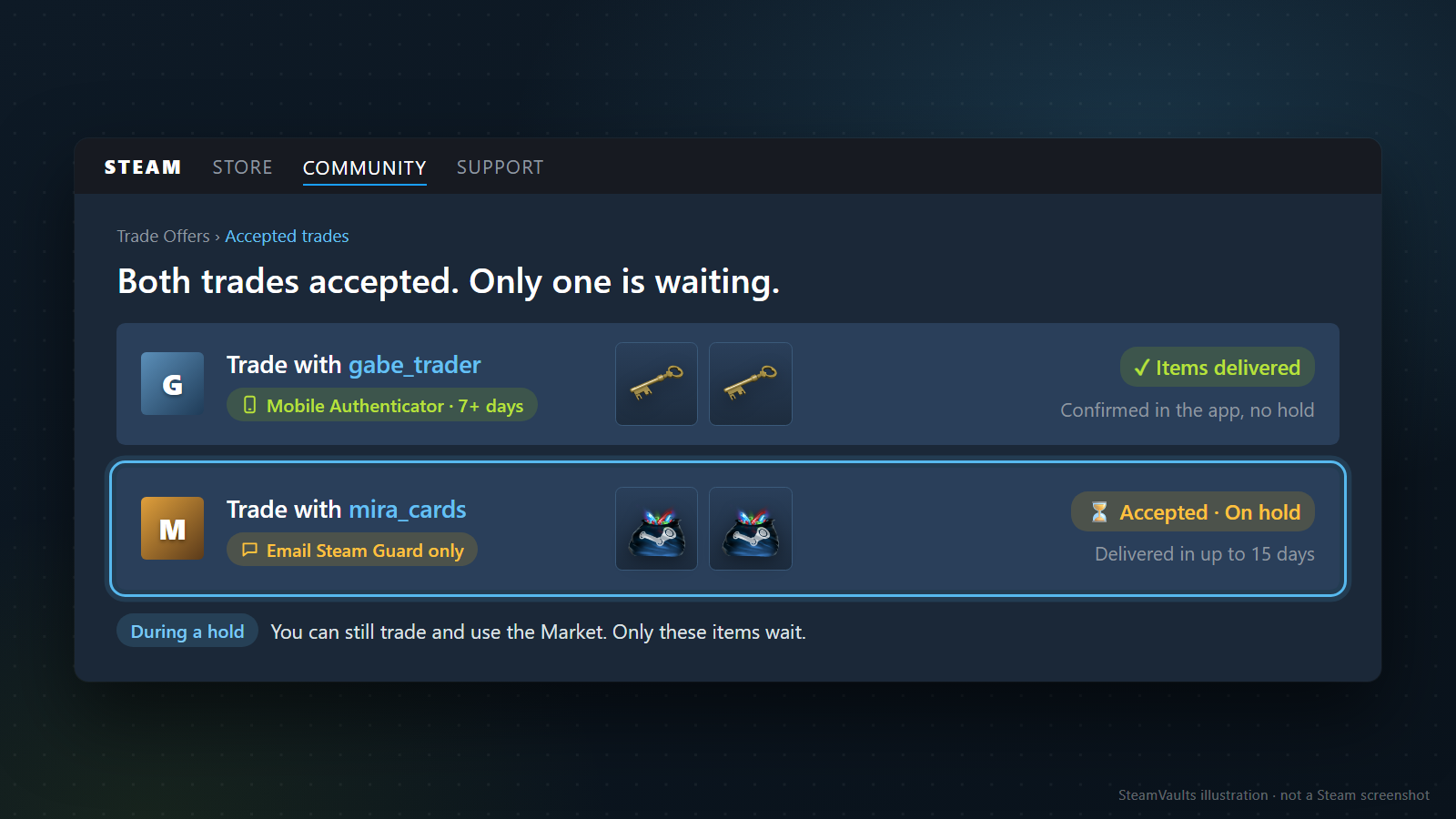
A Trade Hold is not a ban or an account penalty; it is a temporary holding escrow managed directly by Valve's backend servers. When two accounts accept a trade offer, Valve inspects the security profile of the sending account. If the account does not meet strict two-factor authentication criteria, the items are removed from the seller's inventory but withheld from delivery to the recipient for up to 15 calendar days (360 hours).

The Security Purpose of Trade Escrow

Historically, compromised Steam accounts were stripped of valuable inventories within seconds. Attackers would gain access via credential stuffing, phishing, or malware, initiate trades to disposable burner accounts, and liquidate the stolen assets before the rightful owner even realized their account had been breached.

To eliminate this vector, Valve introduced the mandatory Trade Hold:

  • If an account is breached, the 15-day delay grants the legitimate owner a generous window to notice unauthorized activity, access their email notifications, revoke malicious sessions, and cancel pending asset transfers before items permanently leave Valve's custody.

The 7-Day (168-Hour) Mobile Authenticator Warm-Up Window

The primary trigger for a 15-day trade hold is the absence of an active Steam Guard Mobile Authenticator that has been continuously enabled for at least 7 consecutive days (strictly 168 hours to the exact second).

1. Email-Only Steam Guard: If your account protects logins solely via email verification codes, Valve considers your security perimeter vulnerable to email inbox compromises. Consequently, all outgoing trades automatically incur the full 15-day trade hold. 2. Newly Activated Mobile Authenticator: Simply downloading the Steam Mobile App and enabling the authenticator does not grant immediate instant trading. Valve enforces an unyielding 7-day warm-up cooldown. Any trade initiated during this initial 168-hour window will still be subject to the 15-day hold. 3. Friendship Duration Exception (1-Day Hold): Under specific legacy rules, if the two trading parties have been mutual Steam friends for at least 1 full year (365 consecutive days), Valve reduces the hold duration from 15 days to 1 day (24 hours). However, for off-market platforms, automated bots, and new trading partners, the hold is invariably 15 days.

Steam Guard ConfigurationTrade Partner StatusResulting Trade Hold DurationTime to Item Delivery
Mobile Authenticator Active > 7 DaysVerified Partner / Bot with Active 2FA0 Days (Instant)Under 5 Seconds
Mobile Authenticator Active < 7 DaysAny Account15 Days (360 Hours)15 Days
Email Steam Guard OnlyRegular User or Platform Bot15 Days (360 Hours)15 Days
Email Steam Guard OnlySteam Friend for > 1 Year (365 Days)1 Day (24 Hours)24 Hours
Steam Guard Completely DisabledAny AccountTrade BlockedCannot Initiate Trade

Device Changes, Password Resets, and API Invalidation: The Hierarchy of Trade Cooldowns

Stepped hierarchy of Steam security triggers and trade cooldown durations

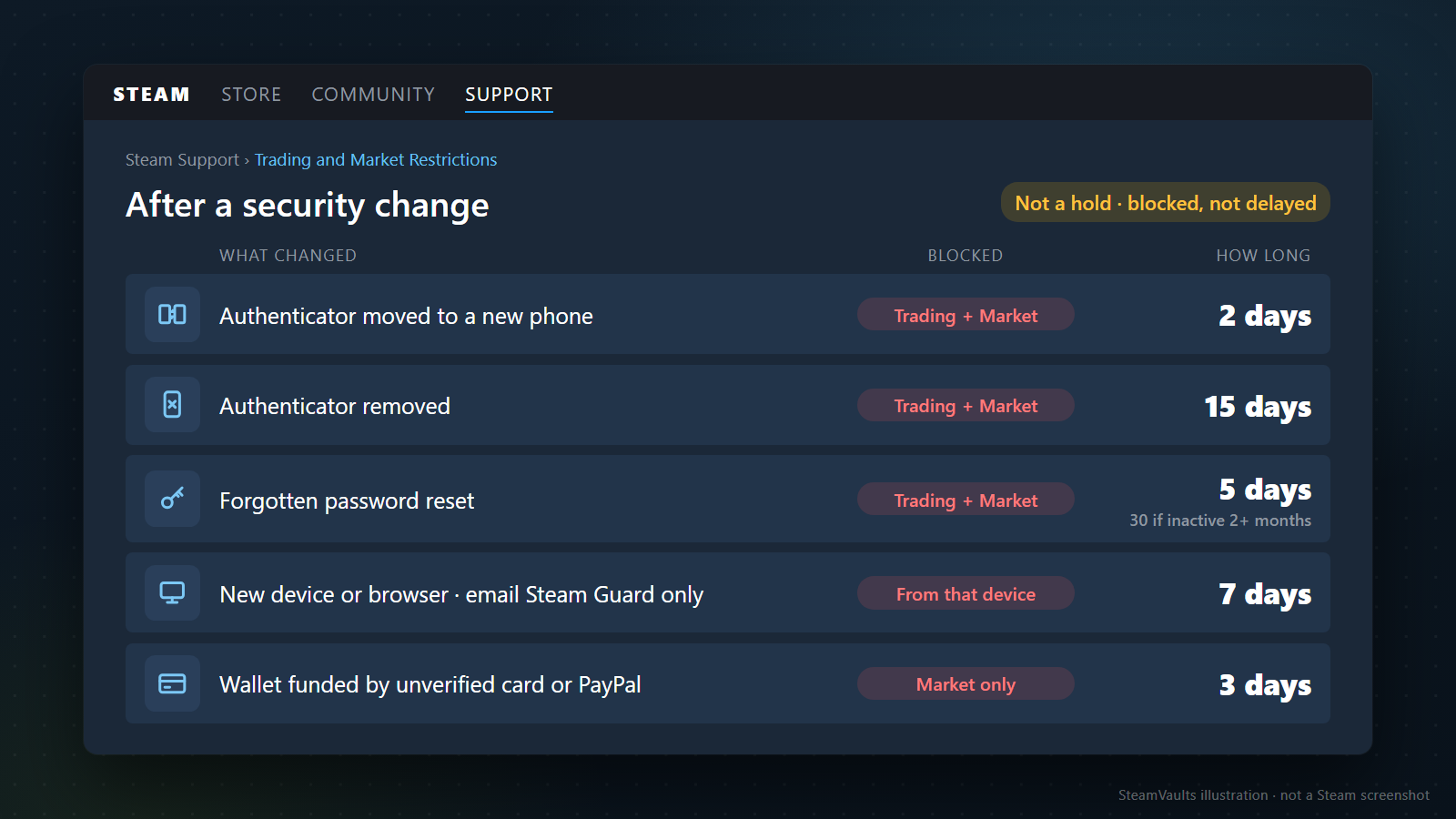
Many traders confuse Trade Holds with Account-Level Trading Restrictions (Trade Cooldowns). While a trade hold allows you to initiate a transaction but delays delivery, a trade restriction blocks you from opening trade offers or accessing the Community Market entirely.

Security-sensitive actions trigger a tiered hierarchy of restrictions designed to isolate accounts during potential recovery disputes:

1. Transferring Mobile Authenticator to a New Phone (2-Day Restriction)

When you upgrade your smartphone or migrate the Steam Mobile App using the official SMS recovery procedure, Valve recognizes that a device migration occurred:

  • Restriction Applied: A mandatory 2-day (48-hour) trade and market restriction is placed on the account.
  • Rationale: If an attacker executed an unauthorized SIM-swap attack to hijack your phone number and migrate your authenticator, the 48-hour lock gives you time to contact your mobile carrier and Valve Support.

2. Complete Removal of the Mobile Authenticator (15-Day Restriction)

If you explicitly disable the Steam Guard Mobile Authenticator or revert to email verification:

  • Restriction Applied: Valve imposes an immediate 15-day complete trading and market ban.
  • Impact: You cannot send trade offers, receive offers, or list items on the Community Market until the 15-day lockout expires.

3. Password Reset via Account Recovery (5-Day vs 7-Day Restriction)

The method used to change your password dictates the resulting restriction:

  • Internal Password Change (From Client Settings): If you are already logged in and change your password knowing your current credentials, zero trading restriction is applied.
  • Forgotten Password Reset (Via SMS/Email Recovery): If you reset your password using the "Forgot Password" recovery flow, Valve places a 5-day trading restriction on the account. If the account had been completely inactive for more than two months prior to the reset, this restriction extends to 30 days.

4. Newly Authorized Browsers and Hardware (7-Day Market Restriction)

Logging into Steam from a new web browser, clearing your browser cookies, or authorizing a new PC via email code triggers a 7-day restriction on Community Market access from that specific device. However, direct P2P item trading remains functional if your mobile authenticator is active on your phone.

Security Trigger EventSpecific Action TakenRestriction ImposedDurationAction Impacted
Phone MigrationAuthenticator transferred via SMSCooldown2 Days (48h)All Trading & Market
Authenticator RemovalReverted to Email or DisabledLockout15 DaysAll Trading & Market
Password Reset (Recovered)Reset via SMS/Email recovery flowCooldown5 DaysAll Trading & Market
New Browser AuthorizationLogged in via new browser/cookie clearDevice Restriction7 DaysCommunity Market Only
Payment Method AdditionUnverified new credit card on accountVerification Hold3 DaysCommunity Market Only

The 7-Day Trading Penalty: Why Cancelling a Held Trade Creates Severe Capital Friction

Seven day account trading cooldown penalty cascade after cancelling a held trade

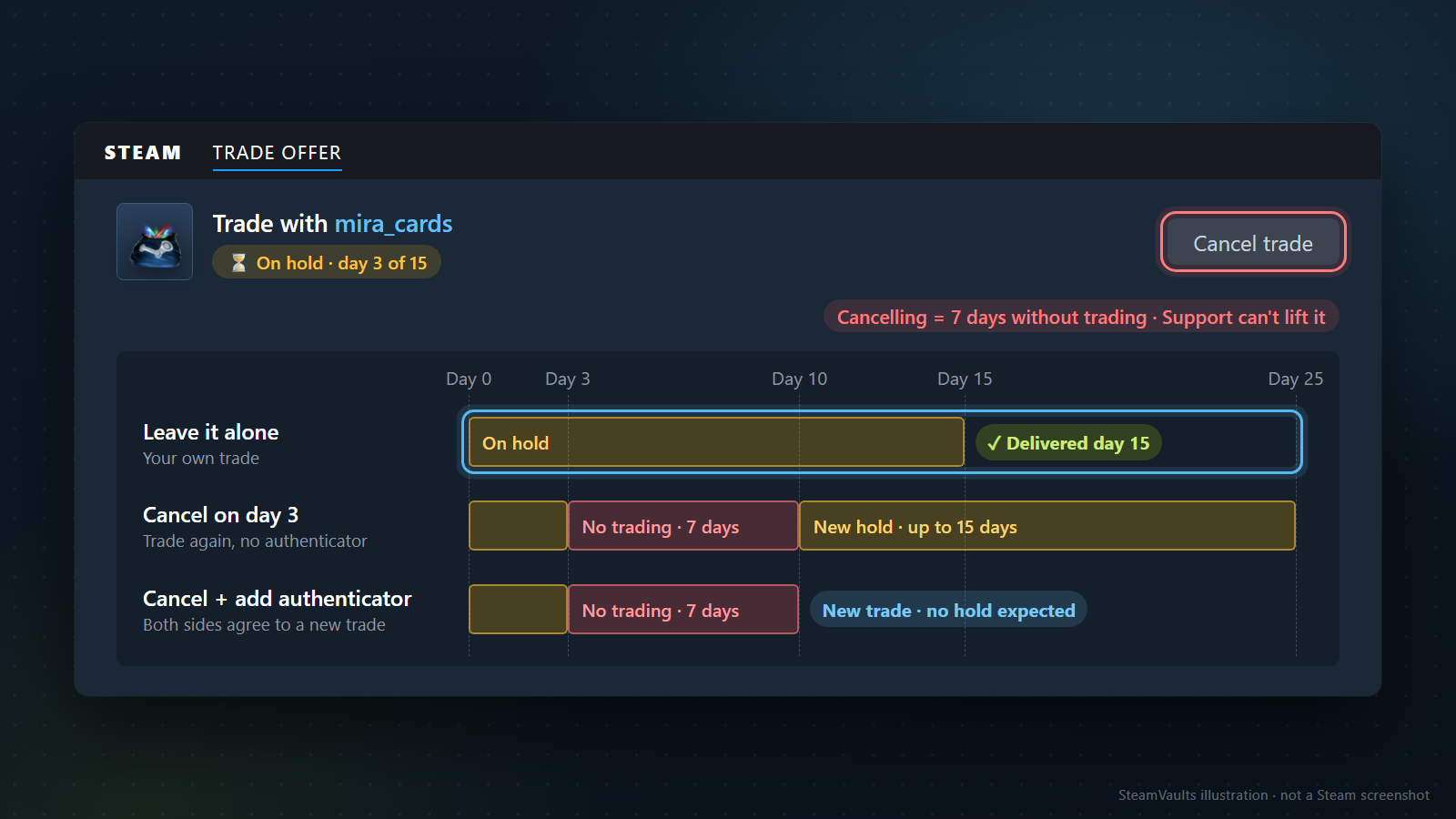
When sellers realize their trade has entered a 15-day hold, their instinctive reaction is often to click "Cancel Trade", assuming they can simply restart the trade or find another buyer who can bypass the hold.

This is the single most catastrophic mistake a Steam trader can make.

Valve's Anti-Harassment & Anti-Scam Penalty Mechanism

Valve's official policy on trade holds states: > "If you cancel an accepted trade that is currently on hold, your account will be subject to a 7-day trading cooldown for your security."

This penalty is deliberately punitive. Scammers who gained access to an account would frequently attempt to cancel pending escrow holds to harass victims or manipulate trading queues. To neutralize this, Valve hardcoded an automated account-wide lockdown:

1. Immediate Execution Freeze: The moment you cancel an active held trade, your ability to initiate or accept any trade offers is revoked for exactly 7 days (168 hours). 2. Cancellation Does Not Expedite Items: Canceling the trade returns the items to your inventory immediately, but those items—along with every other asset in your account—become completely untradable for the next 7 days. 3. Compound Delay Calculation: If you wait 3 days into a 15-day hold and then cancel, you incur an additional 7-day penalty. Your total lost liquidity window becomes: $$ ext{Total Lost Time} = 3 ext{ days elapsed} + 7 ext{ days penalty} = 10 ext{ days completely frozen}$$ If you then attempt to re-trade without an authenticator, you face a fresh 15-day hold, resulting in 25 total days of lost capital velocity.

When Should You Actually Cancel a Held Trade?

There is only one legitimate scenario where clicking Cancel is justified:

  • Suspected Account Hijacking or Malicious Offer: If you inspect the trade details in your Steam client and realize that the trade was sent to an unauthorized account, a cloned phishing bot, or an attacker due to an API Key Scam, you must cancel immediately.
  • In this emergency situation, sacrificing 7 days of trading access is well worth saving 100% of your inventory value from theft.

Trade Hold vs Market Hold vs Item Trade Cooldown: A Structural Comparison

Comparative diagram of Steam Trade Hold Market Hold and item cooldown restrictions

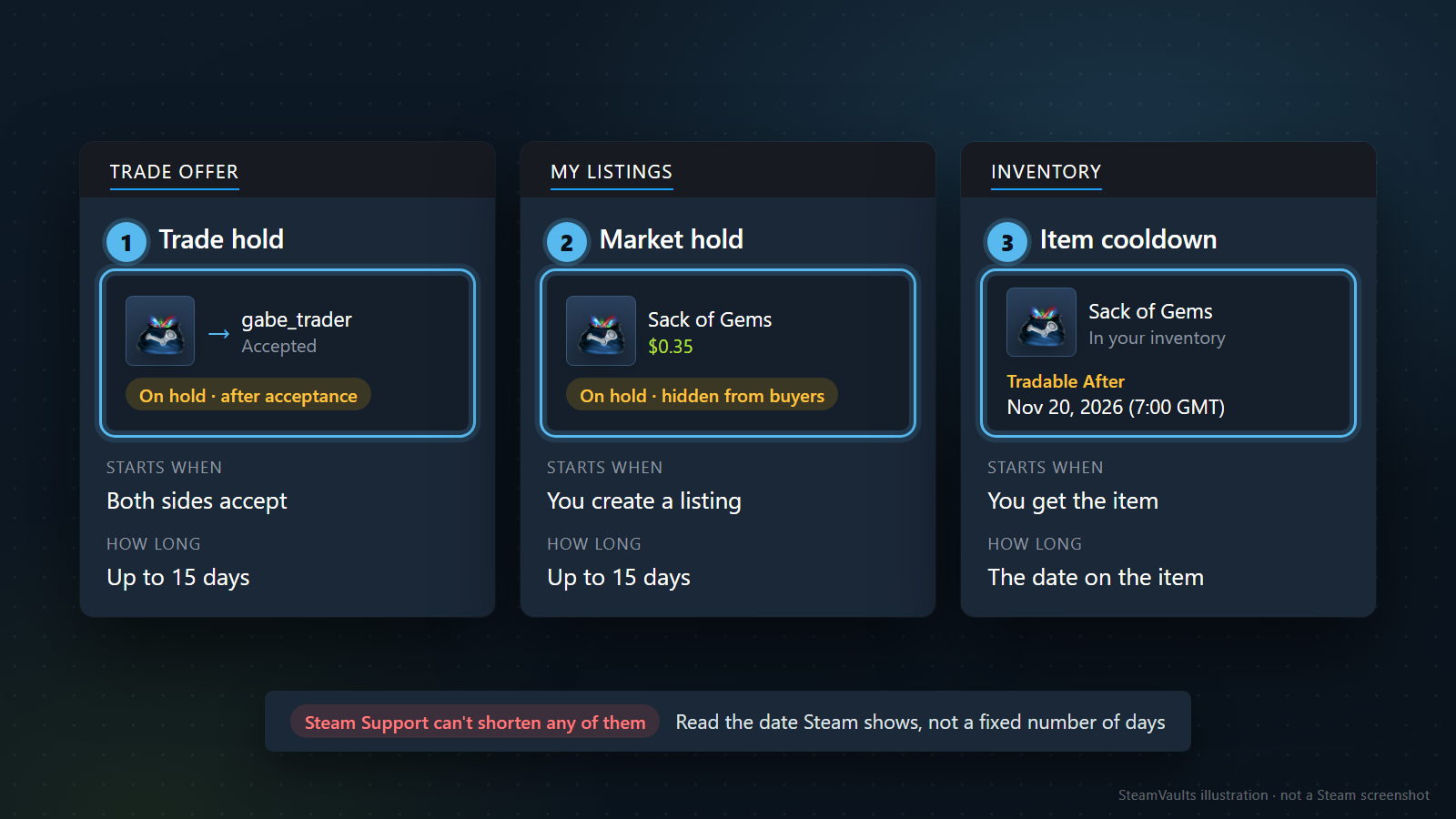
A frequent source of confusion among Steam users is conflating the three distinct delay mechanisms built into the Steam platform: Trade Holds, Market Holds, and Item Trade Cooldowns.

Each restriction operates at a completely different stage of the item lifecycle:

1. Trade Hold (Post-Acceptance P2P Escrow)

  • Point of Intervention: Occurs after both users have agreed to and confirmed a direct P2P Trade Offer.
  • Asset Status: The item is deducted from the sender's inventory and held in Valve's escrow buffer.
  • Duration: Up to 15 days (or 1 day for long-term friends).
  • Cause: Lack of a 7-day mature Steam Guard Mobile Authenticator on the sender's account.

2. Market Hold (Post-Listing Visibility Delay)

  • Point of Intervention: Occurs after you create a Community Market sell listing.
  • Asset Status: The item remains held in a pending state and is completely invisible to prospective buyers on the market order book until the hold period concludes.
  • Duration: 15 days.
  • Cause: Creating a sell listing without an active 7-day mobile authenticator.

3. Item Trade Cooldown (Tradable After Tag)

  • Point of Intervention: Bound directly to the individual item upon acquisition.
  • Asset Status: The item resides safely in your inventory, but its property metadata displays Tradable After: [Date & Time]. You cannot include this item in any trade offer or market listing until the timestamp expires.
  • Duration: Strictly 7 days (168 hours) from the moment of purchase or unboxing.
  • Cause: Purchasing an item on the Steam Community Market, opening an in-game crate/case, or unpacking loose gems.

The Loose Gem Packing Trap

Traders liquidating gems frequently fall into the cooldown contamination trap. If you purchase loose gems or cards on the Community Market, those items carry a 7-day trade cooldown.

If you bundle those restricted loose gems into a Sack of Gems (1,000 gems) before the cooldown expires, the entire newly created Sack of Gems inherits the remaining 7-day trade lock. Always verify that your loose gems are 100% unrestricted before packing them into sacks.

Diagnostic AttributeTrade HoldMarket HoldItem Trade Cooldown
System LevelTransaction-level escrowListing-level delayIndividual item-level property
Activation StageAfter mutual trade acceptanceAfter creating market listingImmediately upon purchase/drop
Item LocationValve Escrow ContainmentPending Market QueueUser Personal Inventory
Standard DurationUp to 15 Days15 DaysStrictly 7 Days (168 Hours)
Trigger CauseUnverified Mobile AuthenticatorUnverified Mobile AuthenticatorValve Market Anti-Fraud Policy
Bypass MethodNone (Requires 7d prior 2FA)None (Requires 7d prior 2FA)None (Hardcoded timestamp)

Why Steam Support Cannot Bypass Holds: Deconstructing Phishing Bypass Scams

Automated Steam security fortress rejecting external bypass tools and manual overrides

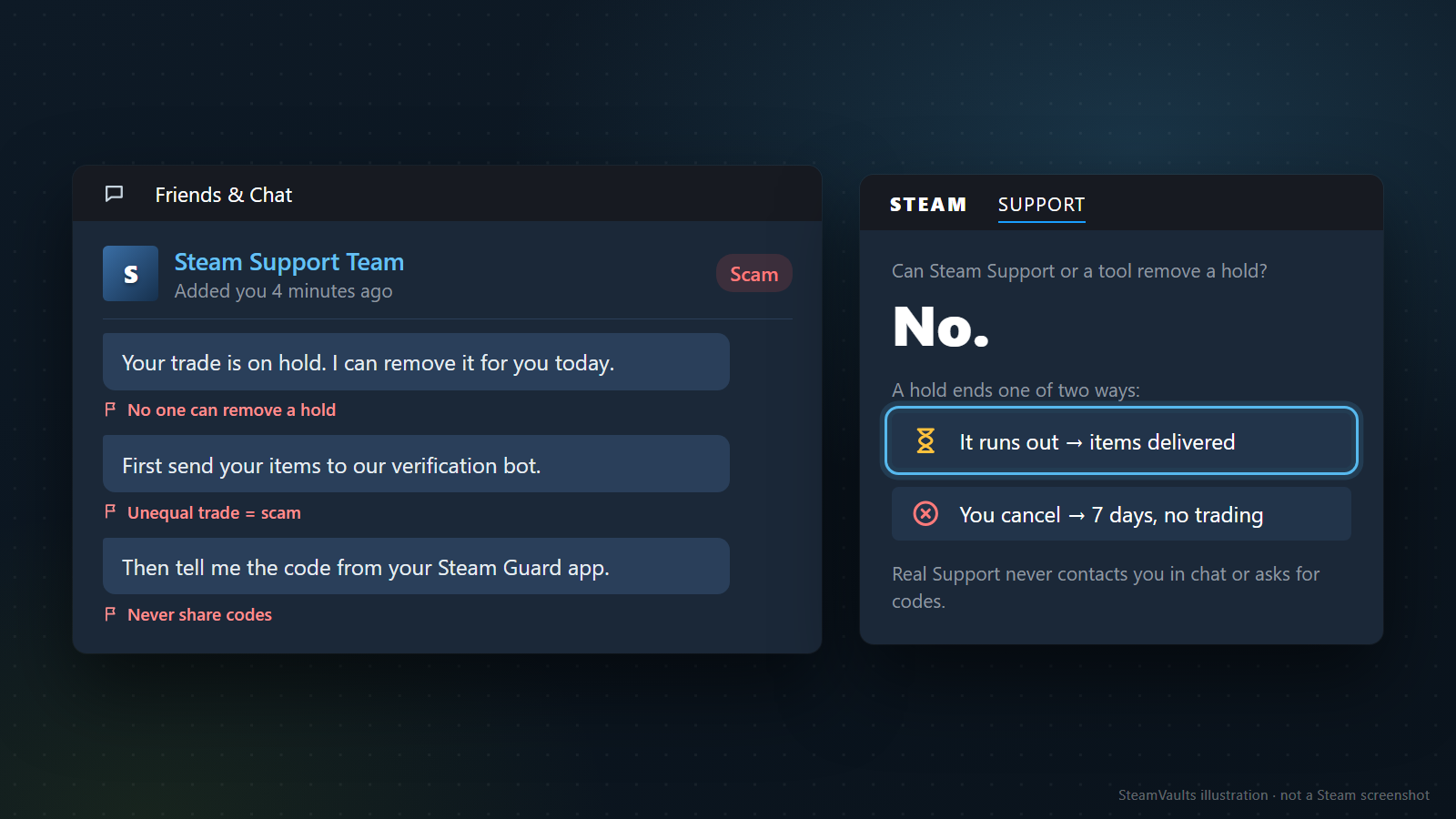
A widespread misconception across Reddit, YouTube, and Discord is that an active trade hold can be removed or accelerated if you submit a compelling ticket to Steam Support.

The Architectural Reality: Zero Manual Override Permissions

Valve's official customer support documentation explicitly states: > "Steam Support cannot modify trade holds, market holds, or trading restrictions under any circumstances, even if an account owner requests it."

This is not bureaucratic obstinacy; it is a fundamental security requirement. If Valve customer service agents possessed a manual override button to remove trade holds, support staff would immediately become the primary target of sophisticated social engineering attacks, insider bribery, and phishing campaigns.

By hardcoding the trade hold rules into Valve's automated backend database with zero administrative override hooks, Valve ensures that the security hold remains immutable.

Deconstructing Third-Party "Hold Bypass" Scams

Fraudsters prey heavily on users frustrated by the 15-day holding period. Be vigilant against these three universal scam templates:

1. "Instant Escrow Bypasser" Browser Extensions: Malicious Chrome or Firefox extensions claiming to "force Steam servers to release escrow instantly." In reality, these extensions inject malicious JavaScript that intercepts your Steam session cookies, steals your credentials, and registers an unauthorized Web API key to execute API Scams. 2. Fake Steam Support Admins on Discord/Telegram: Scammers posing as "Valve Security Agents" claiming they can "manually verify your assets and bypass the hold" if you deposit your items into an "inspection bot." Valve employees will never message you on third-party platforms or request asset transfers. 3. Escrow Bypass Software on GitHub: Counterfeit executable tools (.exe or .bat) promising to exploit backend API endpoints. These files are invariably infostealer trojans designed to siphon Discord tokens, browser passwords, and crypto wallet private keys.

The Golden Rule: Any software, website, or individual claiming to be able to remove, shorten, or bypass a Steam Trade Hold is an active scammer. The only mechanism that resolves an active hold is the passage of time.

The 0-Day Instant Trade Readiness Protocol: 6-Step Checklist for Frictionless Trading

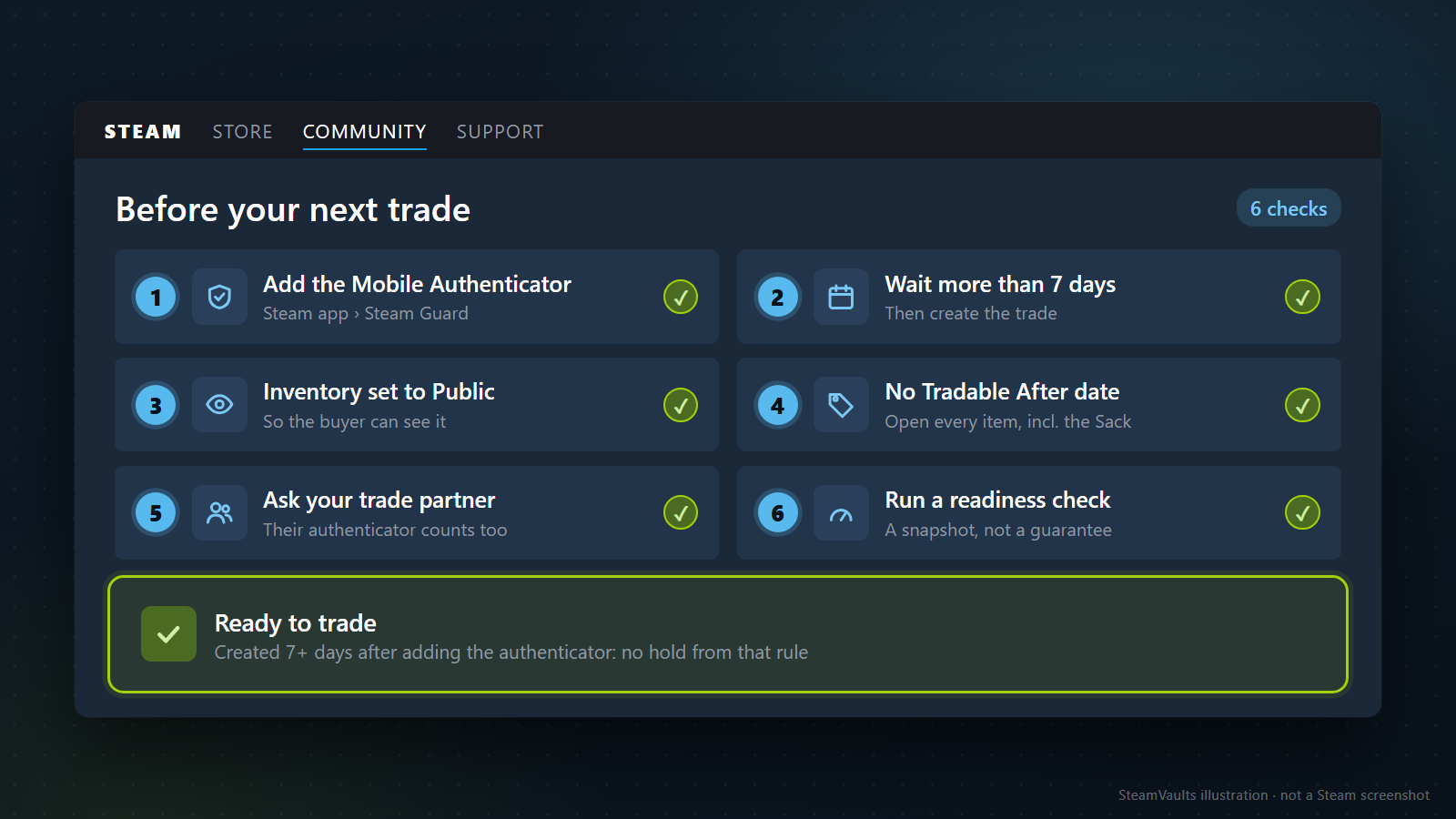
Six step verification readiness protocol for achieving zero day instant trade status

To guarantee that your future transactions—including liquidations at SteamVaults—execute instantaneously with 0 days hold, complete this 6-Step Readiness Protocol:

Step 1: Install and Bind Steam Guard Mobile Authenticator

  • Download the official Steam Mobile App from Apple App Store or Google Play.
  • Sign in to your account, open the Steam Guard tab, and tap Add Authenticator.
  • Enter your mobile phone number, confirm the SMS verification code, and record your Recovery Code (R-code) in a secure offline location.

Step 2: Fulfill the Unbroken 168-Hour Maturation Period

  • Maintain the authenticator on your phone for at least 7 full consecutive days (168 hours) without logging out, resetting settings, or transferring devices.
  • Do not attempt high-value trades until day 8 to ensure the exact hour timestamp has passed.

Step 3: Configure Inventory Privacy to "Public"

  • Open your Steam Profile -> Edit Profile -> Privacy Settings.
  • Set Inventory to Public, and ensure the checkbox "Always keep Steam Community Market inventory items private" is unchecked.

Step 4: Verify Outgoing Items for Individual Trade Locks

  • Inspect your inventory items before initiating a trade.
  • Verify that your items do not display a red or yellow banner stating Tradable After: [Date].
  • If liquidating gems, ensure all 1,000 gems were unrestricted prior to packing into sacks.

Step 5: Verify Trade Partner Readiness (Bilateral Requirement)

  • A trade is only instant if both parties meet the 7-day authenticator rule.
  • If you are trading with an individual, confirm they have had active mobile 2FA for over 7 days. If they only use email, your trade will still be held for 15 days.
  • When trading with institutional platforms like SteamVaults, all company bots maintain year-round enterprise mobile authenticators, guaranteeing 100% partner readiness.

Step 6: Validate Readiness via Trade-Hold Diagnostic Tool

  • Navigate to the SteamVaults Trade Holds Diagnostic Portal.
  • Input your public trade URL to verify that your account has zero active trade holds, zero market restrictions, and is fully cleared for instant 3-minute cashout execution.

Emergency Diagnostic Algorithm: Step-by-Step Resolution Tree for Held Trades

Emergency diagnostic decision tree algorithm for resolving active Steam trade holds

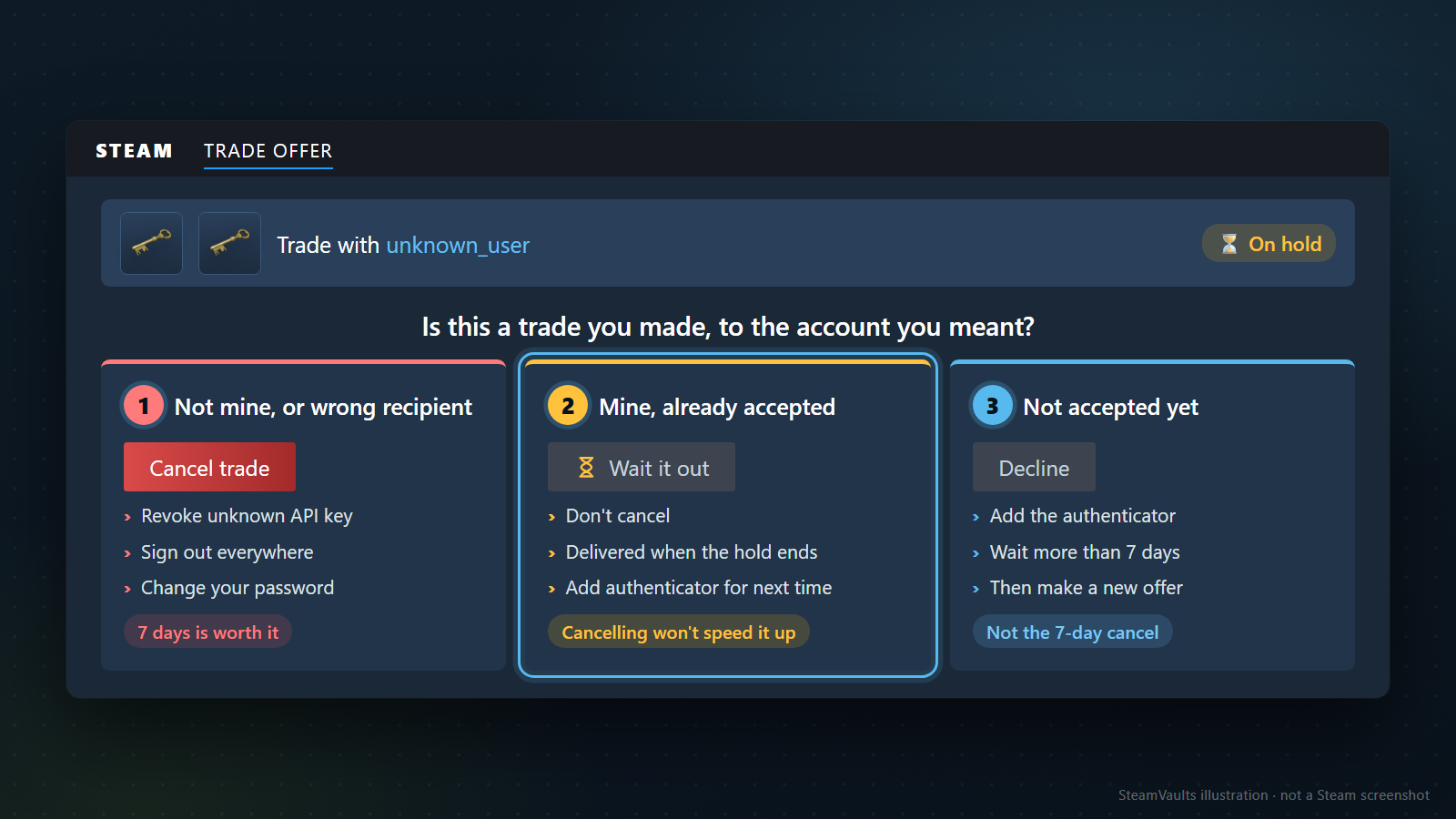
If you currently have an active trade caught in a 15-day hold, execute this emergency decision algorithm:

`` [Trigger: Active Trade Hold Detected] │ ├─► Question 1: Do you completely recognize and trust the recipient? │ │ │ ├─► [NO / UNCERTAIN / SUSPICIOUS]: │ │ │ │ │ ├─ Action 1: Tap "Cancel Trade" immediately in Steam. │ │ ├─ Action 2: Navigate to steamcommunity.com/dev/apikey and REVOKE any key. │ │ ├─ Action 3: Change your Steam password and deauthorize all devices. │ │ └─ Outcome: Your items are saved from theft. Accept the 7-day penalty safely. │ │ │ └─► [YES, VERIFIED TRUSTED PARTNER OR PLATFORM BOT]: │ │ │ ├─► Question 2: Is the trade already accepted and in escrow? │ │ │ │ │ ├─► [YES]: │ │ │ │ │ │ │ ├─ CRITICAL WARNING: DO NOT CLICK CANCEL! │ │ │ ├─ Inspect the exact delivery timestamp shown in Steam Trade History. │ │ │ ├─ Wait out the hold duration. Items will auto-deliver upon completion. │ │ │ └─ Enable Steam Guard Mobile Authenticator NOW for future trades. │ │ │ │ │ └─► [NO, OFFER PENDING ACCEPTANCE]: │ │ │ │ │ ├─ Decline the pending trade offer before acceptance. │ │ ├─ Declining an unaccepted offer incurs ZERO 7-day penalty! │ │ ├─ Activate Steam Guard Mobile Authenticator on your phone. │ │ ├─ Wait 7 days (168 hours) for the authenticator to mature. │ │ └─ Re-initiate the trade on Day 8 for 0-day instant delivery. ``

> System Integrity & Verification — September 21, 2026: All technical hold rules, escrow durations, cancellation penalties, and account restrictions detailed in this report reflect Valve's official Steamworks documentation and live Steam platform enforcement. Never share authenticator confirmation codes or recovery secrets with third parties.

Ready to sell supported Sacks of Gems?

After the bot confirms receipt, USDT is credited to your site balance. Polygon withdrawal is a separate request.