
Creating a New Steam Trade URL: What Stops, What Stays, and Where to Re-Enter It
A new Steam trade URL replaces one route for offers. Where to create it, what is reported to stop, what stays, and the order for entering it again.
Article languages
On this page
Check it now:Trade URL
Someone can send you a trade offer in two ways. They can be on your friend list, or they can hold your trade URL, the long address that lets anyone who has it send an offer without being a friend. Creating a new trade URL replaces the key to the second route. Nothing I found suggests it touches the first, and it has no bearing on anything happening inside your account that you did not do yourself.
People reach for a new URL after pasting the old one into a forum thread, or after a stranger's offers start arriving, and most guides stop at "click the button". The button takes seconds. Afterwards the new address has to go into every site that held the old one, and if offers or site orders are still open, the wrong order can leave something half finished.
Whether handing a trade URL to someone is safe in the first place is covered by Steam Trade URLs: Is It Really Safe to Share One?, and this article starts after that decision.
My sources are Valve's Steam Support pages, which I read on October 27, 2026. Two limits shape everything that follows. The settings page that holds the trade URL needs a sign-in, so I never saw it, and I did not create a new URL to try it. And no Valve page I read says that a new URL disables the old one. That claim comes from four third-party guides, and I mark it each time it matters. The diagrams are explanatory and are not Steam screenshots; site names and scenarios in the examples are invented.
When a new trade URL helps, and when it does nothing
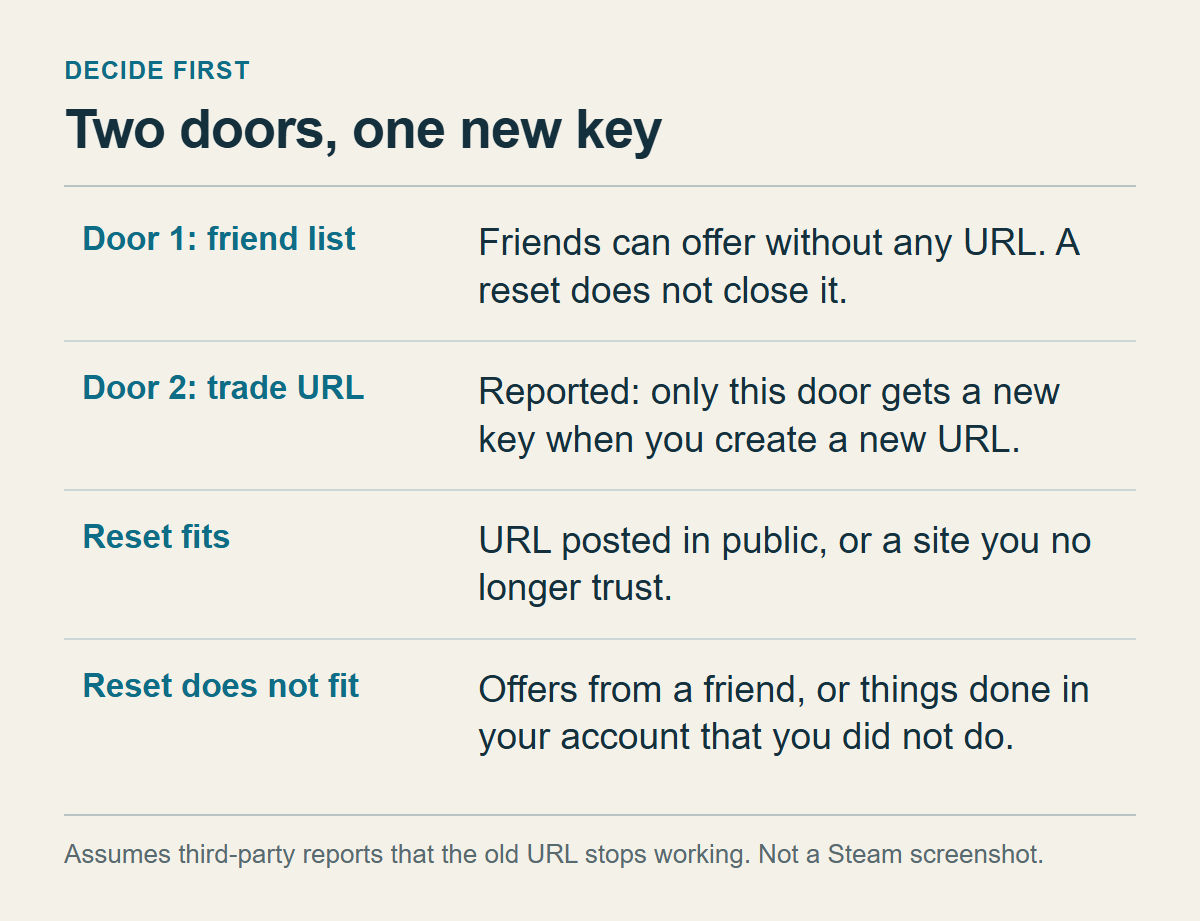
Valve's Steam Trade Offers FAQ says you can send an offer to any friend whose inventory you can view, or to anyone who has given you their Unique Trade URL. Those are two separate doors. A new URL is a new key for the second one. The friend door is listed separately by Valve, and nothing I read suggests a reset touches it.
The rest of this section assumes the reports are right that a new URL makes the old one stop working. Valve does not state it, and the third section weighs how far to trust it. With that assumption in place, the cases sort out quickly.
Posted in public. If the URL sits in a forum thread, a profile comment or a stream chat, it has left your hands, and deleting the post does not call back whoever copied it in the meantime. A new URL is the fitting response, provided the old one really stops.
A site you no longer trust. From outside, you cannot tell where a site stores your address or for how long. If you suspect it survives your account deletion, a new URL is the cleanest cleanup. The price is that sites you still trust lose the old address as well, and each needs the new one entered by hand. The burden is small with two services and large with ten. Count where the URL actually lives before you press anything.
Offers from unknown accounts. First work out which door they came through. Valve's Recommended Trading Practices say an offer shows how long the sender has been your friend, their Steam level, their account age and any groups they moderate. A sender already on your friend list can still offer after you change the URL, because that route is separate. A non-friend who keeps sending offers got the URL from somewhere, and in that case a new URL answers the problem.
An offer or two from a stranger often needs nothing more than a decline. The Trade Offers FAQ says items in an offer stay in your inventory until the offer is accepted, and that an offer must be confirmed through the mobile authenticator app or by email, with no way to opt out of confirmation. An unwanted offer moves nothing by arriving. If the cost of re-registering looks high, declining and watching for a while is a reasonable choice.
Things done in your account that you did not do. That is a different problem, and a URL is not the remedy. The seventh section deals with it.
My rule: if you cannot say where the URL has been, or there is even one place you do not trust, create a new one. If the sender is a friend, do not. In between, count the cost and decide.
Where the trade URL lives, and what nobody documents about the button
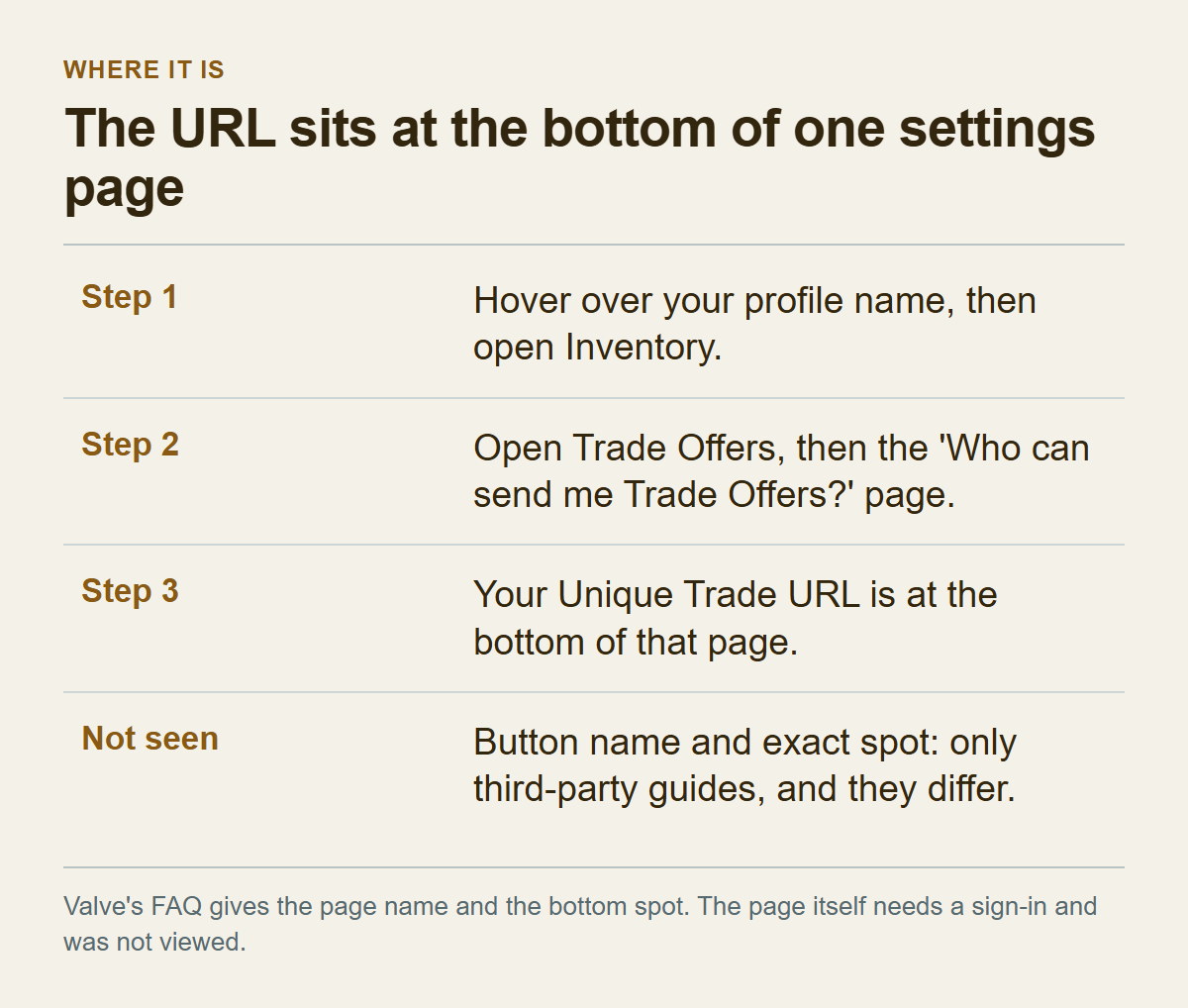
Valve's FAQ says you can find your Unique Trade URL at the bottom of your "Who can send me Trade Offers?" settings page. For sending offers it gives a route that starts at your profile name: hover over it, open Inventory, then Trade Offers. ProSettings and CritFeed, two third-party guides, say the "Who can send me Trade Offers?" link is reached from that Trade Offers screen. So the walk is profile name, Inventory, Trade Offers, then that link, and your URL is at the bottom of the page it opens.
There is also a shortcut through Steam Support. The trading help wizard has an option called "I need my Steam Trade URL". Choosing it without an account redirected to the Steam sign-in page with the destination set to /my/tradeoffers/privacy/, which is the address of the trade offer privacy settings page. That tells you where Valve itself sends people who need the URL. Nothing behind the sign-in was visible, so what the page looks like and what its buttons say is a gap in this article.
The button's name is not in any Valve page. GIGA (a German article from 2016), ProSettings and RiskySkins call it "Create New URL". CritFeed calls it "Create New URL" or "Reset Trade URL". I did not see what the Korean interface says, and other interface languages are equally unknown to me. The guides also disagree on where it sits: ProSettings describes a big blue button under the URL, CritFeed places it next to the Copy button. Trust neither description literally. Look near the URL for a button that means "make a new one".
When the new URL appears, copy all of it. CritFeed lists a wrongly copied URL, along with a reset, as the usual cause of an "Invalid Trade URL" error, and a half-selected string is an easy way to produce one. The structure of the address is explained in the sharing post, so here all you need is to take it from start to finish in one piece.
Two checks before you click. First, are you on a device you trust? Valve's Account Security Recommendations advise avoiding shared computers and logging out on a shared machine. Whoever is signed in on this page can read your URL; that is my inference from Valve placing the URL on this page, not a sentence in a Valve document. Second, are offers or site orders still open? The fourth section covers that.
Restrictions are a gap of their own. Valve's Trading and Market Restrictions page lists the restrictions and their lengths, but does not say whether the settings page opens while one is active, or whether entering a new URL on a site is affected. If the page will not open, check that list for a restriction that matches your account.
What a reset is said to stop, and how much weight the claim carries
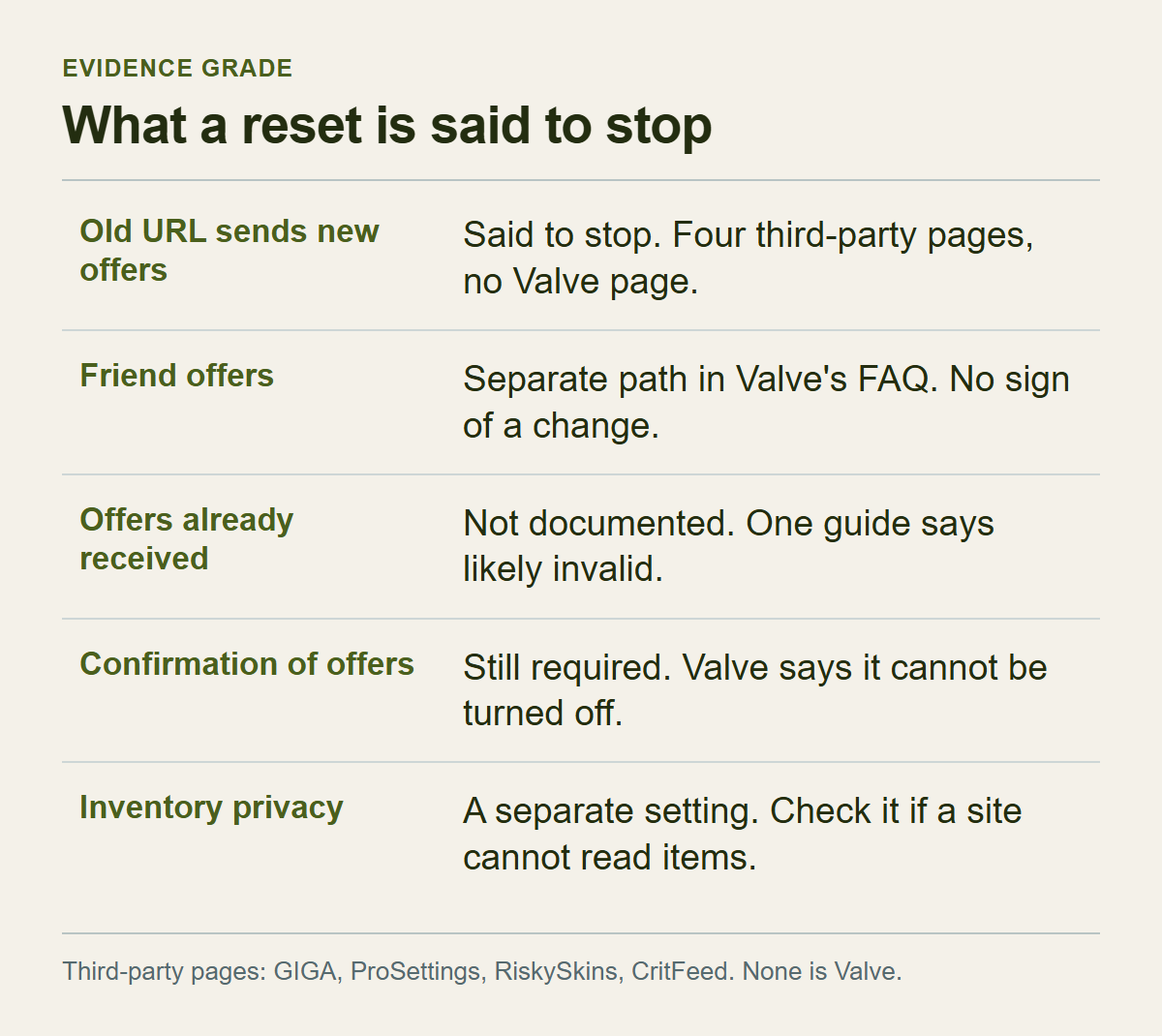
Creating a new URL is said to close the road for offers sent to the old one. How far can that be trusted?
None of the Valve support pages I read says it. Four third-party pages do: GIGA (2016), ProSettings (November 2025), RiskySkins (May 2026) and CritFeed (September 2025, updated October 2025). They differ in age and in who runs them, and that counts for something. Still, none is Valve, and some promote trading services. I treat "the old URL stops" as a widely repeated behaviour, not as something Valve confirmed, and I did not test it. RiskySkins adds that a reset creates a new token and that the URL must be updated on every platform you use; that claim sits at the same grade.
The SteamVaults post on regenerating your trade URL says as plain fact that the previous address stops working, and calls a new URL the most direct way to clean up. I looked for that sentence in Valve's Trade Offers FAQ and in its Steam Trading FAQ and did not find it, so this article files the claim under "widely reported, not confirmed by Valve". The two posts give the same practical advice: create a new URL if you posted it in public or distrust a site, and re-enter it where you still trade. They differ only in certainty. If you came from the sharing post, read its sentence at the grade given here.
Here is how the evidence breaks down:
- Sending new offers to the old URL: reported to stop, by four third-party pages and no Valve page.
- Sending new offers to the new URL: possible, because Valve says anyone given the URL can send an offer.
- Offers from friends: Valve lists that path separately, and I found no sign that a reset changes it.
- Offers that had already arrived: no document. CritFeed says only that offers sent to the old URL will "likely become invalid".
- Confirmation of offers: still required, since Valve says it cannot be turned off.
- Inventory privacy and your restrictions: separate settings that Valve covers elsewhere.
I do not know what "stops" looks like in practice. No document says whether the sender sees an error, whether the offer is created and then blocked on your side, or whether a site just records a failure. So I cannot tell you in advance what error a site will show after the reset.
Stopping also does not erase the old string. It stays in forum posts, chat logs and site databases. All that changes is whether an offer can be made with it, which leaves the cleaning-up and the re-entering to you.
Inventory privacy is the setting that gets mixed up with all this. Valve's Steam Trading FAQ says it has three choices, public, friends only and private, set in your inventory or profile settings, which is a different place from the URL. If a site cannot read your items even after you entered the new URL, look at that setting first. Setting it and checking it are covered in How to Make Your Steam Inventory Public, and the restrictions that attach to items themselves are in Why Your Steam Item Is Not Tradable or Marketable. ProSettings and RiskySkins say outside sites need the inventory to be public in order to send offers. I could not confirm that in a Valve page.
Settle the offers that already exist before you reset
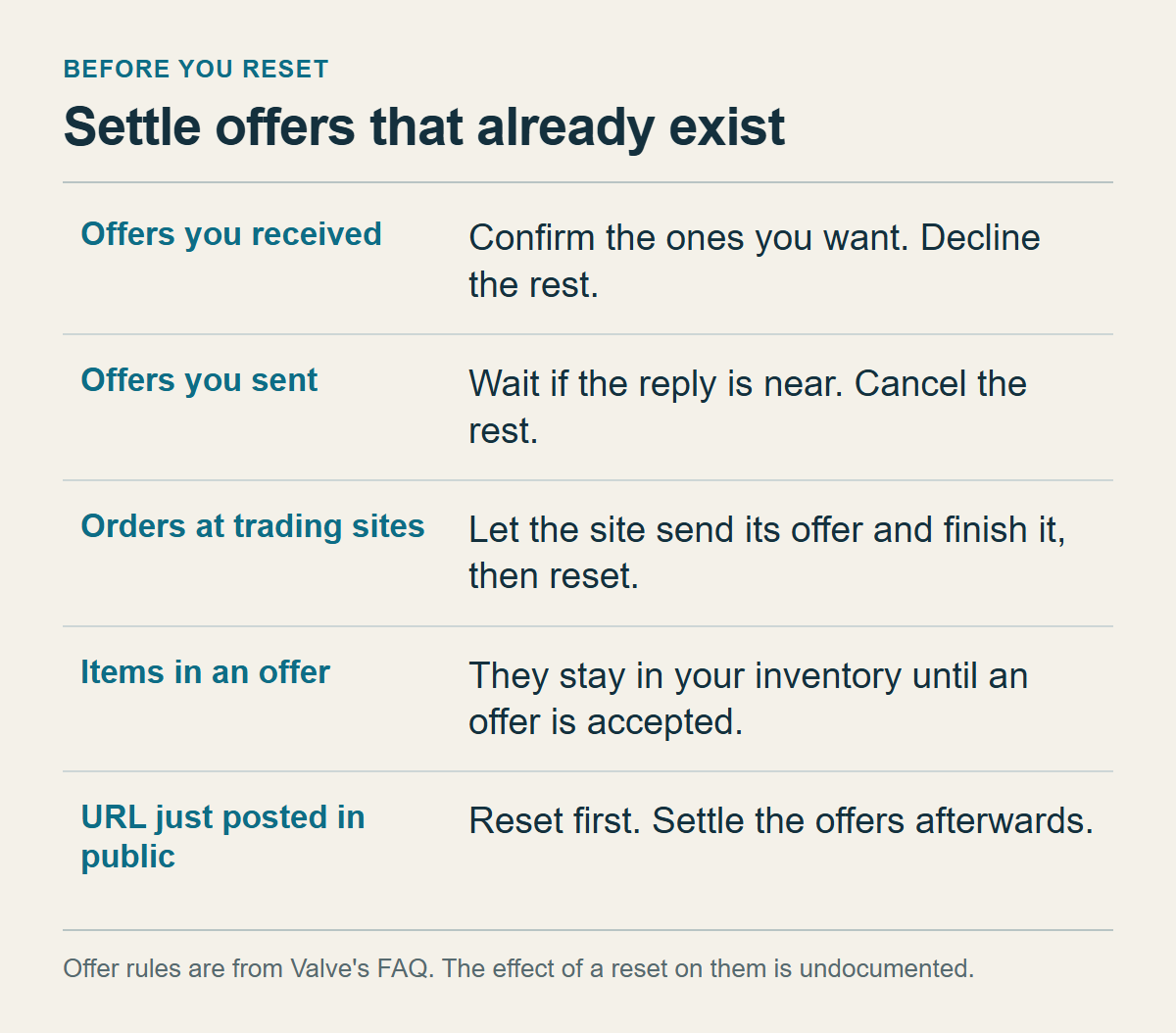
Before changing the URL, find out how many offers are still open.
How to read their states is in the offer lists section of the trade error checklist. From Valve's Trade Offers FAQ I take only the rules this section uses. Items in an offer stay in your inventory until it is accepted. Offers expire by themselves after two weeks, and the expiry date is shown on a pending offer. When one offer is accepted, other pending offers containing the same items become inactive and move to Offer History. Offers you receive can be accepted, declined or countered, and a pending offer you sent can be cancelled from Sent Offers.
What a new URL does to any of those is undocumented. CritFeed says offers already sent to the old URL will "likely become invalid" and advises finishing pending trades first. The author was not sure, since "likely" is the word used, so I do not treat it as fact. I assume nothing either way. The safer course is to settle each offer yourself before the change.
Offers you received: accept the ones you actually want and complete the confirmation that follows, then decline the rest. You can let them expire, but for two weeks they stay in the list and blend in with anything new. Offers you sent: if the other person will probably answer soon, wait, otherwise cancel them.
An order at a trading site, where the site is supposed to send you items, is the awkward one. A site probably creates that offer through your trade URL; that is an inference from the Trade Offers FAQ and not something Valve says. If the site has not sent its offer yet, you have two routes. One is to wait until the offer arrives and you have finished it, then change the URL. The other is to cancel the order on the site, change the URL and place the order again; whether a site lets you cancel varies by site. I would take the first route, because I know nothing about how a site behaves when the address changes in the middle of an exchange.
Urgency flips this order. If you have just realised the URL is on a public board, change it first and clean up the offer list afterwards. An unwanted offer cannot move your items unless you accept and confirm it, so the clean-up can wait. If the pattern is only an occasional offer from strangers, tidy up first.
An illustration with invented numbers. Say three offers have arrived, one sent offer is open, and one site order is waiting. One of the three is a trade you were expecting, so you accept it and complete the confirmation, and you decline the other two, which come from accounts you do not know. The sent offer is waiting for a friend's reply that looks unlikely to come within a day or two, so you cancel it. The site order stays as it is, and you postpone the change until its offer has arrived and you have finished it. The URL then changes while nothing is pending, and any unfamiliar offer that shows up afterwards is clearly new.
Whatever you leave pending, write down how many and from whom. That gives you something to compare against after the change. Read the whole confirmation window in the mobile app before confirming anything that remains, as Valve's Scam: Trade Redirection page urges.
The order for giving the new URL out again
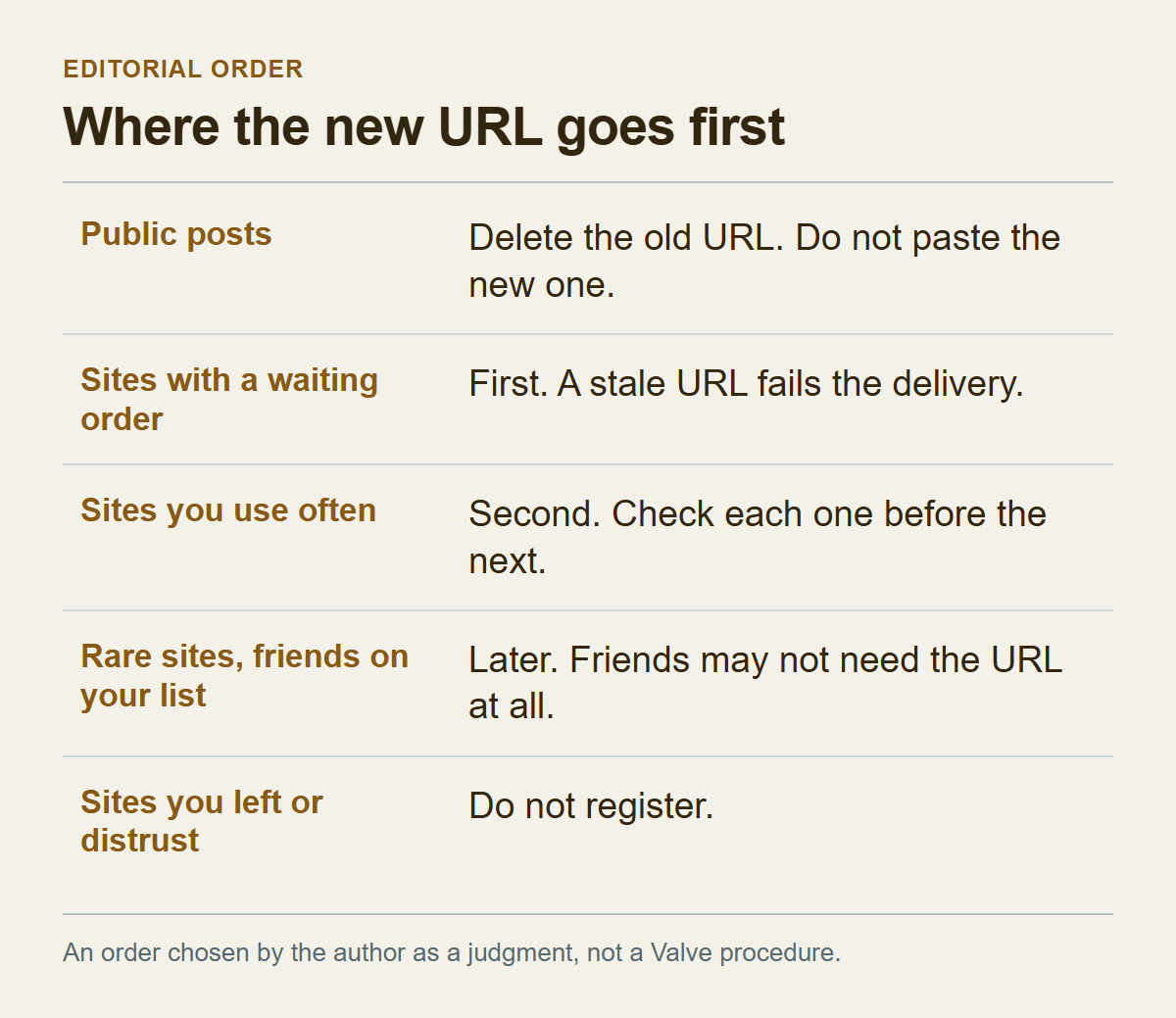
Decide where the new URL will not go before deciding where it will. The whole episode began because you did not know how far the old one had travelled.
List the places that held the old URL. Think of trading sites you signed up for, friends and trading partners who saved it, group chats and messengers where you pasted it, forum posts, profile comments and stream chats, plus your own notes and your browser's autofill. If you cannot remember, searching your mailbox for sign-up emails from trading sites can jog the memory. That list is the raw material for the order below. The order itself is my judgment and is not a Valve procedure.
Public places come first, and they get nothing new. Delete or edit any post that shows the old address. I cannot say deleting adds safety, but it stops people contacting you about a dead address and it removes the temptation to paste the new one there later.
After that, the new URL goes out in this sequence:
1. Sites where items are about to change hands, because you have a withdrawal order open or a listing active. If the old address stops, it will fail the delivery, so these are fixed first. 2. Sites you use often, one at a time. Do the check described in the next section before moving to the next site. 3. Sites you use rarely. Enter the URL when you next log in. The dead address stays on those sites in the meantime, which does no harm if you do not trade there, but put a reminder in your notes to check the URL before the next use.
Friends and trading partners split in two. Someone already on your friend list may not need the URL: Valve says an offer can go to a friend whose inventory the sender can view, so only your inventory's visibility to them needs to be right. A partner who is not a friend gets the new URL by private message when they ask for it, never in a group channel.
Do not enter it at sites you no longer use. If a site lets you delete the account or unlink Steam, doing that is the better move, though sites differ in how they handle it. A site you distrust, such as the one that started all this, gets no URL either.
An invented illustration of the whole order. Site A has a withdrawal order waiting, so it goes first. Site B is used weekly and goes second. Site C is used once a quarter, so it waits for next use. Friend D is already on your list, so you only confirm that your inventory is visible to friends. Trading partner F is not a friend and has your old URL saved, so F gets the new one when F asks. Site E was abandoned and gets nothing, and the forum post that shows the old address is deleted.
The ranking weighs how soon items are due to move, how often you use the site, and how much you trust it. Use other criteria if you like, but keep one rule: nothing goes to a place you distrust. And paste the new URL, rather than retyping it.
Check each registration, then sort what keeps arriving
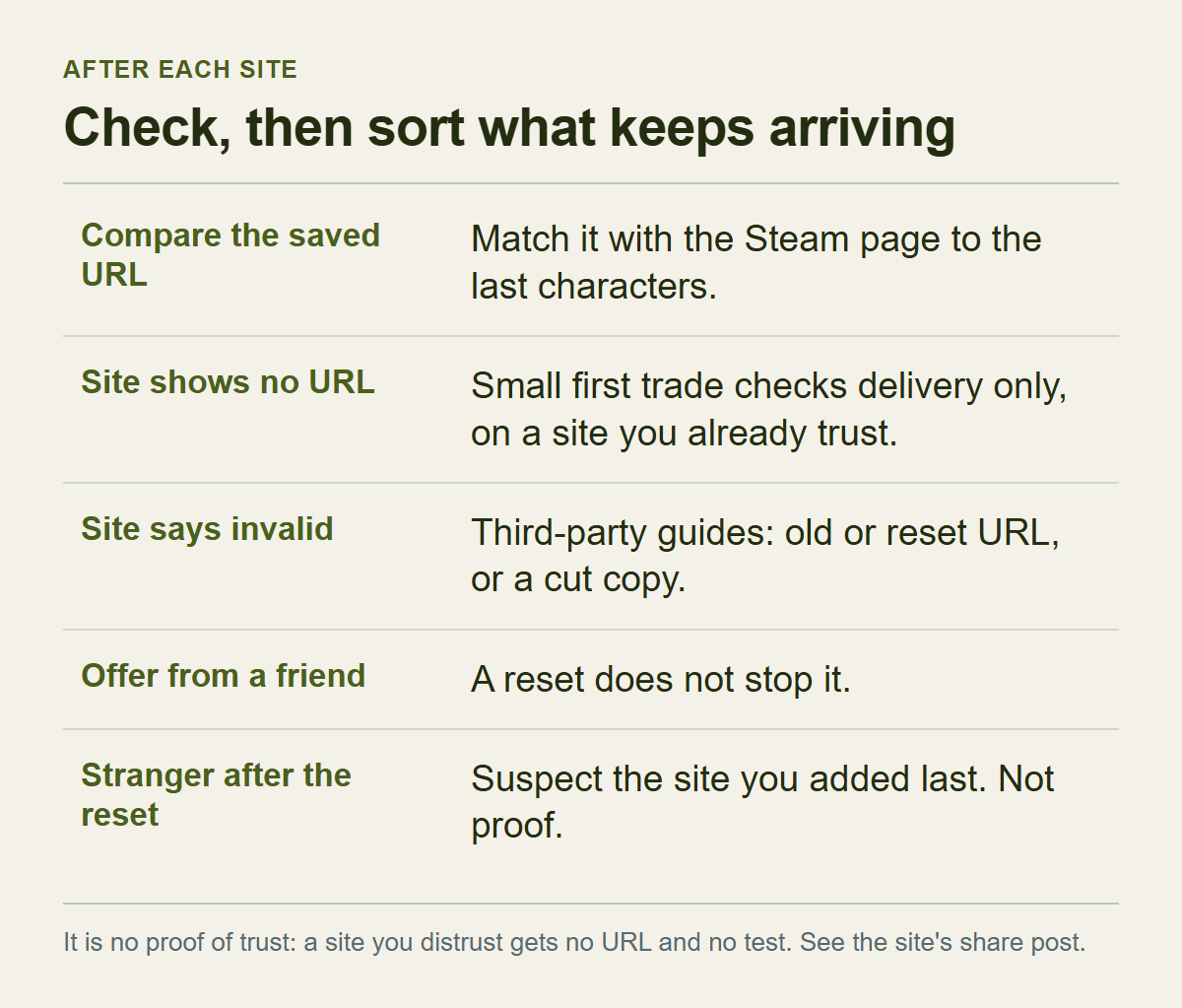
After a site saves the new address, do one check there and then. Compare the URL shown in the site's settings with the one on the Steam page, character by character to the end. The start can match while the token at the end has been cut, so look hardest at the last few characters.
Some sites never display the saved URL and only say "saved". Then the check has to move to the first trade. Before a large trade on such a site, I would send one small trade to see whether the offer arrives. That trade checks delivery only. It is not evidence that the site deserves trust, and I do it only on sites I already decided to use. A site I distrust gets neither the URL nor a test. The sharing post makes the same point about small tests, that one small transaction cannot validate a service, and the trade safety checklist advises against sending a small amount as a test of a counterpart. This check has a narrower purpose: whether an offer reaches the new URL on a site you already decided to use. Whether a site allows a small trade, or sets a fee or a minimum, differs from site to site. If the offer arrives, read the partner and the items as you would for any offer before accepting. If it does not arrive and the site sits at "processing", follow the steps for keeping Steam and a third-party service's status separate.
If a site answers that the URL is invalid, CritFeed lists a recreated or wrongly copied URL as the usual cause, and RiskySkins names an old or reset URL first. I did not reproduce that error. Then look at the inventory privacy setting from the third section.
Registering in stages gives you one more benefit. If unwanted offers start again after the new URL went out, the site you entered last is your first suspect. It is a lead and not proof: the offers could have come through the friend door, or someone who held the old URL may have obtained the new one another way. A lead still beats suspecting all ten sites at once.
If unwanted offers keep coming, sort them by origin. An offer from a friend has nothing to do with the URL, and a new URL cannot stop it. Whether you keep that friend is a separate decision, and the Report Player menu on the sender's profile is the route if you need to report them. An offer made before you created the new URL is handled with the method from the previous section. An offer from an unfamiliar account after the reset is where the staged registration helps.
A different explanation is possible too. If the same stranger keeps sending offers after the new URL went out, the old URL may not have stopped, which would mean the third-party reports were wrong or that some route I do not know about exists. At that point stop guessing and ask Steam Support through the trading help wizard.
How to read and approve an offer that arrives is covered in What to Check Before Confirming a Steam Trade, which also explains why a trade cannot carry Wallet funds and how to check an outside promise.
When the account is the problem, the URL comes last
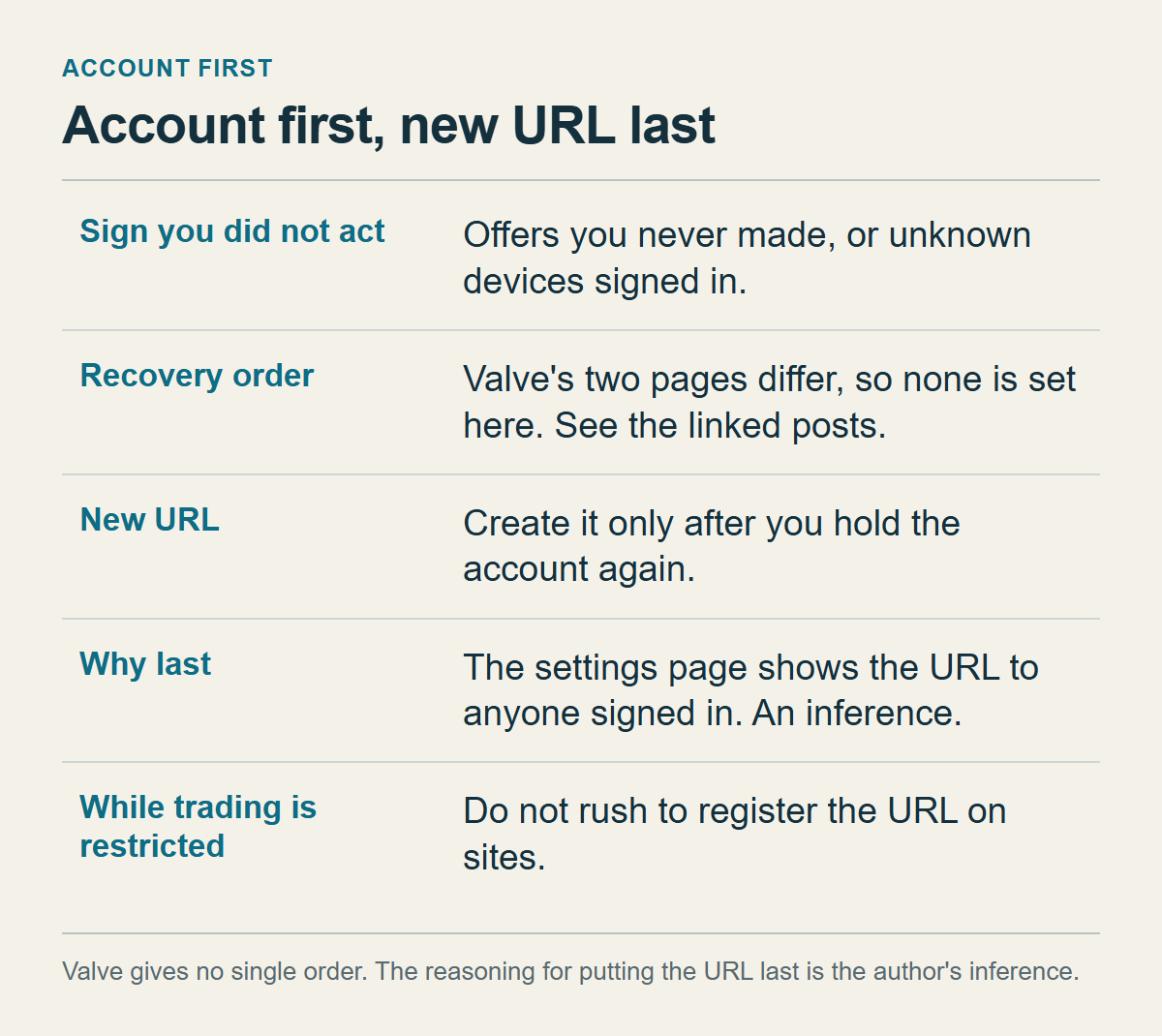
Unwanted offers arriving and things happening in your account that you did not do are different events. If your sent-offers list has an offer you never made, an unknown device is signed in, or a trade was swapped to an account you do not know, the URL is not the issue.
Valve's Scam: Trade Redirection page says a trade cannot be redirected unless the scammer has full access to the account, which means a secure account cannot have a trade redirected.
I do not set a recovery order in this article. The posts on this site order the steps differently, and Valve's own two pages differ as well. The Account Security Recommendations list puts authorized devices, signing out everywhere and the password first. The stolen-account wizard tells you to scan the computer and change the email password before resetting the Steam password. Rather than add a third order, I point you to Steam API Key Scam: What to Do When a Trade Goes to the Wrong Account, which sets the Valve pages side by side and explains its choice, and to If an outgoing offer was not created by you in the trade checklist.
One thing belongs to this article alone: create the new URL after you hold the account again. The URL is shown on a settings page that whoever is signed in can see. If someone else is already inside, they can read the new URL too. Valve does not say this directly; I am reading it from the URL being on that page. So I would recover the account first and create the URL only once I was sure I held it.
After recovery, trading may be blocked for a while. The periods are laid out in the 15-day hold post, in the section on restrictions after a new phone, new device or password reset, and I do not repeat them. My point is only this: while a restriction is on, do not hurry to enter the new URL on sites; put it off until the restriction ends. What happens if you enter a URL during a restriction, and whether the settings page opens in the meantime, is not described on Valve's restrictions page.
A new URL also cannot undo what has happened. What you can expect for items that already left is covered by Recovery has a defined scope and cost in the checklist and by the API key scam article. Checking the Steam Web API key belongs there too, and I found no document saying whether a new trade URL affects a key.
What to write down, and what this article could not confirm
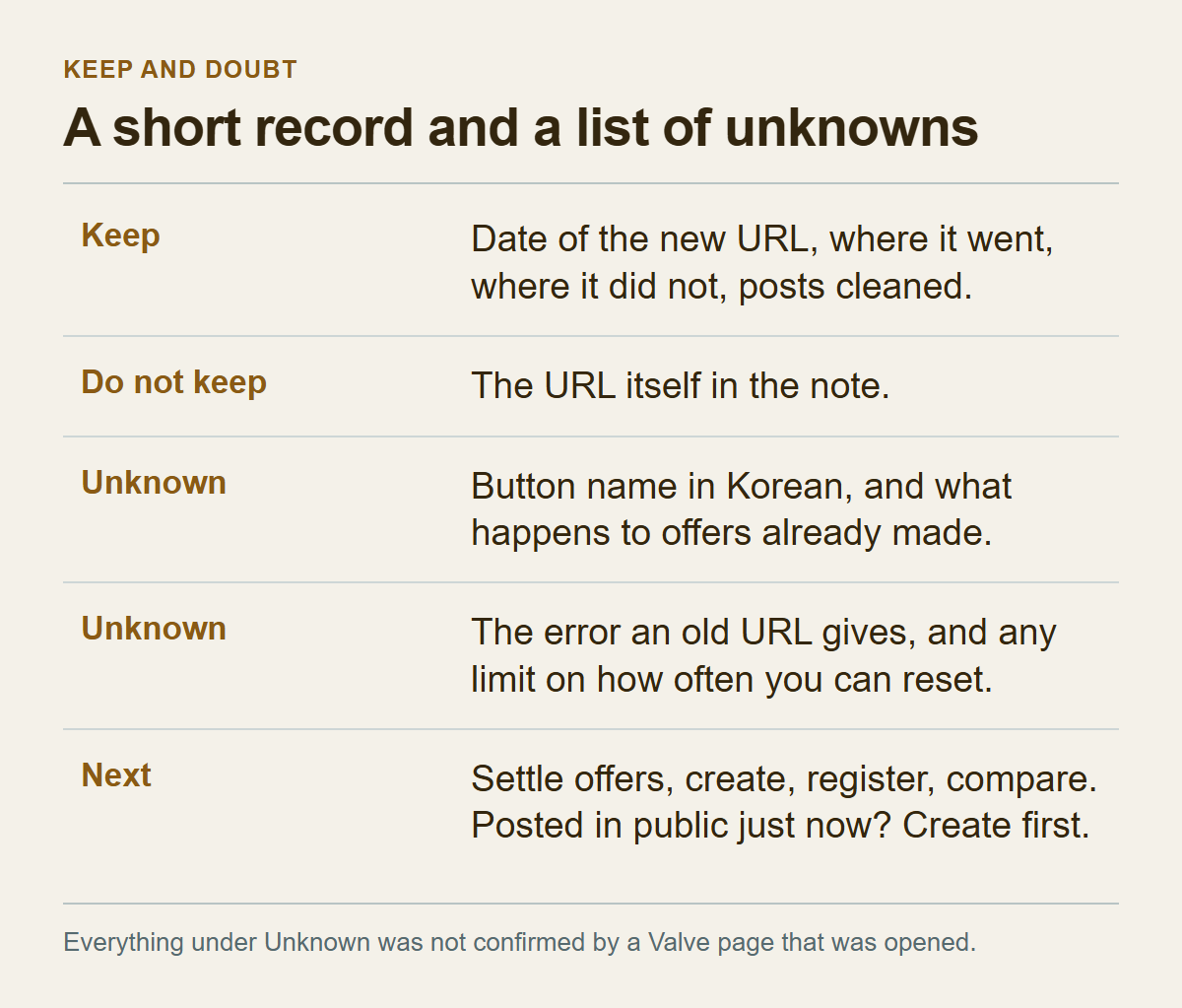
When you are done, leave yourself a short record. What made this episode hard was not knowing where the URL was. Five items are enough for next time: the date you created the new URL, where you entered it and when, the places you deliberately left out, the public posts you cleaned, and anything still left to check. Keep the URL itself out of the note, since a note can leak as easily as a forum post. Writing down the last few characters of the old URL is a suggestion of mine; it helps you recognise the old address if it is still stored on a site.
What this article did not confirm, in one place:
- That the old URL stops working. That comes from four third-party pages, not from Valve.
- What the button is called in the Korean interface, and where exactly it sits.
- What a reset does to offers already made.
- What error the sender sees when an offer goes to the old URL.
- Whether there is a limit on how often you can create a new URL.
- How individual sites store and delete URLs, which varies by site.
- That outside sites need a public inventory to send offers; that comes only from third-party guides.
If any of these affects a real account, open the official trading help wizard and pick the option closest to the problem. It separates the history of trades, trade offers, missing or stolen items, reporting a scammer, trading policy, being unable to trade, and "I need my Steam Trade URL". This article cannot stand in for those answers.
In practice, the order is as follows. First, settle pending offers and note how many you left open. If you posted the URL in public a moment ago, reverse that: create the new URL first and tidy up afterwards. Then create the new URL on a device you trust and copy all of it. Enter it at one site where a trade is about to happen, and compare it to the end. Add the others one at a time the same way, and leave occasional sites until you use them. If a site order stalls or errors after registration, use the trade offer error checklist to separate Steam's records from the site's. Before approving any offer that arrives, run it through the pre-confirmation checklist, and if your sent-offers list shows an offer you never made, go to its account control section and to the API key scam article.