
Steam System Requirements: What Should You Check on Your PC?
Read Steam requirements, identify your hardware and compare reviews or demos. Check memory fields and generated frames with a bounded same-scene plan.
Article languages
On this page
A requirements table becomes useful when you can connect it to the machine in front of you and the game you actually want to play. That sounds straightforward until a laptop product page supplies only a GPU name, a video supplies only an fps number, and the game's recommended column hides its rendering conditions in a footnote. You now have three pieces of information that don't quite answer the same question.
This guide works through that gap. It separates installation and feature requirements from acceptable picture quality, shows what belongs in a hardware record, and builds a small comparison you can use before paying. The worked machine, review records and timing arithmetic below are explicitly hypothetical. No reader's PC was inspected, no game or demo was run, and no fps or input latency was measured for this article.
If you already know your hardware, start with the game's footnotes. If the component names are uncertain, go directly to finding the machine's details. Either route should eventually leave you with a short decision record, not an unsupported statement that every newer GPU is equivalent to something in the recommended list.
Wilds attaches conditions to its recommended 60fps target
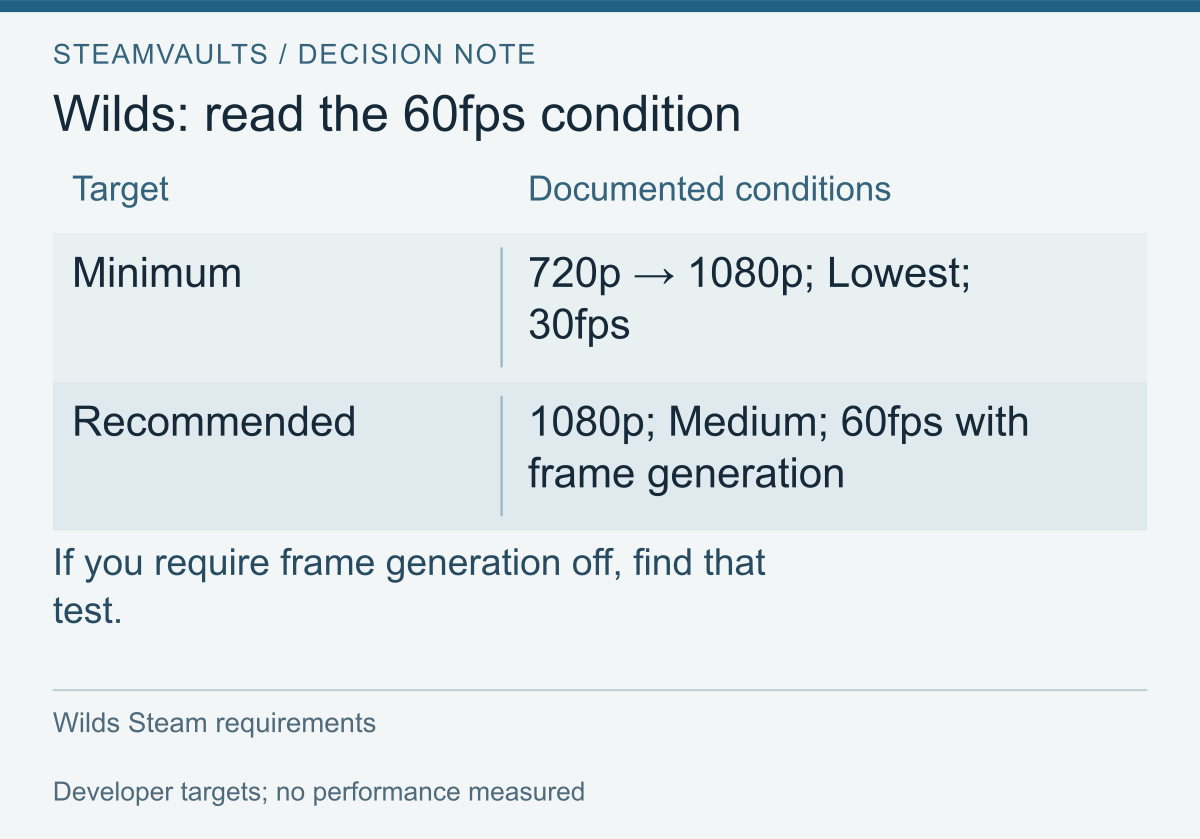
Developer target conditions, not measurements of a reader's PC.
The figure follows the Wilds Steam requirements, read on October 12, 2026 in Korean local time. The recommended 60fps target uses frame generation. If you require that frame rate with the feature off, find evidence for the changed condition. The published enabled target does not settle it.
“Recommended” also has no single graphics preset across games. Cyberpunk 2077's requirements for Update 2.0 onward specify High, 1080p and 60fps with ray tracing off; its RT Overdrive target includes a frame-generation measurement condition. Its RAM and VRAM fields are separate. Keep the applicable version and settings attached when comparing either document.
Read the row as a claim with conditions
Before comparing component names, copy the target as one complete statement: game version, resolution, quality preset, ray tracing state, upscaling state, frame generation state and the developer's stated performance goal. A missing item stays missing. Do not interpret an omitted switch as definitely on or definitely off because another website makes that assumption.
You can then underline the parts you would change. Perhaps the listed quality is acceptable, but generated frames are not. Perhaps you are willing to use reconstruction but want a higher output resolution. A second colour is enough to show the disagreement. This makes the search for reviews specific: you are looking for evidence about those changes, not simply another person saying the game runs.
The CPU and GPU list still matters. It is a reference to compare against, not an ordered answer key for every product ever released. A component absent from that list has not automatically failed; nor has it passed because its model number looks larger. Record the unmatched name and investigate it. Filling the space with “probably fine” makes the sheet easier to read but less useful for a purchase.
A feature requirement is different from an unwanted picture
Suppose a game requires a graphics capability your current evidence has not established. Reducing shadows might change the picture, but it does not establish support for that capability. Treat “can this software use the required features?” and “do I like the performance at these settings?” as separate questions from the start.
Microsoft's Direct3D feature-level explanation distinguishes the API version from the supported hardware features and says a feature level is not a performance measure. Its DirectX check uses dxdiag and the System tab. A displayed version is useful evidence to record; it is not a speed rating.
When a requirement names a feature, keep its exact name in your note and look for the corresponding official hardware or game guidance. If you cannot find that correspondence, write “not checked.” The next useful action is finding the missing documentation, not collecting ten videos at a lower resolution. This is also where I would stop a buying decision that relies on certainty the current evidence cannot supply.
Keep system requirements and your target settings in separate columns
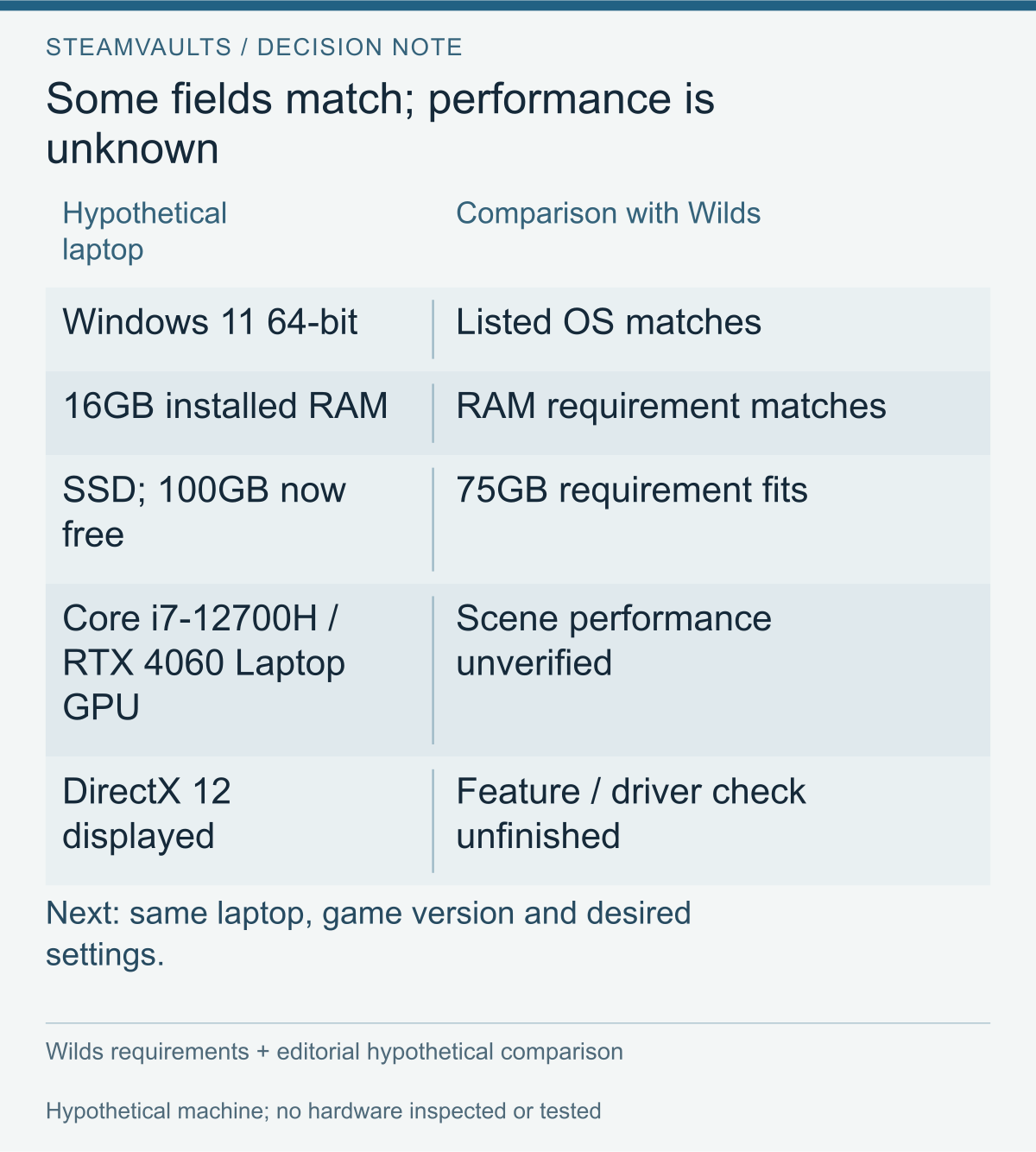
A hypothetical record. Empty result fields identify what a review still needs to establish. No hardware was inspected.
One column asks whether the required environment is present. The other asks which play conditions would make the purchase worthwhile for you. The first contains operating system, required graphics features, memory and storage conditions. The second contains output resolution, acceptable quality, rendering choices and the kinds of scenes you intend to play. A checked box in the first column does not fill the second.
Write a target you can actually compare. For this guide's hypothetical buyer, it is “1920×1080, Medium, ray tracing off, upscaling acceptable, frame generation off, a 60fps goal.” That is an editorial example of a preference, not a recommended setup or an observed result. A different reader might prefer higher image quality at a lower frame rate. Their comparison would legitimately use a different target.
It helps to add one sentence about what you won't compromise. “I can lower distant detail, but I need combat to feel comfortable” is more informative than “I want smooth gameplay.” The former tells you which scenes to examine and which adjustments may be acceptable. It does not pretend that comfort has been measured in somebody else's video.
Work through one incomplete machine record
Use the figure's hypothetical record to follow a decision from checked fields to unresolved ones. Its inputs were invented for comparison, not collected from a reader. The useful next step is finding a review that can address the empty result fields, rather than assigning a score to the checked boxes.
This is already a useful result. It tells you not to spend the next hour confirming the operating system again. It also tells you precisely what a review must identify before you can apply it to the remaining questions. The unlisted CPU requires relevant evidence, and a memory capacity match does not turn the graphics product into the listed reference product.
Do not shorten that conclusion to a percentage such as “four of six passed.” These fields are not equally weighted votes. A missing mandatory capability cannot be outweighed by several matching capacities. Conversely, an unresolved performance comparison is not proof of a mandatory incompatibility. The sheet is a record of different questions, not a scoring system.
Now imagine finding a video with the same GPU wording but no laptop model, no processor and no power mode. It may still show how the game looks at its stated settings. It cannot fill every gap in this machine record. Keep it in the image-quality part of your notes rather than marking the entire laptop as tested.
Make uncertainties visible instead of silently resolving them
Use short status labels: “document match,” “observed in this test,” “different condition,” “not disclosed,” and “not checked.” The first two should also carry their source or date. There is a practical difference between a reviewer not disclosing a setting and you not yet reading their description. Both are incomplete, but they call for different next steps.
If the description is merely unread, open it and inspect the timestamped configuration before searching elsewhere. If the setting is genuinely undisclosed, do not infer it from a menu screenshot taken in another part of the video. A screenshot is evidence of the displayed setting at that moment; continuity with the measured interval is a question the material still needs to answer.
A record that preserves uncertainty can prevent unnecessary spending. You might discover that the missing evidence concerns an optional quality setting you are happy to change. You might instead discover that the mode you care about is completely absent from every available test. Those lead to different decisions, even if both initially looked like “no exact benchmark.”
Specify the screen target, not just its shorthand
Write pixel dimensions when you can. A monitor's advertised maximum, the desktop resolution and the game's selected output are three entries to check rather than one label to copy. If you intend to play in a window or on an external display, put that intended arrangement in the record too. A comparison made for another arrangement remains evidence for that arrangement.
Resolution arithmetic can describe the workload you are asking about without predicting the resulting speed. As a hypothetical illustration, 1920×1080 contains 2,073,600 output pixels and 2560×1440 contains 3,686,400. The second count is approximately 1.78 times the first. That arithmetic is not a claim that a particular game will take 1.78 times as long to render, or that lowering the resolution will produce a matching fps increase. It helps identify a meaningful difference between two test conditions.
Quality presets need the same care. If a reviewer changes individual options after selecting a preset, record those changes. For a purchase comparison, “custom settings” is not unusable; undisclosed custom settings are the problem. You can accept a compromise only after knowing what it changes in the scenes you care about.
Record storage without inventing a universal margin
Total drive capacity is not the same field as currently available space. Windows device and storage information provides device specifications in Settings → System → About and storage information under System → Storage, including other-drive usage through advanced storage settings. Identify the intended destination, not whichever drive happens to appear first.
In the hypothetical record, the free-space reading belongs to the checking date. It does not describe the amount that will remain after installation, later downloads or another application's use. Check the actual installation display and game-specific instructions when you reach that stage. This guide does not add an arbitrary double-capacity rule. Handling a stalled disk operation is a separate question from deciding whether the purchase fits your present machine.
Read rendering and frame generation settings before comparing fps
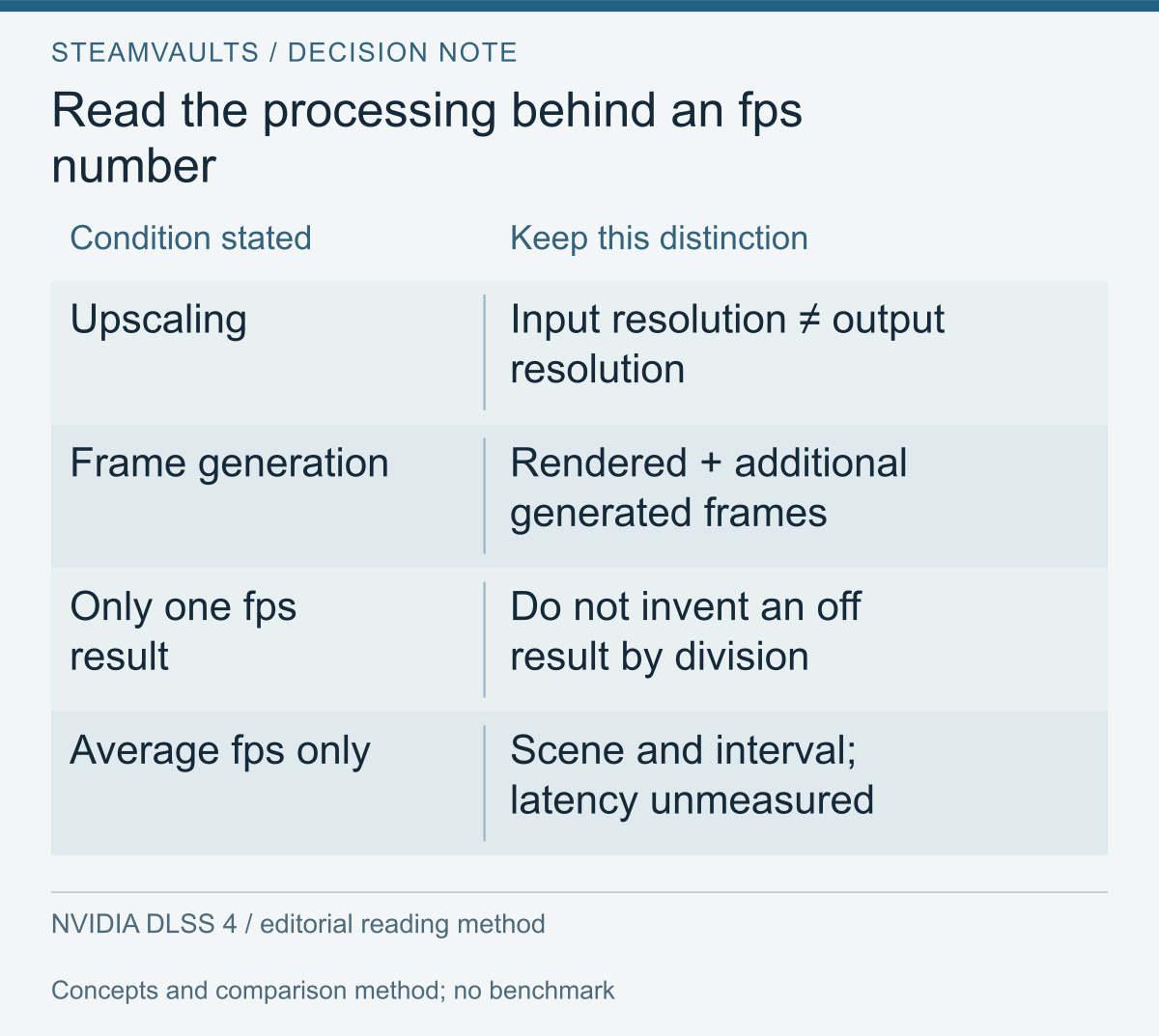
Concepts and a reading method. Do not derive an unreported off result by division or treat fps as measured latency.
NVIDIA's DLSS 4 technical report distinguishes reconstruction from lower-resolution input from generating extra frames between rendered frames. Keep input resolution, output resolution, reconstruction quality mode and frame generation state as separate entries. “1080p” in a video's title does not supply all four.
This distinction matters when your goal is defined with a switch disabled. A counter recorded with that switch enabled answers the recorded condition. If the material supplies both on and off results, preserve them separately. If it supplies only one, do not divide the number by an assumed multiplier to manufacture the missing result. You have not observed that missing condition.
Use frame-time arithmetic to understand a target
For an ideal evenly spaced sequence, divide 1,000 milliseconds by the frame rate to get the interval: roughly 33.33ms at 30fps, 16.67ms at 60fps and 8.33ms at 120fps. These are mathematical examples of uniform delivery, not measurements from Wilds, a review, or the hypothetical laptop. They are not the complete input-to-display delay either.
The numbers explain why “averaged 60” and “each important moment arrived at a comfortable pace” are different statements. Here is a deliberately extreme invented sequence: 60 intervals total one second. In sequence A, all 60 are approximately 16.67ms. In sequence B, 59 are 10ms and one is 410ms. Both have the same total duration and interval count, but the second contains a long pause. The example illustrates information discarded by a single average; it is not a likely pattern or a benchmark result.
When a review reports a frame-time graph or a percentile statistic, read its measurement definition and interval before using it. A label such as “1% low” without a method is not a licence to calculate a value from the average yourself. Different reported quantities should occupy different columns. A graph whose axis or capture interval is unavailable may still show the scene, but its numbers have an unresolved interpretation.
Do not classify every visible pause as a GPU limit from this arithmetic. The example describes delivery, not its cause. Identifying a cause would require additional observations that this pre-purchase comparison has not made. You can record that an important scene pauses without pretending to know which component should be replaced.
Picture continuity, responsiveness and image quality need their own evidence
Fast camera movement can expose a different concern from reading a stationary landscape. Thin details, moving edges and interface elements are useful places to inspect image quality in the stated reconstruction and generation mode. Their appearance is an observation or a viewer's impression unless a declared measurement method accompanies it. Do not turn “looks acceptable to me in this recording” into a universal quality grade.
You also cannot measure a stranger's control response by watching them play. A video can show their action and motion, but a reliable latency claim needs its own method and stated boundary. The counter alone does not provide that. If control feel is essential to your decision, reserve that part for your own accessible demo test or properly scoped latency evidence.
NVIDIA's 2020 Reflex explanation separates frame-production rate from peripheral-action-to-display system latency, and separates that delay from server round-trip latency. This is a dated vendor explanation, not a measurement or a current feature-availability claim. The practical comparison is to ask what each reported quantity includes, rather than rename a throughput number as an end-to-end response time.
Keep the display and recording conditions in mind when judging the material. A compressed recording on a different screen may be sufficient to see the selected preset or a gross pause. It may leave subtle moving detail unresolved. Note that limitation instead of using the recording as proof of every part of the experience.
An fps number can therefore remain useful without becoming the whole verdict. It tells you about the measured quantity under stated conditions. Your purchase depends on whether the relevant scene, picture, responsiveness and permitted compromises are represented. I would rather keep one well-described result and two unanswered questions than collect twenty numbers whose conditions have been stripped away.
Find full hardware names and the right memory fields
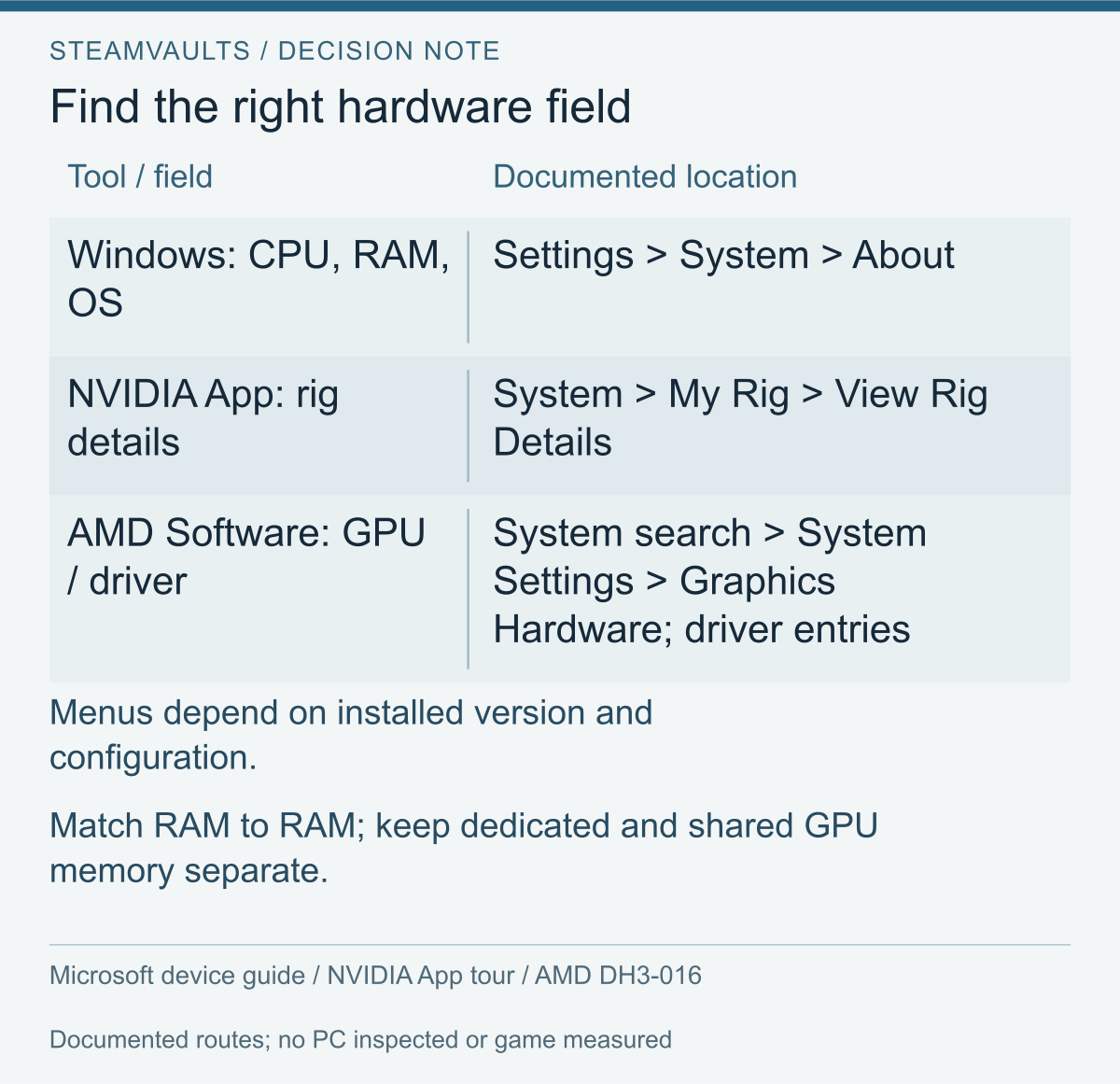
Routes from the official information guides. AMD's example uses 25.6.1; menus can vary by installed version and configuration. No PC was inspected and no performance was measured.
Start with information already available on the machine or its exact manufacturer's configuration. Write the full CPU and GPU strings, the computer's product model, installed RAM, graphics-memory fields, operating-system version and bitness, and driver version. Keep suffixes and the fact that a device is a laptop. “i5,” “RTX,” and “gaming computer” leave too much unidentified for a matching comparison.
The NVIDIA App hardware tour uses System → My Rig → View Rig Details. AMD DH3-016 describes searching for System, opening System Settings and reading Graphics Hardware and driver information; its example is 25.6.1 and screens can vary by configuration and installed version. Use installed guidance rather than treating the figure as an instruction to install software or enable tuning.
Give every field a provenance
Next to each value, write where it came from. For example, “installed device information, checked today” is different from “retail listing for this product family.” A family can have several configurations. Before using a manufacturer's page, match the exact model or configuration identifier you can actually establish. If that identifier is unavailable, preserve the uncertainty rather than choosing the highest specification on the page.
If two records disagree, do not average them. A device readout and an old purchase description might refer to different configurations or to a component changed later. Copy the two values and their origins separately, then look for the exact installed-model explanation. This is an information check, not an invitation to open the machine, flash firmware or change power limits.
Capture only what the comparison needs. A full diagnostic export can contain more than the relevant hardware fields. Before sharing material publicly, examine it and crop or remove unrelated account, user, computer and identifying information. A clear transcription of the necessary values can be preferable to uploading an entire file you have not read. Do not publish a licence key or credentials to obtain a requirements opinion.
Do not add different memory labels together
Installed system RAM, dedicated graphics memory and shared system memory belong in different fields. Microsoft's graphics-adapter definition, retained from the earlier readable document evidence, defines dedicated video memory as not shared with the CPU and shared system memory as the maximum system memory usable by the adapter. This explanation uses that earlier reading, not a new check of the document.
On an invented readout showing 8GB dedicated and 8GB shared, writing “16GB dedicated VRAM” changes the category. Write each label and value instead. A maximum available amount is also not a reading of current use. Matching a capacity does not establish processing speed, behaviour in a particular scene, or equivalence to a different graphics product.
When a product uses an unfamiliar memory description, keep that exact description and seek the product's own documentation. Do not make it resemble a discrete GPU by renaming a shared field. If the game only gives a discrete-product reference, you may need evidence for your actual configuration rather than a misleading capacity total.
A laptop review needs more than the shared GPU name
NVIDIA's RTX 40-series laptop table lists 8GB for the RTX 4060 Laptop GPU. Its laptop power explanation discusses manufacturer graphics-power information, Control Panel System Information, and CPU, memory, thermal and performance-mode differences. Keep the exact laptop model and test mode with the result. This is a request to identify a configuration, not to raise its power setting.
The useful comparison question is now narrower: how close is the tested machine to mine? The same GPU wording with a different processor or undisclosed mode is partial evidence. It is not useless, but the gap belongs in the conclusion. A desktop result should not be silently relabelled as a result for a laptop product whose name shares a number.
If both integrated graphics and an NVIDIA GPU are present, the installed list does not by itself identify the active GPU. On supported power-saving systems, NVIDIA's GPU Activity help describes Desktop → Display GPU Activity Icon in Notification Area for viewing applications using the NVIDIA GPU. The option is not universal. An absent option is not proof of an absent GPU.
Record a driver version as well as the hardware name. If a game's instructions give a version or a supported route, compare that exact guidance with the installed record. Do not use the mere presence of a driver as proof of a specific compatibility condition, or update every component just to make the worksheet look complete. If guidance conflicts or you cannot identify the correct device, keep that question open.
AMD's switchable-graphics FAQ, DH-017, treats the integrated and discrete devices as a coordinated configuration. It recommends manufacturer-provided drivers for compatibility, discusses compatible generic drivers, and requires the same driver type for both devices. Its old menu paths are not a Windows 11 walkthrough. For a dual-GPU laptop, compare the manufacturer's supported configuration before making a driver change; this article does not promise a performance gain from either choice.
Choose reviews and demos around the conditions you need
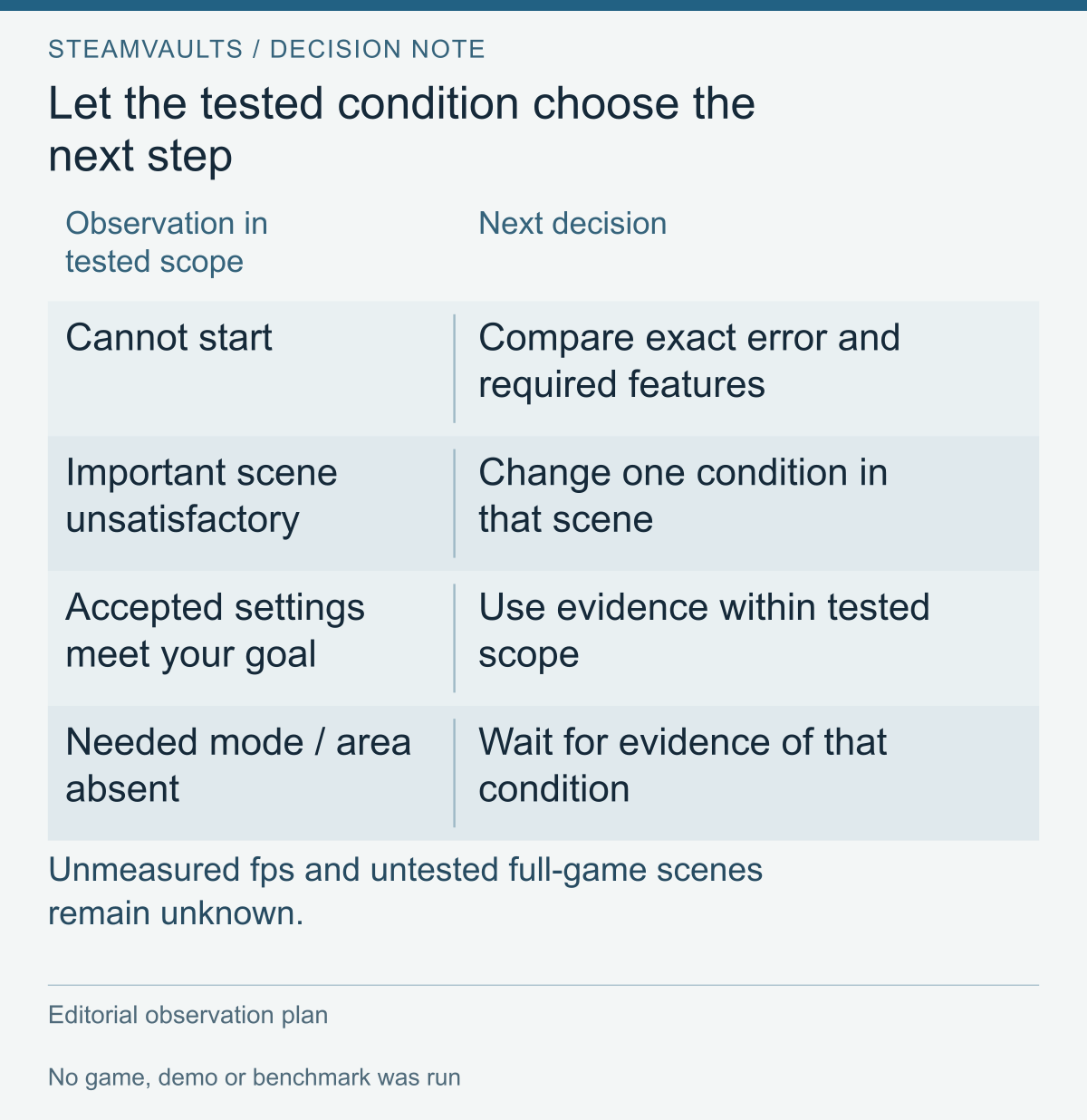
An observation plan, not a demo result. Use accepted evidence within its tested scope and retain unmeasured fps and untested full-game conditions.
A useful review record needs enough context to reproduce the question, not merely admire the result. Keep the game and driver versions, full CPU and GPU names, laptop configuration if relevant, memory, scene, capture interval and all rendering switches beside each number. Also distinguish a measured quantity from the reviewer saying the game felt comfortable.
Start with a few plausible records rather than a huge spreadsheet. For each one, ask which question it actually answers and which field prevents a direct comparison. Do not rank unlike conditions by the largest displayed number. You can use a review to inspect image quality, scene coverage or a stated setting even when it cannot establish your target frame rate.
Three invented records show why the highest number is not the winner
Record A describes a desktop GPU that shares part of the laptop's name, tests a high-resolution maximum preset and supplies a headline average. It shows that reviewer's selected picture. The machine class and target differ, so it does not establish the hypothetical laptop's chosen setting. There is no justified conversion from A's number to the laptop's result.
Record B names the same laptop model, processor and mode, but its run uses generated frames and does not provide an off result. This is closer hardware evidence. It may help you judge the image under the recorded setting. For the reader who made an off result a purchase condition, the essential field is still missing. Do not fill it by halving the headline average.
Record C identifies a close configuration, records the chosen off condition, and shows movement and combat in an available demo section. It has no online test and no later-area coverage. It is the most relevant of these invented records for the particular section and target. That does not make it evidence for the entire game. No fps values are attached to these examples because no such reviews were collected or measured here.
Your next action follows the remaining gap. For A, find a closer machine. For B, seek the missing setting or decide whether you accept the recorded one. For C, ask whether the untested content is essential. If you need online play in later areas before buying, the closest opening-section evidence still leaves the purchase unresolved.
Compare a result only after recording its differences
A compact matrix can make those differences readable. Use one row per record, with columns for hardware, software version, scene and duration, rendering settings, measured quantity and missing scope. Put the source and checking date beside the row rather than in a separate collection of bookmarks. Otherwise a number can survive long after you have forgotten which version produced it.
| Invented record | Hardware match | Rendering match | Content coverage | Useful next question |
|---|---|---|---|---|
| A | Different machine class | Different resolution and preset | Stated review scene | Is there a closer configuration? |
| B | Same disclosed laptop and mode | Required off result missing | Recorded test section | Can the missing setting be checked? |
| C | Close disclosed configuration | Chosen off condition recorded | Demo movement and combat only | Is absent content essential? |
When you find real material, fill the fields with what it discloses and preserve the gaps. Finding one record with your GPU and a different CPU, and another with your CPU and a different GPU, does not produce a measured result for your exact machine. Averaging or weighting unlike results would require a justified predictive model that this guide has not built. The matrix should yield a description of the closest evidence, differences that matter to your goal, and the remaining questions.
Include the scene and version in that description. A fully disclosed quiet-scene test leaves combat unanswered, while combat footage cannot supply an undisclosed configuration. If the recording predates the requirements document's applicable version, retain that discrepancy and check whether its result applies to the version you would install. Use the creator's disclosed version rather than substituting a recent upload date for the game build date. The table above contains no measured fps or benchmark scores.
Plan one bounded test rather than changing everything
If a legitimate demo is actually accessible to you, first write down what it can cover. Wilds' adopted Steam description limits its Prologue Demo to completion of “To the Forest” and excludes online features. Check the available version and checking date. A result from the offered section does not test absent online play or later areas.
Before launching, save the original graphics choices in a note or screenshot, and choose one available scene that relates to your goal. Use a repeatable movement route or combat sequence when the content permits it. Note differences you cannot control, such as a different encounter. This is an editorial observation protocol, not a developer-certified benchmark procedure.
For a manageable first comparison, choose a 60–120 second segment and record its start and end conditions. That duration is a suggested observation window, not proof of full-game stability. It should contain the movement or interaction you care about, rather than spend most of the interval in a menu. If the scene changes before the interval ends, record that rather than pretending the samples describe the same content.
Run the chosen target first. Separate what you can see from what you can measure. You can write that moving edges look unacceptable to you or that an action feels uncomfortable. If you have no identified counter or capture method, you cannot attach a measured fps or latency to those impressions. If a counter's generated-frame scope is unknown, retain that limitation beside its number.
Keep the first visit and a repeated visit identifiable. If the two behave differently, write down that difference without immediately assigning a cause. A quiet repeat does not erase an interruption on the first pass, while one first-pass interruption does not establish that every later pass will behave the same way. If your decision concerns the first experience as well as repeat play, both observations matter. This plan does not identify shader work, storage, temperature or any other unmeasured cause from the difference alone.
If one compromise is acceptable, change one relevant setting and repeat the available route. For example, compare generation off and on while preserving the other choices, or compare two resolution settings with the generation state unchanged. Do not interpret a run with a new preset, new resolution, new reconstruction mode and new generation switch as evidence about just one of those changes.
A small test can stop after the original condition and one or two meaningful alternatives. If the first comparison is inconsistent, a repeat of the same condition may be more useful than another adjustment. Three differently configured runs are not inherently stronger than two understandable ones. Keep the stopping rule attached to the decision: you need evidence for an acceptable setting, not an endless optimisation project before purchasing.
Preserve the scene, the exceptions and the conclusion
For each run, record version, hardware state, settings, scene, observation length, actual measured quantities and your separate impressions. Write a short conclusion with a boundary: “acceptable in this segment at this setting; the later area and online mode were not tested.” That sentence is more useful than simply writing “passes recommended.”
An obvious interruption should remain in the record. If the game changes scene, downloads something, loses focus or receives an unrelated interruption during your chosen interval, do not quietly blend that interval into an uncomplicated comparison. You may decide to repeat it, or decide the disturbance itself matters. Either choice requires the original observation to stay visible.
If the game cannot start, save the exact message and compare its required features before judging performance. This guide does not prescribe repeated reinstalls or repairs; that would be a different diagnosis. A useful next handoff is the information needed in a game-support report, together with the specific requirement you could not verify.
If the tested condition is uncomfortable, decide whether a permitted compromise solves your actual concern. Lower picture quality may be acceptable for one reader and not another. A higher displayed frame count may still leave your chosen control experience unresolved. The decision belongs to the target you wrote, not to an obligation to make the purchase pass.
Finally, missing evidence is a possible outcome. You can wait for a comparable full-game review, keep a lower-setting preference, or decide not to buy on the current information. None requires an invented equivalence chart or an unreported fps prediction. Keep the machine record and target so that a later review can answer the remaining question without starting the whole search again.
Evidence scope: retained official-document readings are dated October 12, 2026 in Korean local time. The Reflex and AMD DH-017 explanations were additionally read on October 13. Their dated or old-interface limitations remain in the text. Publication dates and reading dates are different. The arithmetic, example records and test plan are authored comparisons, not collected performance data. No reader hardware, game execution, demo, benchmark or account operation was observed for this guide.