
Matching Steam mods with a friend's server: versions, dependencies and settings
Compare game and loader versions, Workshop items, dependencies, load order and shared settings using documented game cases and a fictional mod configuration.
Article languages
On this page
Your friend is playing with mods, but you can't join the server. You've compared the names in both lists, and everyone says their files are up to date. Reinstalling at this point can miss the condition that actually differs. What you need to share is a working game-and-mod configuration, not just a list of mod titles.
Start by checking that you're using the same game and loader to reach the same server. Then compare the items and releases, dependencies, load order and settings. A download that hasn't completed and an error triggered by an action after joining need different checks. This guide follows those distinctions. Disabling mods, unsubscribing and cleaning up saves belong in the separate mod-removal guide.
“Fog Route,” its B, C, R and P mods, and the versions and values below are an invented teaching model. They are not mods tested in a real game or measured results. The documented examples from Terraria's tModLoader and Factorio are attributed separately. Factorio is a comparison using its own mod portal, not Steam Workshop.
Are you using the same game and loader to reach the same server?
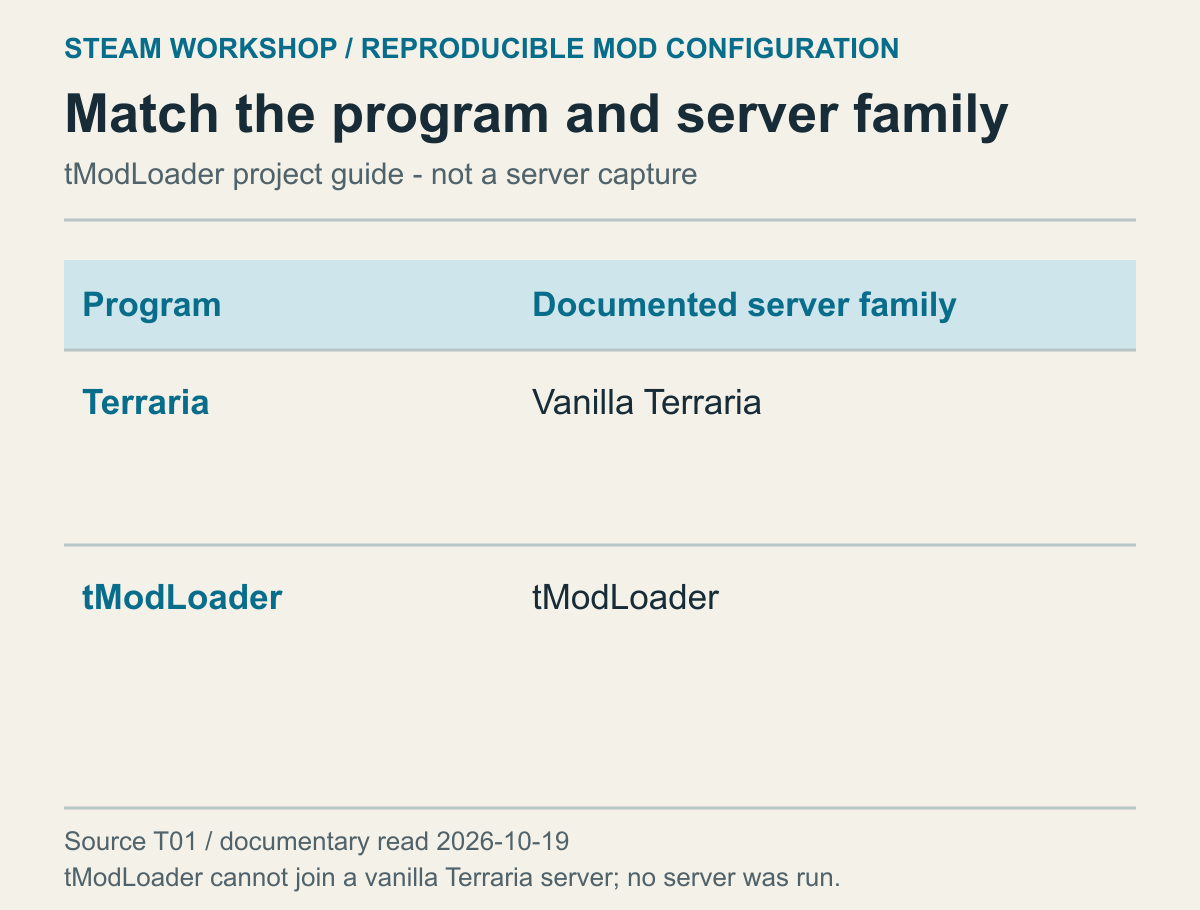
This diagram represents the connection boundary in the tModLoader project's documentation. It is not a capture of a current server list.
In some games, the program you're running matters before the mod list does. The tModLoader project's basic usage guide explains that tModLoader cannot connect to vanilla Terraria servers. Running Terraria and running tModLoader are different starting points. Downloading the mods again because both environments have “Terraria” in their names won't resolve that distinction.
Check the destination your friend sent, too. Is it the server they're hosting now or a separate one used previously? “My friend's server” is a convenient label, but it isn't enough to identify an environment when several have used that name. Confirm which server the address or invitation points to, then compare its game, loader and version with the program you've launched.
Even matching program names don't establish that you've reached the intended server. The tModLoader multiplayer troubleshooting guide includes a case where matching versions still produce a version complaint: a vanilla server may also be running on the same port. The useful distinction is between the error you see and the endpoint you actually reached. It isn't a general instruction to change ports or disable a firewall.
Suppose the fictional Fog Route operator runs a stable server and a test server. A player matches the stable server's mods but connects through an old favourite pointing to the test server. Checking every support range won't correct that comparison while the destination remains wrong. Agree on the server first; its requirements then give both sides a common reference.
Identify who is hosting each part of the environment. A friend opening a room from the game and an operator running a separate dedicated-server program have different screens and responsibilities to check. Updating your friend's personal game doesn't establish that the dedicated server is in the same state. Players check their clients; the operator checks the server that is actually running.
Once the target is right, compare the mods required for that session.
Compare item identity and active configuration, not just names
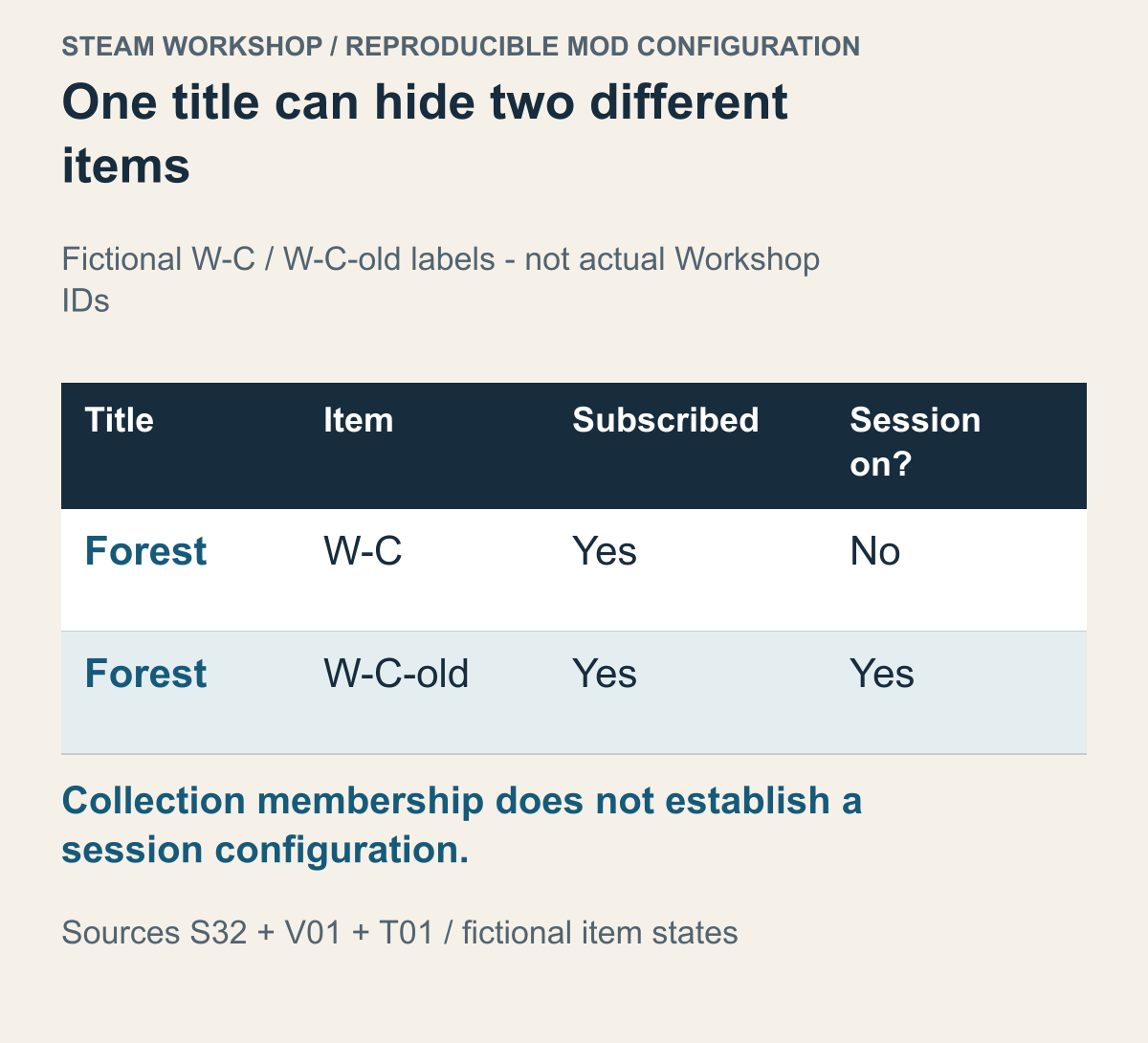
This combines Workshop documentation with the fictional labels W-C and W-C-old. They are not real item IDs or observed client states.
If your friend uses “Forest Expansion,” don't choose the first search result on the strength of the title. An original, a translation, a maintained fork and an item for an older game version can have similar names. Compare the intended item page and its author's instructions. In this model, W-C and W-C-old are separate items even though their titles match. These labels are not real Workshop numbers.
After identifying the item, separate its states. Being subscribed, having received the required files and having the game enable the item for this run answer different questions. Valve's Workshop integration documentation describes the game-side work that recognises and loads downloaded content. Matching subscription lists therefore doesn't establish matching active lists.
The tModLoader usage guide separates downloading a mod from enabling it through Workshop → Manage Mods. That documented distinction is enough for this example; it does not establish another game's activation controls. Compare the item selected for the session rather than treating a download as proof that the game is using it.
A subscription list can include items that this room doesn't use. The important question isn't who has collected the most mod files; it's what the current session loaded. Our fictional player subscribes to W-C but has enabled only W-C-old in a configuration left over from an earlier run. Comparing the current active items comes before another download.
Treat a collection link with the same care. Valve's ISteamUGC documentation distinguishes collection membership from an ordinary item's dependency relationship. Showing an ordinary dependency on the web is also separate from the game's decision about whether it can actually use that content. This is a developer API description, not a consumer feature promising that one collection fixes every game's order and settings.
A collection can help people find items without representing the exact set enabled on today's server. Does a five-item collection correspond to a server using four of them? Is a required supporting mod described elsewhere? If the collection author adds an item, yesterday's list and today's can differ. The group still needs to decide which items belong in the configuration for this run.
The comparison can reveal a different item, a different available release or a different activation state. A different item sends you to the intended distribution page. A different release of the same item leads to the version checks below. If only activation differs, use the game's documented configuration selection. Calling all three “the mod isn't installed” makes the next action harder to choose.
Choose a shared game version before making everything current
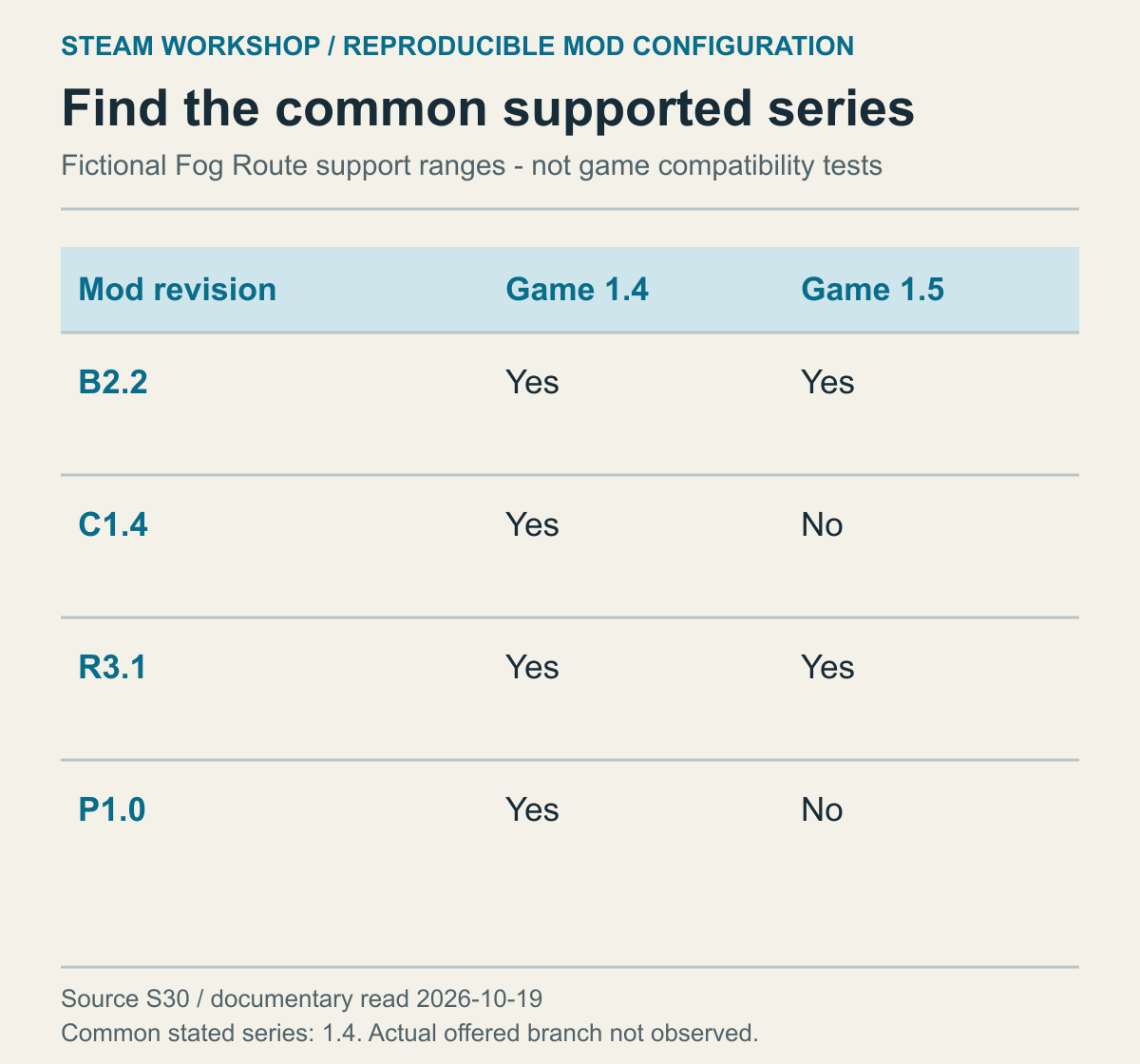
These invented support ranges illustrate an intersection. They are not real branch availability or mod-compatibility test results.
A mod's own revision and the game versions it supports are separate information. Give Fog Route the following fictional releases:
- Base B 2.2 supports game 1.4 and 1.5.
- Forest C 1.4 supports game 1.4.
- Dock R 3.1 supports game 1.4 and 1.5.
- Bridge Patch P 1.0 supports game 1.4.
Different products having different revision numbers is not itself a problem.
To use all four, find the overlap in the game versions they say they support. Here it is 1.4. Choosing game 1.5 from B and R alone drops C's and P's conditions. A majority of two supporting the newer game doesn't remove the other two requirements. If you decide on a new configuration without C, calculate the overlap again. The features you want determine which compatibility question to solve.
Don't fill an undocumented support range with “all versions” in your own comparison. Valve's item-versioning documentation describes a selection rule that treats a release with no specified support range as valid for every build. That is not evidence that the author tested every build. A blank in your comparison means support for the required game version remains unresolved.
Workshop delivers the latest item by default. Features for selecting a mod release associated with a game branch also exist, but depend on developer and author configuration. Rolling the game back doesn't universally give the player the matching historical mods. Check what that game implements and whether the author actually offers a release for the branch.
The support intersection must also be obtainable. All four fictional mods overlap on game 1.4, but that doesn't create a way to get 1.4 if its publisher no longer offers it. An available 1.3 isn't a substitute: C and P were stipulated to support 1.4. A valid overlap and access to the needed files are separate conditions.
If there is no common version, decide whether to change the configuration, wait for a compatible release or play something else. Removing one item from the intended set can affect dependencies, so examine what remains next. Repeatedly pressing download won't make disjoint support ranges overlap.
Follow dependencies through their version constraints
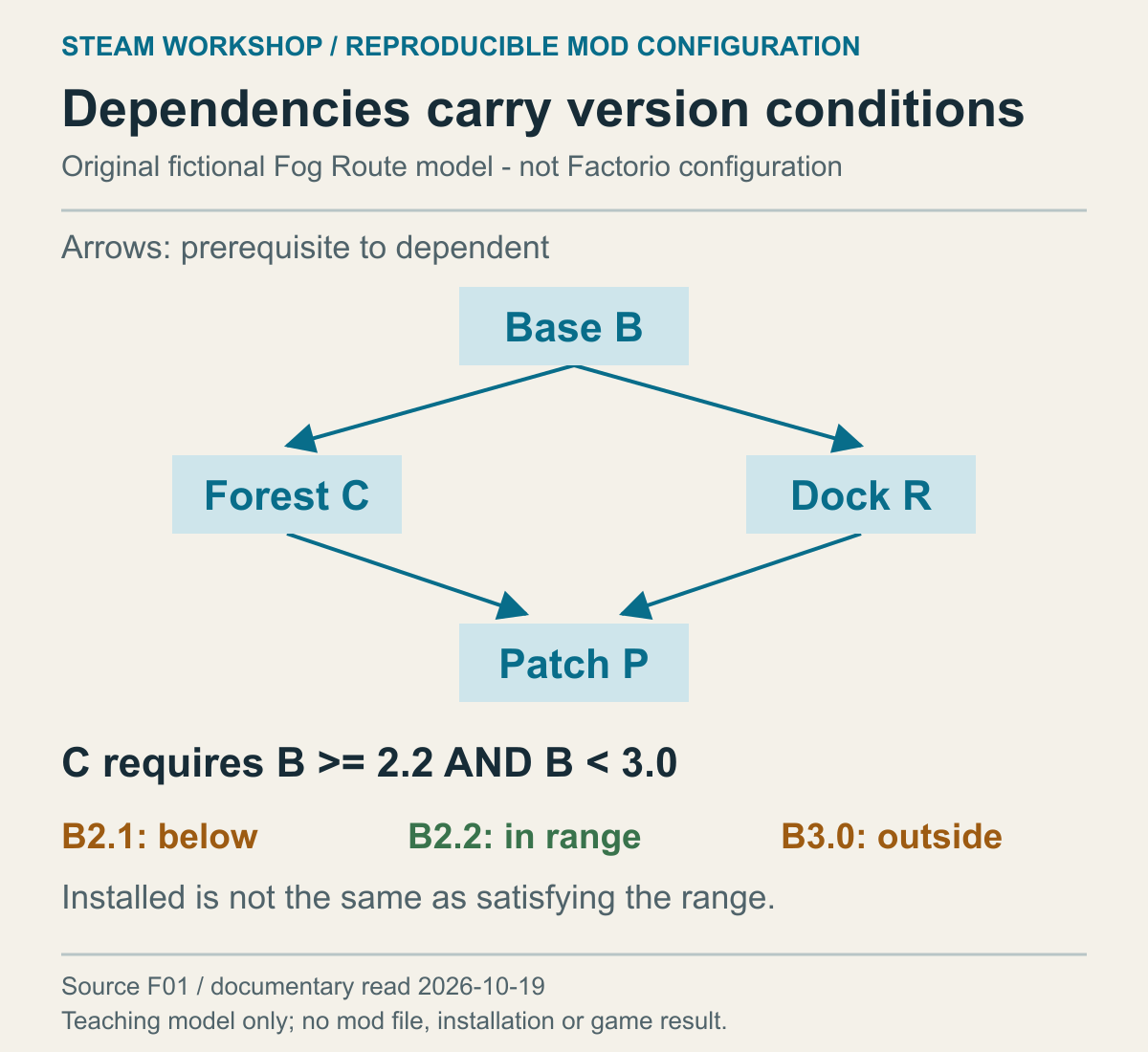
This is a teaching model, not actual Workshop metadata. The arrows identify prerequisites.
Add relationships to Fog Route's four mods. C and R need Base B; P connects their features when both C and R are present. Trace back from P to C and R, then to B, to identify the required bundle. This includes indirect requirements, not just the item named first.
That changes what “one missing mod” means. Having P and C but no B leaves C's prerequisite unmet. Having B but no R leaves P's requirement unmet instead. Adding R to the first configuration still leaves B missing; downloading B again in the second doesn't produce R. Connect the item named in an error with the mod that requires it.
Factorio's mod-structure documentation describes version conditions on dependencies, optional dependencies and incompatible mods. These are rules of Factorio's own mod format, not a notation or validation system shared by every Workshop game. For another game, ask the same questions using that game's and the author's published requirements.
Stipulate that C needs B at least 2.2 but below 3.0. A player with B 3.0 does have B, yet not one that meets the condition. A single “B installed” box hides that difference. B 2.1 is also outside the range; B 2.2 is inside it. A higher revision number is not automatically the better choice for this configuration.
An optional dependency is different from a missing required item. If the fictional description only says that colour mod H adjusts the forest colours when present, it doesn't establish that H is necessary to generate the forest. If adding H introduces a condition on which release is supported, that condition matters once H is chosen. “Optional” doesn't mean every release can be combined.
An incompatibility isn't fixed by filling an empty slot. Suppose R and an alternative dock mod R2 are mutually exclusive implementations of the same role. Installing both is not a more complete configuration. Choose which dock implementation to use. Counting more mods as more complete gives the wrong answer here.
Choosing not to use P doesn't automatically make C and R unnecessary. If the forest and dock features remain the goal, B, C and R remain in the set. Conversely, removing C requires checking the effect on P, which depends on it. Trace towards prerequisites when adding an item and towards its dependants when excluding one. The actual removal and save-cleanup procedure remains in the separate guide linked earlier.
Some sets of instructions can also contradict themselves. If C must follow P and P must follow C, no order satisfies both conditions in this model. Swapping the two lines repeatedly won't solve it. Check whether instructions from different revisions have been mixed or the patch combination is wrong. This is an invented contradictory condition, not an error observed in a game.
Use the same value to understand why order can matter
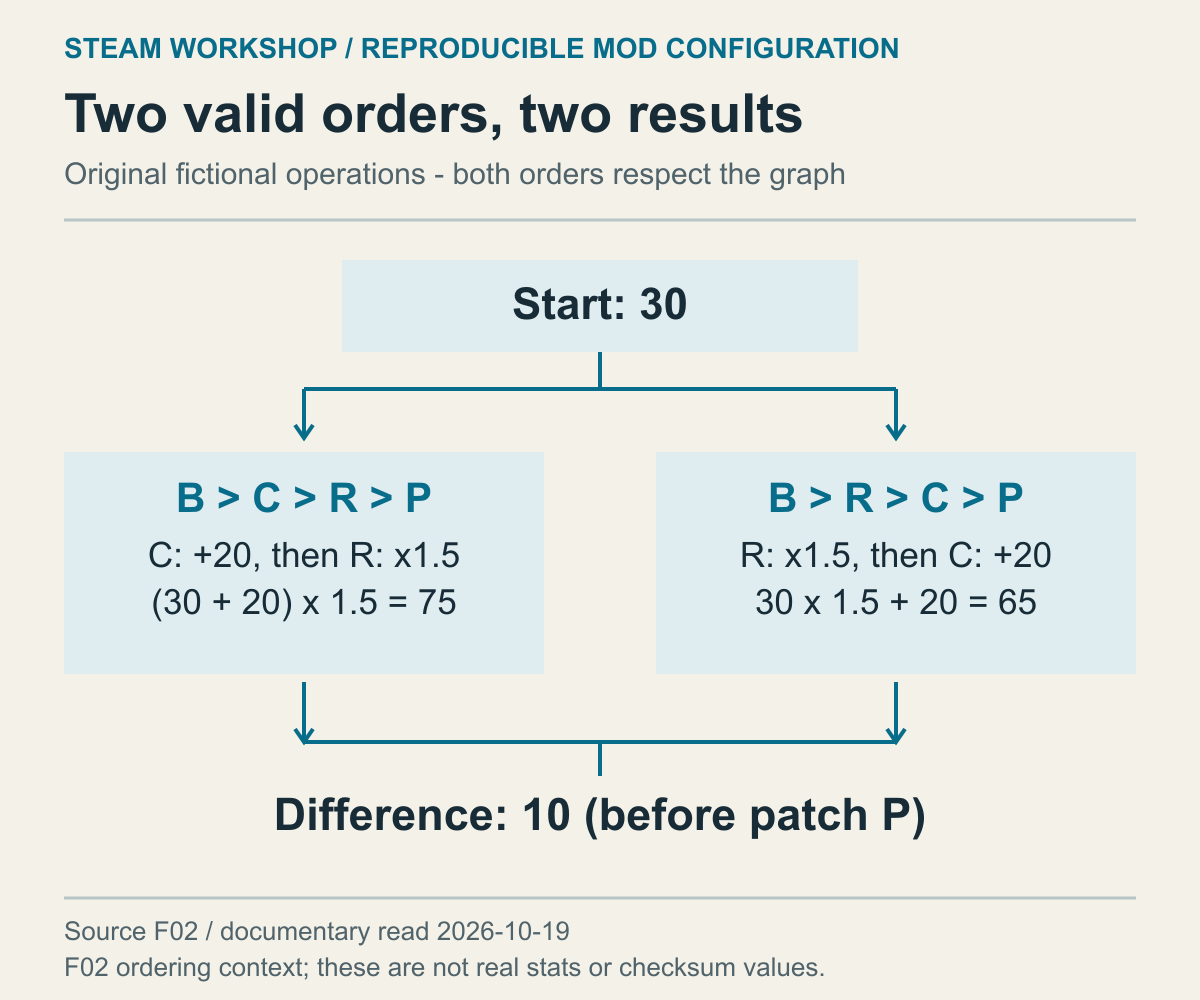
This original calculation explains order effects. It is not a measured game statistic, frame rate or checksum.
Order can differ even after all required mods have arrived. In the model, B establishes the base, C and R add features and P reconciles their interaction. Applying C before B, or trying P's bridge operation before C and R, violates the stipulated prerequisites.
Those prerequisites don't necessarily order C against R. With only B first and P last specified, B→C→R→P and B→R→C→P both remain possible. Four items have twenty-four permutations in total, but the dependencies leave two valid complete orders here. “All requirements are present” and “they run in a valid order” are separate checks.
Whether order changes the result depends on what the mods do. Let the base carrying value be 30, with C adding 20 and R multiplying by 1.5. C first gives 50 multiplied by 1.5, or 75. R first gives 45 plus 20, or 65. The same named mods and starting value produce a difference of 10 because the operations are ordered differently.
This arithmetic doesn't describe every game's overwrite rules. A game may merge properties, reject conflicts or follow a patch stage specified by the author. The question to take from the model is which operation has priority in your game. It doesn't establish a universal rule to put a higher-numbered mod lower in a list. Follow the combination instructions and the game's actual sorting rules.
Factorio's data-lifecycle documentation describes ordering that considers dependencies and internal names, followed by several startup processing stages. That is not a universal UI rule that games load items exactly where a player drags them. Don't force another game's management screen into Factorio's system.
Identify what kind of list you're reading. Alphabetical titles, subscription dates and the active configuration's processing order can be different sorts. If the game hasn't exposed its loading order, one item appearing above another doesn't prove which runs first. If an author says P must apply last, first establish which supported feature controls application order in that game.
If P is stipulated to reconcile both example outcomes to 75, its description also needs the C and R releases it supports. The presence of P doesn't promise compatibility with every future release. A new C or R that resolves the conflict itself can also change the need for an older P. Select a patch for its intended combination, not just its name.
Separate server rules from personal display settings
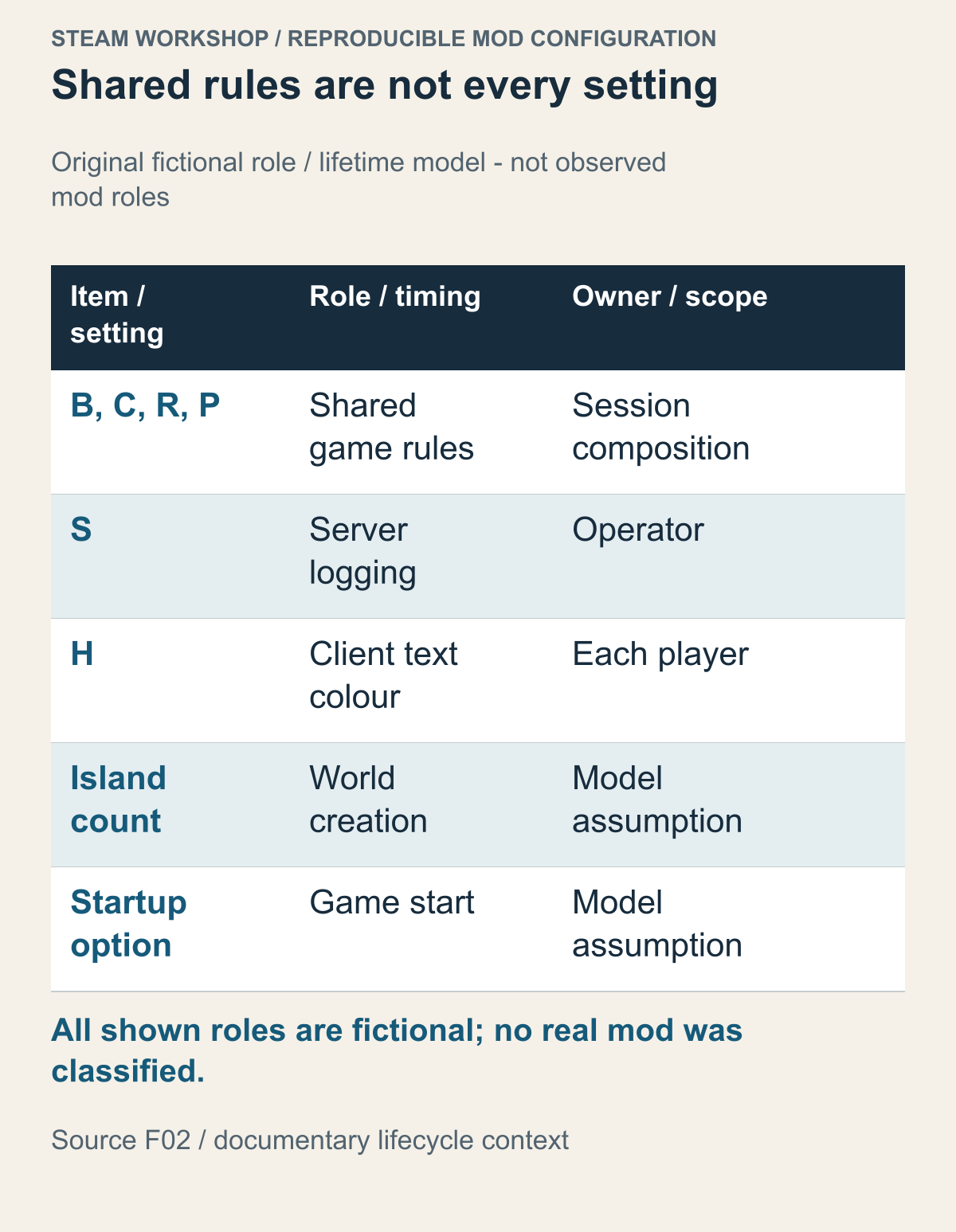
All shown roles are fictional Fog Route assignments. Factorio's documented lifecycle supplies separate timing context; no actual mod role or server value was inspected.
For the Fog Route teaching model, assign roles explicitly before copying a friend's list. Let the shared game rules belong to the session configuration, the logging option to the operator, and the display preference to each player. These are invented assignments, not categories observed in a real game. A participant's personal preference and a shared rule therefore need different comparison targets. For an actual mod, its own game and author documentation must establish where it runs; this fictional table cannot supply that answer.
Define three roles in Fog Route. B, C, R and P are shared game rules; S provides server-operation logging; H selects colours on a player's screen. In this fictional setup, only the operator uses S and each player may choose a different H colour. Requiring every file and setting to match would classify irrelevant differences as failures.
The carrying-value rules are different. Players using different calculations would not be describing one shared configuration. Separate shared rules from preferences so that 65 versus 75 remains a meaningful difference. H's different colour doesn't justify downloading B again or changing the server's dock setting.
Settings also have lifetimes. A world-creation value, a value read at game startup and a value adjustable during play are not interchangeable.
Factorio's lifecycle distinguishes startup settings that contribute to definitions underlying game objects from the stage in which a map runs. A value in a file, the value used by the running environment and the state already created in a world therefore don't fit into a single comparison field. Use developer documentation to find when a value matters, without recasting it as a current user-facing button.
Suppose island count is chosen when a new Fog Route world is created, while H's text colour can change on screen. Changing the island field from 4 to 6 afterwards doesn't establish that two islands appeared in an existing sea. H's colour is stipulated not to affect terrain. Both being called “settings” matters less than their different scope and timing.
With a dedicated server, the operator's actual running configuration is the reference. Changing room settings in a personal client doesn't establish that a separate server's configuration file now matches. Connect the selected file or configuration name with the server that launched it. A player can't verify which server-side value was read by looking only at a client value.
Share the required game rules and mod releases. There is no need to distribute a complete server configuration file containing passwords or administrator tokens.
Missing items, checksum differences and later errors fail at different stages
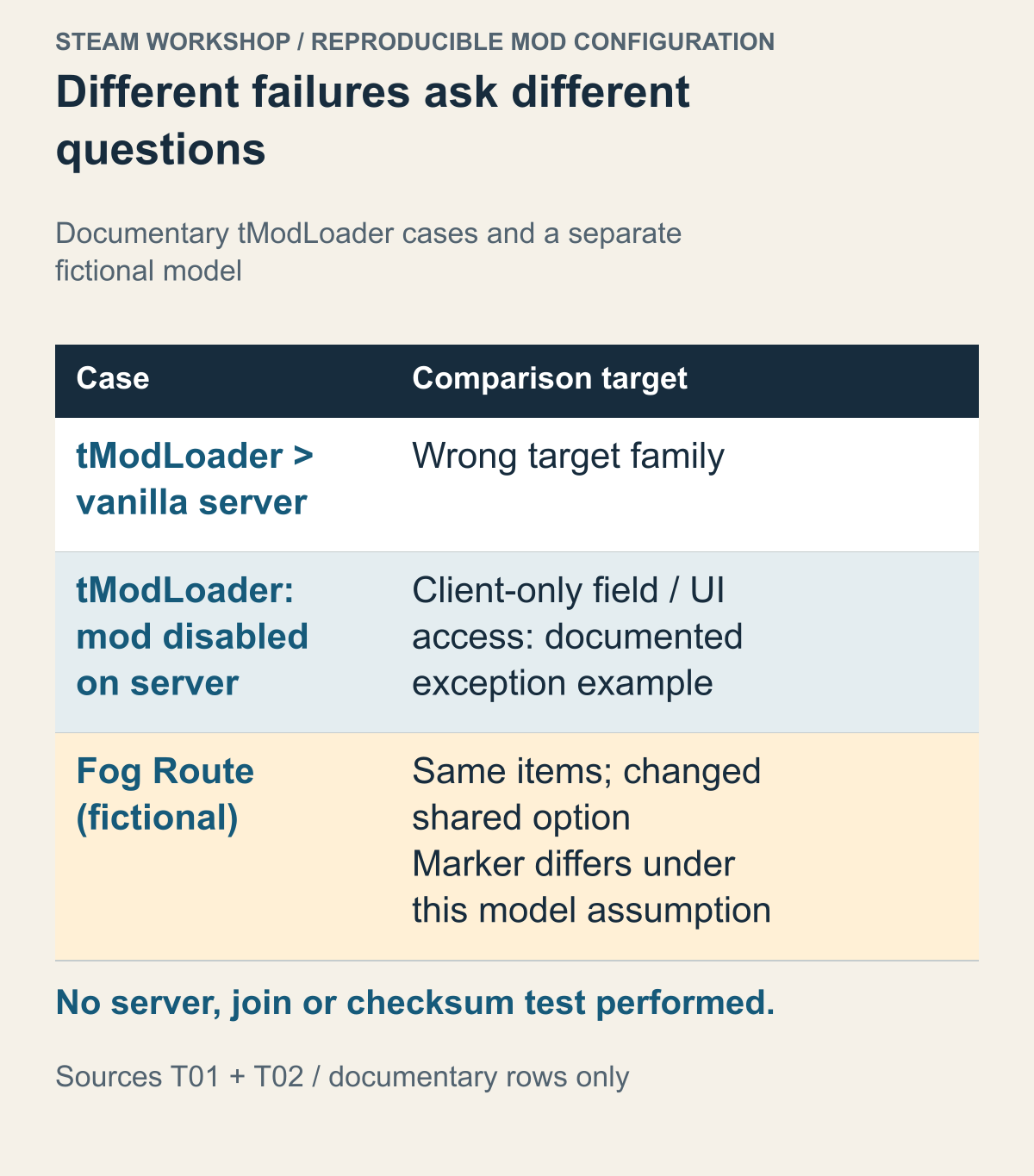
The tModLoader cases come from project documentation; the Fog Route marker rule is invented. This is not an actual error log or a real game's checksum algorithm.
When a game identifies a required item, start with that identifier and required version. A download still in progress, a different enabled item and a missing prerequisite lead to different checks. An error naming an item needn't be broadened without reason into a general checksum problem. Conversely, a connection timeout that names no item doesn't establish a particular missing mod.
For this teaching model, let Fog Route compare the selected item releases and shared startup settings using a configuration marker. This is a stipulated rule of the fictional game, not a description of a real game's checksum algorithm. Matching title lists would not show whether those other inputs match. A different marker under the stated model signals a failed configuration comparison, but does not name the differing field.
For example, keep the fictional item list unchanged, change one shared startup option, and stipulate that the marker changes with it. No mod download is missing in that assumed case. Reinstalling identical item copies does not, by itself, change the option named in the example. Compare that shared option rather than trying to force a real game's value or editing an unknown file. The example separates possession of the same item names from agreement on the chosen configuration.
In the Fog Route model, rejection after comparing the mod set but before sending the world makes item, release and shared-setting comparison relevant. An error only when using a building after receiving the world is a different observation. The join-time list comparison may have passed while action-handling code or stored state still has a problem. Calling both “can't connect” loses the location of the failure.
Role-specific failure also has a documented example. The tModLoader multiplayer guide discusses exceptions that disable a mod on the server, including code accessing a field populated only on clients or a UI that isn't available server-side. A screen working in a personal game therefore doesn't verify dedicated-server execution. This isn't an instruction for players to repair server code themselves.
For a server-side exception, the operator can examine server.log for the mod and error location at that time. A player's enabled-mod indicator doesn't establish whether that exception occurred. Equally, one player's display issue doesn't prove the whole server experienced it. Who reached which stage determines who can investigate the relevant environment.
A state difference developing during extended play is also unlike an initial rejection. Matching a checksum doesn't certify every save, runtime or network condition. If the failure repeats after a particular action or at the point synchronisation is lost, compare that condition. Slow performance shouldn't be treated as the same outcome as refusal to join.
Design small comparisons that preserve dependencies
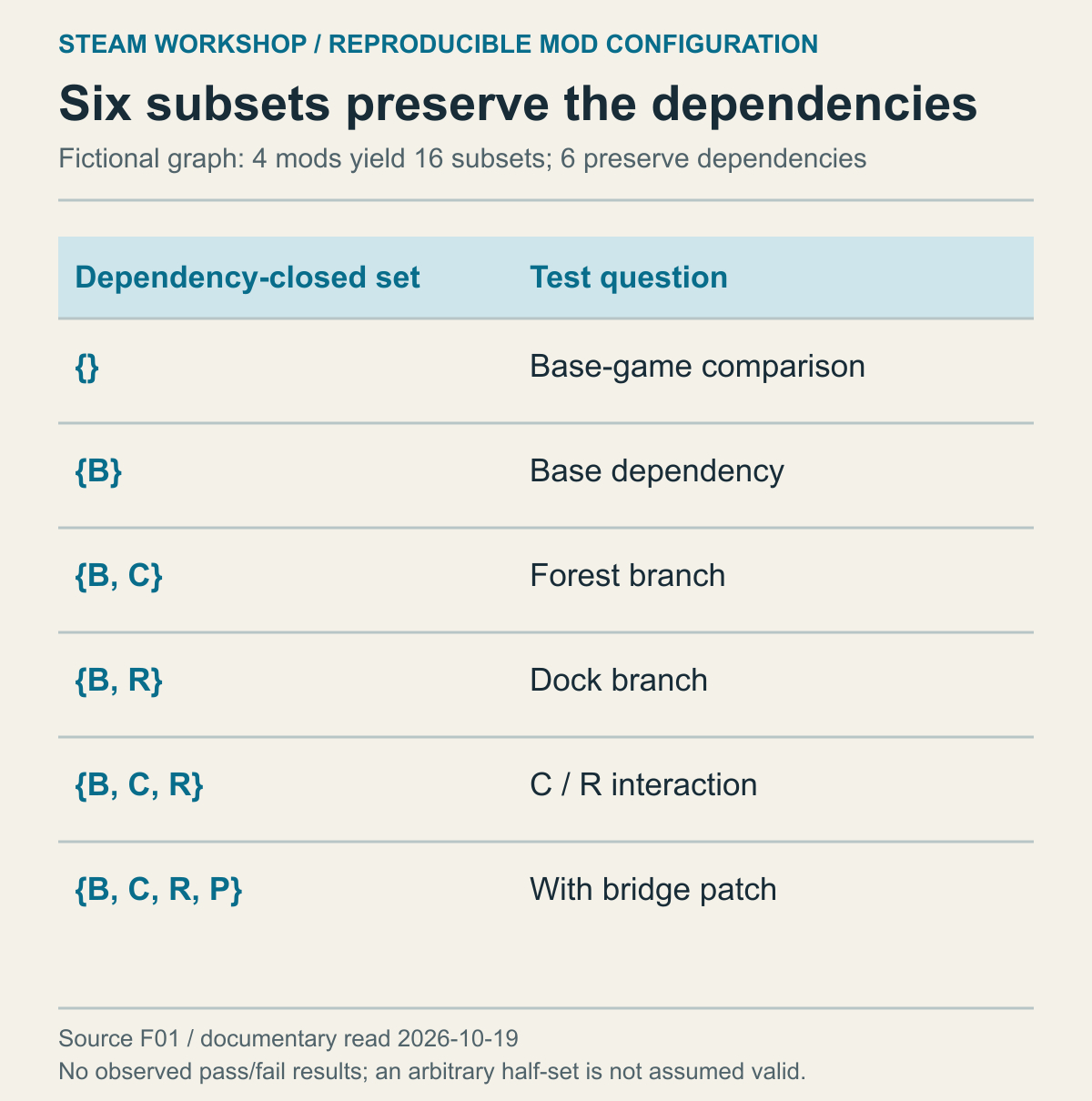
This design is calculated from the B, C, R and P assumptions. Its entries are proposed questions, not observed run results.
With many mods, removing half at a time can sound like a way to find the culprit. Arbitrary halves may not be valid test environments when prerequisites exist. Leaving P while removing B, C and R breaks the dependency model before it tests whether P caused the original problem. A failure there may not be the failure you started with.
Each of four mods can be included or excluded, giving sixteen simple subsets. In this model C and R require B, and P requires both C and R. Only six sets preserve those requirements: none, B, B+C, B+R, B+C+R and B+C+R+P. Eliminating ten possibilities is a calculation from the stated dependencies, not ten successful tests.
No mods provides a base-game comparison; B alone asks what changes when the base dependency is added. B+C examines the forest branch and B+R the dock branch. If each works alone but the original symptom appears in B+C+R, their interaction becomes relevant. That result would not itself assign blame to either author.
P's stipulated role as a compatibility patch matters here. If B+C+R is a combination that requires that patch, failure without P isn't evidence that P may be omitted. B+C+R+P is the relevant complete comparison. A smaller configuration can work where a complete one fails, but this model also permits an intermediate configuration to fail and the patched complete one to work.
That possibility doesn't fit a simple assumption that failure always persists as more mods are added. A half-splitting search based on that assumption can miss the explanation. The goal of small comparisons is to discover which added relationship changes the behaviour, not merely to minimise the number of items.
Choose the axis changed by each comparison, too. Changing the game release while comparing B+C+R+P changes both the combination and game compatibility. To investigate order, retain the items, releases and shared settings while comparing only orders the game supports. To investigate a setting, establish when it is read. These are proposed comparisons, not actions or file edits performed for this article.
Include the location of the original failure in the question. A join problem requires examining a pre-join rejection; a dock-construction failure requires reaching that action. Opening a menu doesn't demonstrate that the dock error is resolved. A controller-input or graphical difference shouldn't be counted as reproduction of the same configuration failure.
A real game's author may specify a particular test sequence or a fresh world. Follow those conditions rather than applying these six sets mechanically. First establish whether the game supports comparing with its required items enabled in a new world or another supported configuration. This design does not authorise removing dependency mods from an existing save to experiment.
The operator and players can divide the checks. If the server disables a mod at startup after an exception, the operator narrows that first. Players compare connections after the server configuration is ready. This ties the sequence to the failing stage, rather than asking several players to keep downloading the same files before the server has even been shown to start.
Distinguish a fresh-world result from compatibility with an existing run
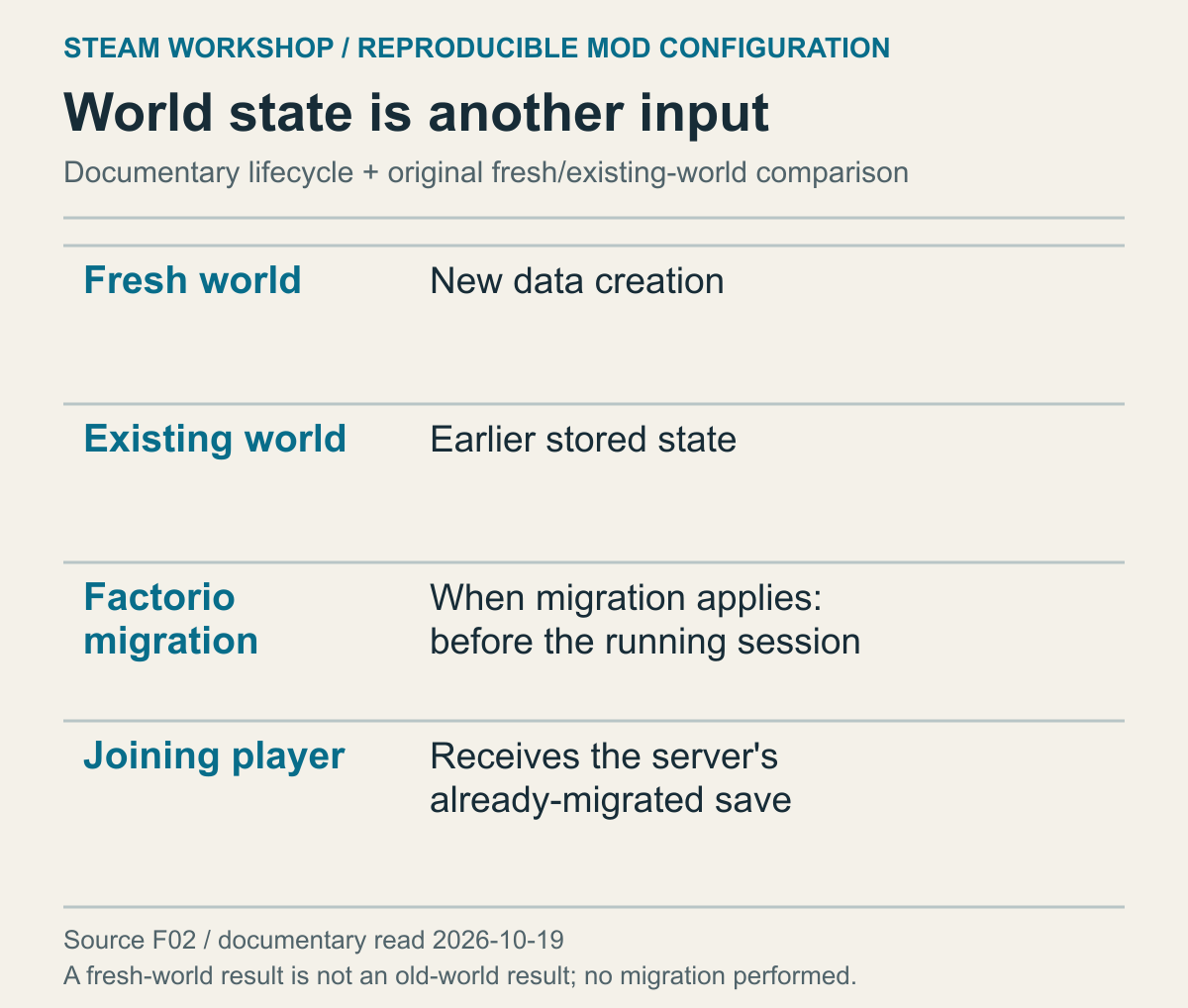
This combines documented save-state distinctions with a hypothetical transition plan. It does not demonstrate successful conversion or recovery of an existing save.
Matching the game and mod configuration doesn't erase state created under earlier rules. A new world generating forests and docks doesn't establish that a long-played world can read the corresponding locations. If continuing an existing save is the goal, the game release and mod combination that created it are also required inputs.
Factorio's lifecycle documentation separates handling configuration changes caused by game, mod or startup-setting changes from migration of stored data. A player joining a running server receives a save that the server has already migrated. This is a game-defined process; a player's latest local downloads don't newly complete every transformation in the server world.
Suppose the fictional P must read a dock-connection marker written by an older C. A new world starts in the new format, while the existing world retains the old marker. If joining works but that location fails, compare new generation with reading existing state. A more accurate mod list alone cannot change content already stored in the world.
The completion condition therefore depends on whether the group wants a fresh run or to continue an existing one. A fresh run concerns creation and the required actions in a new world. Continuing adds the supported transition route and the relevant actions in that world. Rolling back the game doesn't roll back when newer-version data was written. Save-copy and Cloud decisions are covered in the separate save-conflict guide.
Once the group chooses a configuration, coordinate when the operator and players change it. If the server runs R 3.1 while one player moves to R 3.2, the earlier comparison no longer describes the current state. There is no universal update-blocking feature promised here. Check whether the chosen releases can actually be obtained, and revisit versions, dependencies and settings when the configuration changes.
For the next session, the game, loader and server should connect with the chosen items and releases, their prerequisites and the shared settings. State the point actually checked so that a configuration verified only through joining remains distinct from one checked through the intended action in the existing world.
The sources were read on October 19, 2026. No actual game, mod, server, account or save operation, or connection test, was performed. Fog Route's identifiers, versions, graph, settings, arithmetic and test sets are hypothetical explanations distinct from the source rules. The results of the proposed tests remain unknown.