
Moving a Steam game to another platform: which accounts, progress and purchases follow?
Compare Steam account requirements, progress and purchase rights. Read official account rules and fictional models before planning a platform move.
Article languages
On this page
When you want to continue a Steam game on another device, your save is often the first thing you think about. In practice, there are several separate questions: which account you will sign in with, which game you are entitled to use, how progress is associated with an identity, and where paid products can be used. Signing in with the same company's account does not necessarily bring the base game and every currency balance with it. Starting through Steam does not necessarily mean abandoning existing progress, either. The useful decision comes before buying: does the account relationship you are considering produce the result you want?
Additional accounts do not all serve the same purpose. Finding an existing Apex Legends profile, choosing between Steam-only multiplayer and other-platform features in Grounded, and deciding whether optional PlayStation sign-in benefits matter to you are different decisions. This comparison uses official material read on October 19, 2026. It is not a record of creating, signing in to, linking or unlinking accounts, or running games. Situations expressly described as hypothetical are invented examples.
Read what the account is required for, not just its name
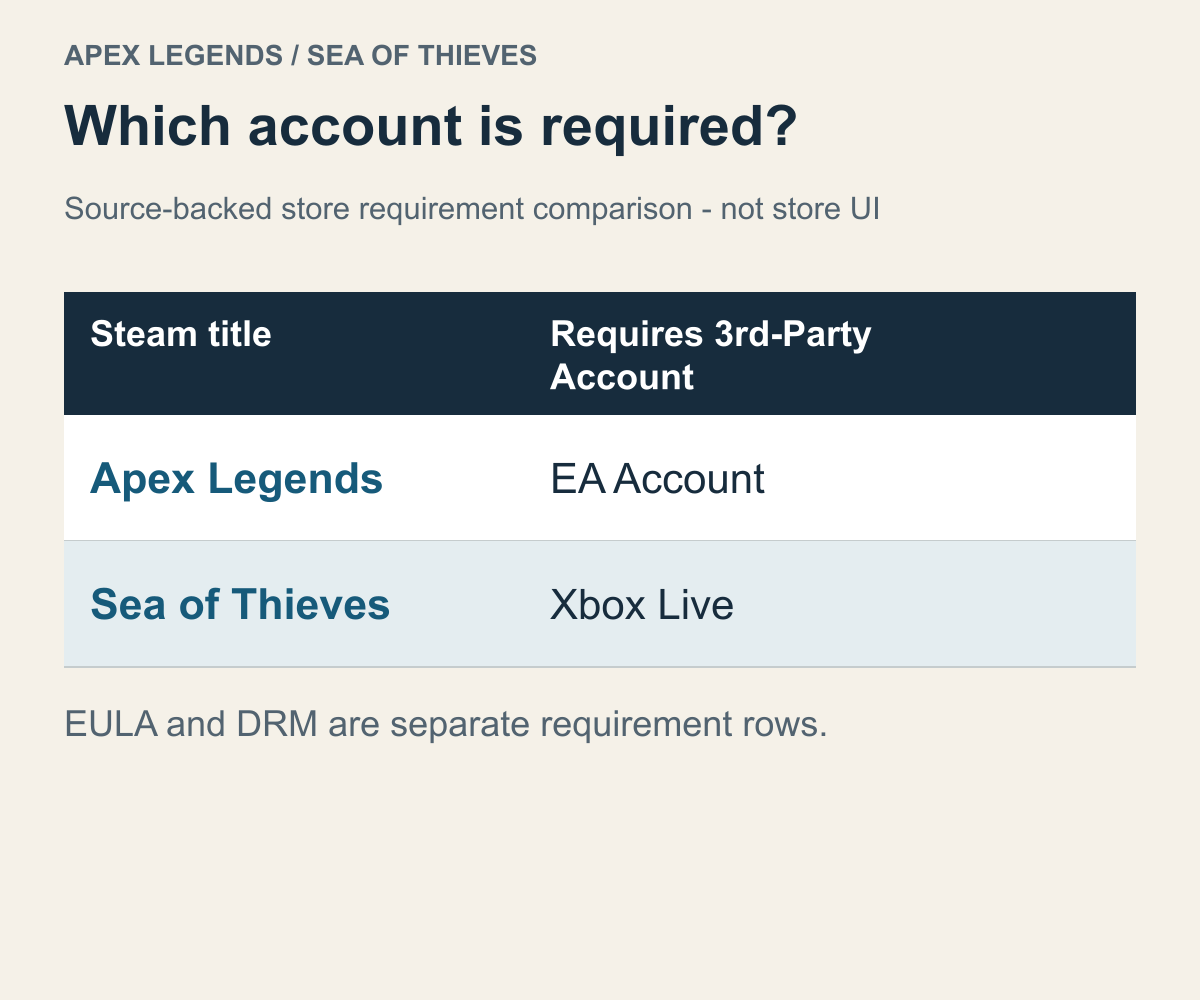
Account conditions read on the two Steam store pages, not an actual sign-in screen.
The English store notice Requires 3rd-Party Account means that an additional provider account is required. The name following it also tells you whose official documentation to consult. The Apex Legends store page named an EA Account, while the Sea of Thieves store page named Xbox Live. If your purchase plan assumes that a Steam account is all you need, this requirement belongs in that plan.
Seeing Xbox in the Sea of Thieves account notice does not, by itself, establish that you must buy a console or a paid subscription. An account, a device and a subscription are separate things. The condition verified here concerns the account required by the Steam version. That short notice does not also explain where an existing pirate's progress will continue. Separating the questions that an account name cannot answer helps you avoid shopping for an unrelated product first.
Suppose you are considering this game as a gift. Alongside “Do you have a Steam account?”, there is a reason to ask whether the recipient can use the Xbox Live account the game requires. If they do not want to use an additional account, even an attractive gift price may not fit their actual conditions for playing. The sender's payment and the recipient's readiness to sign in are different parts of the decision.
After reading an account notice, try completing this sentence: “To use this feature in the Steam version, I need this account.” If you cannot fill in whether it concerns launching the whole game, a particular online feature or an extra benefit, read the feature explanation. This matters because real games can place different requirements on different functions. Grounded, below, is one such example.
It also helps to keep agreements and DRM separate from account notices. An agreement concerns a contract you accept; DRM concerns technology that checks permission to run the game; an account concerns the identity the game uses. Their appearance together on a store page does not mean that accepting one automatically satisfies the others. Nor does an agreement notice, on its own, establish that a separate launcher must be installed.
Grounded shows why the required function matters. Its September 30, 2024 patch 1.4.5 notes distinguish ordinary multiplayer through Steam friends, which does not require a Microsoft account, from crossplay, Shared Worlds and Playgrounds, which still do. Two people buying the same game can therefore reach different decisions about an additional account because they want different features.
If you want to avoid more accounts, you can first separate the features you can do without from those you need, rather than immediately deciding to abandon the game. If Shared Worlds is your purpose, the account exemption for ordinary Steam multiplayer does not complete your preparation. The scope here is the account requirement for those features. The separate question of which connection states allow a group to meet belongs in the comparison of group modes, editions and connection paths.
Moving Apex Legends to Steam is not the same as changing EA accounts
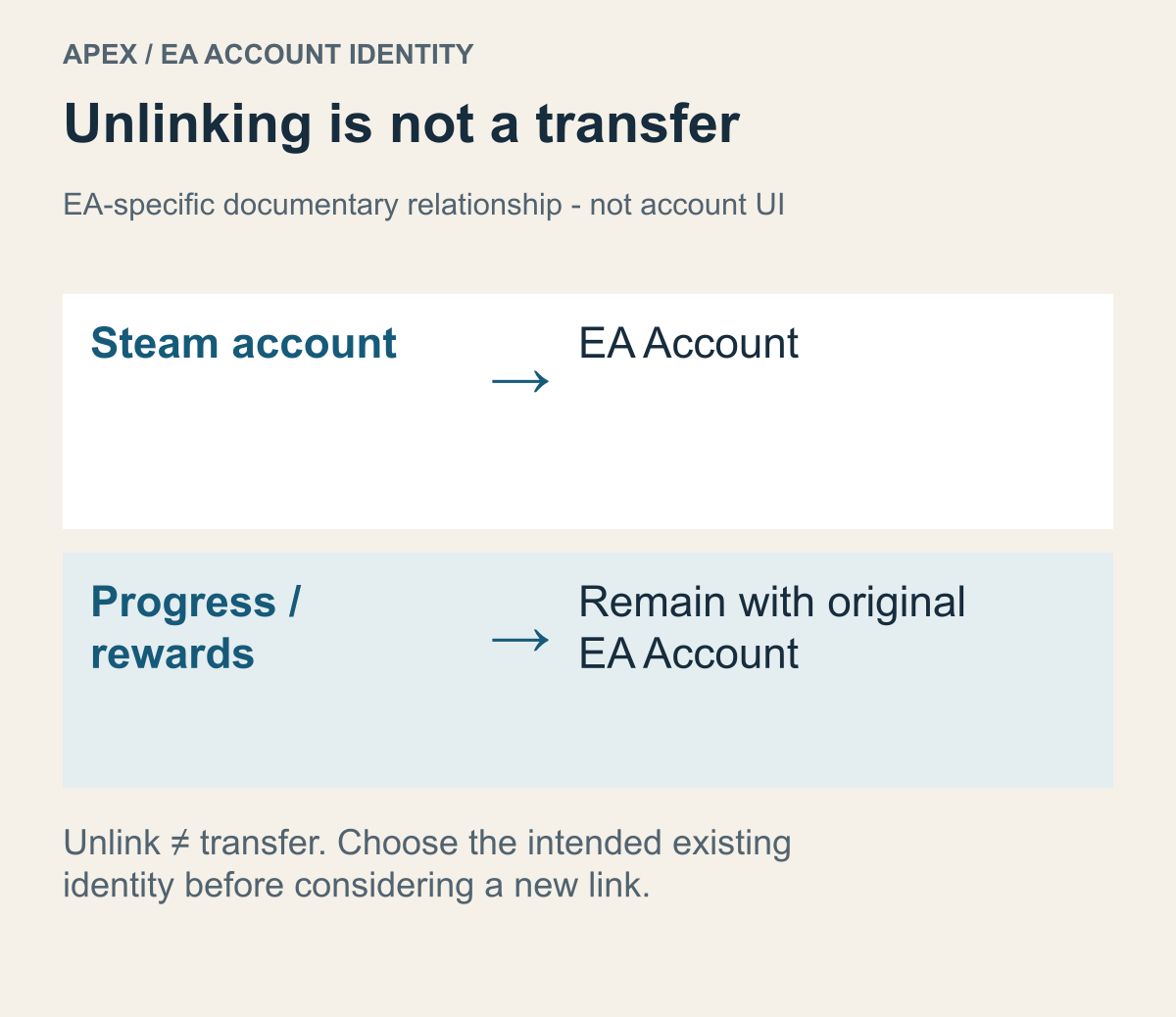
A relationship diagram based on EA's account guidance, not a completed progress transfer.
If you already play Apex Legends, the first question may not be whether you can start again, but where to find what you have already earned. The official Apex FAQ explains that progress and unlocks can continue between the EA App and Steam. It also advises against running both simultaneously with the same linked account. The change concerns the PC platform you use; it does not tell you to replace the EA account holding your progress.
By contrast, EA's unlinking guidance says that progress does not follow when you relink to a different EA account, and that entitlements such as rewards and items remain with the original account. It separately warns about possible problems with Apex Battle Pass progress and item unlocks. Calling “start through Steam” and “link to a different EA account” the same migration obscures that difference.
Imagine someone who has played for a long time through the EA App and now wants to start from their Steam library. They want a different PC platform, not a new character history. The relevant comparison is between the EA account they currently use and the Steam account they plan to use. Creating a new EA account because an old email address is inconvenient adds an account replacement to what began as a platform change.
Remembering a nickname is not enough to identify the account you will sign in to. You first need to establish whether you can access the EA account you used before. EA's linking guidance explains that Connected Accounts shows the linked platforms. Because there is an official way to inspect the existing relationship, understanding it serves your purpose better than creating a new relationship from memory.
This is particularly useful on a shared PC. In a hypothetical case, you intend to use Steam-A with EA-A, where your progress resides, but the browser shows a family member's EA-B. The visible EA-B describes the browser's current state. It is not evidence that your game progress is there. Writing the intended relationship as Steam-A and EA-A separates sharing a device from assuming that you share a game history.
Combining Apex histories requires a further distinction. The separate Cross Progression guidance states that there is one Apex profile per EA account and that Apex progress from two EA accounts cannot be merged. Support guidance about cases in which EA accounts themselves can be combined concerns a different question. Hearing “account merge” is not a reason to expect two developed characters to become one history.
The document also distinguishes the situation at the 2023 introduction, when multiple Apex accounts were under the same EA account, from progress held under separate EA accounts. It describes the former as part of that consolidation, while the latter did not merge. Someone describing an old automatic consolidation and someone now trying to combine two EA accounts do not start from the same structure. Before applying an old success story, establish whether its account structure matches yours.
Suppose a high-level console history belongs to EA-A, while purchases on PC belong to EA-B. The fact that both accounts are yours does not make them a single history. If one combined progression record is essential, you have identified an outcome the documentation does not support. Instead of treating platform relinking as the solution, decide which history you intend to continue. Using one history on two devices is different from adding two histories together; that distinction can end a plan to repeat links in pursuit of an unavailable result.
The historical consolidation also used the highest-level profile as its reference. That is not the same as a present-day feature allowing you to select a profile by money spent or preferred cosmetics. To understand an old consolidation, examine what was under the same EA account at the time and which profile supplied the reference. To combine progress now held under separate EA accounts, you cannot assume that historical process is available to repeat. The document also does not support a plan to raise one account's level so that the two merge now. A past automatic selection rule and today's available choices need to remain separate.
One active history is different from merging histories
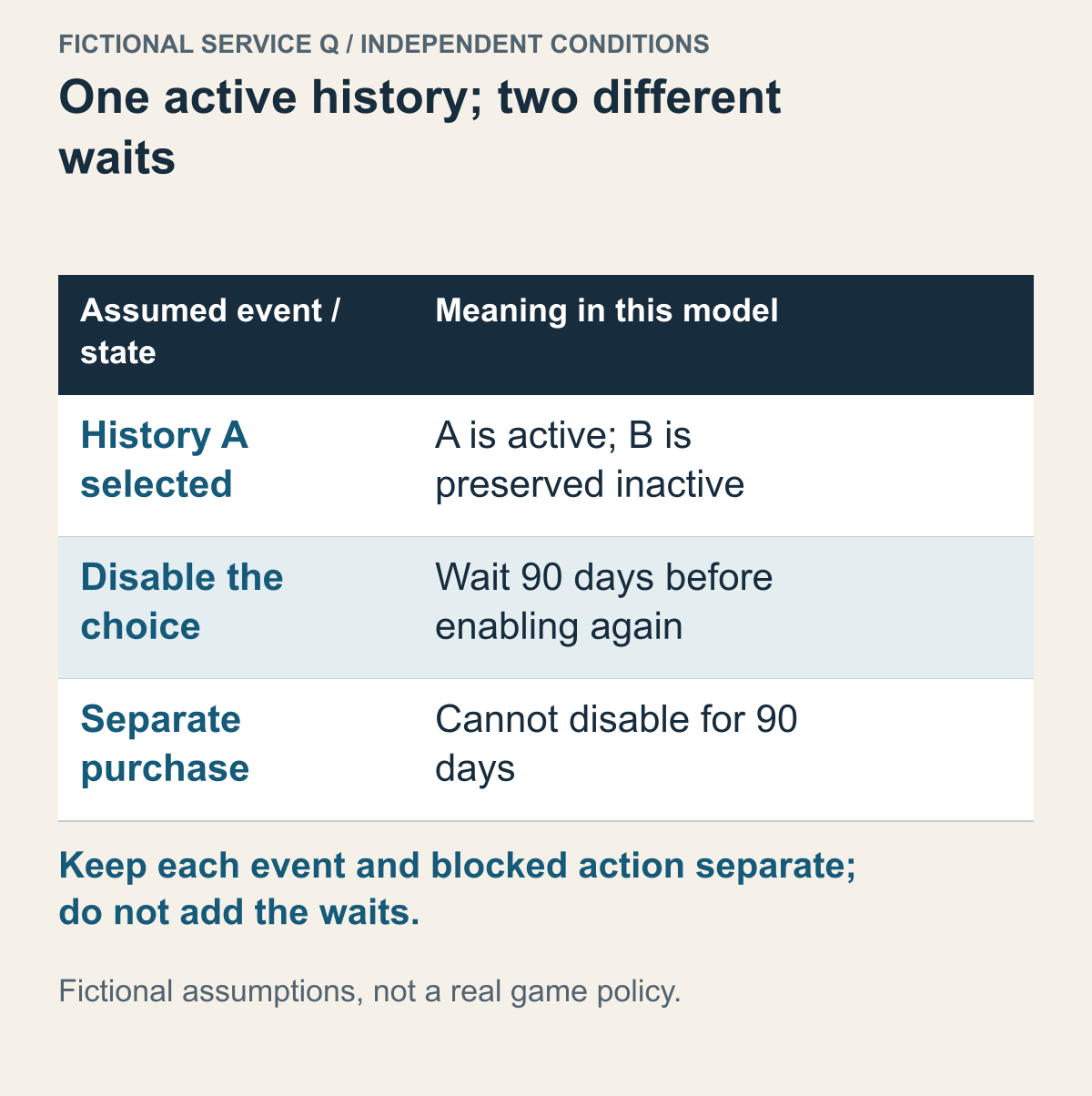
Fictional decision model, not a statement of a named game’s supported behavior.
Consider a fictional service Q with two assumed rules: linking chooses one active character set while preserving the others inactive; disabling that choice starts a 90-day wait before reactivation. Also assume a separate purchase starts a 90-day restriction on disabling it. These are invented conditions for comparing decisions, not Destiny 2 policy. One history becoming usable on several devices would not combine its equipment with another history. Before using a real service, find which operation its official guidance actually describes.
Preservation is not the same as unrestricted access. Suppose you want to continue a long-developed console character through Steam but also use a separate Steam character next weekend. Under this model both histories survive, yet you cannot assume that you can alternate at will. Decide whether you need more places to play one history or frequent access to two histories. Those purposes require different evidence, even when neither history is deleted.
Record each assumed restriction as an event, a blocked action, and a duration. The first starts when the setting is disabled and blocks enabling it again. The second starts with a purchase and blocks disabling. Calling both a 90-day cooldown hides which action is unavailable. A real product may use different periods or conditions; a familiar number in another game cannot establish your own account’s eligibility.
Now compare a plan to switch off today and return next weekend. In the model, permission to switch off would not guarantee permission to return then. A recent purchase could instead prevent the first step. Do not add the two waits without knowing the actual events and dates, and do not make a purchase simply to test whether a restriction applies. The decision is whether the permitted sequence fits the intended play schedule.
A historical migration is a different operation again. Imagine an old one-time transfer whose application period has closed, while ordinary linking remains available. The existence of today’s link would not prove that the old transfer can be reopened or that untransferred history can be recovered. For a real returning account, identify the original platform and migration record, then consult the relevant official eligibility guidance. A freshly installed client is not evidence that an expired migration was completed.
Optional PlayStation sign-in separates playing the game from receiving benefits
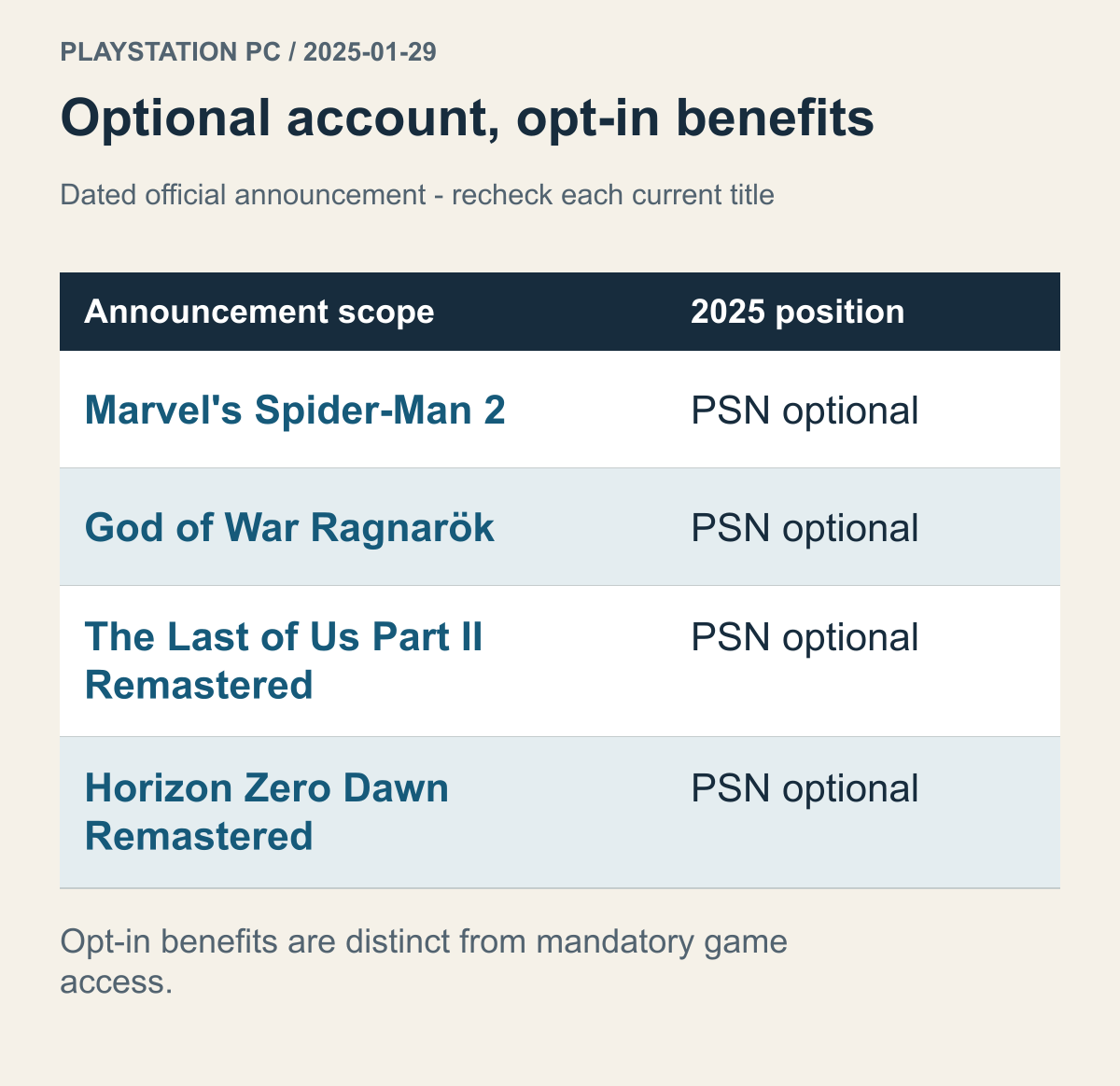
A historical comparison of the January 29, 2025 announcement, not a guarantee of every PC game's current policy or benefit delivery.
PlayStation's January 29, 2025 announcement said that a PlayStation Network account was optional for the PC versions of Marvel's Spider-Man 2, God of War Ragnarök, The Last of Us Part II Remastered and Horizon Zero Dawn Remastered. It also announced in-game benefits for players who signed in. This is a concrete example of why seeing an account notice is not enough to classify it as a requirement to run a game.
The useful comparison is not a vague question about whether you are missing out by declining. Decide whether you want to play the base game or also obtain the sign-in benefits. Someone who wants only the base game and does not want another account may choose to forgo an optional benefit. Whether that choice also means forgoing the game depends on the current account conditions of the particular title.
Someone who already uses a PlayStation account may face a different preparation burden. Having an account still does not establish that every PC release grants every reward. What matters is the benefit condition for the title you have chosen. A sign-in feature and an in-game reward may be connected, but “optional” does not mean that the benefit itself is granted unconditionally.
This differs from Grounded. There, the platform group and desired features determine the account requirement. The PlayStation announcement concerns optional sign-in for named titles. Reducing both to “you do not need an account” loses the crossplay condition in one case and the benefit condition in the other. Deciding not to use an optional feature differs from rejecting a condition of a feature you actually need.
Before buying, match the title to the four named games and the platform in the announcement to the PC edition you intend to buy. Do not extend that policy to unlisted titles. With an older announcement, distinguish what it changed from what the store currently requires. Here it serves as a policy example in which account use and benefits are separate, not as a recommendation of a current reward list.
Accounts, launchers and DRM require different preparation
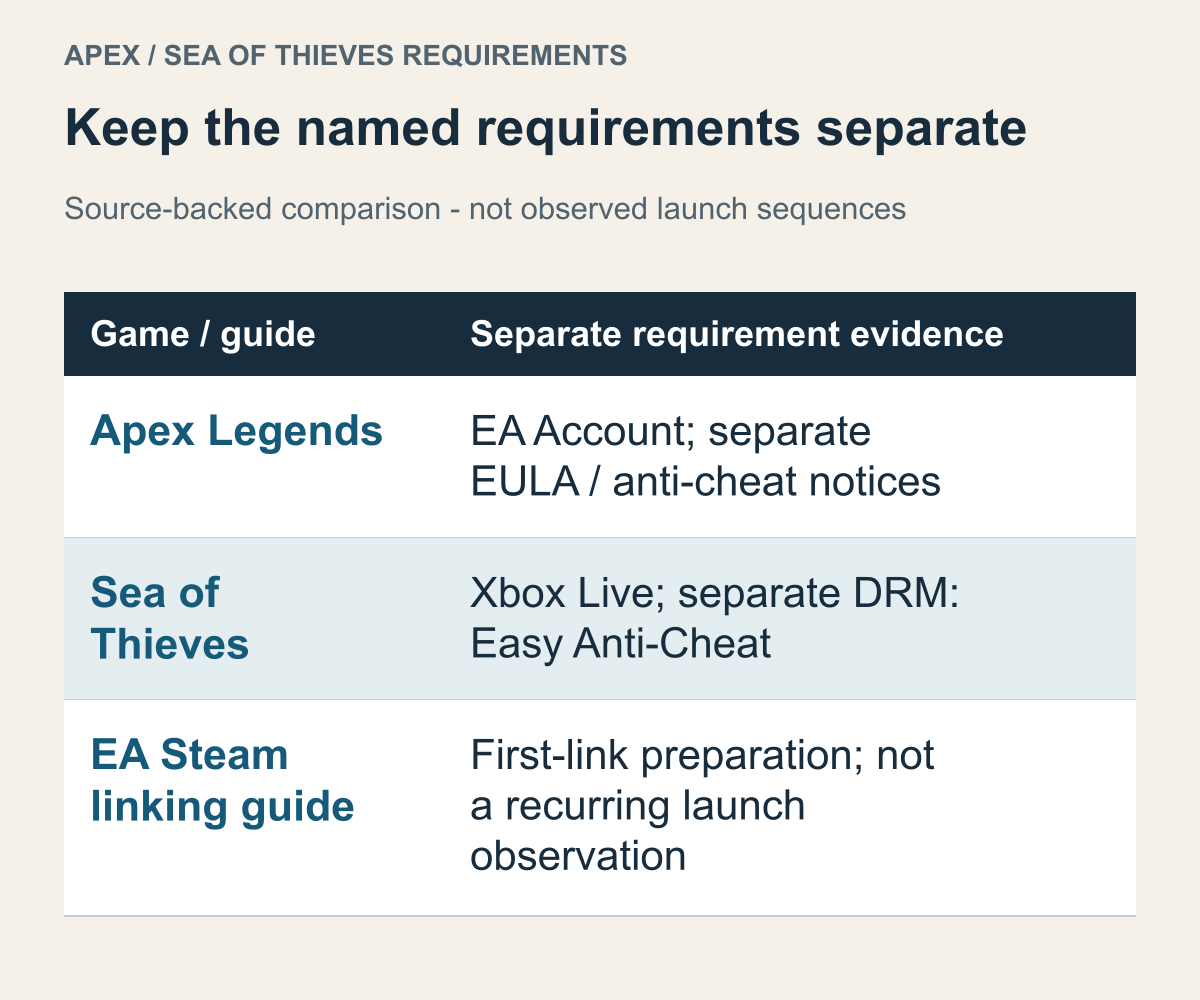
Steam store notices and EA linking guidance shown separately, without recreating an installation screen.
Accepting an account requirement does not settle the software environment. An account answers who signs in, a launcher concerns which program the game passes through, and DRM concerns how permission to run it is checked. An agreement concerns which contract you accept. Calling all four “another login” removes distinctions you need on a PC where you lack installation permission or when considering a separate contract you do not wish to accept.
The Sea of Thieves store page displayed the Xbox Live account and Easy Anti-Cheat DRM on separate lines. The Apex page's EA account, additional agreement and anti-cheat notices were not interchangeable descriptions either. One account name does not reveal a launcher sequence familiar from another game. A company name is also insufficient evidence that all its games pass through the same software.
EA's Steam-linking guidance mentions the EA App in preparation for the first link. That source answers a question about getting ready for an initial link. It does not answer the separate question of which windows appear every time a game launches. In a pre-purchase comparison, keep the account requirement seen on the store separate from the company's stated preparation for that first link.
Suppose you will alternate between a personal desktop and a shared laptop with restricted installation permissions. Being able to use the same account does not make the two devices equally prepared. Whether you can install and run the required software on each device is another condition. The account may be ready while the device's usage rules prevent the environment you want. Creating one more account does not resolve that kind of difference.
You can also distinguish your reasons for avoiding an additional account. Reducing the number of logins to manage, avoiding additional software and declining a particular agreement require different answers. A response about login counts does not resolve the other concerns. Even if you decide against the purchase or choose another device, the decision is clearer when you know which condition does not fit.
Activision's limits on changing links can affect a purchase plan
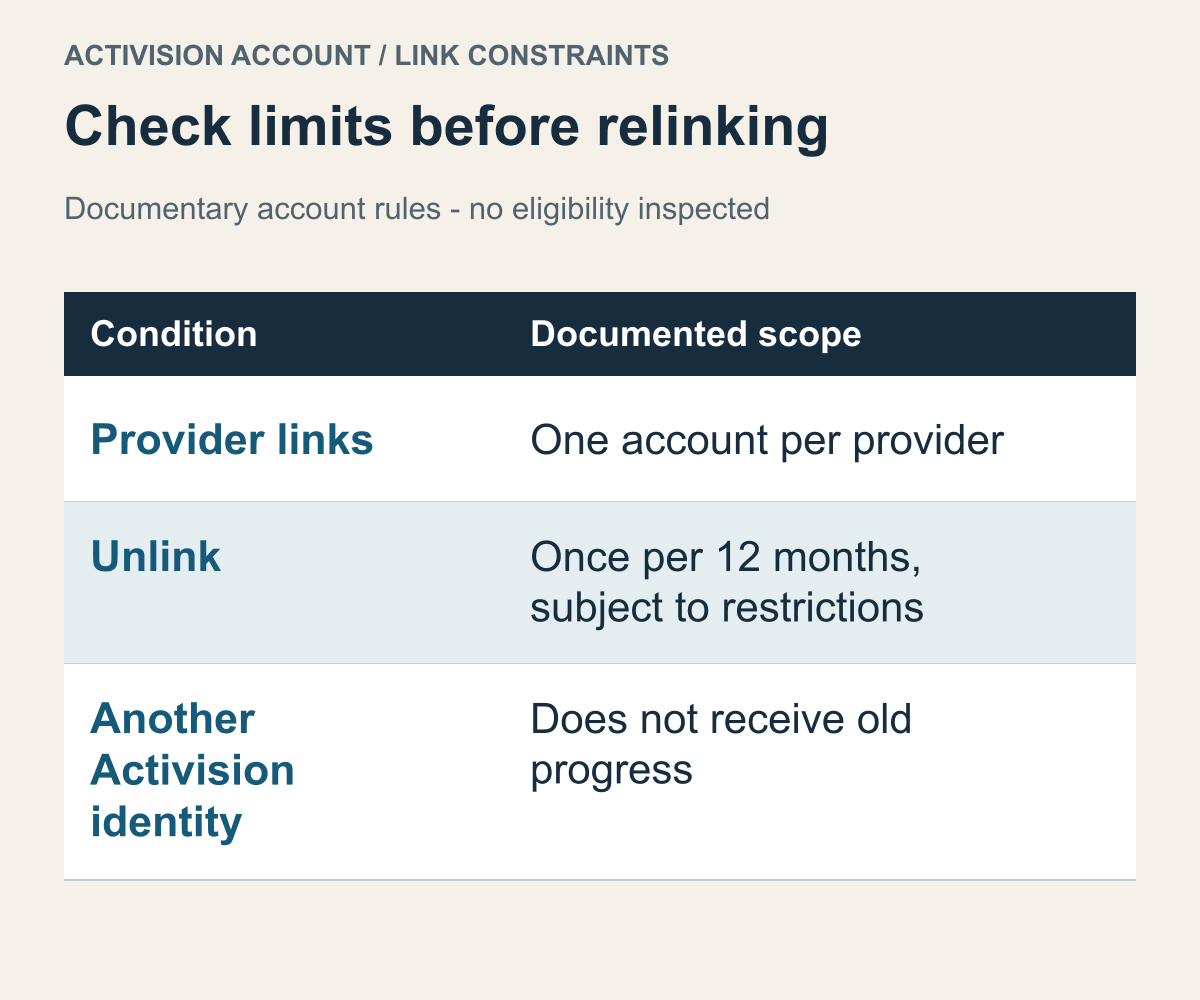
Conditions in the account-management document read on October 19, 2026, not an eligibility assessment of an actual account.
Activision's account-management guidance describes linking one account per provider and includes Steam among the platforms. It limits unlinking a platform account to once every 12 months, while sanctions or suspicious activity may further restrict unlinking. That number does not mean you can freely repeat account changes.
This makes an existing relationship relevant before buying. If you have already linked a Steam account, a plan to “try another Activision account briefly and return if I dislike it” may begin with an unsupported assumption about repeatable trials. A free account does not necessarily make changing its relationship inexpensive. The cost here includes waiting for another opportunity to change, not only a payment amount.
The same document explains that, for games supporting cross-progression, progress is stored on the Activision account rather than the platform account. Linking to a different Activision account does not carry the existing progress over; relinking to the original relationship allows access to the existing progress and content. Read that alongside the change restrictions. A history remaining in its original account does not establish that you can return to it at any moment you choose.
Two purchase goals clarify the distinction. Someone continuing an existing history on a new platform starts with the Activision account holding that history. Someone using the same platform account under an entirely different Activision account must consider both progress and eligibility to change the link. Both may reach a sign-in screen, but they expect different outcomes. “Which history will I continue?” comes before “Which account can I sign in with?”
Suppose a family wants to place two different Steam accounts under one Activision account. Compare that plan with the one-account-per-provider condition first. Sharing a PC does not alter a provider-level restriction. Collecting several people's histories for easier management is not the same as a documented permissible account structure. This is not a proposal to merge their accounts or alternate their links.
Useful information to identify includes the Activision account currently linked with Steam, where the intended history resides, and whether there was a recent link change—not an account password. Check the particular game's support for cross-progression as well. A company's account-management rules are not a promise that every past title offers the feature. Preparation in this case means fitting the shared account rules to the specific game's functionality.
Warframe's Link is not the former Merge feature
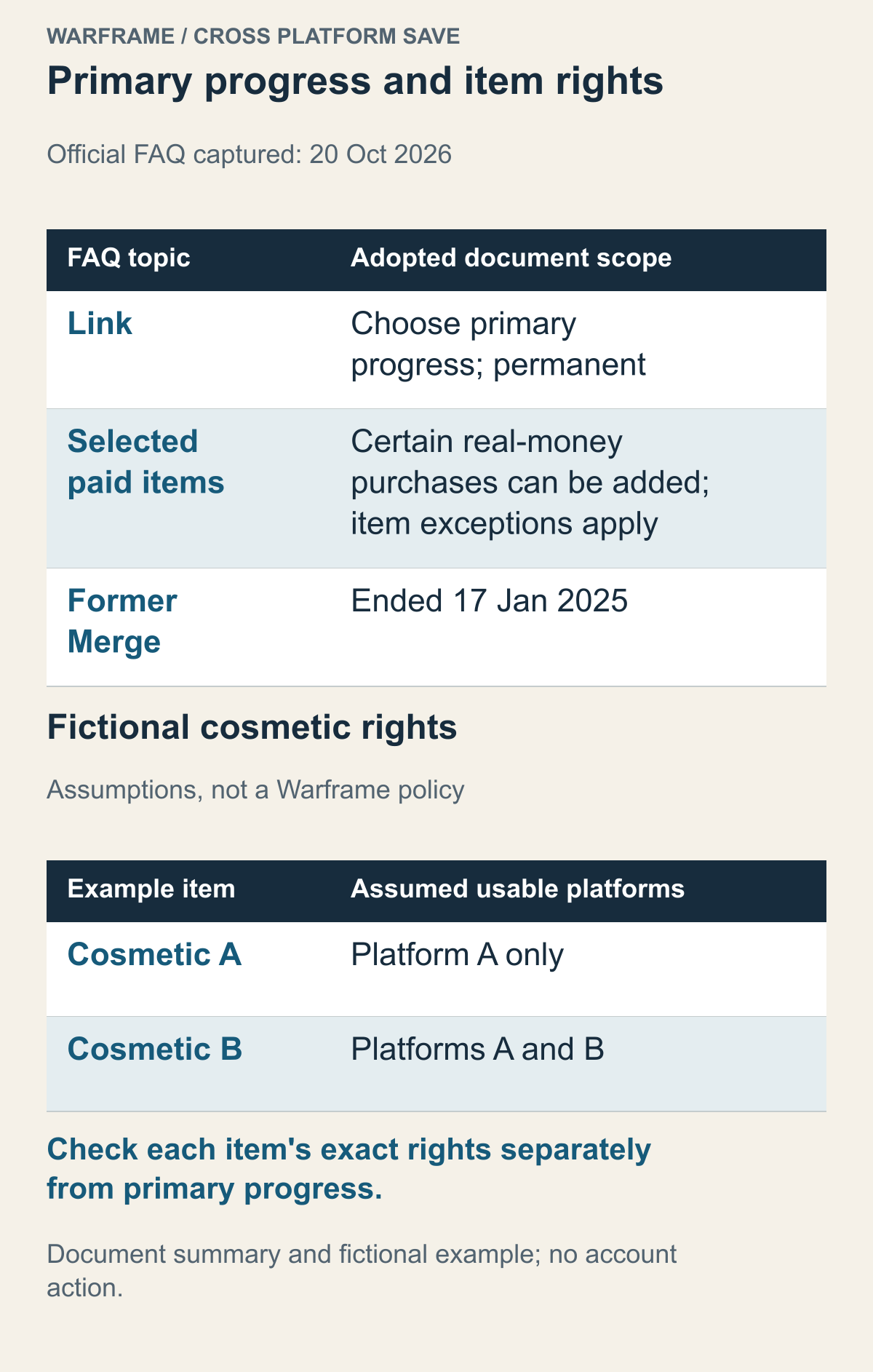
Top: the official Warframe FAQ summary from the October 20, 2026 capture. Bottom: fictional cosmetic A/B rights, not Warframe policy. This chart does not report an account-linking test.
The official Warframe Cross Platform Save FAQ distinguishes Link from the formerly available Merge. Linking selects a primary account whose progress is used on the other linked platforms. It does not merge the other accounts’ progression into the primary history. The official document describes linking as permanent.
The fact that progress is not combined does not mean that every purchase disappears. The FAQ explains that, since June 2024, certain real-money purchases from other accounts can also be added to the primary account during linking, with item-specific exceptions. Selecting the progress that becomes primary and determining whether a particular paid item is retained are separate questions. That exception does not bring back the discontinued Merge.
The same FAQ describes Merge as a limited-time feature that combined inventories of eligible accounts and ended on January 17, 2025. An older video showing two inventories being combined is not evidence that today's Link produces the same result. Cross-platform save linking continuing to exist does not establish that the ended form of merging remains available.
Suppose you have completed many quests on PC but also developed a different character on another platform. Start by deciding which progress should be primary, not by imagining the combined final inventory. Having two histories makes selecting one more consequential. Installing the Steam version adds a route to access the game; selecting a primary account determines the progress you will use through that route.
Here is a fictional cosmetic example rather than a TennoGen rule: assume an item bought on platform A is usable only on A, while another item has an explicitly listed A-and-B entitlement. A shared progress history would not make the two purchases interchangeable. For an actual item, compare its exact name, purchase record, and officially covered platforms before including it in the move. Primary-account selection and an individual product’s rights remain separate questions.
Purchase time can matter only when the relevant official conditions say so. If a real policy distinguishes older and newer purchases, locate the stated cutoff and the transaction date; do not infer the rule from another item or a remembered screenshot. If the destination platform is not covered, keep availability unconfirmed. A broad PC/non-PC category is less precise than the rights for the specific product you want to use.
This changes how you describe what an account contains. “The account I used longest” is less useful than identifying which quest progress you want to keep and where you bought a cosmetic you want to use elsewhere. The first corresponds to the primary-account choice, the second to the product's platform scope. Always choosing the account with the largest spending total, or always choosing the newest account, cannot answer both questions at once.
Compare the expected outcomes before following a confirmation button through a linking screen. If combining two inventories is essential, revise any plan that assumes today's Link can substitute for the ended Merge. If the goal is one history across devices, the primary account and product scope provide the relevant preparation. This is a real case in which the everyday word “linking” can conceal different operations.
COD Points balances and items bought with them can have different boundaries
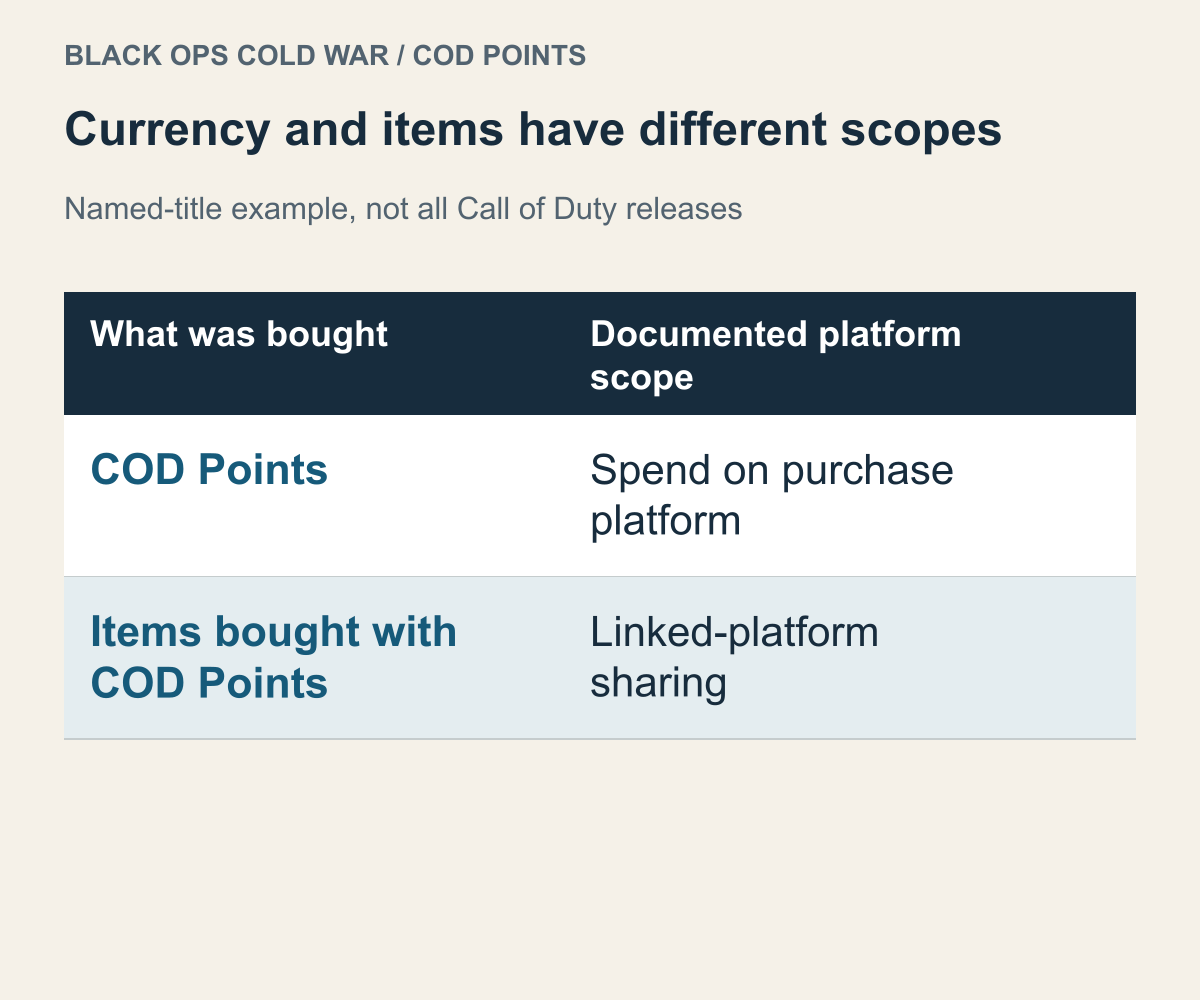
A reading of Activision's 2020 Black Ops Cold War explanation, not a rule extended to every current Call of Duty title.
Even when you understand cross-progression, where you can spend a remaining paid-currency balance is another question. Activision's Black Ops Cold War COD Points guidance explains that points can be spent only on the platform where they were purchased, while items bought with those points are shared between linked platforms. Holding currency and obtaining an item with it have different boundaries in this example.
That official explanation concerns the 2020 title and the services linked in its stated scope. It is not a claim that every currently sold installment or bundle grants the same rights. The pre-purchase question follows directly: after asking whether your account continues, ask where the remaining currency and items already obtained can each be used. “It belongs to my account” is not enough to give both the same mobility.
Suppose you have paid points remaining on one platform but plan to use only another platform in future. First determine whether that balance can actually be included in the budget for the new platform. A budget assuming immediate access to the balance and the funds you can use there may differ. This is not advice to buy something in advance to move value. It is a reason not to treat an immobile balance as transferable spending money.
The same distinction helps frame a question when a cosmetic appears under an account but the currency looks different. Before changing a link on the assumption that the account is wrong, investigate whether the title treats currency balances and acquired items within the same scope. An account mismatch and a platform-specific currency rule are different explanations. One visible symptom does not establish which one applies.
Nor should an explanation that points can be used within a company's series become a claim that all game items are interchangeable. This material distinguishes cross-title scope separately. The list is not used here to recommend current products. If you are considering a new title or item, compare the currency's platform scope and the product's game scope separately. There are two boundaries: platforms across one axis and games across the other.
For this reason, a pre-move purchase list needs more than a monetary total. You can separate the base-game entitlement, progress you want to continue, remaining paid currency and cosmetics you need. One following you is not a reason to tick off the others. Compare the items that matter to you with their official conditions first. Separating whether you need to buy a base game again from where you can spend currency also helps reduce a plan's unnecessary duplicate purchases.
A free sign-in account and a paid entitlement are different conditions
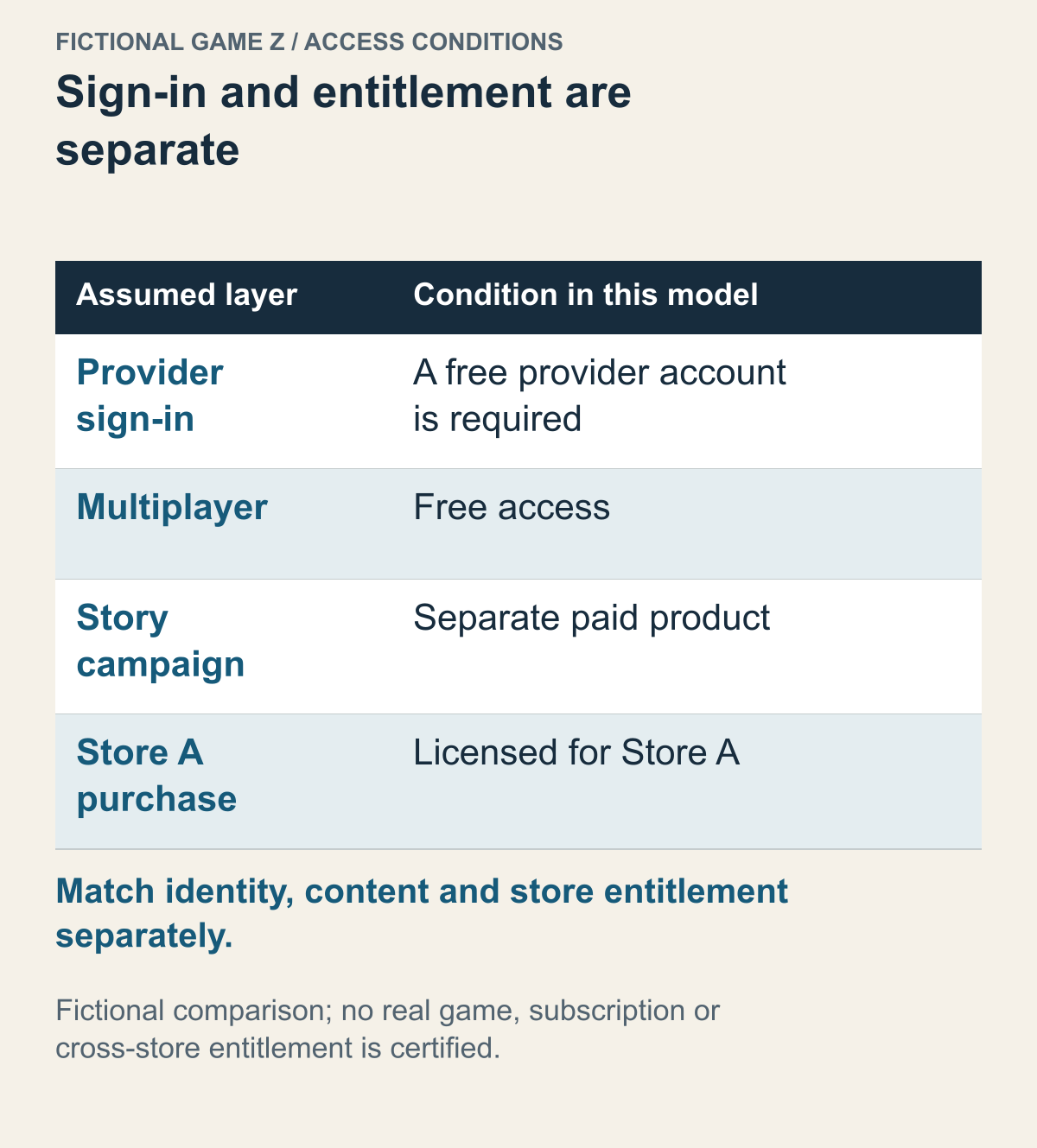
Fictional decision model, not a statement of a named game’s supported behavior.
Take a fictional PC game Z. Assume its multiplayer is free, sign-in requires a free provider account, its story campaign is a separate paid product, and a campaign purchased in store A is licensed for store A. These are illustrative premises, not Halo Infinite or Game Pass conditions. Separating identity, price, content, and store entitlement gives four specific checks for a real game instead of treating a provider’s name as proof that you must buy a console or subscription.
A required account tells you who signs in, not what paid membership you need. Under these assumptions, purchasing a subscription merely because the account bears a familiar platform name would not answer the actual requirement. Conversely, free multiplayer would not remove the sign-in condition. For the chosen title, read both the account notice and the official explanation of the desired mode’s access conditions.
If the goal is the story, the fictional free multiplayer entitlement would not include it. Having prepared the account would not create ownership of the campaign. A missing story option should therefore lead first to identifying the product and content actually obtained, rather than immediately changing account links. The same symptom can reflect missing entitlement or the wrong identity; it does not identify which explanation applies.
The store boundary in the example is independent of the shared sign-in. A purchase licensed for store A would not become a store B entitlement merely because both clients accept the same provider account. Check the real offer’s supported purchase routes and included platforms before budgeting a move. Do not transfer a console or another store’s purchase description to Steam without explicit coverage.
An existing provider account consequently answers only part of the preparation. Can you access it, which mode do you want, what content is included, and where will a paid product be used? Record the answer that belongs to each layer. If one remains unknown, treat it as an unresolved purchase condition rather than filling it with a familiar brand name.
Across these cases, name the outcome rather than counting accounts. Apex concerns the EA identity holding progress; the Grounded patch illustrates function-specific requirements; Activision guidance separates progress from change eligibility; Warframe separates a primary history from product rights. Decide which history and features are indispensable. That makes a decision to prepare an account, buy a particular product, or wait easier to explain.