
Why your Steam Deck battery can drop while plugged in
Separate charging warnings from battery changes. Compare PD ports, cable ratings, dock power and W versus Wh without treating ratings as measured charging.
Article languages
On this page
When a Steam Deck's battery percentage falls with power connected, it's easy to assume charging has stopped altogether. However, the connection indication, slow-charger warning and battery level describe different things. Separating the power needed during play from the power supplied through the current connection helps identify the next question. The largest number printed on a charger doesn't establish what the Deck is receiving. A dock and connected accessories also belong in the description of that path.
This guide distinguishes ordinary charging-connection questions for Steam Deck LCD and OLED using Valve documentation read on October 19, 2026. No charging rates or cables were physically tested, and no electrical repair instructions are provided. The focus is a device that powers on normally. If a connector is damaged or the device behaves abnormally, stop ordinary comparisons and seek official support. Nothing here declares an unidentified cable safe to try.
The warning and battery percentage answer different questions
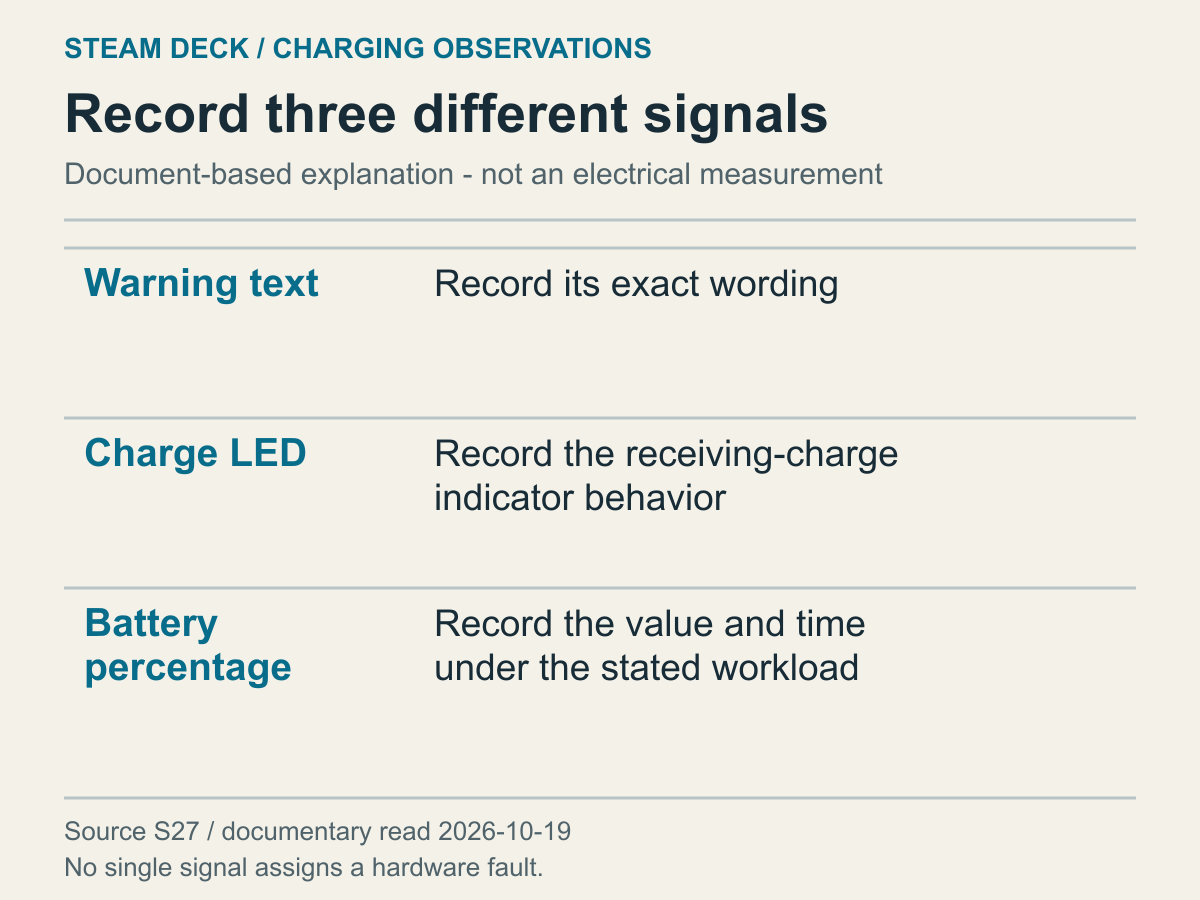
An editorial separation of warning, LED and battery information based on Valve guidance, not measured results.
First describe what you actually see. A slow-charger warning, a falling percentage despite a connection indication, and unexpected LED behavior raise different questions. They can occur together without becoming the same observation. The warning is a clue about supply conditions. A battery-level change concerns stored energy over an interval, while the LED is another status indication. Don't use one indication to fill in the results of the others before checking them.
Valve's Steam Deck troubleshooting document says the LED beside the charging port indicates charging and can remain lit after full charge. That doesn't mean the battery must increase quickly at every instant while the light is on. This is a narrow reading of a documented indicator, not a measurement of current power or battery condition. Concluding that the charger and battery are definitely fault-free because the light is on would also exceed that evidence.
The same document describes LED dimming after a delay as normal, distinguishing LCD at 3–5 seconds from OLED at 15 seconds. Match the model before comparing your light with someone else's video. Valve also explains that a device left connected for a long period can slowly discharge below a displayed 100 percent. That behavior isn't the same information as a slow-charger warning. A less-than-full number after prolonged connection doesn't by itself identify insufficient supply or a battery fault.
If the level isn't continuing to fall but simply doesn't reach 100 percent, a user-chosen maximum charge target is a separate question. The official SteamOS 3.7.8 announcement, dated May 22, 2025, introduced Battery Charge Limit as a way to set a maximum charge limit for Steam Deck. The path named in that announcement was Settings → Power. This isn't the same explanation as the gradual level change after prolonged connection described above: it asks what completion target was selected. Compare availability on your device with the guidance for its SteamOS version. If you can establish the limit, distinguish the completion you expected from the target selected.
Checking the maximum target and judging whether power is currently sufficient are also separate tasks. A record of the level not rising beyond a target isn't the same result as a record of it continuing to fall during play. The former adds a question about the selected target and your expectation; that setting alone doesn't establish an explanation for the latter's continuing decline. If a slow-charger warning also appears, the warning and connection-path questions remain. Before deciding that the charge target is the cause, identify whether you are addressing an expected completion point or the difference between supply and use during operation. This distinction can avoid unnecessary changes to an already suitable power path while also preventing a target setting from obscuring a real decline.
When comparing battery levels, include when each number was observed. Remembering only that the later value differed can omit the game being played, a suspended state or a connection change in between. Different conditions on different days don't isolate one cause. You don't have to complete a prescribed test duration or reach an invented normal percentage. Begin with times and states already observed, pairing the numbers with their connection and usage conditions.
Suppose you compare an evening spent playing through a dock with the following day's directly connected Deck. Even if battery behavior differs, several conditions changed. The dock, workload and starting level haven't been separated. That doesn't make the observations useless; it limits what they establish. Recording that a particular setup produced a particular result leaves a clear basis for choosing the next comparison without prematurely assigning a cause.
A disappearing warning doesn't replace checking battery behavior. Equally, a percentage that briefly stays unchanged doesn't establish that the warning was wrong. Connection and use interact, but the visible indicators needn't describe the same quantity at the same interval. Their detailed update behavior wasn't verified for this article. Avoid reading too much into a momentary number. Keep the observed result distinct from the interpretation you can actually support.
Your intended outcome matters too. Holding charge during play, charging while not using the device, and using a dock without a warning are different goals. People can want different things from the same charger. Saying only that charging is slow leaves the comparison unclear. Choose the condition you want to achieve today, then ask whether the available observations can establish it. That prevents unrelated indicators from becoming substitutes for the result you really need.
Charger output markings aren't measurements at the Deck
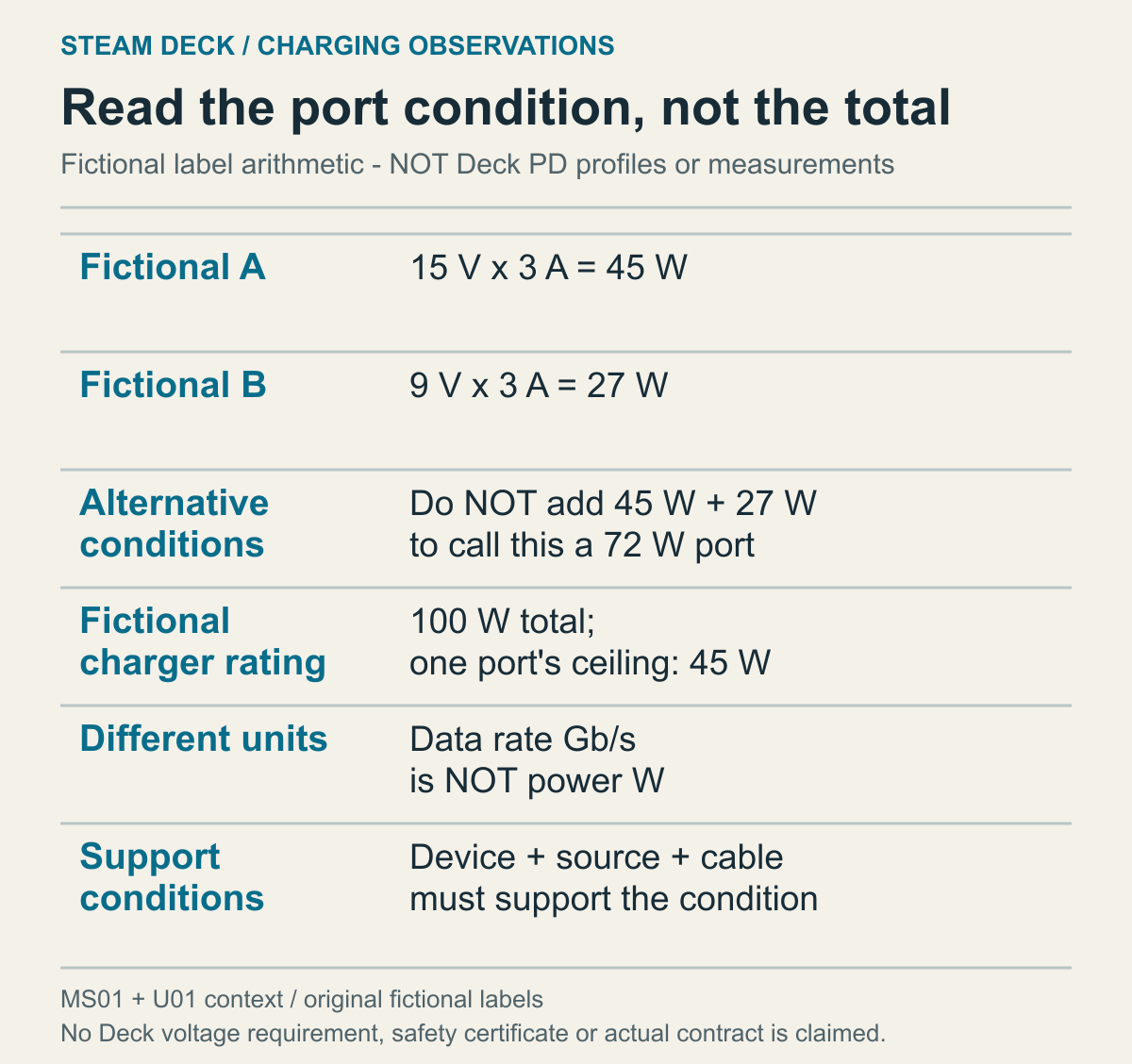
A fictional label calculation informed by Microsoft USB-C guidance and USB-IF PD concepts, not actual Deck PD profiles.
A USB-C-shaped connector doesn't make every charger provide equivalent power conditions. Valve documents USB Power Delivery for the Deck and says it doesn't support the named Fast Charging or Quick Charge standards. A product description saying fast charging therefore isn't enough to establish the relevant compatibility. Advertising language and the Deck's power method are different information. Record the charger manufacturer, model and output conditions rather than deciding from its product name alone.
The OLED section of the Steam Deck technical specifications read here lists a PD3.0 Type-C supply and 45W. That number is used within the verified OLED specification scope. The other model tab wasn't separately opened and verified, so this is not presented as an independent reading of its LCD specifications. Nor should the supply rating become an assertion about power entering the battery at every moment. Supply capability and battery behavior after device use are distinct.
Read the conditions attached to a label's headline output. Does it concern one port or the entire charger? Does the same condition apply when several ports are used? Which connector is currently connected to the Deck? This article didn't survey every manufacturer's output combinations. If a label is complicated, use that product's official explanation. Don't add conditions you haven't understood and present the sum as the power available to the Deck.
Imagine multiple devices connected to one charger. Remembering only its total number can leave out the actual port conditions. This isn't a verified example of a particular charger's allocation algorithm. It identifies the question you need to ask about concurrent connections. If the manufacturer doesn't explain simultaneous-use conditions, leave that detail unknown rather than reconstructing it from a battery percentage. The percentage isn't a measurement of the port's negotiated output.
USB-IF's PD explanation describes devices requesting needed power within a flexible power-management arrangement. A source having a high maximum capability doesn't establish that the present connection uses that maximum. The useful task is to identify supported conditions along the path to the Deck, not simply locate the largest printed number. That general document doesn't show a particular Deck's request, so it cannot establish which voltage your device necessarily selects.
V and A on an output label mean voltage and current. Their product expresses power in W for that condition. For a fictional example, 15V at 3A gives 45W; a different fictional condition of 9V at 3A gives 27W. The same 3A does not make those powers equal. Neither example is presented as a required or observed Deck PD profile. The arithmetic shows why reading the units and conditions matters as much as reading the digits.
Microsoft's USB-C guidance also describes the device, charger and cable supporting the necessary power conditions together. Its Windows troubleshooting screens and driver procedures aren't being imported into SteamOS. The adopted point is the whole connection's capability. A combination offered by the source still needs compatible support along the path. A PD marking and verification of the particular conditions your setup needs aren't equivalent checks.
Suppose one fictional port lists 15V at 3A and 9V at 3A as two available profiles. Adding 45W and 27W to claim 72W delivered would misread the example. Those are alternative conditions at one port, not two simultaneous supplies. The actual manufacturer's description determines what its label means. This calculation doesn't invent a Deck voltage requirement or suggest combining ports to make up missing voltage. Use it only to interpret the condition that a particular port can provide.
The distinction between total capacity and a port ceiling is similar. A fictional product might specify 100W total and a 45W maximum for one port. Emptying the other ports doesn't automatically raise that port's stated ceiling to 100W. A real product's official allocation rules determine how concurrent use affects it. Read the total rating, selected port and that port's conditions together. Don't borrow a different charger's allocation table to fill in a missing table for your own model.
Even after identifying USB PD support, the connection path still matters. Cables, connectors and a dock may lie between source and Deck. Verifying one component's name or specification isn't verification of the entire path. At this stage, the aim isn't choosing a new charger. It's describing the equipment already in use. Reading your existing combination and judging a potential purchase against your intended workload are separate tasks. Establish the former before treating replacement as the answer.
Match cable power information separately from charger output
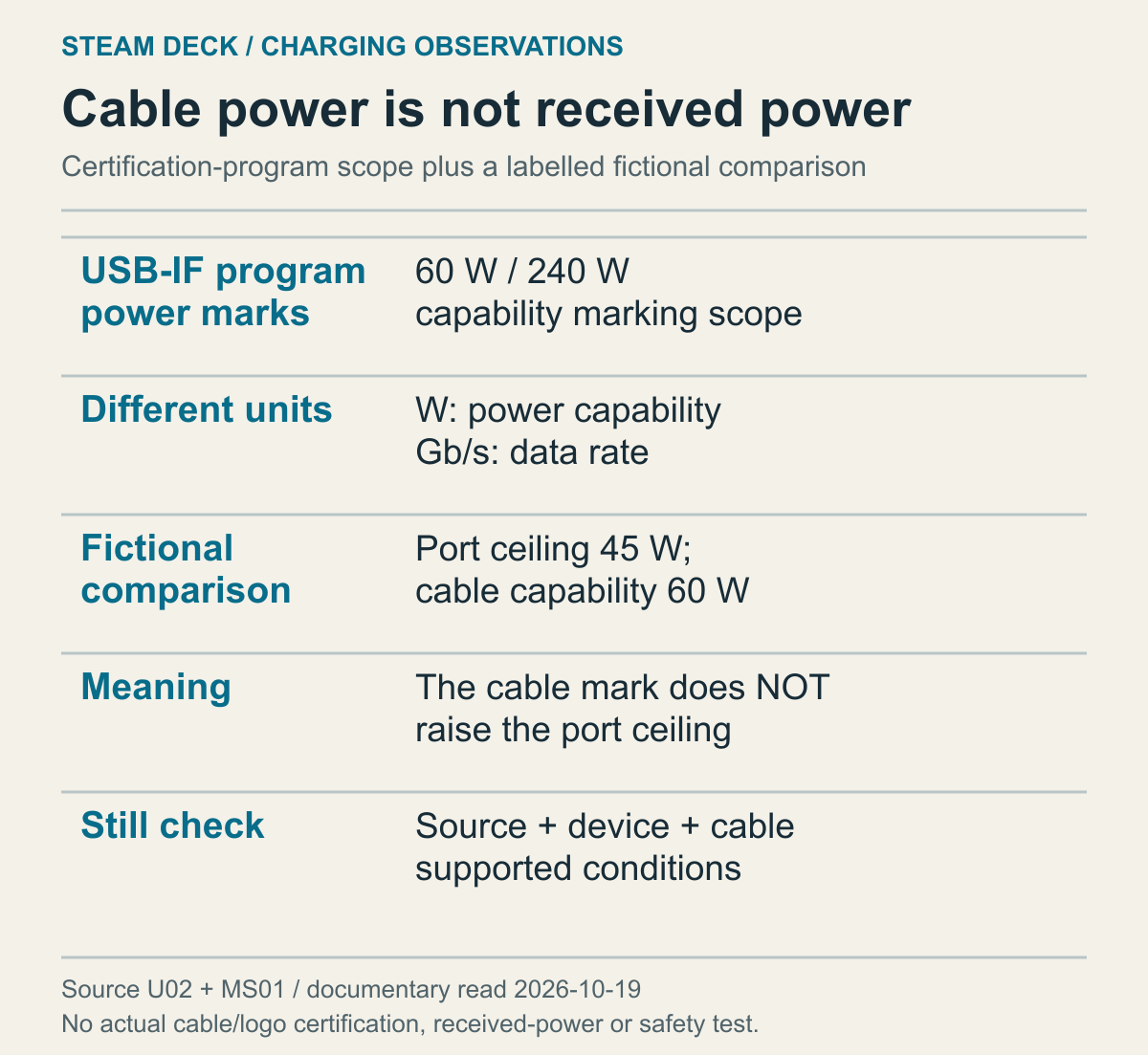
Based on USB-IF cable-marking requirements, not an authentication test or a measurement of delivered Deck power.
With a detachable cable, read its supported conditions after identifying the charger. A charger offering an output doesn't establish the cable's capability. Conversely, a high power number on the cable doesn't establish that the source port offers that amount. The components perform different roles. Compare what the source can provide with what the cable supports rather than treating either specification as a substitute for the other.
USB-IF's cable requirements distinguish power and data-rate markings for USB-C-to-USB-C cables submitted to its certification program. They specify 60W or 240W power markings and distinguish USB 2.0 cables in the data-marking requirements. This describes that program's requirements, not authentication of every cable sold. It does establish the conceptual distinction: W and Gb/s on one product answer different questions.
For example, a 60W cable marking doesn't mean the Deck always receives 60W. If the fictional source port considered above is limited to 45W, the cable's larger number doesn't increase that ceiling. Device and source support must also agree with the connection conditions. This isn't a diagnosis that one component is defective. It is an order for reading capabilities. Checking only the cable number while skipping the port conditions leaves the original supply question unanswered.
Reading only data information creates the opposite problem. A high Gb/s number cannot be converted into W to calculate charging capability. Transferring game files and powering a device during play require different information. An external display introduces video capability as another separate condition. Having transferred data quickly through a cable doesn't by itself establish charging or video performance. Keep the specification relevant to the problem you're actually trying to understand.
An existing cable without an identified marking isn't automatically proven faulty. Its capability remains insufficiently established. If you know its manufacturer and model, compare the official power specification. If you don't, don't assume a logo exists or apply another cable's description. Power conditions are relevant to a charging warning; data conditions are relevant to a transfer question. Following the appropriate specification avoids relying on a large but unrelated number without turning unknown equipment into a safety recommendation.
Describe the cable even in a direct connection
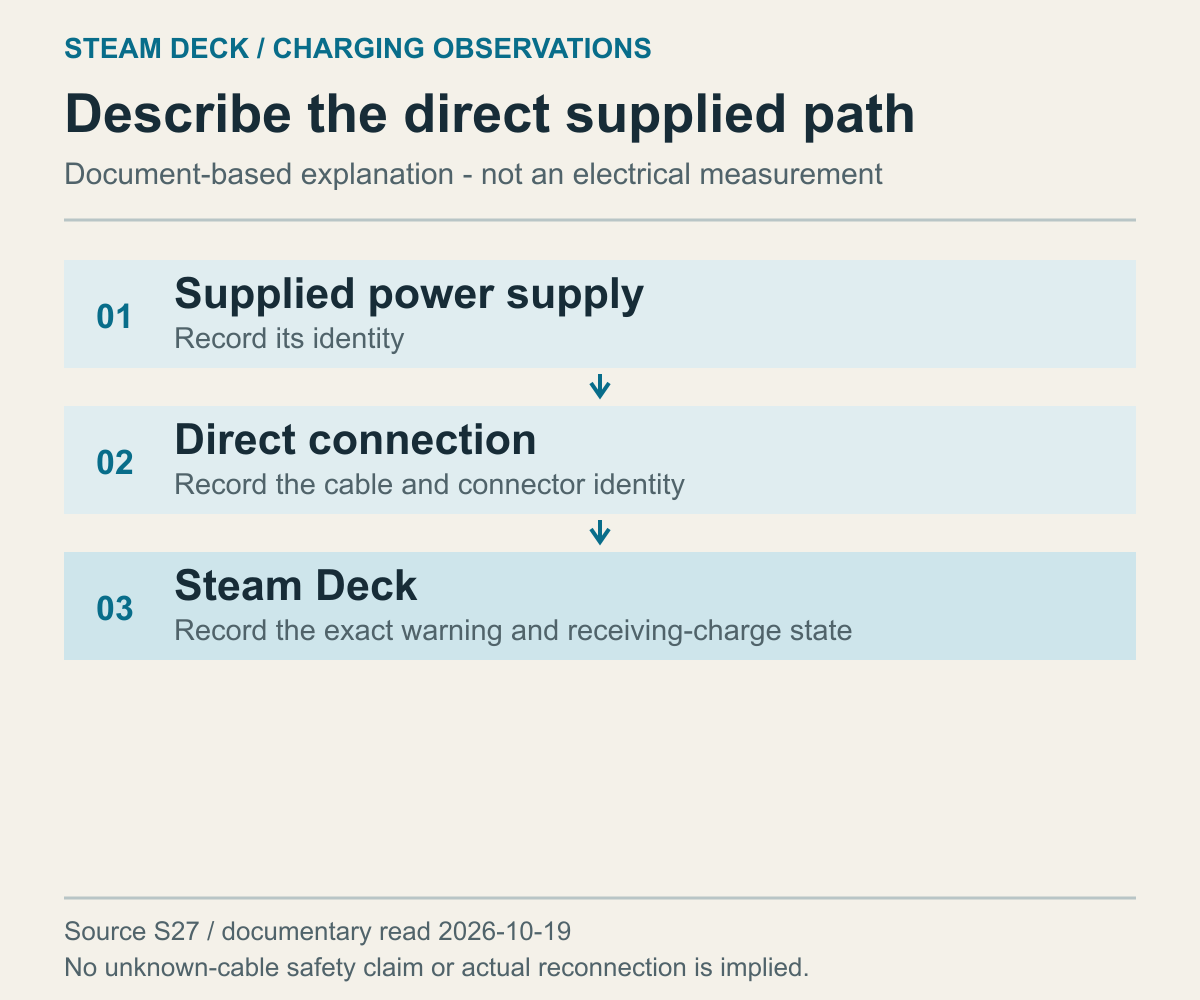
An editorial illustration of the documented direct connection, not an electrical test result.
A short path description helps when a setup becomes complicated. Is the charger connected directly to the Deck, or is there a dock or extension between them? Even a connection called direct may omit the cable's identity. Note whether it is attached to the charger, separately selected or regularly exchanged with another device. Two observations using the same charger name aren't necessarily comparable if the cable changed between them.
Valve's use of a directly connected supplied power source is not expanded here into an electrical inspection result. Distinguishing the supplied arrangement from other equipment is nevertheless useful when describing a setup. If you haven't observed the supplied arrangement, that result remains unknown. Reading this guide doesn't require a new charging experiment. Start with what you already know, without connecting unidentified equipment merely to complete a comparison.
Similar names and appearance don't establish a cable's capabilities or condition. This manuscript didn't inspect cable internals, certification or damage. It doesn't guarantee that any available cable is safe to plug in. Where information is missing, consult the product's official intended use and specifications. An unidentified cable remains an unidentified part of the path. Don't replace that uncertainty with an unsupported assurance that it will be fine.
If a connector appears damaged or something seems abnormal, don't continue an ordinary power comparison. Inserting objects into the port, modifying a cable, opening the device or changing electrical components is outside this guide. External appearance and usage history are the relevant observations available here. Beyond that scope, describe the device and power equipment to official support. Reusing a potentially damaged arrangement to identify the cause faster is not recommended.
Changing several components at once also limits the conclusion. Suppose the charger, cable and dock all change and the warning disappears. That establishes a different result with the new combination, but doesn't isolate the cause in the old one. The distinction matters before purchasing replacements or arranging repair. A seemingly resolved symptom isn't the same as an identified fault. Record comparisons that actually occurred and leave unperformed ones unperformed.
A dock adds another power condition to the path
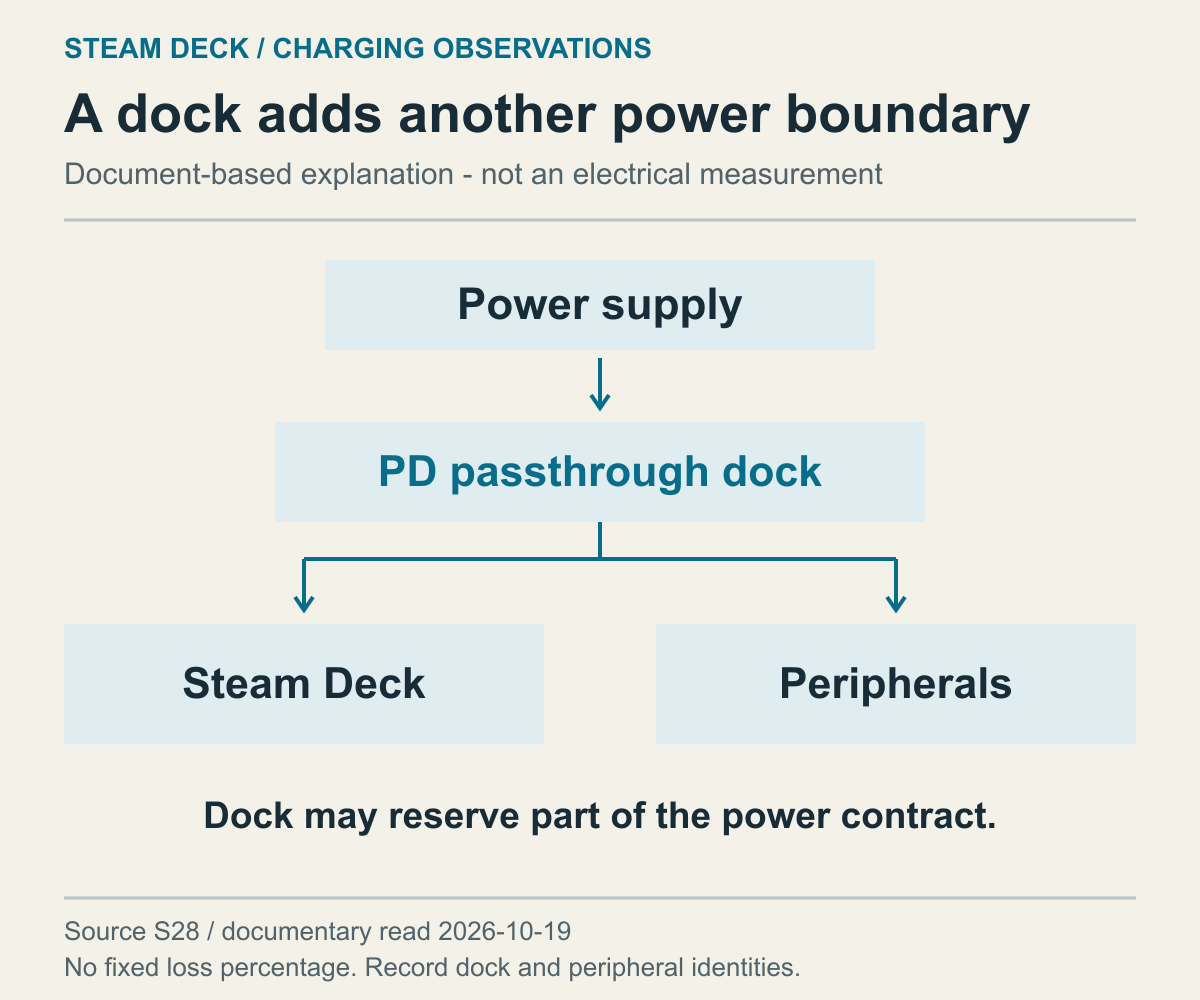
An editorial separation of source and accessory paths based on Valve's dock documentation.
Power delivered through a dock is subject to the dock's conditions. The Steam Deck docking troubleshooting document describes USB-C Power Delivery passthrough as necessary for powering the Deck through a dock. It also says some docks reserve part of the negotiated power for peripherals, potentially producing a slow-charger warning. That supports treating docked and direct paths separately. It doesn't establish an identical reserve or warning behavior for every dock.
A working picture or keyboard doesn't prove that the power condition reaching the Deck meets your goal. A dock combines several functions. Record video success separately from battery maintenance during play. Otherwise, the conclusion that the dock works can become an unsupported conclusion that the supply is sufficient. The reverse is also wrong: a charging warning doesn't establish failure of every dock function. Describe the observation for the function where it occurred.
List connected peripherals as they were: a display, external storage or input devices. You don't need invented wattages for each item. Their actual consumption was not investigated here. Begin by distinguishing a Deck-only arrangement from one with several attached devices. Even without numerical loads, an accurate connection description is useful for support. A speculative total would introduce apparent precision without supplying the missing measurements.
Check that you understand which dock connection is the power input and which leads to the Deck. Product layouts differ, so your own dock's official instructions are the reference. This guide doesn't recommend swapping similar-looking ports by guesswork. If the power-input role isn't clear, identify the model and read its documentation. Establish an accurate description of the existing setup rather than inventing an undocumented connection to try.
If a warning appears only through the dock, the next decision can concern the limitations acceptable for your present task. Handheld use and continued external-display use create different priorities. The latter may require checking the dock's official conditions and support. Neither automatically requires buying a replacement. First state the function needed and the symptom observed; otherwise the same configuration questions may remain after a purchase. Understanding the path then makes the relationship between consumption and battery behavior easier to interpret.
Connected power doesn't guarantee a positive battery balance
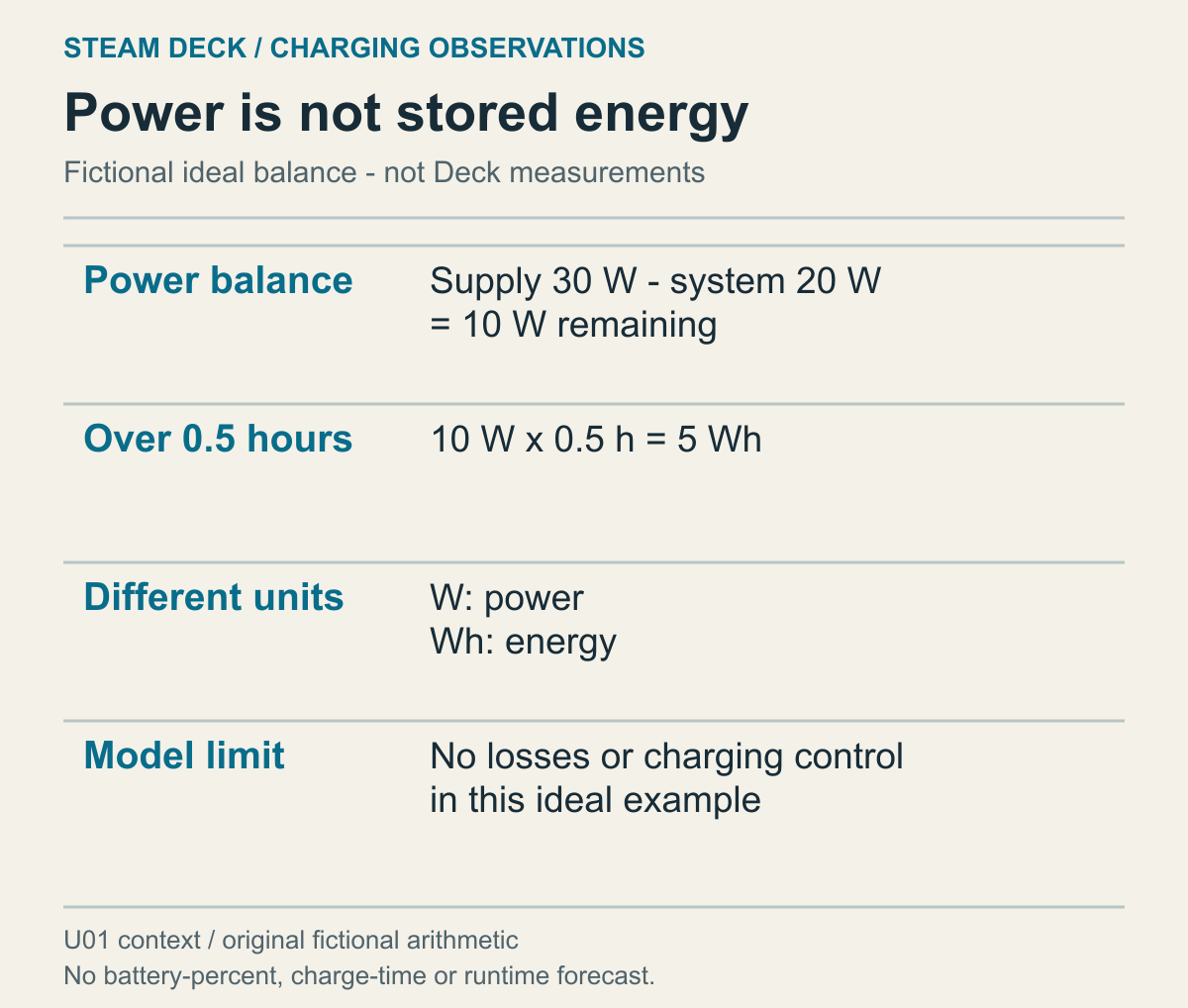
An ideal calculation excluding losses and charging control, not a prediction of real battery change or charging time.
Separate the presence of external power from how much remains after the device uses energy. A device consumes energy while operating. If the external supply is smaller than that consumption, stored energy can decrease. This is an explanation of a relationship, not a measured Deck power flow. A connection indication alongside a falling battery level is therefore not a logical contradiction. Identifying what is insufficient still requires the actual path and usage conditions.
Take a deliberately ideal fictional example: 30W supplied from outside while the device uses 20W. The remainder is 10W. If those conditions remain constant for half an hour, and we intentionally exclude losses and charging control, that remainder corresponds to 10W multiplied by 0.5 hours, or 5Wh. These aren't measured Deck or game values. The example separates power used by the device from the remainder, then uses time to turn a power difference into an energy amount.
W and Wh consequently aren't interchangeable. W describes power; Wh describes energy supplied or consumed over time. The OLED specification's 45W supply and 50Whr battery aren't the same type of number. A battery number of 50 being larger than 45 doesn't establish an inadequate charger. Nor does their numerical proximity promise charging within an hour. First distinguish energy capacity from the actual power remaining for battery charging under the operating conditions.
In the same ideal example, increasing device consumption to 30W leaves a difference of zero. External power is connected, but the simplified calculation leaves no additional energy for the battery. Assuming consumption greater than supply gives a decreasing stored-energy balance. If your goal is holding charge during play, a supply's nameplate rating alone doesn't answer it. This is why the path and activity belong with battery observations. The hypothetical calculation cannot reveal the actual device's wattage.
Battery percentage isn't a field into which the 5Wh result can simply be inserted. Actual usable battery energy, current condition and changing supply and consumption weren't measured. That's why this example is not converted into percentage gained or remaining play time. The useful observation is whether the level increased, held or fell under the described conditions. Understanding the units prevents the largest charger rating from becoming a complete explanation of that observation.
Playing and not playing are different usage conditions. If you've already observed a difference, record the states separately. This guide doesn't require launching a demanding game or deliberately draining the battery for a fixed period. There is no need to add load to a device whose condition concerns you. Existing ordinary-use observations can be the starting point. What matters is not concealing the differences between the two situations being compared.
If the apparent rate of decrease differs, identify what else changed. The charger, path, activity and starting level may all be different. No battery-health test or lifespan threshold is supplied here. A particular percentage drop alone isn't a diagnosis of wear or defect. Give support the conditions along with the observed battery change. Separating the result from the cause you suspect makes the remaining question more precise.
Use the connection results to choose the next question
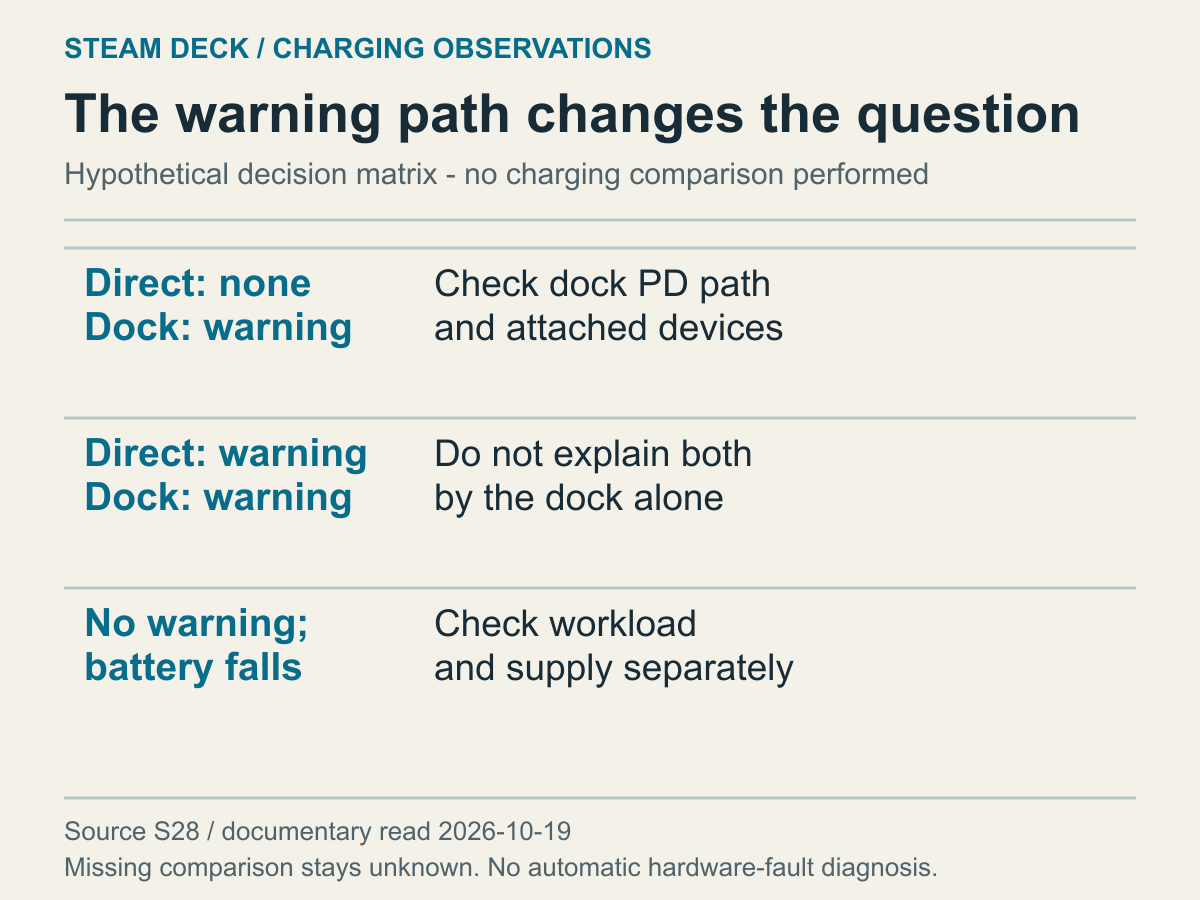
An editorial comparison based on PD and docking documentation, not physical results from a tested Deck.
Put known direct and docked results beside each other. Alongside warning presence, check whether the source, cable and activity were the same. Identical result labels don't establish equivalent comparisons if conditions differ. The matrix isn't an automatic fault detector. It helps decide whether to examine a dock-only difference or conditions common to both paths. A missing comparison remains a missing observation rather than an invitation to invent a result.
The first fictional case has no observed warning directly connected, but a warning through the dock. Questions remain about the dock's power input, PD passthrough and attached peripherals. The documented possibility of reserved power is relevant to that branch. Dock failure has not been proven, so replacement isn't yet the conclusion. Consider why the dock is needed now: handheld use and a necessary external display allow different temporary choices about the arrangement.
In the second fictional case, the warning appears both directly and through the dock. Because it also occurs without the dock, that component alone doesn't explain the whole observation. Identify whether a source or cable was common to both cases, or whether each used different equipment. A shared component isn't automatically defective either; its power method and supported profiles may remain unverified. Describing the common conditions helps avoid repeating only dock-specific advice.
The third case has no observed warning but a falling battery level during play. Record no warning and the battery change separately. Don't erase the battery observation because the warning was absent, or invent a warning because the percentage fell. Supply-versus-use balance, output conditions and actual activity remain relevant questions. Whether the goal is holding charge in play or charging at rest also matters. Warning presence alone doesn't establish that your desired outcome was achieved.
If you know only one path, the other result is unknown. You don't need unfamiliar equipment to force the table to completion. Not having observed the supplied power arrangement, or not knowing the dock model, is itself relevant context. You can contact Steam Support with the information available: LCD or OLED, exact warning, source and cable, connection path, observation times and activity. Include only things actually observed, without presenting an unperformed test as completed.
This table doesn't certify battery health or cable safety. Suspected device or connector abnormalities call for official support before further comparisons. For ordinary-use observations, identify the branch closest to your situation and choose the remaining question. It might concern dock passthrough, direct-source specifications or battery behavior under load. The purpose is to replace a vague charging problem with a question appropriate to the actual combination in use.