SteamVaultsSteamVaults
15 min read

Do Steam Games and DLC Need the Same Store?

Buying DLC from another store? Compare official conditions for your existing base game and account, including Steam keys and publisher stores.

Written by SteamVaults
Steam DLCgame purchasesexpansion compatibility
Article languages
On this page
  1. A game bought from another retailer may be a Steam edition
  2. For a free base game, check where you own it
  3. Factorio's official website also provides Steam keys
  4. Read the base game requirement beside the product name
  5. FINAL FANTASY XIV separates Windows and Steam
  6. Deathtrap DLC stays on the platform where you buy it
  7. In Guild Wars 2, decide which account gets the expansion
  8. For The Sims 4, the specified store is Marketplace on Web
  9. Soundtracks don't all follow the same rule
  10. Buying the base game again is a different purchase
  11. Tell support how the two products fit together

You own the base game and have found the DLC you want on another store. Perhaps you're considering Steam DLC for a game bought elsewhere, or an expansion from the publisher's website for your Steam game. Must the base game and DLC come from the same place?

If you activated an external Steam key, you own the Steam edition even though you paid elsewhere. That doesn't make every expansion sold elsewhere compatible with it. Check the activation platform as well as the seller, then make sure the product is for the game account you use.

Before comparing discounts, I'd want to answer one question:

Will this DLC work with the base game I already use?

It sounds obvious, yet some games need more than a "PC" label or a promise that you can play with friends. Official documents show that the obstacles differ between games.

I read the official purchase conditions for Factorio, FINAL FANTASY XIV, Orcs Must Die! Deathtrap, Guild Wars 2, Total War: WARHAMMER and The Sims 4. This article compares their documented permissions and restrictions. It isn't a record of signing into accounts, buying packs or testing delivery and gameplay.

I don't think buying one DLC should require learning every Steam feature. Years of playing a game don't automatically teach you how its store products work, either. When an unfamiliar term appears, start with what this purchase needs: which base game you own and where the new product will be registered. Reading support pages while shopping for an expansion is a nuisance. I'd still feel better knowing the conditions before paying.

A game bought from another retailer may be a Steam edition

Check the product's activation platform and actual registration before relying on the retailer's name.

Valve describes Steam keys as a way to sell games through other digital stores and retail shops. Activating one adds the associated product license to a Steam account. What you receive depends on the product assigned to that key. Valve's Steam Keys documentation

An unused key isn't a registered base game yet. Check the exact game, edition and region, too.

I haven't checked whether any particular retailer's key is valid or already used. Explaining that external Steam keys exist doesn't amount to recommending a specific purchase.

If all you remember is seeing the game's name in your Steam library, check a little further. Steam Support distinguishes product codes for Steam registration from adding non-Steam games to the library for convenience. Did you register a product license, or just add an easier way to launch an external game? Steam Support's Retail CD Keys guidance

Treating a launcher entry as a product license can make it look as though you meet a DLC requirement when you don't. Steam Support's advice to check the packaging or key-delivery email for the activation platform helps here. You don't need to forward the entire email to anyone; use it to check the product name and platform yourself.

"I bought it in a sale and it still runs" leaves the registration platform unanswered.

For a free base game, check where you own it

A free base game can add to the confusion. Suppose you claimed one on Epic and now see its DLC discounted on Steam. Is the question whether a free copy qualifies for DLC, or whether the stores differ?

Epic says you don't need to repurchase a base game claimed free on its store to buy DLC there. Getting it free doesn't mean adding its original price to this purchase. That answer concerns an Epic base game and Epic DLC; it doesn't establish compatibility with Steam DLC. Epic's guidance on DLC for a free base game

Ownership matters in the reverse direction, too. For someone with a Steam base game considering Epic add-ons, Epic says you usually need the base game in your Epic account to buy DLC or add-ons. Keep "usually": this short answer neither covers every game's exceptions nor decides whether a particular product fits your Steam copy. Epic's DLC purchase prerequisite

I'd record the store alongside free games, too. Remembering that a game cost nothing doesn't tell me whether it matches the DLC I'm looking at.

Factorio's official website also provides Steam keys

Factorio's official base-game purchase page says upgrading your Factorio account with a website key gives you direct downloads and, afterward, access to a free Steam key. Factorio's official base-game purchase page

Its purchase FAQ also requires linking a Steam account to receive the Steam key. It describes email delivery after linking and says linking helps prevent fraudulent purchases. I didn't test account linking or key delivery. Factorio's official purchase FAQ

If you bought the base game on the official website, you can consider new DLC after meeting those conditions, obtaining the Steam key and registering it to your intended Steam account.

For a Steam base game, you might consider the website expansion. Space Age's purchase page requires the Factorio base game and offers a free Steam key after upgrading your account with the expansion's website key. The official Factorio: Space Age purchase page

This route requires meeting the website's purchase and account conditions, then obtaining and registering the Steam key.

In both guides, the website key upgrades your Factorio account. It is separate from the Steam key you receive afterward.

These conditions concern Factorio's official purchase pages. I haven't extended them to base games bought from other retailers or GOG. I couldn't read the Steam product description for Space Age during this research, so I haven't verified its exact Steam base-game requirement link, Korean price or checkout eligibility for your account.

Read the base-game requirement beside the product name

Steam's developer documentation describes DLC bought on the Steam store or activated with a key, and tells games to check DLC ownership. Having files on your computer doesn't establish that your account owns the DLC. Valve's DLC documentation

You don't need to memorize how developers implement this. Just don't skip the purchase conditions because "I already have the base-game files, so I only need the expansion files." Whether your account meets the product's base-game requirement matters more than the installed folder's size or the icon you launch. Before looking for ways to move files or change installation settings, check whether the new product is sold for the license you hold.

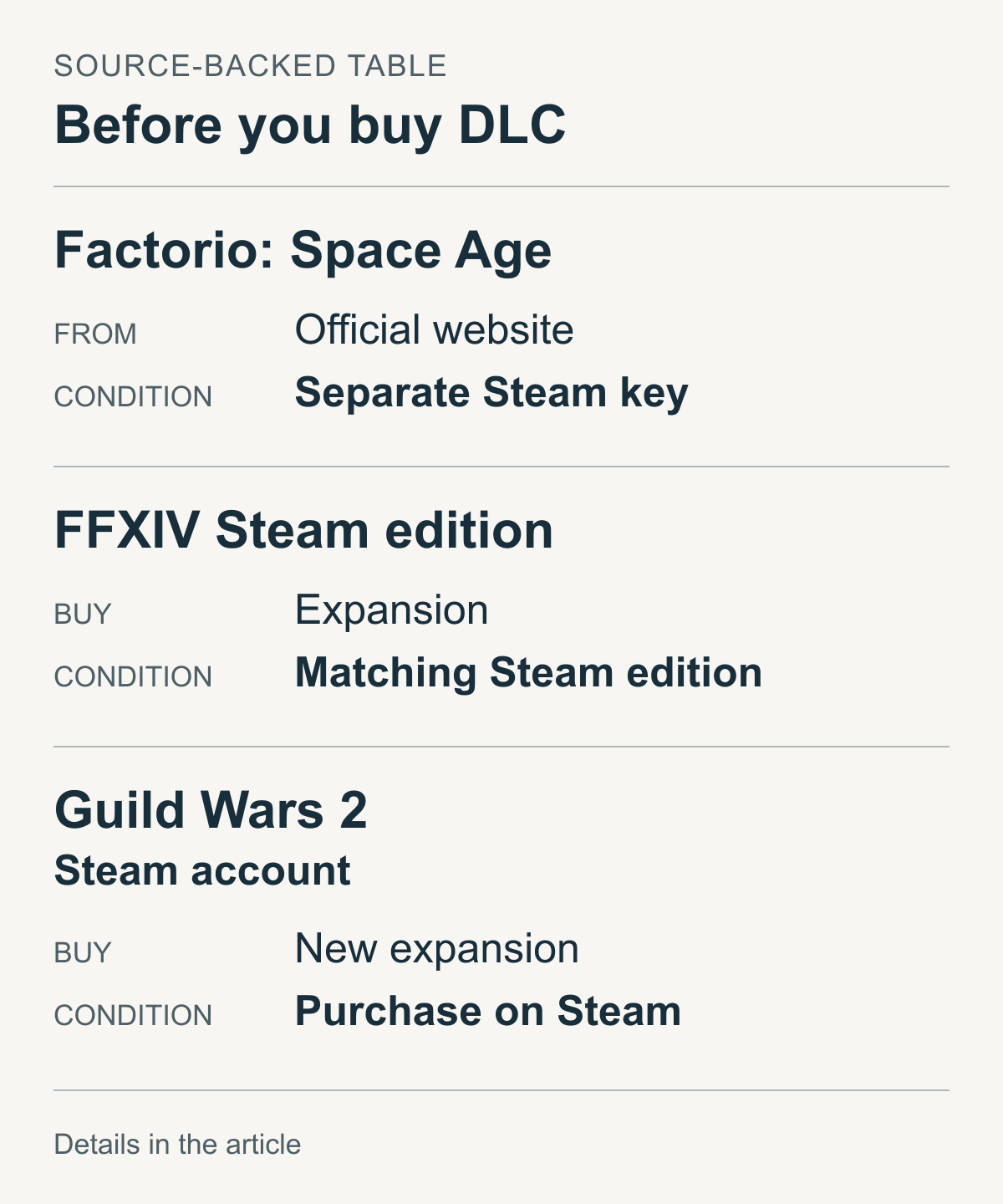
Official purchase conditions for Factorio: Space Age, FFXIV's Steam edition and Guild Wars 2 Steam accounts

This table compares purchase conditions from official documents. It isn't a Steam screen or a record of a successful purchase. See each game's section for key and account conditions.

If you play Immortal Empires in Steam's Total War: WARHAMMER III, consider DLC originally released for another installment. SEGA says Curse of the Vampire Coast doesn't require the WARHAMMER II base game when bought for this mode. Having II in the DLC's name doesn't mean adding II to your cart. SEGA's Immortal Empires DLC ownership guide

The guide also requires content on the same game client. For new DLC to use in Steam's III, check that the DLC license is for Steam, too. Permission to buy without II doesn't permit using Epic's II DLC on Steam. These are separate conditions.

You're adding content to III's Immortal Empires. This isn't a claim that the DLC gives you II itself or its original campaign. I'd note the intended mode alongside the DLC name when comparing products.

Readers who already have Immortal Empires access through I or II have another case to consider. SEGA's December 2025 change announcement says I owners can buy new II and III DLC for this campaign. Campaign access doesn't mean owning all of III's paid content. This article only considers adding DLC to a campaign you already use, not how to gain access. SEGA's Immortal Empires access FAQ

FINAL FANTASY XIV separates Windows and Steam

FINAL FANTASY XIV's global-service documents show why "PC" needs care. Square Enix's North American support site treats standard Windows PC and Steam as separate, incompatible platforms. Expansions must match the base game's registration platform. A shared title doesn't remove that distinction. Square Enix's Windows PC and Steam comparison

If you own the standard Windows edition, the same expansion title on Steam doesn't establish compatibility.

This doesn't make "Windows" synonymous with non-Steam across other publishers' games. Follow the terminology used by the publisher of the game you're buying.

Buying the base game again on Steam brings up another account condition. Square Enix says a service account with Windows PC registered cannot also register Steam, or vice versa. The product region must match the Square Enix account region: Japan, the Americas, or Europe and other regions. Square Enix's Steam registration conditions

The aim is to add an expansion to your current service account. Creating another account or changing links isn't a solution recommended here.

A Korean-language listing doesn't establish a region match. Check the regions of both your Square Enix account and the product.

These are North American English support documents for the global service. They don't verify overseas-product compatibility with Korea's separate domestic service.

The same guide describes separate Square Enix registration after Steam purchases of Starter Edition and Complete Edition. Consider both the purchasing account and the game service account receiving the license.

Deathtrap DLC stays on the platform where you buy it

Orcs Must Die! Deathtrap supports play across platforms. That might suggest linking Steam and Epic accounts also makes DLC usable on either. An official FAQ addresses this question.

Robot Entertainment says linking Epic and Steam doesn't share DLC access between platforms. DLC is usable where you bought it; using it on both requires buying it on both. Cross-platform online play doesn't transfer DLC ownership. Deathtrap's platform-specific DLC guidance

The answer concerns Steam DLC used on Epic. If you're considering Steam DLC for your Epic base game, an existing account link doesn't provide an exception.

"Can I play with a friend on Epic?" and "Can my Epic base game use this Steam DLC?" name the same platforms but ask different questions.

This explanation is limited to Deathtrap. Support for playing together doesn't establish the individual use conditions of every paid product.

In Guild Wars 2, decide which account gets the expansion

For your existing ArenaNet account, is the same-named Steam expansion actually a discounted option?

ArenaNet's Steam FAQ distinguishes existing Guild Wars 2 accounts created on its website from accounts created through Steam. Moving an existing account to Steam isn't supported. Both groups can play on the same servers; that doesn't make them the same purchasing account. Guild Wars 2 Steam FAQ

When checking retailer discounts, read account conditions. ArenaNet lists its website, authorized retailers and in-game upgrades, but requires new expansions for Steam Guild Wars 2 accounts to be bought directly on Steam. ArenaNet's buying guide

Even officially listed retailers need checking: does the expansion fit your account type?

The Steam FAQ allows some special item codes but excludes gem codes and Guild Wars 2 expansion game codes from Steam Guild Wars 2 accounts.

Steam activation keys and publisher-account expansion serials differ. Follow Guild Wars 2's Steam-account purchase conditions.

For The Sims 4, the specified store is Marketplace on Web

For packs bought on a publisher's website and used on Steam, The Sims 4 has relevant official guidance. The store is specifically The Sims 4 Marketplace on Web, rather than any EA storefront.

EA says PC and Mac players can buy content online through Marketplace. You use an EA account to buy and access content, and purchases are added to it. To add a pack to the game you play on Steam, check that the web account is your usual game account. I wouldn't expect stores to reconcile a purchase made on another, similarly named account. EA's Marketplace web purchase guide

The separate pack guide names Steam explicitly. EA says packs bought with real money on Marketplace should download automatically to your PC platform, including Steam. It lists Expansion Packs, Game Packs, Stuff Packs and Kits, and begins by requiring the base game to be installed and updated. EA's guide to Marketplace pack purchases

This doesn't establish compatibility for every EA app product or EA code from another retailer. The storefront examined here is Marketplace on Web. Check other sellers' conditions separately.

Soundtracks don't all follow the same rule

Not every extra product beside a game is the same kind of DLC. Valve supports a separate soundtrack product type that people can buy without owning the game. Its documentation distinguishes older music products sold as DLC. Valve's soundtrack product documentation

So "I bought a game's music on Steam even though my game came from elsewhere" doesn't establish expansion compatibility. It concerns a different product type. Nor does "Soundtrack" in a title prove there's no base-game requirement. Read the product page to check its type and whether it requires the game. Finding the music files is a separate question from this purchase decision.

Buying the base game again is a different purchase

What about buying the base game again on Steam? I wouldn't immediately calculate that as "just add the base-game price to the DLC." A plan to expand your existing game and account has become a new base-game purchase. Even a small total isn't the price of the same combination you originally wanted. Moving to another edition or account needs its own consideration. This article stops at purchases that retain your current base game and intended account.

Tell support how the two products fit together

If the documents don't cover your combination, ask before paying. Presenting the base game and DLC together gives support more to work with than "Will this DLC work?" The game name alone leaves out the edition, where you registered it and the product page you're considering.

It also helps to identify what you need answered. If official guidance explicitly excludes your combination, asking which product fits your current game is more useful than hoping the exclusion might not apply. If you can't remember where you registered the base game, that isn't a finding of incompatibility: you're missing information. Start with the old listing and registration record. If the documents don't discuss your account type at all, identify that gap in the question. Calling all three situations "incompatible" hides what still needs checking.

When reading someone else's support answer, read their question as well. A recent answer isn't necessarily relevant to your case. Did the question identify the base game and seller? Did the answer depend on a particular pack or account? A standalone "yes" loses those conditions.

Here is a starting point for a support question:

> My current base game is [exact game and edition], used on [registration platform and game account type]. The DLC I want to buy is [seller and public product link], and its listed activation target is [Steam or game account type]. Will this purchase apply while I keep my existing base game and account? If it requires another base game or a product for a particular region, please point me to the official conditions.

This is a sample question, not a real support reply or successful purchase. Fill the brackets with the details needed to identify the products. You don't need to post product keys, passwords or payment details on a public board. Start with the account type and product link. If support needs to inspect your personal account, use that company's official private support channel.

When an answer arrives, keep more than the word "yes." Read which base game the answer assumes and whether it covers continuing with your current game account. If you asked about a base game on another platform and received general guidance for Steam base-game owners, the relevant part may remain unresolved. Ask about that difference.

If a store page and a support document seem to disagree, check the scope of each statement. One may describe general buying options while another covers Steam accounts specifically. If they concern the same product and account and still conflict, don't simply choose the more favorable sentence. Send both links and the confusing condition to support.

An approaching sale deadline doesn't fill in a missing answer. If I still couldn't confirm that the DLC fits my game, I'd let that price go. That isn't a prediction that another sale will come or offer a bigger discount. I find it hard to justify paying for a product while remaining unsure whether I can use it with my game. This is my order for comparing prices, not a rule everyone must follow.

Once official guidance covers your combination, I don't think you need to keep chasing exceptions from other games. The aim isn't to understand every product on a platform. If you've established that this DLC fits your base game, you can decide based on its price and the content you want. Check what you need to know; one purchase shouldn't demand unnecessary homework.