


You already own one of the three games in a bundle. The store shows both a large discount and a bundle price, but it may not be obvious what you're buying: the two remaining games, or another purchase that includes the one you own.
Steam bundles don't all use the same purchase rules. Establish the type before comparing prices. I'd start with the items your account will actually buy, rather than the full bundle's list price. Counting an owned game as a new benefit can make a discount look more generous than it is.
The explanation below uses Valve's Steam Bundles documentation checked on October 5, 2026. It doesn't verify regional prices or checkout availability for your signed-in account.
Check which of the two bundle rules applies
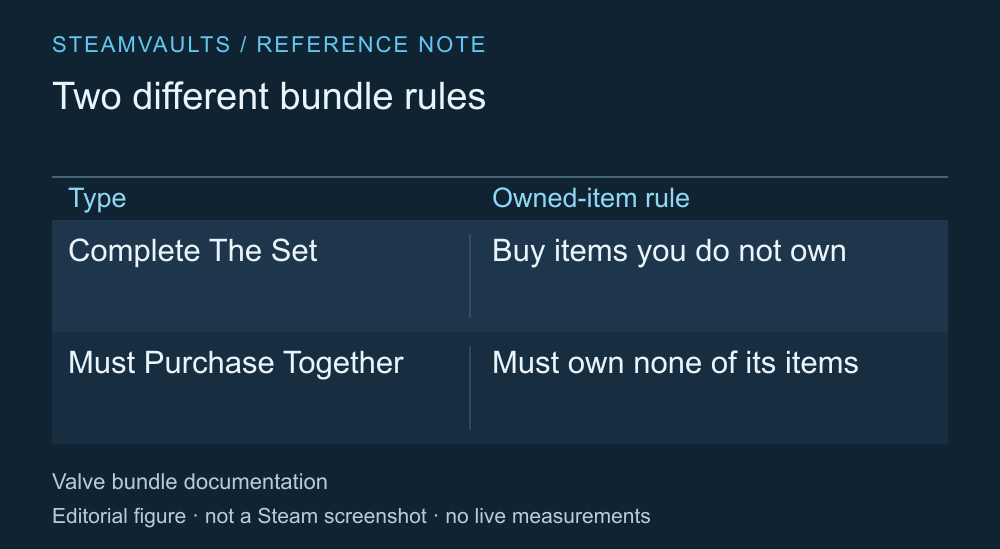
The purchase conditions for the two bundle types described by Valve.
Valve defines two types. Complete The Set lets you buy the items you don't already own. Must Purchase Together sells all the included items together and requires the buyer to own none of them. Similar bundle artwork can sit above very different rules for owned games. Official Steam Bundles documentation
If you own one game, don't assume every bundle will let you buy just the rest. Read the contents and purchase instructions while signed in. Pay attention to how the owned game is marked and which items remain in the purchase.
Similar product names don't always mean you own the same entitlement. A base game, DLC and a separate version can have similar names, so open each item's product page. This comparison concerns ownership on your Steam account; it doesn't count installation files from another store as equivalent ownership.
Don't add the two discount percentages
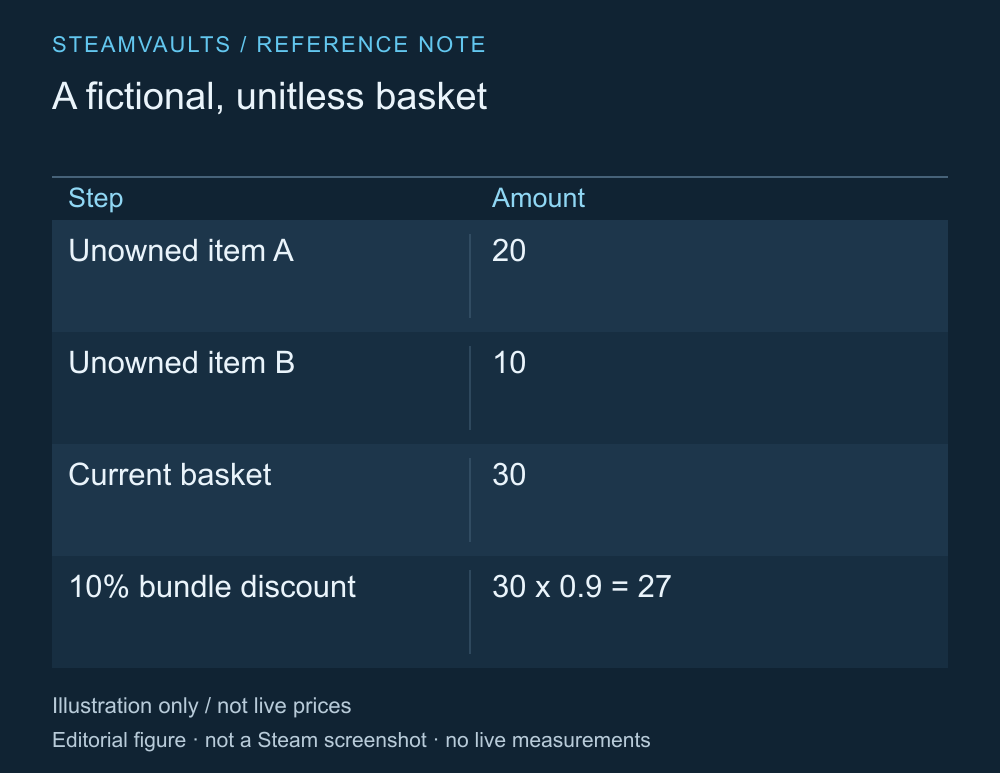
An example without a currency. These are not actual game prices or a current sale.
Valve explains that a bundle's discount applies to the current selling prices of its contents. If an individual item is already discounted, you can't simply add that percentage to the bundle discount and treat the result as one discount rate. How bundle pricing works
Take a fictional example. The current prices of the two remaining items are 20 and 10. Applying a further bundle discount of 10% gives 30 × 0.9 = 27. What you once paid for an owned game isn't part of this remaining basket. These numbers explain the calculation; on your account, use the final amount shown just before purchase.
Another trap is including things you don't want in the comparison. Perhaps you only intend to play one of the two games, but the higher discount for buying both leads you to spend more. Compare the bundle with the current cost of the one game you originally wanted, as well as with the list-price total of the same bundle contents.
An unwanted game can feel almost free, yet the money still leaves your account for the whole basket. I'd write down the increase over my original spending plan alongside the advertised saving.
Recheck a gift using the recipient's account
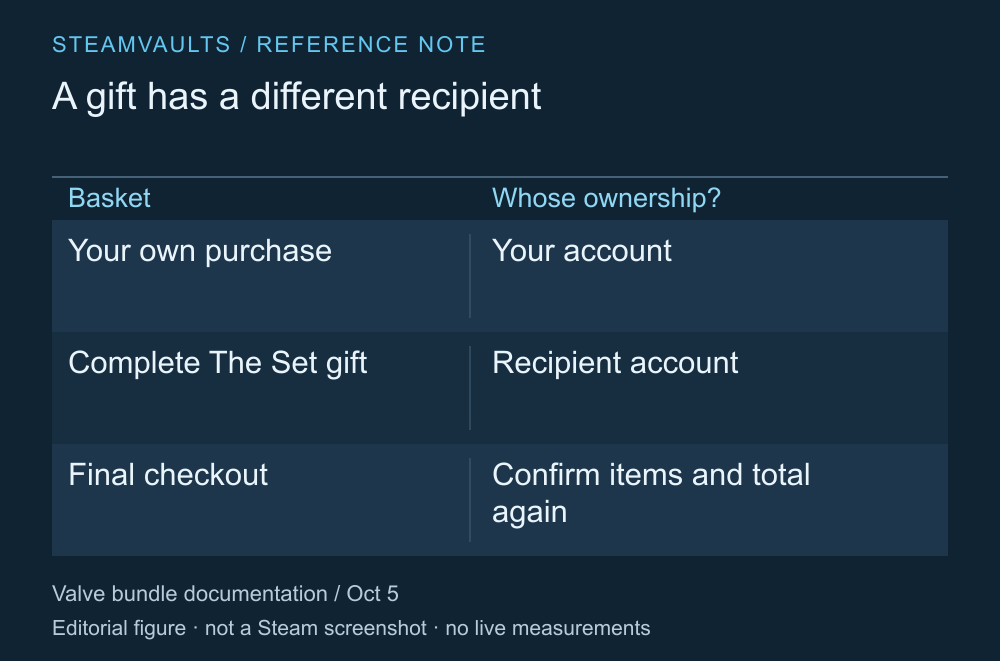
Your owned games and the recipient's owned games are different lists.
The current official documentation also describes gifting Complete The Set bundles based on the items the recipient doesn't own. Don't apply an older article's blanket claim that these bundles can't be gifted to every purchase today. Bundle gifting guidance
The price shown for your account isn't necessarily the price of the gift. After choosing the recipient, check the displayed items and total again. This guide hasn't verified regional or individual-product purchase restrictions. Documentation describing a gifting method doesn't guarantee a successful checkout for a particular friend right now.
Nor does a game in your library automatically become a spare gift copy. Read an offer that excludes owned entitlements separately from an offer that provides another copy.
Later additions don't automatically expand your library
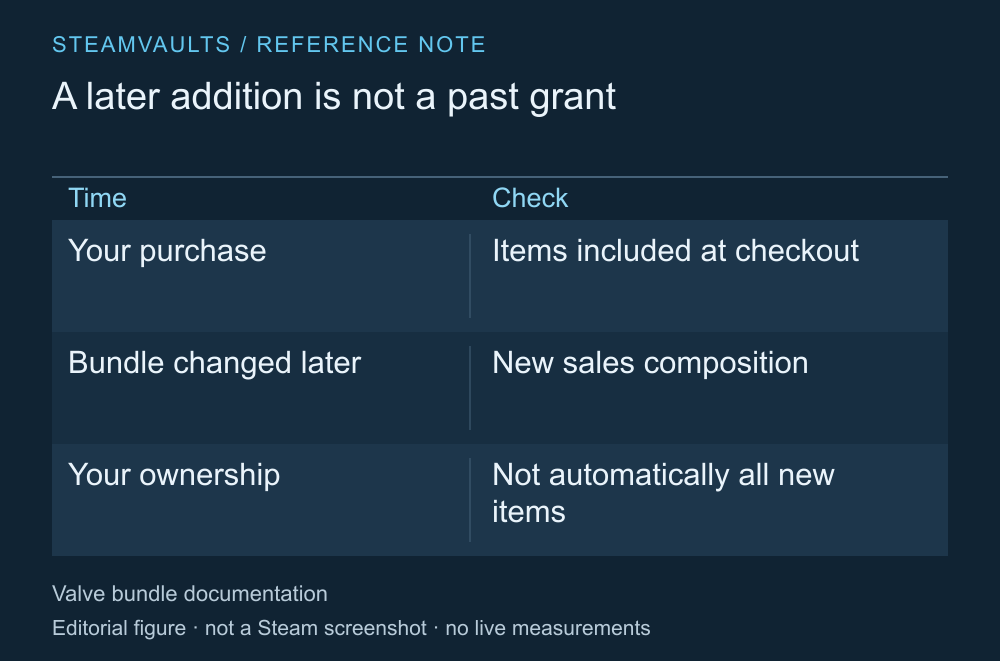
Changes to a bundle's sale contents are separate from changes to past purchasers' entitlements.
Valve says developers can add or remove bundle contents later. Check the items being sold today. A new item appearing in a bundle later doesn't establish that previous buyers will automatically receive it. Changes to bundle contents
Before buying, settle three questions: which unowned items you'll receive, which of them you want, and the total you'll pay to get them. A prominent discount percentage doesn't answer those questions.
If you're considering Deluxe content as an upgrade, also read how to compare edition extras. Deciding which content you want and checking the purchase calculation for your account are different parts of the decision.
You can stop if the items look different from what you expected at checkout. A sale timer isn't a reason to pay while you're still unsure why an owned game appears in the offer. A bundle that looks cheap may still cost more than the purchase you actually need.